# applet-iconfont-cli
> 把iconfont图标批量转换成多个平台小程序的组件。不依赖字体,支持多色彩。
Latest version **0.1.10** (published 2023-12-26) · MIT license · 0 weekly downloads
## Install
```sh
npm install applet-iconfont-cli
pnpm add applet-iconfont-cli
yarn add applet-iconfont-cli
bun add applet-iconfont-cli
```
Provides the commands `iconfont`, `iconfont-init`, `iconfont-create`.
## Health
**Score 15/100 (F)** — status: abandoned.
Positive: no vulnerabilities.
Warnings: low downloads; no types; no esm support; pre 1.0.
Negative: abandoned; low maintenance score.
## Facts
| | |
|---|---|
| Version | 0.1.10 |
| Published | 2023-12-26 |
| First published | 2023-12-21 |
| Weekly downloads | 0 |
| License | MIT |
| TypeScript types | none |
| Module format | CommonJS |
| Dependencies | 8 |
| Unpacked size | 48.3 KB |
| Known vulnerabilities | 0 (+26 in 2 direct dependencies) |
| Install scripts | no |
| GitHub stars | 1 |
| Author | LLtaishuai |
| Maintainers | leileitaishuai |
| Keywords | mini-program, iconfont, iconfont-cli, xiaochengxu, wechat-program, alipay-program, baidu-program, toutiao-program, kuaishou-program, qq-program |
## Links
- npm: https://www.npmjs.com/package/applet-iconfont-cli
- Repository: https://github.com/LLtaishuai/mini-program-iconfont-cli
- Homepage: https://github.com/LLtaishuai/mini-program-iconfont-cli#readme
- Issues: https://github.com/LLtaishuai/mini-program-iconfont-cli/issues
- npm.io page: https://npm.io/package/applet-iconfont-cli
## Dependencies (8)
- [glob](https://npm.io/package/glob.md) ^7.1.4
- [axios](https://npm.io/package/axios.md) ^0.19.0
- [tslib](https://npm.io/package/tslib.md) ^1.10.0
- [colors](https://npm.io/package/colors.md) ^1.3.3
- [mkdirp](https://npm.io/package/mkdirp.md) ^0.5.1
- [xml2js](https://npm.io/package/xml2js.md) ^0.4.19
- [fs-extra](https://npm.io/package/fs-extra.md) ^8.1.0
- [minimist](https://npm.io/package/minimist.md) ^1.2.5
## Alternatives
- [@sindresorhus/slugify](https://npm.io/package/@sindresorhus/slugify.md) — 3.7M weekly downloads
- [solid-js](https://npm.io/package/solid-js.md) — 2.7M weekly downloads
- [expo-glass-effect](https://npm.io/package/expo-glass-effect.md) — 2.5M weekly downloads
- [nanoassert](https://npm.io/package/nanoassert.md) — 780.8K weekly downloads
- [@ffmpeg/ffmpeg](https://npm.io/package/@ffmpeg/ffmpeg.md) — 529.5K weekly downloads
## Recent versions
- 0.1.10 (latest) — 2023-12-26
- 0.1.9 — 2023-12-26
- 0.1.8 — 2023-12-26
- 0.1.7 — 2023-12-26
- 0.1.6 — 2023-12-21
- 0.1.5 — 2023-12-21
- 0.1.4 — 2023-12-21
- 0.1.3 — 2023-12-21
- 0.1.2 — 2023-12-21
- 0.1.1 — 2023-12-21
## README
# applet-iconfont-cli
把iconfont图标批量转换成多个平台小程序的组件。不依赖字体,支持多色彩。
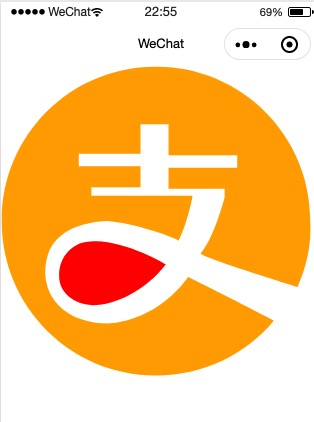
# 支持平台:
- 微信小程序
- 支付宝小程序
- 百度小程序
- 头条小程序(字节跳动)
- 快手小程序
- QQ小程序
- ...
# 特性
1、纯组件
2、不依赖字体文件
3、支持px和rpx两种格式
4、原样渲染多色彩图标
5、图标颜色可定制
# Step 1
安装插件
```bash
# Yarn
yarn add applet-iconfont-cli --dev
# Npm
npm install applet-iconfont-cli --save-dev
```
# Step 2
生成配置文件
```bash
npx iconfont-init
# 可传入配置文件输出路径
# npx iconfont-init --output iconfont.json
```
此时项目根目录会生成一个`iconfont.json`的文件,内容如下:
```json
{
"symbol_options": [
{
"url": "请参考README.md,复制 http://iconfont.cn 官网提供的JS链接",
"trim_icon_prefix": "",
"prefix": "前缀--可用于区分不同的icon项目, 默认为common",
}
],
"save_dir": "./iconfont",
"use_rpx": false,
"default_icon_size": 18
}
```
### 配置参数说明:
#### symbol_options
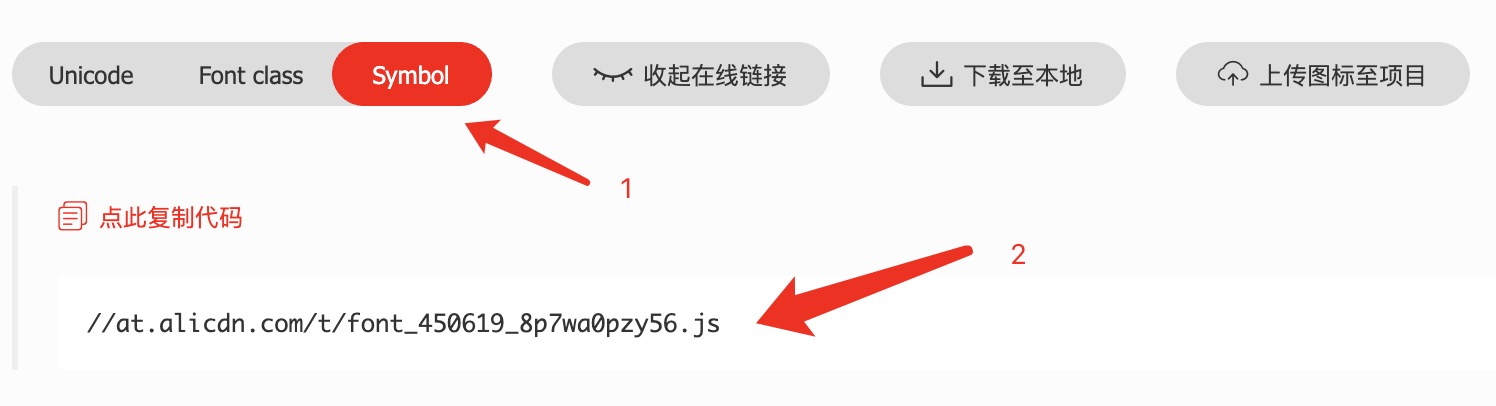
- url 请直接复制[iconfont](http://iconfont.cn)官网提供的项目链接。请务必看清是`.js`后缀而不是`.css`后缀。如果你现在还没有创建iconfont的仓库,那么可以填入这个链接去测试:`http://at.alicdn.com/t/font_1373348_kk9y3jk2omq.js`。
- trim_icon_prefix 如果你的图标有通用的前缀,而你在使用的时候又不想重复去写,那么可以通过配置这个选项把前缀统一去掉。
#### save_dir
根据iconfont图标生成的组件存放的位置。每次生成组件之前,该文件夹都会被清空。
#### use_rpx
使用微信提供的[尺寸单位rpx](https://developers.weixin.qq.com/miniprogram/dev/framework/view/wxss.html#%E5%B0%BA%E5%AF%B8%E5%8D%95%E4%BD%8D)还是普通的像素单位`px`。默认值为false,即使用`px`。
#### default_icon_size
我们将为每个生成的图标组件加入默认的字体大小,当然,你也可以通过传入props的方式改变这个size值。
# Step 3
生成小程序标准组件
```bash
# 可传入配置文件路径
# npx iconfont-XXXXX --config iconfont.json
# 微信小程序 默认微信小程序
npx iconfont-create --model wechat
# 支付宝小程序
npx iconfont-create --model alipay
# 百度小程序
npx iconfont-create --model baidu
# 头条小程序
npx iconfont-create --model toutiao
# 快手小程序
npx iconfont-create --model kuaishou
# QQ小程序
npx iconfont-create --model qq
```
生成后查看您设置的保存目录中是否含有所有的图标
-------
在生成代码之前,你可以顺便参考[snapshots目录](https://github.com/LLtaishuai/mini-program-iconfont-cli/tree/master/snapshots)自动生成的快照文件。
# Step 4
#### 微信小程序 | QQ小程序
在根目录的`app.json`文件中引入全局图标组件,避免每个page都引入(麻烦)。
```json5
// 绝对路径
{
"usingComponents": {
"iconfont": "/iconfont/iconfont"
}
}
```
#### 支付宝小程序 | 百度小程序 | 头条小程序 | 快手小程序
不支持全局引入,您需要在各自page的`.json`文件中引入。
```json5
// 绝对路径
{
"usingComponents": {
"iconfont": "/iconfont/iconfont"
}
}
```
# 使用
在page中使用图标。
```jsx harmony
// 原色彩
// 单色:红色
// 多色:红色+橘色
// 不同格式的颜色写法
// 与文字对齐
Hello
```
# 更新图标
当您在iconfont.cn中的图标有变更时,只需更改配置`symbol_url`,然后再次执行`Step 3`即可生成最新的图标组件。
```bash
# 修改 symbol_url 配置后执行:
# 微信小程序
npx iconfont-wechat
# 支付宝小程序
npx iconfont-alipay
# 百度小程序
npx iconfont-baidu
# 头条小程序
npx iconfont-toutiao
# 快手小程序
npx iconfont-kuaishou
# QQ小程序
npx iconfont-qq
```
--------
欢迎使用,并给我一些反馈和建议,让这个库做的更好。
---
_Source: https://npm.io/package/applet-iconfont-cli · Machine-readable twin of the npm.io package page. Health data is recomputed on every publish._