# ascii-art-table
> _ _ _ (_)(_) | | __ _ ___ ___ _ _ ______ __ _ _ __ | |_ / _` |/ __| / __|| || ||______| / _` || '__|| __| | (_| |\__ \| (__ | || | | (_| || | | |_ \__,_
Latest version **1.0.1** (published 2019-11-19) · 0 weekly downloads
## Install
```sh
npm install ascii-art-table
pnpm add ascii-art-table
yarn add ascii-art-table
bun add ascii-art-table
```
## Health
**Score 15/100 (F)** — status: abandoned.
Positive: no vulnerabilities.
Warnings: low downloads; no types; no esm support.
Negative: abandoned; low maintenance score.
## Facts
| | |
|---|---|
| Version | 1.0.1 |
| Published | 2019-11-19 |
| First published | 2019-08-11 |
| Weekly downloads | 0 |
| TypeScript types | none |
| Module format | CommonJS |
| Dependencies | 1 |
| Unpacked size | 28.3 KB |
| Known vulnerabilities | 0 |
| Install scripts | no |
| Maintainers | khrome |
## Links
- npm: https://www.npmjs.com/package/ascii-art-table
- npm.io page: https://npm.io/package/ascii-art-table
## Dependencies (1)
- [ascii-art-ansi](https://npm.io/package/ascii-art-ansi.md) ^1.1.0
## Recent versions
- 1.0.1 (latest) — 2019-11-19
- 1.0.0 — 2019-10-28
- 0.0.3 — 2019-08-18
- 0.0.2 — 2019-08-18
- 0.0.1 — 2019-08-11
## README
_ _ _
(_)(_) | |
__ _ ___ ___ _ _ ______ __ _ _ __ | |_
/ _` |/ __| / __|| || ||______| / _` || '__|| __|
| (_| |\__ \| (__ | || | | (_| || | | |_
\__,_||___/ \___||_||_| \__,_||_| \__|
ascii-art-table.js
=================
[]()
[]()
[]()
This module allows you to work with ansi strings in a style aware way, so you aren't constantly doing string manipulation and scanning when working with terminal strings. It offers a clean abstraction to build ascii-art utilities on top of.
Installation
------------
npm install ascii-art-table
Usage
------
### require('ascii-art-table')
To do anything with it, you'll need to include the library:
```javascript
const Table = require('ascii-art-table');
```
* [ascii-art-table](#module_ascii_art_table)
* [Table.create(string, handler)](#module_ascii_art_table.create) ⇒ string
* [new Table(options)](#module_ascii_art_table.constructor) ⇒ string
* [.addRow(data)](#module_ascii_art_table.addrow) ⇒ string
* [.setHeading(column1, ..., columnN)](#module_ascii_art_table.addcolumn) ⇒ string
* [.addColumn(data)](#module_ascii_art_table.addcolumn) ⇒ string
* [.write(width)](#module_ascii_art_table.write) ⇒ string
### Table.create(ansiString, handler)
Map through an ansi string one character at a time, without any of those characters being styles.
**Kind**: static property of [ascii-art-table](#module_ascii_art_table)
| Param | Type | Description |
| --- | --- | --- |
| options | object | input string to map across |
| options.data | Array of Arrays | data to display |
| options.columns | Array of Objects | column configurations |
| options.bars | String | type: `single`, `double`, `block`, `angles` |
**Example**
We can produce ASCII/ANSI tables in a similar manner to [ascii-table](https://www.npmjs.com/package/ascii-table), but with colors and styles!
To produce a standard box style (and it will attempt to be smart about column widths **without** truncating ansi codes):
```js
Table.create({
width : 80,
data : [ /* ... */ ]
}, function(rendered){
// use rendered text
});
```
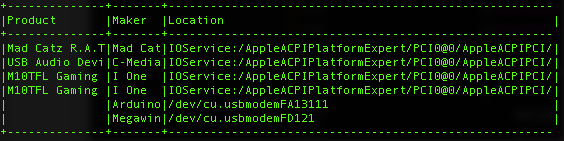
If you add some additional options you get:
```js
Table.create({
width : 80,
data : [ /* ... */ ],
verticalBar : ' ',
horizontalBar : ' ',
intersection : ' ',
columns : [
{
value : 'Product',
style : 'black+gray_bg'
}, {
value : 'Maker',
style : 'white'
}, {
value : 'Location',
style : 'white'
}
]
}, function(rendered){
// use rendered text
});
```
which will output:
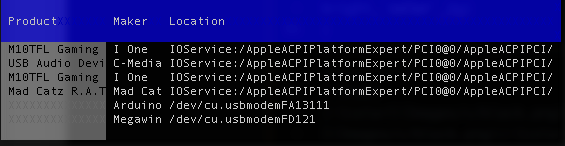
You can also play with border colorings and built-in borders (`single`, `double`, `block` and `angles`) using the UTF box drawing characters
```js
Table.create({
width : 80,
data : [ /* ... */ ],
bars : 'single',
borderColor : 'bright_white'
}, function(rendered){
// use rendered text
});
```
which will output:
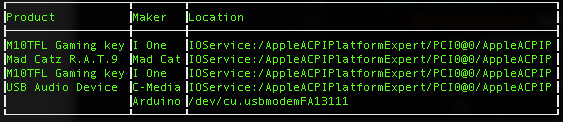
To define this manually it would look like:
```js
Table.create({
width : 80,
data : [ /* ... */ ],
bars : {
'ul_corner' : '┏',
'ur_corner' : '┓',
'lr_corner' : '┛',
'll_corner' : '┗',
'bottom_t' : '┻',
'top_t' : '┳',
'right_t' : '┫',
'left_t' : '┣',
'intersection' : '╋',
'vertical' : '┃',
'horizontal' : '━',
},
borderColor : 'bright_white',
}, function(rendered){
// use rendered text
});
```
Another example:
```js
Table.create({
width : 80,
data : [ /* ... */ ],
bars : 'double',
headerStyle : 'yellow',
dataStyle : 'bright_white',
borderColor : 'gray'
}, function(rendered){
// use rendered text
});
```
which will output:
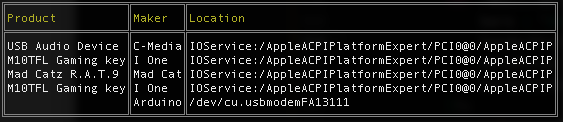
---
_Source: https://npm.io/package/ascii-art-table · Machine-readable twin of the npm.io package page. Health data is recomputed on every publish._