# astro-terminal-player
> Embed player for terminal sessions (recorded with asciinema) in your Astro project. Using asciinema player under the hood. Comes with full asciinema player settings support, typings and docs hints.
Latest version **0.1.5** (published 2022-11-19) · ISC license · 0 weekly downloads
## Install
```sh
npm install astro-terminal-player
pnpm add astro-terminal-player
yarn add astro-terminal-player
bun add astro-terminal-player
```
## Health
**Score 20/100 (F)** — status: abandoned.
Positive: esm support; no vulnerabilities.
Warnings: low downloads; no types; pre 1.0.
Negative: abandoned; low maintenance score.
## Facts
| | |
|---|---|
| Version | 0.1.5 |
| Published | 2022-11-19 |
| First published | 2022-10-15 |
| Weekly downloads | 0 |
| License | ISC |
| TypeScript types | none |
| Module format | ESM + CommonJS |
| Dependencies | 2 |
| Unpacked size | 15.7 KB |
| Known vulnerabilities | 0 |
| Install scripts | no |
| GitHub stars | 171 |
| Author | Julian Cataldo |
| Maintainers | julian.cataldo |
| Keywords | astro, astro-component, asciinema, terminal, sessions, cli, recording, player, javascript, command-line |
## Links
- npm: https://www.npmjs.com/package/astro-terminal-player
- Repository: https://github.com/JulianCataldo/web-garden
- Homepage: https://code.juliancataldo.com/component/astro-terminal-player
- Issues: https://github.com/JulianCataldo/web-garden/issues
- npm.io page: https://npm.io/package/astro-terminal-player
## Dependencies (2)
- [zod](https://npm.io/package/zod.md) ^3.19.1
- [asciinema-player](https://npm.io/package/asciinema-player.md) ^3.0.1
## Alternatives
- [@salesforce/cli](https://npm.io/package/@salesforce/cli.md) — 389.7K weekly downloads
- [@mintlify/cli](https://npm.io/package/@mintlify/cli.md) — 208.9K weekly downloads
- [@grafana/e2e-selectors](https://npm.io/package/@grafana/e2e-selectors.md) — 128.7K weekly downloads
- [mintlify](https://npm.io/package/mintlify.md) — 112.0K weekly downloads
- [@intlayer/cli](https://npm.io/package/@intlayer/cli.md) — 22.8K weekly downloads
## Recent versions
- 0.1.5 (latest) — 2022-11-19
- 0.1.4 — 2022-10-21
- 0.1.3 — 2022-10-21
- 0.1.2 — 2022-10-18
- 0.1.1 — 2022-10-17
- 0.1.0 — 2022-10-15
## README
# 🚀 Astro — Terminal player (Asciinema)
[](https://www.npmjs.com/package/astro-terminal-player)

[](https://github.com/JulianCataldo/web-garden/blob/develop/LICENSE)
[](https://makeapullrequest.com)
[](https://astro.build)
[](http://www.typescriptlang.org/)
[](https://prettier.io)
[](https://editorconfig.org)
[](https://eslint.org)
Embed player for terminal sessions (recorded with [asciinema](https://asciinema.org)) in your Astro project.
Using [asciinema player](https://github.com/asciinema/asciinema-player) under the hood.
Comes with full asciinema player settings support, typings and docs hints.
Auto plays / pauses when player is visible.
## 📦 Installation
```sh
pnpm i asciinema-player astro-terminal-player
```
### Vite client-side fix
You might want to add this to your `astro.config`:
```js
export default defineConfig({
/* ... */
vite: { optimizeDeps: { include: ['asciinema-player'] } },
});
```
So client-side, third-party JS will be loaded properly, instead of getting this error:
`Uncaught SyntaxError: The requested module '.../@babel/runtime/regenerator/...' does not provide an export named 'default' ... `
Also importing asciinema-player CSS solve a discrepency between `dev` and `build` where the latter comes unstyled. To fix this, add this to your CSS:
`@import 'asciinema-player/dist/bundle/asciinema-player.css';`
Note that this component is already importing CSS bundle internally, so this is a temporary quick fix.
## 🛠 Usage
```astro
---
import { TerminalPlayer } from 'astro-terminal-player';
import myRecordedCast from '../assets/myRecordedCast.cast?url';
// ...
---
```
```astro
```
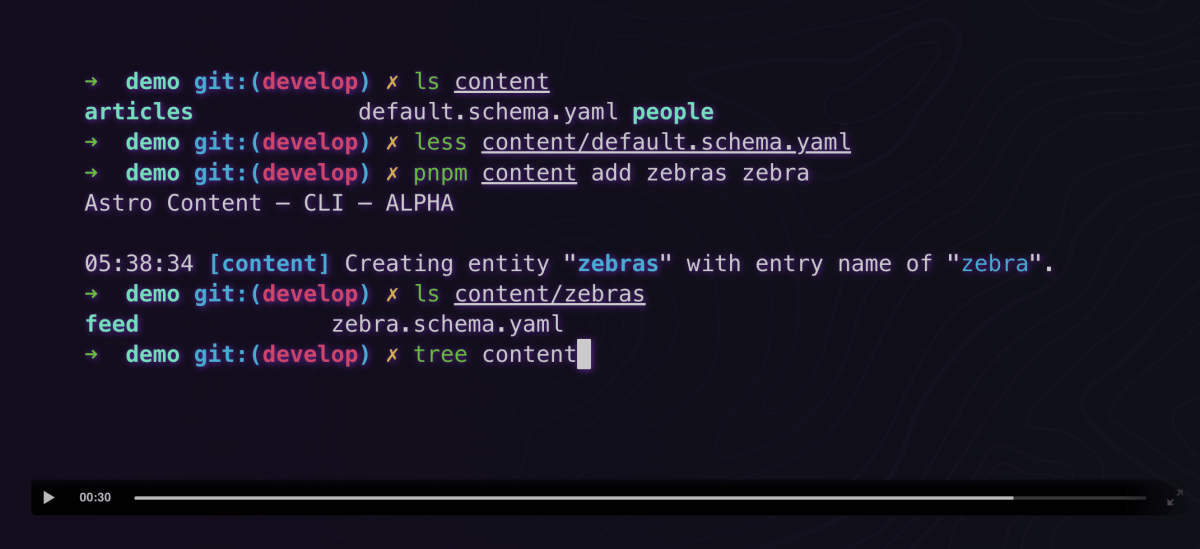
## 🎉 Result
---
_Source: https://npm.io/package/astro-terminal-player · Machine-readable twin of the npm.io package page. Health data is recomputed on every publish._