# authportal
> ## Overview
Latest version **1.0.9** (published 2022-05-26) · MIT license · 0 weekly downloads
## Install
```sh
npm install authportal
pnpm add authportal
yarn add authportal
bun add authportal
```
## Health
**Score 15/100 (F)** — status: abandoned.
Positive: no vulnerabilities.
Warnings: low downloads; no types; no esm support.
Negative: abandoned; low maintenance score.
## Facts
| | |
|---|---|
| Version | 1.0.9 |
| Published | 2022-05-26 |
| First published | 2022-05-26 |
| Weekly downloads | 0 |
| License | MIT |
| TypeScript types | none |
| Module format | CommonJS |
| Dependencies | 31 |
| Unpacked size | 1.5 MB |
| Known vulnerabilities | 0 |
| Install scripts | no |
| Maintainers | ariboren |
## Links
- npm: https://www.npmjs.com/package/authportal
- npm.io page: https://npm.io/package/authportal
## Dependencies (31)
- [ws](https://npm.io/package/ws.md) ^8.4.2
- [pug](https://npm.io/package/pug.md) ^3.0.2
- [axios](https://npm.io/package/axios.md) ^0.26.0
- [dotenv](https://npm.io/package/dotenv.md) ^16.0.0
- [base-64](https://npm.io/package/base-64.md) ^1.0.0
- [express](https://npm.io/package/express.md) ^4.17.2
- [winston](https://npm.io/package/winston.md) ^3.7.2
- [node-gzip](https://npm.io/package/node-gzip.md) ^1.1.2
- [puppeteer](https://npm.io/package/puppeteer.md) ^13.5.2
- [request-ip](https://npm.io/package/request-ip.md) ^2.1.3
- [prom-client](https://npm.io/package/prom-client.md) ^14.0.1
- [user-agents](https://npm.io/package/user-agents.md) ^1.0.1014
- [@slack/types](https://npm.io/package/@slack/types.md) ^2.4.0
- [jsonwebtoken](https://npm.io/package/jsonwebtoken.md) ^8.5.1
- [ua-parser-js](https://npm.io/package/ua-parser-js.md) ^1.0.2
- [console-stamp](https://npm.io/package/console-stamp.md) ^3.0.3
- [@slack/webhook](https://npm.io/package/@slack/webhook.md) ^6.1.0
- [fast-mhtml2html](https://npm.io/package/fast-mhtml2html.md) ^1.0.2
- [puppeteer-extra](https://npm.io/package/puppeteer-extra.md) ^3.2.3
- [@packages/common](https://npm.io/package/@packages/common.md) file:packages/common
- [express-validator](https://npm.io/package/express-validator.md) ^6.14.0
- [exponential-backoff](https://npm.io/package/exponential-backoff.md) ^3.1.0
- [@maxmind/geoip2-node](https://npm.io/package/@maxmind/geoip2-node.md) ^3.4.0
- [@google-cloud/logging](https://npm.io/package/@google-cloud/logging.md) ^9.8.3
- [@google-cloud/storage](https://npm.io/package/@google-cloud/storage.md) ^5.18.2
- [puppeteer-extra-plugin-portal](https://npm.io/package/puppeteer-extra-plugin-portal.md) ^3.0.1
- [puppeteer-extra-plugin-stealth](https://npm.io/package/puppeteer-extra-plugin-stealth.md) ^2.9.0
- [puppeteer-extra-plugin-adblocker](https://npm.io/package/puppeteer-extra-plugin-adblocker.md) ^2.12.0
- [puppeteer-extra-plugin-recaptcha](https://npm.io/package/puppeteer-extra-plugin-recaptcha.md) ^3.5.0
- [puppeteer-extra-plugin-breadcrumbs](https://npm.io/package/puppeteer-extra-plugin-breadcrumbs.md) ^1.0.24
- [@playback-sports/puppeteer-screen-recorder](https://npm.io/package/@playback-sports/puppeteer-screen-recorder.md) 2.0.2-playback-1
## Recent versions
- 1.0.9 (latest) — 2022-05-26
- 1.0.3 — 2022-05-26
## README
# tv-auth
## Overview
This repository contains our tv-auth service which allows users to authenticate against a variety of TV providers. The service takes a user's username and password for a given provider, logs them in on the provider's site, and then parses the provider for the user's subscription type. This whole process is made possible through the use of [Puppeteer](https://pptr.dev/). The tv-auth service interacts with our DB via the API to store user login attempts as well as the subscriptions parsed. This data is then used by room-server to determine if the users has access to the content being streamed in the room.
## Service architecture
The tv-auth service is a websocket server that receives and sends signals to individual clients in order to authenticate them and provide information around whether or not their authentication was successful. The service's client implementation can be found in [common/tv-auth](https://github.com/playback-sports/common/tree/master/tv-auth). A typical TV auth session between a client and this service looks something like:
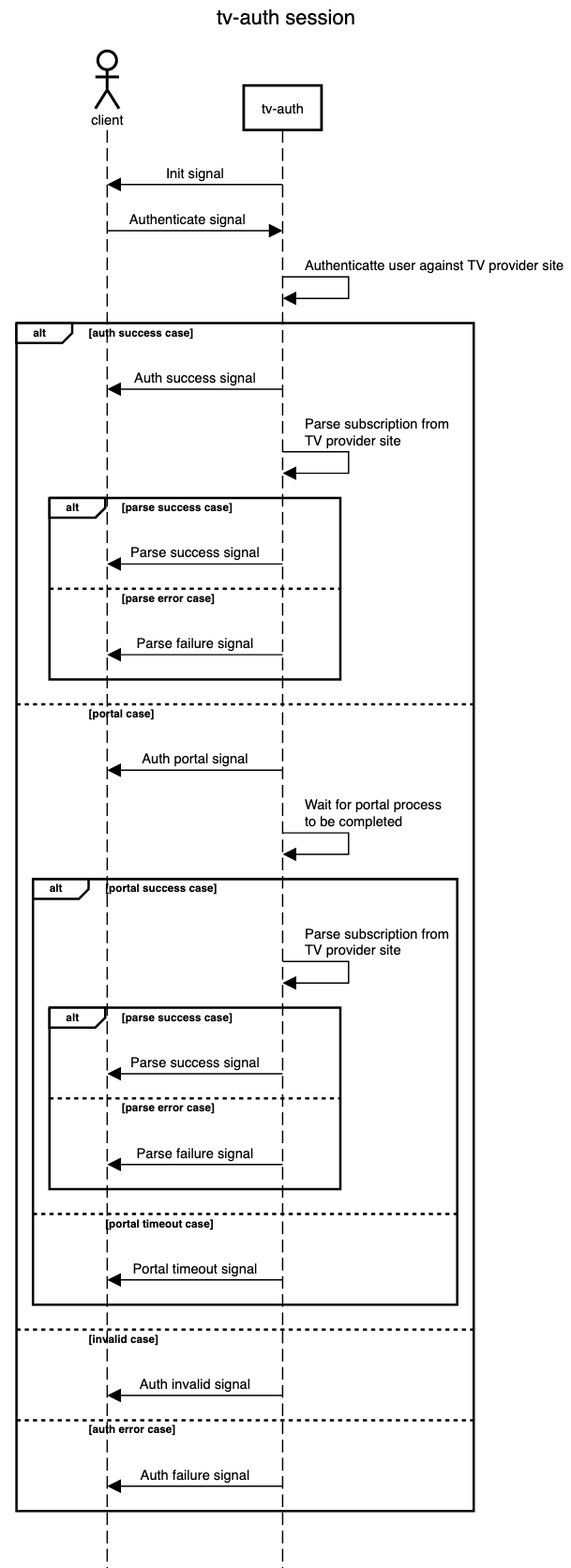
Multiple instances of the `tv-auth` service are deployed to our cluster. Each service instance can be thought of as its own higly provisioned web browser where each authentication session is performed in an isolated incognito tab. Each `tv-auth` service deployment runs behind different network configurations. There are deployments that run directly from GCP's network, on Nord's VPN, and through different web proxies. These different networks configurations are neccesary as some TV providers will block traffic to their site if they detect it originating from a suspicious source, like a cloud network or other bot-like sources.
### TV provider authentication interface
The list of TV providers supported can be seen by listing the `src/auth` directory of this repo. Each TV provider authentication file implements an interface that allows the provider to be consumed from `src/service.ts`. The interface is comprised of the following methods:
```
auth(page: Page, logger: winston.Logger, signal: AuthSignal) => Promise<{
result: AuthResult;
}>
```
The `auth` method is used by the client to send the user's credentials for a select provider.
```
portalVerification(page: Page, logger: winston.Logger) => Promise<{
result: PortalResult;
}>
```
The `portalVerification` method handles cases where the provider uses two-factor authentication or reCAPTCHA like techniques to identify users.
```
parseSubscription(page: Page, logger: winston.Logger, countryIsoCode?: string) => Promise<
SubscriptionParserResult
>;
```
The `parseSubscription` methods is used to crawl the provider's site and extract subscripton information specific to the user which will determine whether or not the user has access to given TV content.
```
parseLocation(page: Page, logger: winston.Logger) => Promise;
```
The `parseLocation` methods is used to extract the user's account location from the provider's site. This will be used during the access verification process to determine regional access to TV content.
### Telemetry
The main source of insight in to the results of authentication sessions comes from the `#tv-auth-bot` channel in Slack. The channel is alerted every time an authentication is attempted. An example of a successful authentication alert looks like:
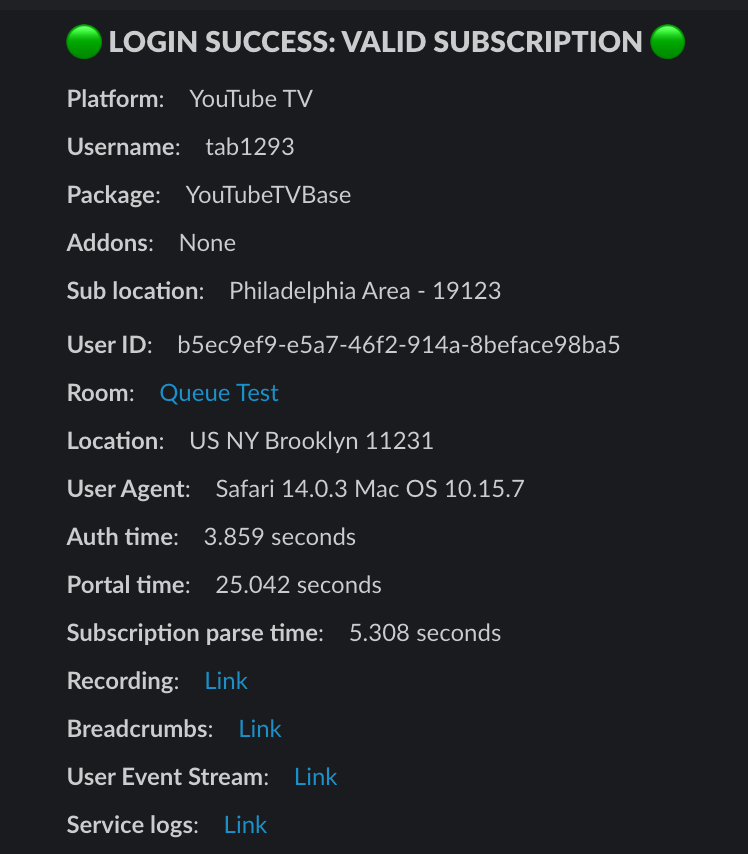
The alert contains a variety of information about the authentication session as seen above. The tv-auth service creates recordings for each auth session as well as a trail of "breadcrumbs" to help debug the flow if something goes wrong. Here is the above example's recording [link](https://tv-auth.getplayback.com/recording?connectionID=5a0879de-aac1-4356-b0ee-7e0dbc1e40d9) and breadcrumbs [link](https://tv-auth.getplayback.com/breadcrumbs/D25C61BB9B69962E70BB0C2A4AB5D23D). The logs associated with the auth session are also linked to [here](https://tv-auth.getplayback.com/logs/5a0879de-aac1-4356-b0ee-7e0dbc1e40d9?time=1652650929495).
### Related moderator tool
There is a TV authentication moderation tool that we use in order to "whitelist" users who have trouble connecting to their TV provider. A lot of times either the provider or our service may not handle every authentcation attempt correctly while it is likely the case that the user does indeed have access. In these cases we use the moderator tool to manually grant access to the user. The tool can be found [here](https://www.getplayback.com/mod/tvAuth).
## Development
Clone this repo with submodules: `git clone --recurse-submodules git@github.com:playback-sports/tv-auth.git`
To install missing dependencies run: `yarn install`
To build the tv-auth service run: `yarn build`.
If building on an ARM-based chip, you may need to install Rosetta: `softwareupdate --install-rosetta`
To start the tv-auth service locally, run: `yarn start`. In order to run locally you will need to create a `.env` file to set the appropriate environment values to run the service locally. An example of an `.env` file can be found [here](https://playback.1password.com/vaults/tmr65dpi7rhsdinfhqkqp4zt4e/allitems/yk2jih52trcc7p3yh5i2sa2mdu) in 1password. You will also need to create a `.npm-token` file in this repo in order to authenticate to our [NPM repository](https://www.npmjs.com/settings/playback-sports/packages).
To build a docker image run: `make docker-build`.
To then push the docker image to GCR run `make docker-push`.
**Note** the image tag pushed to GCR is defined by the `GIT_BRANCH` environment variable in the [Makefile](https://github.com/playback-sports/tv-auth/blob/master/Makefile#L1)
---
_Source: https://npm.io/package/authportal · Machine-readable twin of the npm.io package page. Health data is recomputed on every publish._