# auto-palette
> Extract prominent color palette from your image automatically
Latest version **1.4.0** (published 2024-12-27) · MIT license · 0 weekly downloads
## Install
```sh
npm install auto-palette
pnpm add auto-palette
yarn add auto-palette
bun add auto-palette
```
## Health
**Score 50/100 (C)** — status: stable.
Positive: has types; esm support; no vulnerabilities; high quality score.
Warnings: low downloads.
Negative: stale.
## Facts
| | |
|---|---|
| Version | 1.4.0 |
| Published | 2024-12-27 |
| First published | 2023-01-01 |
| Weekly downloads | 0 |
| License | MIT |
| TypeScript types | bundled |
| Module format | ESM + CommonJS |
| Dependencies | 0 |
| Unpacked size | 480.6 KB |
| Known vulnerabilities | 0 |
| Install scripts | yes |
| GitHub stars | 16 |
| Author | Tatsuya Maki |
| Maintainers | t28 |
| Keywords | color, palette, canvas, image, imagedata, jpg, png |
## Links
- npm: https://www.npmjs.com/package/auto-palette
- Repository: https://github.com/t28hub/auto-palette-ts
- Issues: https://github.com/t28hub/auto-palette-ts/issues
- npm.io page: https://npm.io/package/auto-palette
## Alternatives
- [exif-parser](https://npm.io/package/exif-parser.md) — 3.8M weekly downloads
- [vite-plugin-compression](https://npm.io/package/vite-plugin-compression.md) — 569.5K weekly downloads
- [pica](https://npm.io/package/pica.md) — 442.4K weekly downloads
- [@reportportal/client-javascript](https://npm.io/package/@reportportal/client-javascript.md) — 408.8K weekly downloads
- [@tldraw/state](https://npm.io/package/@tldraw/state.md) — 316.0K weekly downloads
## Recent versions
- 1.4.0 (latest) — 2024-12-27
- 1.3.4 — 2024-12-22
- 1.3.3 — 2024-12-02
- 1.3.2 — 2024-02-19
- 1.3.1 — 2024-02-09
- 1.3.0 — 2024-02-09
- 1.2.0 — 2024-01-14
- 1.1.0 — 2023-12-27
- 1.0.1 — 2023-12-22
- 1.0.0 — 2023-12-17
- 0.1.1 — 2023-02-11
- 0.1.0 — 2023-02-11
- 0.0.2 — 2023-01-22
- 0.0.1 — 2023-01-01
## README
# Auto Palette
> Auto Palette is a library that automatically extracts a prominent color palette from your image.
[](https://www.npmjs.com/package/auto-palette)
[](https://github.com/t28hub/auto-palette-ts/blob/main/LICENSE)
[](https://github.com/t28hub/auto-palette-ts/actions/workflows/build.yml)
[](https://app.codacy.com/gh/t28hub/auto-palette-ts/dashboard?utm_source=gh&utm_medium=referral&utm_content=&utm_campaign=Badge_grade)
[](https://codecov.io/gh/t28hub/auto-palette-ts)
[](https://app.fossa.com/projects/custom%2B14538%2Fgithub.com%2Ft28hub%2Fauto-palette-ts?ref=badge_shield&issueType=license)
## Features
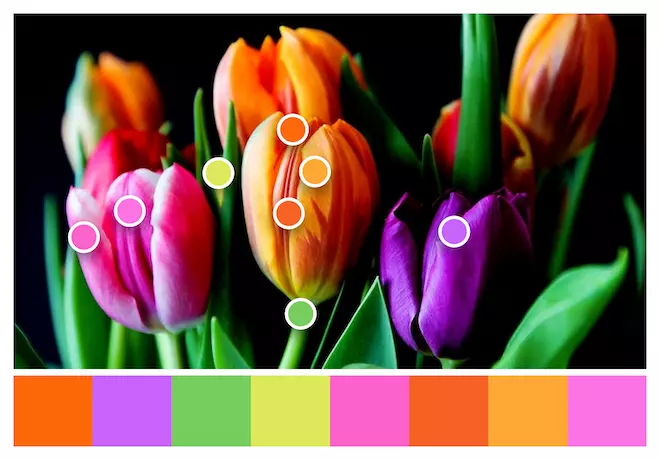
> [!NOTE]
> Photo by Pixabay from Pexels: https://www.pexels.com/photo/yellow-pink-and-violet-tulips-52508/
❯ Automatically extracts color palette from image
❯ Provides detailed color information color, name, position and population
❯ Supports multiple color extraction algorithms (`dbscan`, `dbscan++`, `kmeans` )
❯ Supports multiple image sources (`HTMLImageElement`, `HTMLCanvasElement`, `ImageData`)
❯ Supports both Browser and Node.js
❯ Zero dependencies
## Installation
Using npm:
```bash
$ npm install auto-palette
```
Using yarn:
```bash
$ yarn add auto-palette
```
Using pnpm:
```bash
$ pnpm add auto-palette
```
## Usage
```ts
// ESM
import { Palette } from 'auto-palette';
// CJS
const { Palette } = require('auto-palette');
const palette = Palette.extract(image);
const swatches = palette.findSwatches(8, 'vivid');
for (const swatch of swatches) {
console.log({
name: swatch.name, // The similar color name of the swatch
color: swatch.color.toString(), // The color of the swatch
position: swatch.position, // The position of the swatch in the image
population: swatch.population, // The pixel count of the swatch
});
}
```
## Examples
| Source Image | Default | Vivid | Muted |
|:------------------------------------------------------------------------------------------------------------------------------------------------------------------------------------------------------------------------------:|:-------------------------------------------------------------------------------------------------------------------------------:|:---------------------------------------------------------------------------------------------------------------------------:|:---------------------------------------------------------------------------------------------------------------------------:|
| [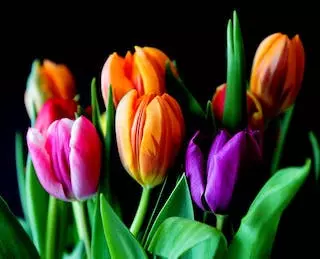](https://www.pexels.com/photo/yellow-pink-and-violet-tulips-52508/) | 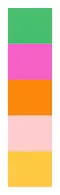 | 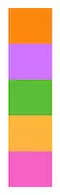 | 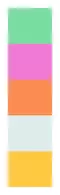 |
| [](https://www.pexels.com/photo/closeup-photo-of-doughnuts-1191639/) | 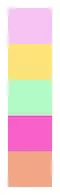 | 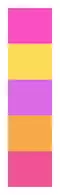 | 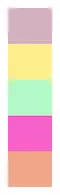 |
| [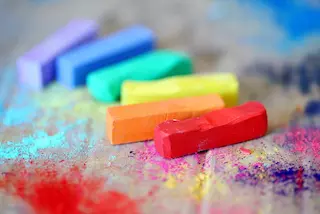](https://www.pexels.com/photo/close-up-photo-of-assorted-colored-chalks-1153895/) | 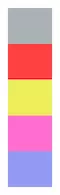 | 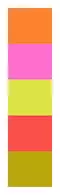 |  |
## API
For more detailed information, please refer to
the [documentations](https://github.com/t28hub/auto-palette-ts/tree/main/docs) in the `docs` directory.
### Palette
#### `extract(image: ImageSource, options?: Options): Palette`
Extracts a color palette from the given image source(HTMLImageElement, HTMLCanvasElement or ImageData).
It takes an image source and an optional `Options` object as parameters.
```ts
const options: Options = {
algorithm: 'dbscan',
samplingRate: 0.5,
maxSwatches: 16,
filters: [luminanceFilter(0.2, 0.8)],
};
const palette = Palette.extract(image, options);
```
The `Options` can include properties such as `algorithm`, `samplingRate`, `maxSwatches`, and `filters`.
```ts
interface Options {
// The color extraction algorithm to use. Default is 'dbscan'.
algorithm?: 'dbscan' | 'dbscan++' | 'kmeans';
// The sampling rate of the image. Default is 1.0.
samplingRate?: number;
// The maximum number of swatches to extract. Default is 256.
maxSwatches?: number;
// The color filters to apply. Default is [opacityFilter()].
filters?: ColorFilter[];
}
```
#### `findSwatches(n: number, theme?: Theme): Swatch[]`
Finds the best `n` swatches in the palette.
The “best” swatches are determined based on their population and optionally a theme.
The theme can be `basic`, `vivid`, `muted`, `light` or `dark`. Default is `basic`.
```ts
const swatches = palette.findSwatches(5, 'light');
```
## Contributing
Contributions are welcome! For detailed information on how to contribute, please refer to the [CONTRIBUTING](https://github.com/t28hub/auto-palette-ts/blob/main/CONTRIBUTING.md) guidelines.
## License
This library is distributed under the MIT License.See
the [LICENSE](https://github.com/t28hub/auto-palette-ts/blob/main/LICENSE).
[](https://app.fossa.com/projects/custom%2B14538%2Fgithub.com%2Ft28hub%2Fauto-palette-ts?ref=badge_large&issueType=license)
---
_Source: https://npm.io/package/auto-palette · Machine-readable twin of the npm.io package page. Health data is recomputed on every publish._