# auto-react-app
> redux+router+cra的react框架
Latest version **1.0.4** (published 2018-09-10) · ISC license · 0 weekly downloads
## Install
```sh
npm install auto-react-app
pnpm add auto-react-app
yarn add auto-react-app
bun add auto-react-app
```
Provides the command `AutoReact`.
## Health
**Score 15/100 (F)** — status: abandoned.
Positive: no vulnerabilities.
Warnings: low downloads; no types; no esm support.
Negative: abandoned; low maintenance score.
## Facts
| | |
|---|---|
| Version | 1.0.4 |
| Published | 2018-09-10 |
| First published | 2018-08-28 |
| Weekly downloads | 0 |
| License | ISC |
| TypeScript types | none |
| Module format | CommonJS |
| Dependencies | 9 |
| Unpacked size | 5.8 KB |
| Known vulnerabilities | 0 (+1 in 1 direct dependencies) |
| Install scripts | no |
| Maintainers | sunnyyanan |
## Links
- npm: https://www.npmjs.com/package/auto-react-app
- npm.io page: https://npm.io/package/auto-react-app
## Dependencies (9)
- [fs](https://npm.io/package/fs.md) 0.0.1-security
- [ora](https://npm.io/package/ora.md) ^3.0.0
- [path](https://npm.io/package/path.md) ^0.12.7
- [chalk](https://npm.io/package/chalk.md) ^2.4.1
- [which](https://npm.io/package/which.md) ^1.3.1
- [shelljs](https://npm.io/package/shelljs.md) ^0.8.2
- [inquirer](https://npm.io/package/inquirer.md) ^6.2.0
- [commander](https://npm.io/package/commander.md) ^2.17.1
- [download-git-repo](https://npm.io/package/download-git-repo.md) ^1.1.0
## Recent versions
- 1.0.4 (latest) — 2018-09-10
- 1.0.3 — 2018-09-10
- 1.0.2 — 2018-09-10
- 1.0.1 — 2018-08-28
- 1.0.0 — 2018-08-28
## README
基于 cra 的 react 开发框架,
使用了 router4.0 及 react-redux
## 使用方式
1、npm i auto-react-app -g 安装包
2、AutoReact init 初始化应用,根据提示输入应用名
3、npm start 启动应用
此应用基于facebook官方脚手架create-react-app搭建,更多能力查看[这里](https://github.com/facebookincubator/create-react-app/blob/master/packages/react-scripts/template/README.md)
[toc]
## 目录结构
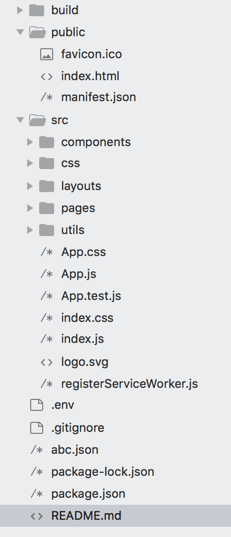
public下是主入口,含html,图标等,一般不需要更改。
src下是所有最后会打包压缩的内容。
components目录下是一些公共组件或页面拆分后的组件,如多个页面共有的同一个表格。
css是样式文件。
layout是页面的布局入口。
pages对应每个页面。
utils中是一些工具类。
## 如何开发
### 搭建环境
1、安装homebrew
```
ruby -e "$(curl -fsSL https://raw.githubusercontent.com/Homebrew/install/master/install)"
```
2、安装node
```
brew link node
brew uninstall node
brew install node
```
3、验证安装是否成功
```
npm -v
node -v
```
### 开发过程
#### 目前支持的组件
[蚂蚁的组件](https://ant.design/docs/react/introduce-cn),antd的加载已引入按需加载方式。
```
引入
import {Button} from 'antd';
使用
```
注意这里的this.dosomething是一个方法,上面的()=>{}写法是jsx语法中的方法。2种方式都是正确的。
更多组件使用参考fusion或antd
#### 设计自己的layout
在layout中选用已有的layout或者参考蚂蚁[layout](https://ant.design/components/layout-cn/)组件编写自己想要的页面布局。记得在页面主体部分加入``````引入页面路由。
#### 在index.js中配置layout
```
修改from后为自己的layout组件即可
import Layout from './layouts/AntdLeftLayout';
```
#### 编写页面
在pages目录下,参考[react](https://reactjs.org/) 官方教程编写自己的页面。多个页面共有组件,或单页面拆分出的组件放入components中。
#### 配置路由
在utils目录下的routes中引入页面,配置页面路由,格式如:
```
```
原理是基于[react-router](https://reacttraining.com/react-router/web/api/Router/history-object)
注意这里还引入了[react-loadable](https://github.com/thejameskyle/react-loadable),它用来做代码分割,从而实现按需加载。写法如Routes.js中:
```
const AsyncApp = Loadable({
loader: () => import('../App'),
loading: MyLoadingComponent
});
```
## 可能有哪些问题
### 路由跳转
方式一:
使用react-router中的``` ```
方式二:
调用this.props.history.push('/home'),这是[history](https://github.com/ReactTraining/history)的能力,它还可以监听路由变化
### 请求发送
使用[fetch](https://github.com/github/fetch)来请求接口,部分功能目前封装在utils目录下的request中,可以通过如下方式使用,可以根据实际情况修改request文件:
```
引入:
import request from '../utils/Request';
调用:
request('/getPoplayer.json').then(response => alert(response));
```
---
_Source: https://npm.io/package/auto-react-app · Machine-readable twin of the npm.io package page. Health data is recomputed on every publish._