# babel-plugin-display-name-custom
> Display name inference for your custom React component creators.
Latest version **0.1.3** (published 2017-02-15) · MIT license · 0 weekly downloads
## Install
```sh
npm install babel-plugin-display-name-custom
pnpm add babel-plugin-display-name-custom
yarn add babel-plugin-display-name-custom
bun add babel-plugin-display-name-custom
```
## Health
**Score 15/100 (F)** — status: abandoned.
Positive: no vulnerabilities.
Warnings: low downloads; no types; no esm support; pre 1.0.
Negative: abandoned; low maintenance score.
## Facts
| | |
|---|---|
| Version | 0.1.3 |
| Published | 2017-02-15 |
| First published | 2017-02-13 |
| Weekly downloads | 0 |
| License | MIT |
| TypeScript types | none |
| Module format | CommonJS |
| Dependencies | 0 |
| Known vulnerabilities | 0 |
| Install scripts | no |
| GitHub stars | 15 |
| Author | Esa-Matti Suuronen |
| Maintainers | epeli |
## Links
- npm: https://www.npmjs.com/package/babel-plugin-display-name-custom
- Repository: https://github.com/epeli/babel-plugin-display-name-custom
- Homepage: https://github.com/epeli/babel-plugin-display-name-custom#readme
- Issues: https://github.com/epeli/babel-plugin-display-name-custom/issues
- npm.io page: https://npm.io/package/babel-plugin-display-name-custom
## Recent versions
- 0.1.3 (latest) — 2017-02-15
- 0.1.2 — 2017-02-15
- 0.1.1 — 2017-02-14
- 0.1.0 — 2017-02-13
## README
# babel-plugin-display-name-custom
display name inference for your custom react component creators
so that instead of
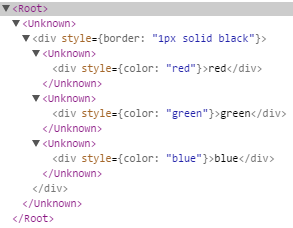
you could see
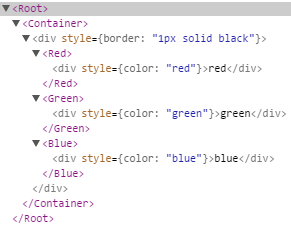
in React Developer Tools for code like
```js
import {createComponent} from "./create";
const Container = createComponent("div", {
border: "1px solid black",
});
const Red = createComponent("div", {
color: "red",
});
const Green = createComponent("div", {
color: "green",
});
const Blue = createComponent("div", {
color: "blue",
});
const Root = () => (
red
green
blue
);
```
# usage
install
yarn add babel-plugin-display-name-custom
add `display-name-custom` to `.babelrc`
```json
{
"presets": ["es2015", "react"],
"plugins": [
"syntax-object-rest-spread",
"transform-object-rest-spread",
["display-name-custom", {
"modules": {
"./create": {
"createComponent": true
}
}
}]
]
}
```
The `modules` object is a mapping of module names to the exported
functions which return new React components.
In the above example `./create` is
```js
export const createComponent = (Component, styles) => {
return props => ;
};
```
You can also add inference to 3rd party modules
```json
{
"modules": {
"react-redux": {
"connect": true
}
}
}
```
The default export can be added using the `default` keyword
```json
{
"modules": {
"create-component": {
"default": true
}
}
}
```
# how it works?
After the plugin is configured it knows which functions return new React components.
Using that information it scans your source code for variable declarations which are initialized
using those. When a declaration is found it sets the `displayName` property
of the component to the variable name.
In practice it transpiles
```js
const Red = createComponent("div", {
color: "red",
});
```
to
```js
const Red = createComponent("div", {
color: "red",
});
Red.displayName = "Red";
```
# library author?
For library authors the plugin also exports a `createPlugin` factory
for generating preconfigured library specific display name plugins.
Just add `babel.js` to the root of your npm module with contents like
```js
module.exports = require("babel-plugin-display-name-custom").createPlugin({
modules: {
"mylib": {createComponent: true},
},
});
```
and your users then can use it with just
```json
{
"presets": ["es2015", "react"],
"plugins": [
"mylib/babel"
]
}
```
Checkout [react-simple][] for a real world example
[react-simple]: https://github.com/epeli/react-simple
---
_Source: https://npm.io/package/babel-plugin-display-name-custom · Machine-readable twin of the npm.io package page. Health data is recomputed on every publish._