# bitswipe-admin
> Lamassu admin server. First part of Lamassu stack you need to install.
Latest version **0.5.14** (published 2017-12-19) · UNLICENSED license · 0 weekly downloads
## Install
```sh
npm install bitswipe-admin
pnpm add bitswipe-admin
yarn add bitswipe-admin
bun add bitswipe-admin
```
Provides the command `lamassu-admin`.
## Health
**Score 15/100 (F)** — status: abandoned.
Positive: no vulnerabilities.
Warnings: low downloads; no types; no esm support; pre 1.0.
Negative: abandoned; low maintenance score.
## Facts
| | |
|---|---|
| Version | 0.5.14 |
| Published | 2017-12-19 |
| First published | 2017-12-19 |
| Weekly downloads | 0 |
| License | UNLICENSED |
| TypeScript types | none |
| Module format | CommonJS |
| Node | 0.10.x |
| Dependencies | 17 |
| Known vulnerabilities | 0 (+7 in 3 direct dependencies) |
| Install scripts | no |
| GitHub stars | 1 |
| Author | Seth Bergman |
| Maintainers | sethbergman |
| Keywords | bitcoin |
## Links
- npm: https://www.npmjs.com/package/bitswipe-admin
- Repository: https://github.com/bitswipe-stack/bitswipe-admin
- Homepage: https://github.com/bitswipe-stack/bitswipe-admin#readme
- Issues: https://github.com/bitswipe-stack/bitswipe-admin/issues
- npm.io page: https://npm.io/package/bitswipe-admin
## Dependencies (17)
- [ip](https://npm.io/package/ip.md) ^0.3.0
- [async](https://npm.io/package/async.md) ~0.2.10
- [yargs](https://npm.io/package/yargs.md) ^1.2.1
- [lodash](https://npm.io/package/lodash.md) ~2.4.1
- [request](https://npm.io/package/request.md) ^2.34.0
- [ss-jade](https://npm.io/package/ss-jade.md) 0.1.x
- [ss-hogan](https://npm.io/package/ss-hogan.md) 0.1.x
- [ss-stylus](https://npm.io/package/ss-stylus.md) 0.1.x
- [socketstream](https://npm.io/package/socketstream.md) 0.3.10
- [lamassu-bitgo](https://npm.io/package/lamassu-bitgo.md) ^0.1.7
- [lamassu-bitpay](https://npm.io/package/lamassu-bitpay.md) ~0.3.0
- [lamassu-config](https://npm.io/package/lamassu-config.md) ~0.4.0
- [lamassu-kraken](https://npm.io/package/lamassu-kraken.md) ^1.1.1
- [lamassu-bitstamp](https://npm.io/package/lamassu-bitstamp.md) ~0.2.0
- [lamassu-coindesk](https://npm.io/package/lamassu-coindesk.md) ~0.2.0
- [lamassu-coinapult](https://npm.io/package/lamassu-coinapult.md) ^0.4.5
- [lamassu-bitcoinaverage](https://npm.io/package/lamassu-bitcoinaverage.md) ~0.2.0
## Recent versions
- 0.5.14 (latest) — 2017-12-19
## README
# Bitswipe Admin Frontend
# Lamassu ATM Process Improvement Documentation
-------
### Background
BitSwipe has been contracted to assist a client with their conversion of fiat currency to Bitcoin. This client receives fiat currency from their deployed Lamassu ATMs and needs to convert this currency to Bitcoin in order to pay their ATM customers. In the process, the client receives a percent of each transaction in the form of revenue.
### Current process
1. The client receives fiat currency from the Lamassu ATM and deposits the currency into their bank account.
2. The client then wires this currency over to a BitSwipe bank account.
3. BitSwipe wires these funds to the Kraken exchange.
4. BitSwipe exhanges these funds for Bitcoin.
5. BitSwipe sends Bitcoin to the client’s wallet.
6. The client uses the new Bitcoin to pay customer when they deposit fiat currency into the Lamassu ATM.
### Proposed process
1. The client receives fiat currency from the Lamassu ATM.
2. The Lamassu server initiates an exchange of fiat currency to Bitcoin on the client’s behalf.
3. The Lamassu server sends the Bitcoin to the customer’s wallet
4. The client deposits fiat currency received from the ATM to their bank account and then wires these funds to their Kraken account.
### Technical background
The Lamassu ATM runs on open source technology. The front-end ATM interface runs on javascript and Ruby and the back-end server runs on Javascript. There are various plugins for wallets (BitGo, Bitcoind, Coinapult, Blockchain.info, GreenAddress) and exchanges (Kraken, Bitstamp, Coinbase, Coinapult, Coinfloor, itBit).
-------
# Implementation Requirements for Kraken API
### Signup
- First, sign up for a Kraken account: [https://www.kraken.com/en-us/signup](https://www.kraken.com/en-us/signup)
- Then, verify your account in order to deposit and withdraw funds: [https://www.kraken.com/u/verify](https://www.kraken.com/u/verify)
- Once verified, deposit fiat funds to the USD balance of your account.
### Create an API key
Under settings, and API, create a new key:
[https://www.kraken.com/u/settings/api](https://www.kraken.com/u/settings/api)
Assign it the following permissions:
[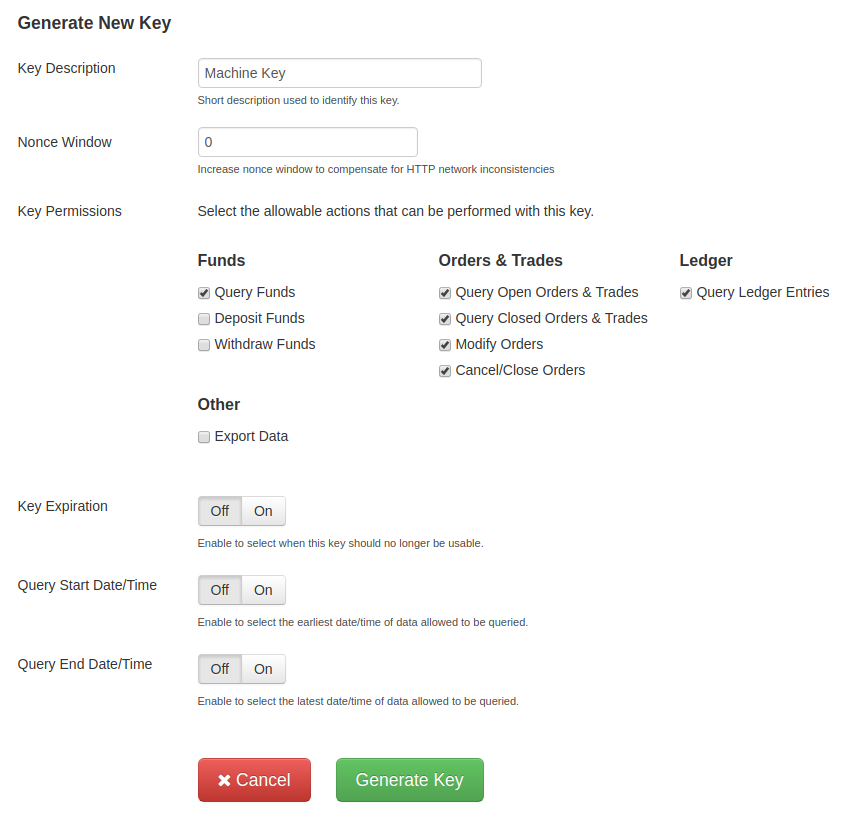](https://support.lamassu.is/hc/article_attachments/115001782992/Kraken_API_1.png)
Copy down the API Key and Private Key shown.
[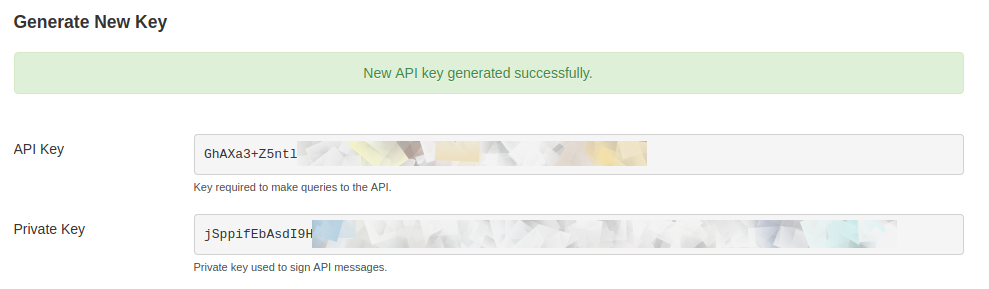](https://support.lamassu.is/hc/article_attachments/115001783192/Kraken_API_2.png)
### Configuring in your admin
Open the 'Third Party Services / Kraken' panel in your Lamassu admin. Input the API Key and Private Key credentials, clicking Submit:
[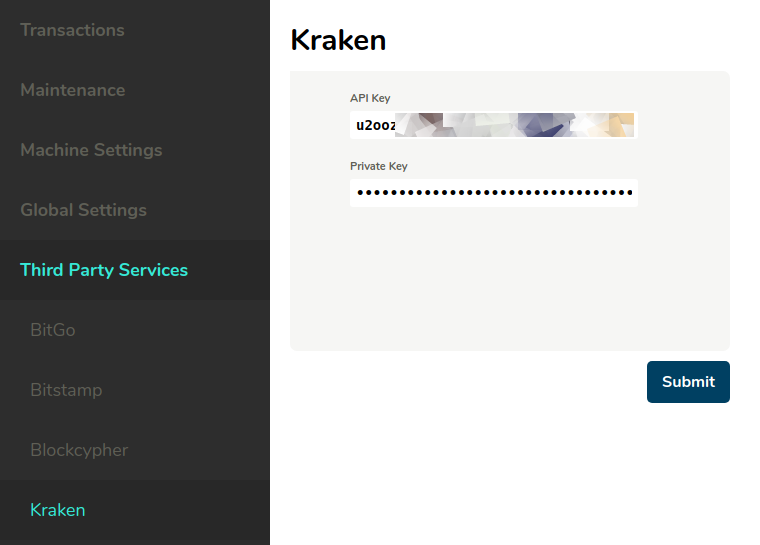](https://support.lamassu.is/hc/article_attachments/115001781551/Kraken_panel.png)
Then navigate to the 'Global Settings / Wallet Settings' panel. Select Kraken from the Exchange and Ticker drop-down list under the tab for each currency that you'd like to enable trading for:
[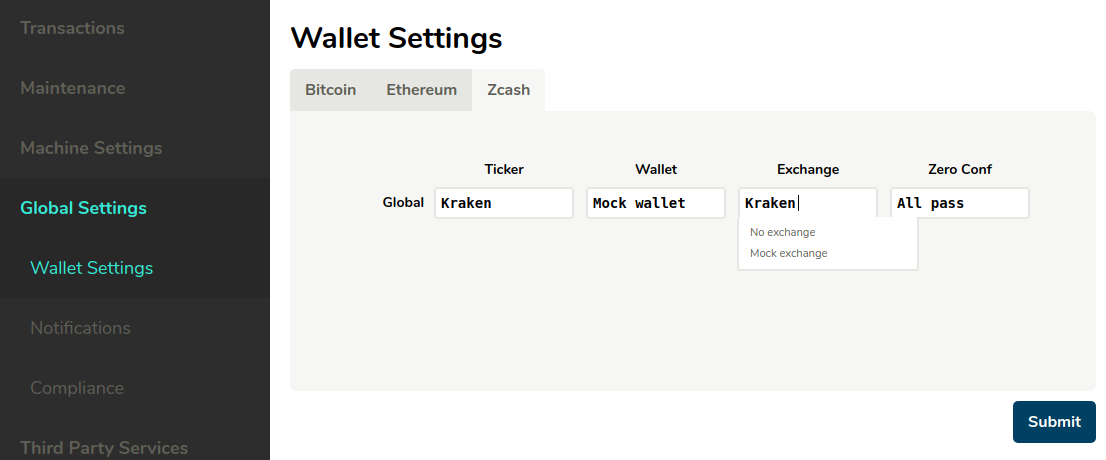](https://support.lamassu.is/hc/article_attachments/115001783312/Kraken_wallet.png)
### Testing
Test trades by placing purchases at the machine and ensure fiat is converted into the relevant cryptocurrency in your Kraken balances.
## Documentation Articles
Setting up the Lamassu admin
Configuring Bitcoin Core (bitcoind)
Updating your backend software
Unpairing your machine
Latest software releases & notices
Lamassu server commands
-------
# TODO
- Research implementation for cloud infrastructure
- Kubernetes or Docker
- Simplify setup process
- Security and penetration testing
- Automate server configuration
- Documentation updates and fix broken links
- Process improvement for user experience
- Engineering team call
=======
# lamassu-admin
Lamassu admin server. First part of Lamassu stack you need to install.
## Installation
```sh
git clone git@github.com:lamassu/lamassu-admin.git
cd lamassu-admin
npm install
```
You also need a Postgres running. Postgres is required for storing configuration
of the remote server. Install Postgres with your package manager of choice, then:
```sh
sudo su - postgres
createuser --superuser lamassu
createdb -U lamassu lamassu
```
Then you need SQL scripts to seed initial configs. They are under `/database`.
You can bootstrap your database by running:
```sh
psql lamassu lamassu < database/lamassu.sql
```
## Configuration
You'll be able to configure your stack when you start the server for the first
time.
## Running
```sh
node app.js
```
Then, [open it](http://localhost:8081).
## Deployment
### Heroku
Both `lamassu-admin` and [`lamassu-server`](https://github.com/lamassu/lamassu-server)
are deployable to Heroku.
First, you need to get a [Heroku](https://heroku.com) account and install the
Heroku toolkit.
### The easy way
`deploy-all.sh` is an easy installation and deployment script. You can run it
standalone, without cloning `lamassu-admin`. It'll clone both repositories to
your current working directory and deploy them to Heroku:
```sh
mkdir lamassu
curl https://raw.github.com/lamassu/lamassu-admin/master/deploy-all.sh > deploy-all.sh
chmod +x deploy-all.sh
./deploy-all.sh
```
You can deploy updates to your applications by rerunning `deploy-all.sh`.
### A bit harder way
You can also clone and deploy each app individually. To do that, clone both
`lamassu-admin` and `lamassu-server`.
```sh
git clone https://github.com/lamassu/lamassu-admin.git
git clone https://github.com/lamassu/lamassu-server.git
```
Next, deploy `lamassu-admin`:
```sh
cd lamassu-admin
./deploy.sh
```
Visit the deployed application to configure your Lamassu ATM. Make sure to input
all required API keys.
Next, to deploy `lamassu-server` you need to grab `DATABASE_URL` for the Postgres
database our deployment script created.
```sh
db=$(heroku config:get DATABASE_URL)
```
Then, go to `lamassu-server` and deploy it:
```sh
DATABASE_URL="$db" ./deploy.sh
```
You need to pass `DATABASE_URL` to it since both `lamassu-admin` and `lamassu-server`
use the same database.
Both applications should be deployed and running.
---
_Source: https://npm.io/package/bitswipe-admin · Machine-readable twin of the npm.io package page. Health data is recomputed on every publish._