# botframework-webchat-component-root-v2-root
> React component of botframework-webchat
Latest version **0.0.14** (published 2020-06-02) · MIT license · 0 weekly downloads
## Install
```sh
npm install botframework-webchat-component-root-v2-root
pnpm add botframework-webchat-component-root-v2-root
yarn add botframework-webchat-component-root-v2-root
bun add botframework-webchat-component-root-v2-root
```
## Health
**Score 15/100 (F)** — status: abandoned.
Positive: no vulnerabilities.
Warnings: low downloads; no types; no esm support; pre 1.0.
Negative: abandoned; low maintenance score.
## Facts
| | |
|---|---|
| Version | 0.0.14 |
| Published | 2020-06-02 |
| First published | 2020-06-02 |
| Weekly downloads | 0 |
| License | MIT |
| TypeScript types | none |
| Module format | CommonJS |
| Dependencies | 20 |
| Unpacked size | 2.4 MB |
| Known vulnerabilities | 0 (+10 in 2 direct dependencies) |
| Install scripts | no |
| GitHub stars | 0 |
| Author | Microsoft Corporation |
| Maintainers | mdable2 |
## Links
- npm: https://www.npmjs.com/package/botframework-webchat-component-root-v2-root
- Repository: https://github.com/mdable2/BotFramework-WebChat
- Homepage: https://github.com/mdable2/BotFramework-WebChat/tree/master/packages/component#readme
- Issues: https://github.com/mdable2/BotFramework-WebChat/issues
- npm.io page: https://npm.io/package/botframework-webchat-component-root-v2-root
## Dependencies (20)
- [redux](https://npm.io/package/redux.md) 4.0.5
- [glamor](https://npm.io/package/glamor.md) 2.20.40
- [remark](https://npm.io/package/remark.md) 10.0.1
- [globalize](https://npm.io/package/globalize.md) 1.4.2
- [react-say](https://npm.io/package/react-say.md) 2.0.1-master.c5d6304
- [classnames](https://npm.io/package/classnames.md) 2.2.6
- [prop-types](https://npm.io/package/prop-types.md) 15.7.2
- [react-film](https://npm.io/package/react-film.md) 2.0.2
- [markdown-it](https://npm.io/package/markdown-it.md) 10.0.0
- [math-random](https://npm.io/package/math-random.md) 1.0.4
- [memoize-one](https://npm.io/package/memoize-one.md) 5.1.1
- [react-redux](https://npm.io/package/react-redux.md) 7.2.0
- [sanitize-html](https://npm.io/package/sanitize-html.md) 1.20.1
- [strip-markdown](https://npm.io/package/strip-markdown.md) 3.0.4
- [simple-update-in](https://npm.io/package/simple-update-in.md) 2.1.1
- [event-target-shim](https://npm.io/package/event-target-shim.md) 5.0.1
- [react-dictate-button](https://npm.io/package/react-dictate-button.md) 1.2.2
- [event-target-shim-es5](https://npm.io/package/event-target-shim-es5.md) 1.0.1
- [react-scroll-to-bottom](https://npm.io/package/react-scroll-to-bottom.md) 1.3.2
- [botframework-webchat-core-root-v2](https://npm.io/package/botframework-webchat-core-root-v2.md) ^0.0.13
## Recent versions
- 0.0.14 (latest) — 2020-06-02
- 0.0.13 — 2020-06-02
## README
# 
### [Click here to find out what is new in Web Chat](https://github.com/microsoft/BotFramework-WebChat/blob/master/CHANGELOG.md)
# Bot Framework Web Chat
[](https://badge.fury.io/js/botframework-webchat)
[](https://fuselabs.visualstudio.com/BotFramework-WebChat/_build/latest?definitionId=498&branchName=master)
[](https://coveralls.io/github/microsoft/BotFramework-WebChat?branch=master)
This repository contains code for the Bot Framework Web Chat component. The Bot Framework Web Chat component is a highly-customizable web-based client for the Bot Framework V4 SDK. The Bot Framework SDK v4 enables developers to model conversation and build sophisticated bot applications.
This repo is part of the [Microsoft Bot Framework](https://github.com/microsoft/botframework) - a comprehensive framework for building enterprise-grade conversational AI experiences.
# Version notes
> This section points out important version notes. For further information, please see the related links and check the [`CHANGELOG.md`](https://github.com/microsoft/BotFramework-WebChat/blob/master/CHANGELOG.md)
## Direct Line Speech support in Web Chat 4.7.0
Starting from Web Chat 4.7.0, Direct Line Speech is supported, and it is the preferred way to provide an integrated speech functionality in Web Chat. We are working on [closing feature gaps](https://github.com/microsoft/BotFramework-WebChat/labels/Direct%20Line%20Speech) between Direct Line Speech and Web Speech API (includes Cognitive Services and browser-provided speech functionality).
## Upgrading to 4.6.0
Starting from Web Chat 4.6.0, Web Chat requires React 16.8.6 or up.
Although we recommend that you upgrade your host app at your earliest convenience, we understand that host app may need some time before its React dependencies are updated, especially in regards to huge applications.
If your app is not ready for React 16.8.6 yet, you can follow the [hybrid React sample](https://github.com/microsoft/BotFramework-WebChat/tree/master/samples/01.getting-started/g.hybrid-react-npm) to dual-host React in your app.
## Speech changes in Web Chat 4.5.0
There is a breaking change on behavior expectations regarding speech and input hint in Web Chat. Please refer to the section on [input hint behavior before 4.5.0](https://github.com/microsoft/BotFramework-WebChat/blob/master/docs/SPEECH.md#input-hint-behavior-before-4-5-0) for details.
## Migrating from Web Chat v3 to v4
[View migration docs](https://github.com/microsoft/BotFramework-WebChat/tree/master/docs/MIGRATION.md) to learn about migrating from Web Chat v3.
# How to use
First, create a bot using [Azure Bot Service](https://azure.microsoft.com/en-us/services/bot-service/).
Once the bot is created, you will need to [obtain the bot's Web Chat secret](https://docs.microsoft.com/en-us/azure/bot-service/bot-service-channel-connect-webchat?view=azure-bot-service-3.0#step-1) in Azure Portal. Then use the secret to [generate a token](https://docs.microsoft.com/en-us/azure/bot-service/rest-api/bot-framework-rest-direct-line-3-0-authentication?view=azure-bot-service-4.0) and pass it to your Web Chat.
## Connect a client app to bot
Web Chat provides UI on top of the Direct Line and Direct Line Speech Channels. There are two ways to connect to your bot through HTTP calls from the client: by sending the Bot secret or generating a token via the secret.
We strongly recommend using the token API instead of providing the app with your secret. To learn more about why, see the [authentication documentation](https://docs.microsoft.com/en-us/azure/bot-service/rest-api/bot-framework-rest-direct-line-3-0-authentication?view=azure-bot-service-4.0) on the [token API](https://docs.microsoft.com/en-us/azure/bot-service/rest-api/bot-framework-rest-direct-line-3-0-api-reference?view=azure-bot-service-4.0) and client security.
For further reading, please see the following links:
- Using Web Chat with [Azure Bot Services authentication](https://blog.botframework.com/2018/09/01/using-webchat-with-azure-bot-services-authentication/)
- [Enhanced Direct Line authentication features](https://blog.botframework.com/2018/09/25/enhanced-direct-line-authentication-features/)
## Integrate with JavaScript
Web Chat is designed to integrate with your existing website using JavaScript or React. Integrating with JavaScript will give you moderate styling and customizability options.
You can use the full, typical Web Chat package (called full-feature bundle) that contains the most typically used features.
Here is how how you can add Web Chat control to your website:
```html
```
> `userID`, `username`, `locale`, `botAvatarInitials`, and `userAvatarInitials` are all optional parameters to pass into the `renderWebChat` method. To learn more about Web Chat props, look at the [Web Chat API Reference](https://github.com/microsoft/BotFramework-WebChat/tree/master/docs/API.md) documentation.
> Assigning `userID` as a static value is not recommended since this will cause all users to share state. Please see the [`API userID entry`](https://github.com/microsoft/BotFramework-WebChat/blob/master/docs/API.md#userID) for more information.
More information on localization can be found in the [Localization](https://github.com/microsoft/BotFramework-WebChat/tree/master/docs/LOCALIZATION.md) documentation.
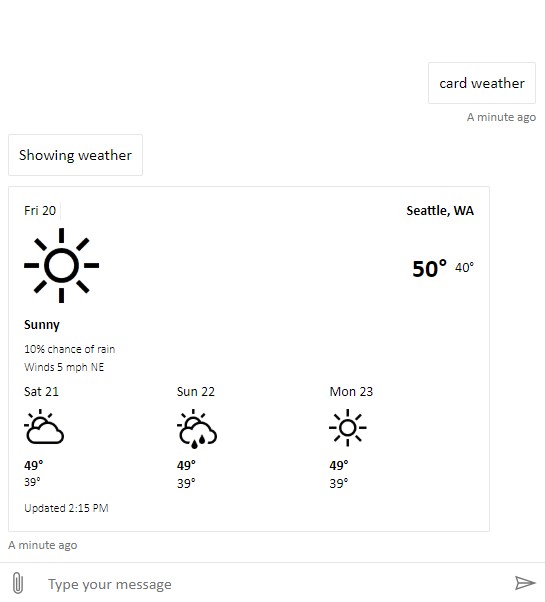
See the working sample of the [full Web Chat bundle](https://github.com/microsoft/BotFramework-WebChat/tree/master/samples/01.getting-started/a.full-bundle).
## Integrate with React
For full customizability, you can use React to recompose components of Web Chat.
To install the production build from NPM, run `npm install botframework-webchat`.
```js
import React, { useMemo } from 'react';
import ReactWebChat, { createDirectLine } from 'botframework-webchat';
export default () => {
const directLine = useMemo(() => createDirectLine({ token: 'YOUR_DIRECT_LINE_TOKEN' }), []);
return ;
};
```
> You can also run `npm install botframework-webchat@master` to install a development build that is synced with Web Chat's GitHub `master` branch.
See the working sample of [Web Chat rendered via React](https://github.com/microsoft/BotFramework-WebChat/tree/master/samples/01.getting-started/e.host-with-react/).
# Customizing the Web Chat UI
Web Chat is designed to be customizable without forking the source code. The table below outlines what kind of customizations you can achieve when you are importing Web Chat in different ways. This list is not exhaustive.
| | CDN bundle | React |
| ----------------------------- | :--------: | :------: |
| Change colors | ✔ | ✔ |
| Change sizes | ✔ | ✔ |
| Update/replace CSS styles | ✔ | ✔ |
| Listen to events | ✔ | ✔ |
| Interact with hosting webpage | ✔ | ✔ |
| Custom render activities | | ✔ |
| Custom render attachments | | ✔ |
| Add new UI components | | ✔ |
| Recompose the whole UI | | ✔ |
See more about [customizing Web Chat](https://github.com/microsoft/BotFramework-WebChat/blob/master/samples/README.md) to learn more on customization.
## Supported Activity Types on the Web Chat Client
Bot Framework has many activity types, but not all are supported in Web Chat. [View activity types docs](https://github.com/microsoft/BotFramework-WebChat/tree/master/docs/ACTIVITYTYPES.md) to learn more.
# Samples list
[View the complete list of Web Chat samples](https://github.com/microsoft/BotFramework-WebChat/tree/master/samples) for more ideas on customizing Web Chat.
# Further reading
## API Reference
View the [API documentation](https://github.com/microsoft/BotFramework-WebChat/tree/master/docs/API.md) for implementing Web Chat.
## Browser compatibility
Web Chat supports the latest 2 versions of modern browsers like Chrome, Edge, and FireFox.
If you need Web Chat in Internet Explorer 11, please see the [ES5 bundle demo](https://microsoft.github.io/BotFramework-WebChat/01.getting-started/c.es5-bundle).
Please note, however:
- Web Chat does not support Internet Explorer older than version 11
- Customization as shown in non-ES5 samples are not supported for Internet Explorer. Because IE11 is a non-modern browser, it does not support ES6, and many samples that use arrow functions and modern promises would need to be manually converted to ES5. If you are in need of heavy customization for your app, we strongly recommend developing your app for a modern browser like Google Chrome or Edge.
- Web Chat has no plan to support samples for IE11 (ES5).
- For customers who wish to manually rewrite our other samples to work in IE11, we recommend looking into converting code from ES6+ to ES5 using polyfills and transpilers like [`babel`](https://babeljs.io/docs/en/next/babel-standalone.html).
## Localization
View the [localization documentation](https://github.com/microsoft/BotFramework-WebChat/tree/master/docs/LOCALIZATION.md) for implementing in Web Chat.
## Notifications
View the [notification documentation](https://github.com/microsoft/BotFramework-WebChat/tree/master/docs/NOTIFICATION.md) for implementing in Web Chat.
## Telemetry
View the [telemetry documentation](https://github.com/microsoft/BotFramework-WebChat/tree/master/docs/TELEMETRY.md) for implementing in Web Chat.
## Speech
Web Chat supports a wide-range of speech engines for a natural chat experience with a bot. This section outlines the different engines that are supported:
- [Direct Line Speech](#integrate-with-direct-line-speech)
- [Cognitive Services Speech Services](#integrate-with-cognitive-services-speech-services)
- [Browser-provided engine or other engines](#browser-provided-engine-or-other-engines)
### Integrate with Direct Line Speech
Direct Line Speech is the preferred way to add speech functionality in Web Chat. Please refer to the [Direct Line Speech](https://github.com/microsoft/BotFramework-WebChat/blob/master/docs/DIRECT_LINE_SPEECH.md) documentation for details.
### Integrate with Cognitive Services Speech Services
You can use Cognitive Services Speech Services to add speech functionality to Web Chat. Please refer to the [Cognitive Services Speech Services](https://github.com/microsoft/BotFramework-WebChat/blob/master/docs/SPEECH.md) documentation for details.
### Browser-provided engine or other engines
You can also use any speech engines which support [W3C Web Speech API standard](https://wicg.github.io/speech-api/). Some browsers support the [Speech Recognition API](https://caniuse.com/#feat=mdn-api_speechrecognition) and the [Speech Synthesis API](https://caniuse.com/#feat=mdn-api_speechsynthesis). You can mix-and-match different engines - including Cognitive Services Speech Services - to provide best user experience.
# How to test with Web Chat's latest bits
_Testing unreleased features is only available via MyGet packaging at this time._
If you want to test a feature or bug fix that has not yet been released, you will want to point your Web Chat package to Web Chat's daily feed, as opposed the official npmjs feed.
Currently, you may access Web Chat's dailies by subscribing to our MyGet feed. To do this, you will need to update the registry in your project. **This change is reversible, and our directions include how to revert back to subscribing to the official release**.
## Subscribe to latest bits on `myget.org`
To do this you may add your packages and then change the registry of your project.
1. Add your project dependencies other than Web Chat.
1. In your project's root directory, create a `.npmrc` file
1. Add the following line to your file: `registry=https://botbuilder.myget.org/F/botframework-webchat/npm/`
1. Add Web Chat to your project dependencies `npm i botframework-webchat --save`
1. Note that in your `package-lock.json`, the registries pointed to are now MyGet. The Web Chat project has upstream source proxy enabled, which will redirect non-MyGet packages to `npmjs.com`.
## Re-subscribe to official release on `npmjs.com`
Re-subscribing requires that you reset your registry.
1. Delete your `.npmrc file`
1. Delete your root `package-lock.json`
1. Remove your `node_modules` directory
1. Reinstall your packages with `npm i`
1. Note that in your `package-lock.json`, the registries are pointing to https://npmjs.com/ again.
# Contributing
See our [Contributing page](https://github.com/microsoft/BotFramework-WebChat/tree/master/.github/CONTRIBUTING.md) for details on how to build the project and our repository guidelines for Pull Requests.
This project has adopted the [Microsoft Open Source Code of Conduct](https://opensource.microsoft.com/codeofconduct/).
For more information see the [Code of Conduct FAQ](https://opensource.microsoft.com/codeofconduct/faq/) or
contact [opencode@microsoft.com](mailto:opencode@microsoft.com) with any additional questions or comments.
# Reporting Security Issues
[View the security documentation](https://github.com/microsoft/BotFramework-WebChat/tree/master/docs/SECURITY.md) to learn more about reporting security issues.
---
_Source: https://npm.io/package/botframework-webchat-component-root-v2-root · Machine-readable twin of the npm.io package page. Health data is recomputed on every publish._