# box-win
> window box by vue3
Latest version **1.0.1-1** (published 2023-03-14) · MIT license · 0 weekly downloads
## Install
```sh
npm install box-win
pnpm add box-win
yarn add box-win
bun add box-win
```
## Health
**Score 15/100 (F)** — status: abandoned.
Positive: no vulnerabilities.
Warnings: low downloads; no types; no esm support.
Negative: abandoned; low maintenance score.
## Facts
| | |
|---|---|
| Version | 1.0.1-1 |
| Published | 2023-03-14 |
| First published | 2023-03-14 |
| Weekly downloads | 0 |
| License | MIT |
| TypeScript types | none |
| Module format | CommonJS |
| Dependencies | 0 |
| Unpacked size | 28.5 KB |
| Known vulnerabilities | 0 |
| Install scripts | no |
| GitHub stars | 2 |
| Author | dnoyeb |
| Maintainers | dnoyeb |
| Keywords | box-win, win-box, window, box, box-win-vue3 |
## Links
- npm: https://www.npmjs.com/package/box-win
- Repository: https://github.com/dnoyeb/box-win
- Homepage: https://github.com/dnoyeb/box-win#readme
- Issues: https://github.com/dnoyeb/box-win/issues
- npm.io page: https://npm.io/package/box-win
## Alternatives
- [react-native-root-siblings](https://npm.io/package/react-native-root-siblings.md) — 102.9K weekly downloads
- [@praxisui/dialog](https://npm.io/package/@praxisui/dialog.md) — 2.0K weekly downloads
- [easy-toggle-state](https://npm.io/package/easy-toggle-state.md) — 350 weekly downloads
- [ngx-lightbox-evp](https://npm.io/package/ngx-lightbox-evp.md) — 19 weekly downloads
- [react-native-modal-translucent-axton](https://npm.io/package/react-native-modal-translucent-axton.md) — 4 weekly downloads
## Recent versions
- 1.0.1-1 (latest) — 2023-03-14
- 1.0.1 — 2023-03-14
- 1.0.0 — 2023-03-14
## README
# box-win
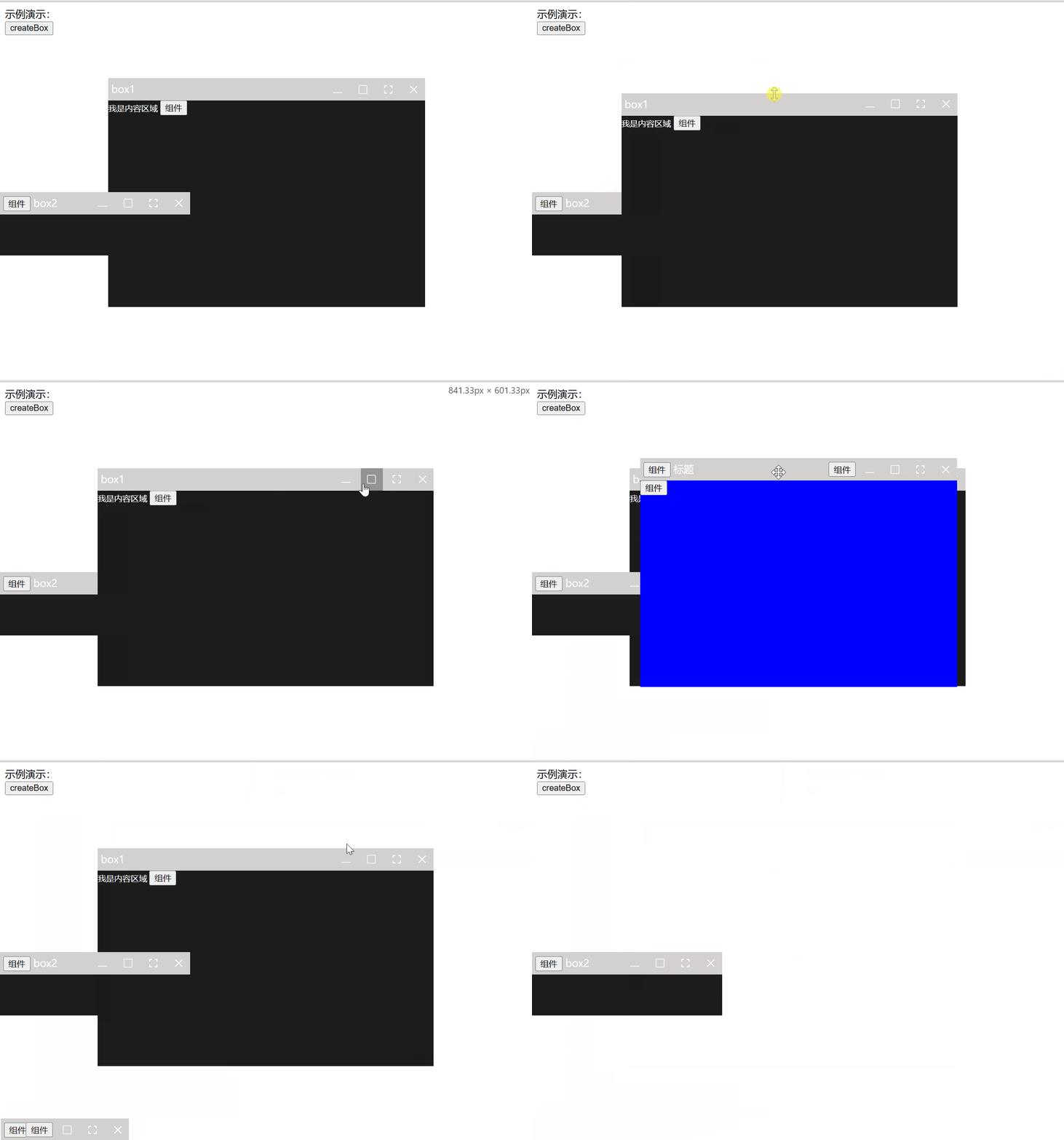
一款基于vue3的仿windows弹窗。
可以组件模板编写或函数式创建。
## 安装
```sh
npm add 'box-win'
```
两种方式:
1、组件式引入
```sh
//全局 test为自定义组件
import BoxWin from 'box-win'
app.use(BoxWin)
//或局部引入
import { BoxWin } from 'box-win'
我是内容区域
```
2、函数式创建
```sh
//test为自定义组件
import { boxWin } from 'box-win'
boxWin.createBoxWin({
position: 'center',
bodyStyle: { background: 'blue' },
headIcon: h(test, {
test: 111
}),
title: '标题',
body: h(test, {
test: 333
}),
headControl: h(test, {
test: 444
}),
})
```
## 配置
```sh
props参数:
modelValue?: boolean //普通引入控制显示
title?: string,
width?: string; // 默认宽 —— 设置头高 宽高最好传入变量
height?: string; // 默认高
top?: string; // 默认距离上
left?: string; // 默认距离左
position?: string; // 默认比top、left优先,暂时支持center
animate?: boolean; //是否需要动画
duration?: number,//动画时间,单位 s
headHeight?: string; // 默认控制栏高
headStyle?: Record; // 控制栏样式
bodyStyle?: Record; //主要内容区域样式
resizeAble?: boolean | string; // 是否可以调整尺寸 默认可以调整
dragAble?: boolean | string; // 是否可以拖拽 默认可拖拽
minShow?: boolean; // 全屏控制显示 默认显示
maxShow?: boolean; // 全屏控制显示 默认显示
fullShow?: boolean; // 全屏控制显示 默认显示
closeShow?: boolean; // 关闭控制显示 默认显示
headIcon?: Slots | HTMLElement,
headTitle?: Slots | HTMLElement,
headControl?: Slots | HTMLElement,
body?: Slots | HTMLElement,
响应事件:
'update:modelValue',
'fullscreen',
'exitFullscreen',
'max', 'restore',
'min',
'close'
```
---
_Source: https://npm.io/package/box-win · Machine-readable twin of the npm.io package page. Health data is recomputed on every publish._