# calendar-native-web-component
> Calendar - Native HTML Web Component
Latest version **0.0.32** (published 2021-11-04) · MIT license · 0 weekly downloads
## Install
```sh
npm install calendar-native-web-component
pnpm add calendar-native-web-component
yarn add calendar-native-web-component
bun add calendar-native-web-component
```
## Health
**Score 15/100 (F)** — status: abandoned.
Positive: no vulnerabilities.
Warnings: low downloads; no types; no esm support; pre 1.0.
Negative: abandoned; low maintenance score.
## Facts
| | |
|---|---|
| Version | 0.0.32 |
| Published | 2021-11-04 |
| First published | 2021-08-24 |
| Weekly downloads | 0 |
| License | MIT |
| TypeScript types | none |
| Module format | CommonJS |
| Dependencies | 0 |
| Unpacked size | 152.1 KB |
| Known vulnerabilities | 0 |
| Install scripts | no |
| GitHub stars | 9 |
| Author | Patric Gutersohn |
| Maintainers | pguso |
| Keywords | calendar, web, component |
## Links
- npm: https://www.npmjs.com/package/calendar-native-web-component
- Repository: https://github.com/pguso/calendar-web-component
- Homepage: https://github.com/pguso/calendar-web-component#readme
- Issues: https://github.com/pguso/calendar-web-component/issues
- npm.io page: https://npm.io/package/calendar-native-web-component
## Alternatives
- [@opentelemetry/exporter-zipkin](https://npm.io/package/@opentelemetry/exporter-zipkin.md) — 14.8M weekly downloads
- [pusher-js](https://npm.io/package/pusher-js.md) — 2.0M weekly downloads
- [browserify](https://npm.io/package/browserify.md) — 1.7M weekly downloads
- [sqs-consumer](https://npm.io/package/sqs-consumer.md) — 1.7M weekly downloads
- [@sanity/eventsource](https://npm.io/package/@sanity/eventsource.md) — 930.8K weekly downloads
## Recent versions
- 0.0.32 (latest) — 2021-11-04
- 0.0.31 — 2021-08-26
- 0.0.30 — 2021-08-26
- 0.0.29 — 2021-08-26
- 0.0.28 — 2021-08-26
- 0.0.27 — 2021-08-26
- 0.0.26 — 2021-08-26
- 0.0.25 — 2021-08-26
- 0.0.24 — 2021-08-26
- 0.0.23 — 2021-08-26
- 0.0.22 — 2021-08-26
- 0.0.21 — 2021-08-25
- 0.0.20 — 2021-08-25
- 0.0.19 — 2021-08-25
- 0.0.18 — 2021-08-25
- … 17 more at https://npm.io/package/calendar-native-web-component/versions
## README
## Simple native web component calendar
Native HTML web component calendar. Can easily be used in any framework or plain HTML.
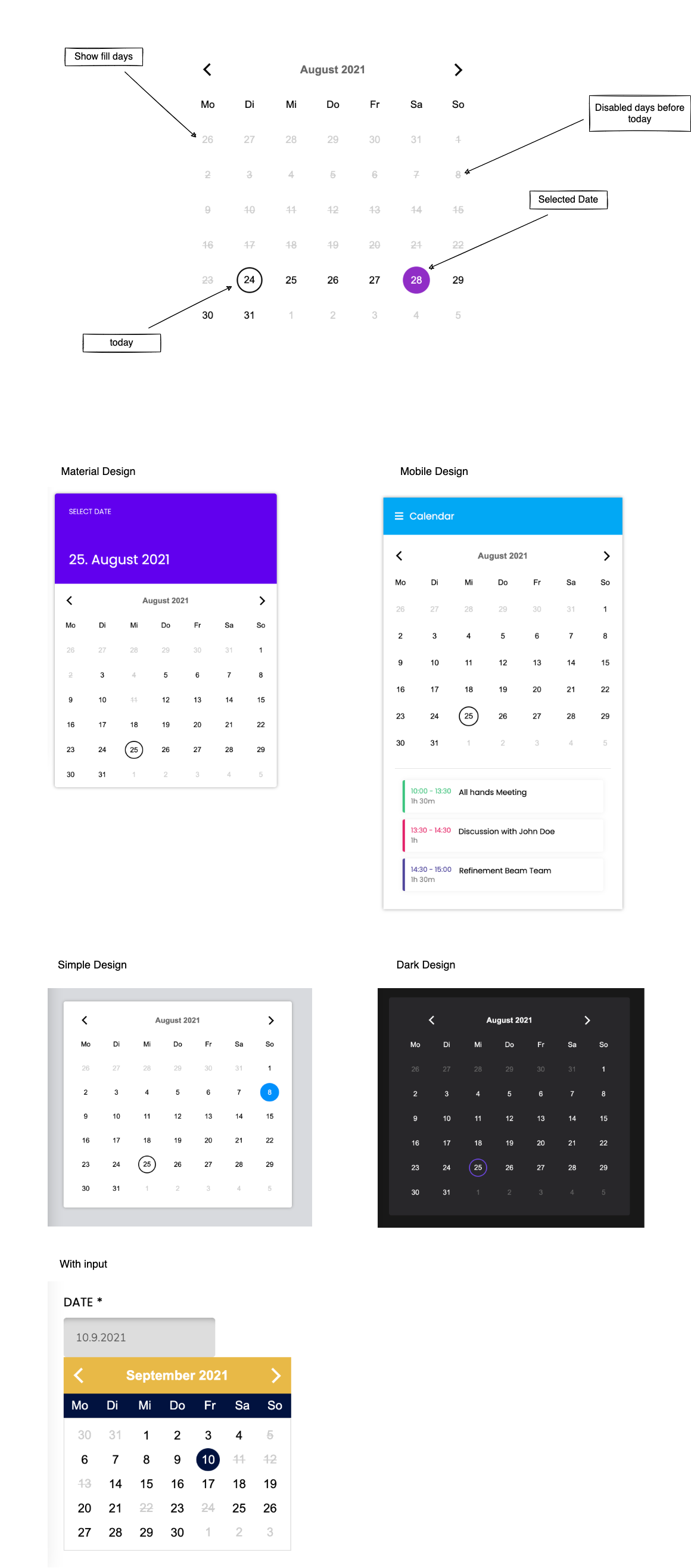
### Styled Examples (Codepen)
[Material Design](https://codepen.io/pguso/pen/mdwyWMJ)
[Simple Design](https://codepen.io/pguso/pen/vYZEJJY)
[Mobile Design](https://codepen.io/pguso/pen/VwWYzdw)
[Dark Design](https://codepen.io/pguso/pen/YzQPrdr)
[With Input](https://codepen.io/pguso/pen/rNwVOdW)
### Integration
#### Install the calendar component
```npm i calendar-native-web-component```
or
```yarn add calendar-native-web-component```
#### Import the package
```import 'calendar-native-web-component'```
or
```require('calendar-native-web-component')```
#### Use Tag
Just integrate this Tag into your HTML and you should see the component.
``````
#### Properties
Example of setters
Usage in HTML file
```html
```
Usage in JavaScript
```javascript
const datePicker = document.getElementById('date-picker')
datePicker.dayNames = ['Mo', 'Di', 'Mi', 'Do', 'Fr', 'Sa', 'So']
datePicker.monthNames = ['January', 'February', 'March', 'April', 'May', 'June', 'July', 'August', 'September', 'October', 'November', 'December']
datePicker.showFillDays = false
datePicker.disableDaysBeforeToday = true
datePicker.disabledDates = [
{year: 2021, day: 3, month: 9},
{year: 2021, day: 12, month: 9},
{year: 2021, day: 22, month: 9},
]
datePicker.primaryColor = '#000'
datePicker.secondaryColor = '#000'
datePicker.headerTextColor = '#000'
datePicker.disabledTextColor = '#000'
datePicker.dayTextColor = '#000'
datePicker.selectedTextColor = '#000'
datePicker.selectedBorderColor = '#000'
datePicker.monthNameBackground = '#E9B947'
datePicker.dayNamesBackground = '#01123F'
datePicker.additionalStyle = `
.calendar > * {
line-height: 2rem;
}
header {
padding: .5rem 1rem;
}
`
```
Example of getters
Usage in HTML file
```html
```
Usage in JavaScript
```javascript
const datePicker = document.getElementById('date-picker')
console.log(datePicker.selectedDate)
console.log(datePicker.currentMonth)
console.log(datePicker.today)
```
### Dev Setup
- clone repository
- open the console and switch into the root of this repository
- run `yarn` to install the dependencies
### Run dev server
``` yarn start ```
Open http://localhost:8081/ in your browser and start building.
### Build for production use
``` yarn run build ```
---
_Source: https://npm.io/package/calendar-native-web-component · Machine-readable twin of the npm.io package page. Health data is recomputed on every publish._