# cascade-cli
> CLI for Git automation
Latest version **0.2.0** (published 2018-09-04) · MIT license · 0 weekly downloads
## Install
```sh
npm install cascade-cli
pnpm add cascade-cli
yarn add cascade-cli
bun add cascade-cli
```
Provides the commands `cas`, `cascade`.
## Health
**Score 15/100 (F)** — status: abandoned.
Positive: no vulnerabilities.
Warnings: low downloads; no types; no esm support; pre 1.0.
Negative: abandoned; low maintenance score.
## Facts
| | |
|---|---|
| Version | 0.2.0 |
| Published | 2018-09-04 |
| First published | 2018-06-19 |
| Weekly downloads | 0 |
| License | MIT |
| TypeScript types | none |
| Module format | CommonJS |
| Dependencies | 10 |
| Unpacked size | 184.2 KB |
| Known vulnerabilities | 0 (+6 in 1 direct dependencies) |
| Install scripts | no |
| Author | Jason R. Haddix |
| Maintainers | jasonrhaddix |
| Keywords | cascade, cli, git, github, merge |
## Links
- npm: https://www.npmjs.com/package/cascade-cli
- Repository: https://github.com/jasonrhaddix/cascade-cli
- Homepage: https://github.com/jasonrhaddix/cascade-cli#readme
- Issues: https://github.com/jasonrhaddix/cascade-cli/issues
- npm.io page: https://npm.io/package/cascade-cli
## Dependencies (10)
- [clui](https://npm.io/package/clui.md) ^0.3.6
- [chalk](https://npm.io/package/chalk.md) ^2.4.1
- [lodash](https://npm.io/package/lodash.md) ^4.17.10
- [inquirer](https://npm.io/package/inquirer.md) ^6.0.0
- [commander](https://npm.io/package/commander.md) ^2.15.1
- [node-emoji](https://npm.io/package/node-emoji.md) ^1.8.1
- [simple-git](https://npm.io/package/simple-git.md) ^1.96.0
- [child-process](https://npm.io/package/child-process.md) ^1.0.2
- [command-exists](https://npm.io/package/command-exists.md) ^1.2.6
- [child-process-async](https://npm.io/package/child-process-async.md) ^1.0.1
## Alternatives
- [@salesforce/cli](https://npm.io/package/@salesforce/cli.md) — 389.7K weekly downloads
- [@mintlify/cli](https://npm.io/package/@mintlify/cli.md) — 208.9K weekly downloads
- [@grafana/e2e-selectors](https://npm.io/package/@grafana/e2e-selectors.md) — 128.7K weekly downloads
- [mintlify](https://npm.io/package/mintlify.md) — 112.0K weekly downloads
- [@intlayer/cli](https://npm.io/package/@intlayer/cli.md) — 22.8K weekly downloads
## Recent versions
- 0.2.0 (latest) — 2018-09-04
- 0.1.3 — 2018-07-11
- 0.1.2 — 2018-07-04
- 0.1.1 — 2018-07-03
- 0.1.0 — 2018-07-03
- 0.0.14 — 2018-06-21
- 0.0.13 — 2018-06-21
- 0.0.12 — 2018-06-21
- 0.0.11 — 2018-06-21
- 0.0.10 — 2018-06-21
- 0.0.9 — 2018-06-21
- 0.0.8 — 2018-06-21
- 0.0.7 — 2018-06-19
- 0.0.6 — 2018-06-19
- 0.0.5 — 2018-06-19
- … 4 more at https://npm.io/package/cascade-cli/versions
## README

## Overview
Cascade adds Git automation via the command line, and seeks to streamline your workflow.
With Cascade you can:
* __Create__ a local and remote repo with multiple branches with one command `cascade create [branches...]`
* __Merge__ and push multiple branches with one command `cascade merge `
_Cascade runs commands on the underlying Git API and requires Git to be installed to work. Also, your login credentials are not read or stored - they are completely hidden to Cascade_
## Installation
To use Cascade in any directory be sure to install globally.
```bash
npm i -g casade-cli
```
## Create
Creating a repo is done using the `create` command in a new folder. Cascade will initialize a local repository, generate and commit a README file, then [optionally] create a remote repository.
##### Usage
````bash
cascade create [branches...]
````
`` refers to the remote repository name. `[branches...]` refers to at least one or more optional branches you wish to create. You can chain on more branches by separating them by a space.
By default, when creating a repository, a `master` branch will be implicitly created. When adding optional branches, each branch will be created off of the mainline branch,
##### Example
````bash
cascade create my_project develop feature
````
##### Shorthand Example
````bash
cas c my_project develop feature
````
##### options
| Flag | Shorthand | Description |
| ------------- | ------------ | ----------------------------------- |
| --no-remote | | Does not create a remote repository |
__CREATE NOTES:__
1. When creating a repository, you MUST select a unique repo name for your account. Cascade will fail if a repository exists with the same name of the one you're trying to create.
## Merge
Merging branches with the `merge` command. Cascade will handle pulling, merging, and pushing of branches on the repo.
##### Common Git workflow pattern
```bash
git add -A
git commit -m "message"
git checkout develop
git pull
git merge --no-ff feature -m "Merged 'feature' into develop"
git push
git checkout master
git pull
git merge --no-ff develop -m "Merged 'develop' into master"
git push
```
More or less, this is a familiar pattern when working on a project with multiple branches.
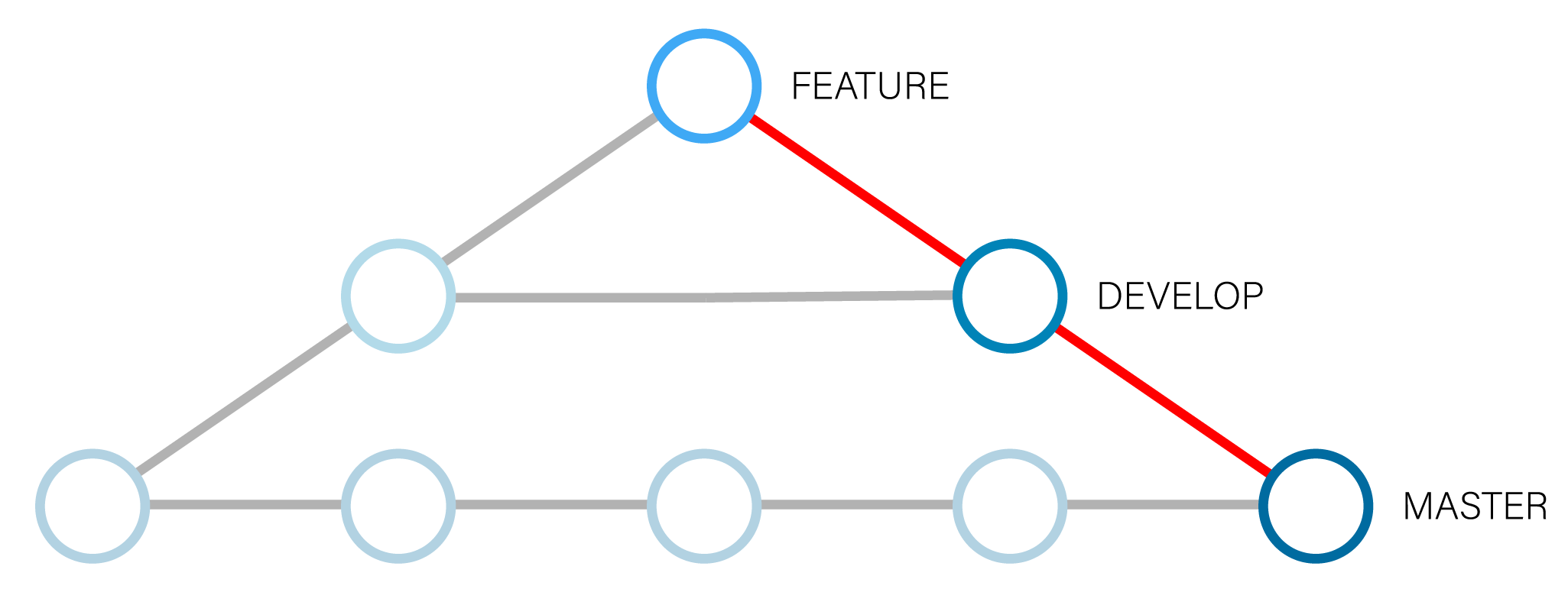
##### Cascade equivalent
```
git add -A
git commit -m "message"
cascade merge feature develop master
```
##### Usage
````bash
cascade merge
````
`` refers to the HEAD pointer. `` refers to at least one or more required branches to merge. You can chain more branches to merge separated by a space.
##### Example
````bash
cascade merge feature develop master
````
##### Shorthand Example
````bash
cas m feature develop master
````
##### options
| Flag | Shorthand | Description |
| ------------- |:------------:| ------------------------------------------:|
| --no-push | | Does not push commits to remote repository |
__MERGE NOTES:__
1. Currently Cascade only supports merging not rebasing, and by default sets the Fast-Forward flag to false `--no-ff`. `--no-ff` creates a more readable Git tree, but will add a commit for the merge.
2. Cascade does not currently support diffing of files or any conflict resolution beyond the Git 3-way auto-merge.
3. If a remote repository does not exist, Cascade will continue merge your local branches.
## Commands
| Command | Shorthand | Description |
| ------------- |:------------:| -----------------------------------:|
| create | c | Creates a repository |
| merge | m | Merges branches |
#### Upcoming Features
* Ability to set default options
* Create an optional package.json file when making a new repository
---
_Source: https://npm.io/package/cascade-cli · Machine-readable twin of the npm.io package page. Health data is recomputed on every publish._