# ciao-vue-tinymce
> A Tinymce Component For VueJS
Latest version **1.0.15** (published 2018-10-24) · MIT license · 0 weekly downloads
## Install
```sh
npm install ciao-vue-tinymce
pnpm add ciao-vue-tinymce
yarn add ciao-vue-tinymce
bun add ciao-vue-tinymce
```
## Health
**Score 15/100 (F)** — status: abandoned.
Positive: no vulnerabilities.
Warnings: low downloads; no types; no esm support.
Negative: abandoned; low maintenance score.
## Facts
| | |
|---|---|
| Version | 1.0.15 |
| Published | 2018-10-24 |
| First published | 2018-01-22 |
| Weekly downloads | 0 |
| License | MIT |
| TypeScript types | none |
| Module format | CommonJS |
| Node | >= 4.0.0 |
| Dependencies | 4 |
| Unpacked size | 988.2 KB |
| Known vulnerabilities | 0 (+19 in 3 direct dependencies) |
| Install scripts | no |
| GitHub stars | 12 |
| Author | Ciao |
| Maintainers | chung-ciao |
| Keywords | vuejs, tinymce |
## Links
- npm: https://www.npmjs.com/package/ciao-vue-tinymce
- Repository: https://github.com/ciao-chung/ciao-vue-tinymce
- Homepage: https://github.com/ciao-chung/ciao-vue-tinymce#readme
- Issues: https://github.com/ciao-chung/ciao-vue-tinymce/issues
- npm.io page: https://npm.io/package/ciao-vue-tinymce
## Dependencies (4)
- [uuid](https://npm.io/package/uuid.md) ^3.2.1
- [jquery](https://npm.io/package/jquery.md) ^3.3.1
- [tinymce](https://npm.io/package/tinymce.md) ^4.7.4
- [bootstrap](https://npm.io/package/bootstrap.md) 3
## Recent versions
- 1.0.15 (latest) — 2018-10-24
- 1.0.14 — 2018-10-18
- 1.0.13 — 2018-02-11
- 1.0.12 — 2018-02-07
- 1.0.11 — 2018-02-04
- 1.0.10 — 2018-02-04
- 1.0.9 — 2018-02-04
- 1.0.8 — 2018-02-03
- 1.0.7 — 2018-02-03
- 1.0.6 — 2018-02-01
- 1.0.5 — 2018-02-01
- 1.0.4 — 2018-01-25
- 1.0.3 — 2018-01-24
- 1.0.2 — 2018-01-23
- 1.0.1 — 2018-01-23
- … 1 more at https://npm.io/package/ciao-vue-tinymce/versions
## README
# Ciao Vue Tinymce
> A Vue 2 Tinymce component
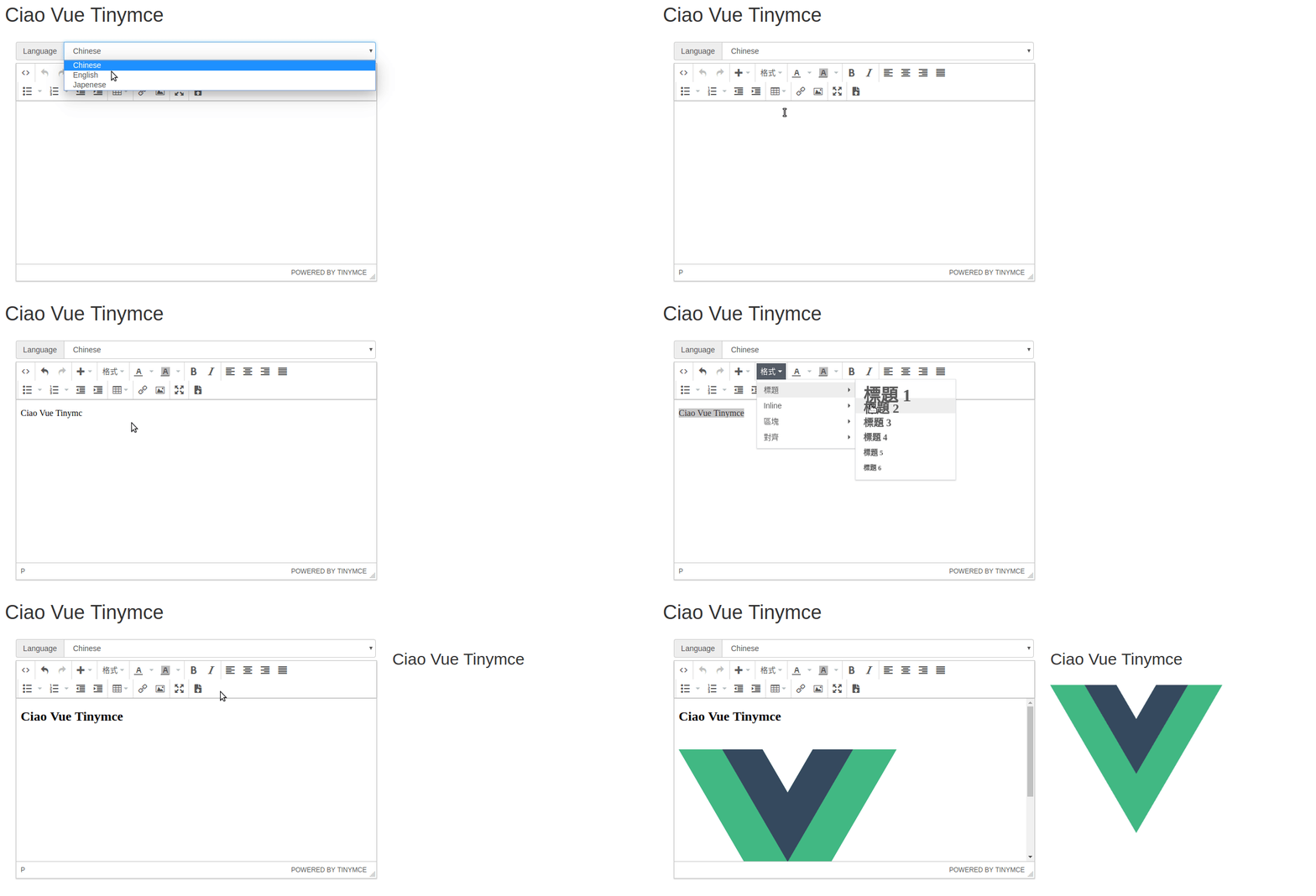
## Chinese Documentation
[Chinese Documentation](https://github.com/ciao-chung/ciao-vue-tinymce/blob/master/docs/Chinese.md)
## Feature
* Easy for use just bind v-model
* Language can be customize
* Can be photo upload and custom uploaded image tag
* Can catch photo upload Event
## Installation
> npm install ciao-vue-tinymce
or yarn
> yarn add ciao-vue-tinymce
## Expose jQuery
You must expose jquery before use **Ciao Vue Tinymce**
```javascript
import $ from 'jquery'
window.$ = $
```
## Base Usage
Just use **v-model** bind value
When editor on blur will auto sync v-model value
```html
```
## Property
### disabled
> Boolean
Setup disabled mode.
### tools
> Array
By set this property, you can add multiple custom buttons to tinymce by [addButton](https://www.tinymce.com/docs/api/tinymce/tinymce.editor/#addbutton)
Via set a callback function for **onclick** property
You will been given a **editor** argument
And use **tinymce editor instance**, by this **editor** argument
**Example**
```html
```
### language
> String
To specify language
Should set language code by this property
The language code of tinymce can reference [this](https://www.tinymce.com/docs/configure/localization/#language)
When use language option
You need download [Language Package](https://www.tinymce.com/download/language-packages/)
And set [language_url](https://www.tinymce.com/docs/configure/localization/#language_url) for tinymce
**Example**
```html
```
### photoUploadRequest
> Function
This property is a function type
And it should return a **[Promise](https://developer.mozilla.org/docs/Web/JavaScript/Reference/Global_Objects/Promise)**
Because **Ciao Vue Tinymce** can make sure upload request is finished via use **[await](https://developer.mozilla.org/docs/Web/JavaScript/Reference/Operators/await)** in this way
In addition, this function must given **file** and **onProgress** two argument
Let request can send the file to upload
**Example(Template)**
```html
```
**Example(Script)**
```javascript
export default {
computed: {
uploadApi: function(file, onProgress) {
return new Promise((resolve, reject) => {
$.ajax({
url: 'http://foo.bar/path/to/upload',
jsonDataRequest: false,
processData: false,
contentType: false,
data: file,
success: (data) => { resolve(data) },
error: (error) => { reject(error) },
})
})
},
},
}
```
This upload feature also support progress bar
To enable progress feature
Just add upload progress event listener
And pass progress percentage to **onProgress** funciton
**Example(Script)**
```javascript
export default {
computed: {
uploadApi: function(file, onProgress) {
return new Promise((resolve, reject) => {
$.ajax({
url: 'http://foo.bar/path/to/upload',
jsonDataRequest: false,
processData: false,
contentType: false,
data: file,
xhr: () => {
let xhr = $.ajaxSettings.xhr()
xhr.upload.addEventListener('progress', (progress) => {
const percentage = Math.floor(100*(progress.loaded/progress.total))
return onProgress(percentage)
}, false)
return xhr
},
success: (data) => { resolve(data) },
error: (error) => { reject(error) },
})
})
},
},
}
```
If you don't want to custom **photoUploadTag** property
Your upload photo response should be json format
And this json must been had **url** property
**Example(Upload Photo Response Data)**
```javascript
{
url: 'https://vuejs.org/images/logo.png'
}
```
### photoUploadTag
> Function
After upload photo
**Ciao Vue Tinymce** will insert image tag into editor
For example, if upload response is **{ url: 'https://vuejs.org/images/logo.png' }**
By default, **Ciao Vue Tinymce** will create default image tag **<img src="https://vuejs.org/images/logo.png" />**
If you want custom image tag
You can replace it as follows
Just create a function and given a **result** argument(result is upload response)
In this way, you can make image tag whatever you want
**Example**
```javascript
export default {
methods: {
resposneImage: function (result) {
return ` `
}
},
}
```
**Full Example**
```html
```
### formDataFilename
> String
By default that, upload **FormData** filename will be **file** as follow
```javascript
file.append('file', file)
```
If you want custom this filename
You can config it by set this property
### config
This option allow you replace any default tinymce config
You can set any tinymce setting
**Example**
```html
```
### code
> Object
If you wanna insert code sample into editor
This option at least configure **css** to specify css style path
That is, tinymce [codesample_content_css](https://www.tinymce.com/docs/plugins/codesample/#codesample_content_css) config
```javascript
{
css: `${window.location.origin}/static/tinymce/codesample/prism.css`,
}
```
If you want custom dropdown list of code language
You can custom by adding **languages** option
```javascript
{
css: `${window.location.origin}/static/tinymce/codesample/prism.css`,
languages: [
{text: 'Bash', value: 'base'},
{text: 'HTML/XML', value: 'markup'},
{text: 'JavaScript', value: 'javascript'},
{text: 'JSON', value: 'json'},
{text: 'CSS', value: 'css'},
{text: 'SASS', value: 'sass'},
{text: 'PHP', value: 'php'},
{text: 'SQL', value: 'sql'},
{text: 'Markdown', value: 'markdown'},
]
}
```
**Full Example**
```html
```
## Event
### blur
This event will be emitted when editor on blur
And this event will pass editor content as an argument
**Example(Template)**
```html
```
**Example(Script)**
```javascript
export default {
methods: {
onBlur: function(data) {
// TODO
}
},
}
```
### change
This event will be emitted when editor on change
And this event will pass editor content as an argument
**Example(Template)**
```html
```
**Example(Script)**
```javascript
export default {
methods: {
onChange: function(data) {
// TODO
}
},
}
```
### uploadSuccess
This event will be emitted when **photoUploadRequest** resolve(success) Promise
And this event will pass upload response result as an argument
**Example(Template)**
```html
```
**Example(Script)**
```javascript
export default {
methods: {
onUploadSuccess: function(data) {
// TODO
}
},
}
```
### uploadFail
This event will be emitted when **photoUploadRequest** reject(error) Promise
And this event will pass upload response error as an argument
**Example(Template)**
```html
```
**Example(Script)**
```javascript
export default {
methods: {
uploadFail: function(error) {
// TODO
}
},
}
```
---
_Source: https://npm.io/package/ciao-vue-tinymce · Machine-readable twin of the npm.io package page. Health data is recomputed on every publish._