# cslog
> Colorful & Simple React Console Logger
Latest version **1.1.0** (published 2020-07-30) · MIT license · 0 weekly downloads
## Install
```sh
npm install cslog
pnpm add cslog
yarn add cslog
bun add cslog
```
## Health
**Score 30/100 (F)** — status: abandoned.
Positive: esm support; no vulnerabilities.
Warnings: low downloads; no types.
Negative: abandoned.
## Facts
| | |
|---|---|
| Version | 1.1.0 |
| Published | 2020-07-30 |
| First published | 2020-07-30 |
| Weekly downloads | 0 |
| License | MIT |
| TypeScript types | none |
| Module format | ESM + CommonJS |
| Node | >=10 |
| Dependencies | 0 |
| Unpacked size | 35.5 KB |
| Known vulnerabilities | 0 |
| Install scripts | no |
| GitHub stars | 2 |
| Author | shivampip |
| Maintainers | shivampip |
## Links
- npm: https://www.npmjs.com/package/cslog
- Repository: https://github.com/shivampip/cslog
- Homepage: https://github.com/shivampip/cslog#readme
- Issues: https://github.com/shivampip/cslog/issues
- npm.io page: https://npm.io/package/cslog
## Recent versions
- 1.1.0 (latest) — 2020-07-30
- 1.0.2 — 2020-07-30
- 1.0.1 — 2020-07-30
- 1.0.0 — 2020-07-30
## README
# cslog
> Colorful & Simple React Console Logger
[](https://www.npmjs.com/package/cslog) [](https://standardjs.com)
## Install
```bash
npm install --save cslog
```
 ## Usage
```jsx
import React, { Component } from 'react'
import log from 'cslog'
const App = () => {
log.success('Hello World') //debug messages
log.error('Hello World')
log.d(data, 'PersonInfo') //variable
log.d(data)
log.h1('Hello World') //Header tag
log.hi('Hello JS', 'blue', 'yellow', true) //Blue text on yellow background, Broder: true
log.p('This is a sample paragraph. it is multiline') //Paragraph tag
log.p('I am different color text', 'white', 'purple') //White text on purple background
log.b('I am Bold') //Bold
log.bi('I am Bold italic') //Bold + Italic
return
## Usage
```jsx
import React, { Component } from 'react'
import log from 'cslog'
const App = () => {
log.success('Hello World') //debug messages
log.error('Hello World')
log.d(data, 'PersonInfo') //variable
log.d(data)
log.h1('Hello World') //Header tag
log.hi('Hello JS', 'blue', 'yellow', true) //Blue text on yellow background, Broder: true
log.p('This is a sample paragraph. it is multiline') //Paragraph tag
log.p('I am different color text', 'white', 'purple') //White text on purple background
log.b('I am Bold') //Bold
log.bi('I am Bold italic') //Bold + Italic
return Check Console
}
export default App
```
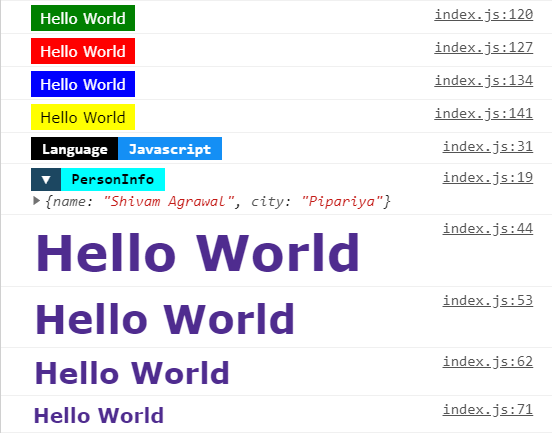
Color log variable values.
```jsx
const lname = 'I speak Hindi & English'
const data = {
name: 'Shivam Agrawal',
city: 'Pipariya'
}
log.d(lname, 'Language')
log.d(data, 'PersonInfo')
```
Debug messages
```jsx
log.success('Hello World')
log.error('Hello World')
log.info('Hello World')
log.warn('Hello World')
```
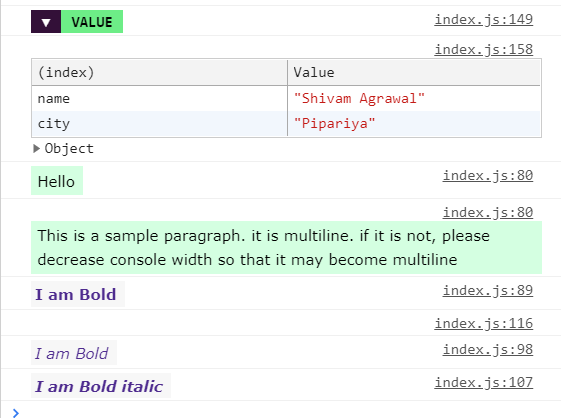
Simple HTML tags in console
```jsx
log.h1('Hello World')
log.h2('Hello World')
log.h3('Hello World')
log.h4('Hello World')
log.p('Hello')
log.p('This is a sample paragraph. it is multiline')
log.b('I am Bold')
log.br()
log.i('I am Bold')
log.bi('I am Bold italic')
```
All HTML functions accepts three options parameters
1. bg (background color)
2. fg (foreground color)
3. border (enable/disable border)
```jsx
log.h3('I am unique styled text', 'green', 'black', true) //Green text on black background, border enabled
```
#### Chage Global Settings
```jsx
log.border(true) //Enable border globally
log.setColor('red') //Set global color: red
```
If you like it
- [Follow me](https://github.com/shivampip) on Github
## License
MIT © [shivampip](https://github.com/shivampip)
---
_Source: https://npm.io/package/cslog · Machine-readable twin of the npm.io package page. Health data is recomputed on every publish._