# custom-avatar-generator
> Angular Element (Web Component) that creates a random avatar svg image and lets the user customize it with endless possible combinations.
Latest version **1.2.0** (published 2021-08-31) · MIT license · 0 weekly downloads
## Install
```sh
npm install custom-avatar-generator
pnpm add custom-avatar-generator
yarn add custom-avatar-generator
bun add custom-avatar-generator
```
## Health
**Score 15/100 (F)** — status: abandoned.
Positive: no vulnerabilities.
Warnings: low downloads; no types; no esm support.
Negative: abandoned; low maintenance score.
## Facts
| | |
|---|---|
| Version | 1.2.0 |
| Published | 2021-08-31 |
| First published | 2021-04-04 |
| Weekly downloads | 0 |
| License | MIT |
| TypeScript types | none |
| Module format | CommonJS |
| Dependencies | 12 |
| Unpacked size | 486 KB |
| Known vulnerabilities | 0 (+20 in 3 direct dependencies) |
| Install scripts | no |
| Author | Maidi |
| Maintainers | maidi29 |
| Keywords | avatar, avatar generator, avatar customizer, angular element, unique avatar, interactive, web component |
## Links
- npm: https://www.npmjs.com/package/custom-avatar-generator
- Repository: https://github.com/maidi29/custom-avatar-generator
- Homepage: https://htmlpreview.github.io/?https://github.com/maidi29/custom-avatar-generator/demo/demo/index.html
- Issues: https://github.com/maidi29/custom-avatar-generator/issues
- npm.io page: https://npm.io/package/custom-avatar-generator
## Dependencies (12)
- [tslib](https://npm.io/package/tslib.md) ^2.0.0
- [zone.js](https://npm.io/package/zone.js.md) ~0.10.3
- [@angular/core](https://npm.io/package/@angular/core.md) ~11.0.1
- [@angular/forms](https://npm.io/package/@angular/forms.md) ^11.2.9
- [@angular/common](https://npm.io/package/@angular/common.md) ~11.0.1
- [@angular/compiler](https://npm.io/package/@angular/compiler.md) ~11.0.1
- [@angular/elements](https://npm.io/package/@angular/elements.md) ~11.0.1
- [@angular/animations](https://npm.io/package/@angular/animations.md) ^11.2.9
- [@angular/platform-browser](https://npm.io/package/@angular/platform-browser.md) ~11.0.1
- [angular-in-memory-web-api](https://npm.io/package/angular-in-memory-web-api.md) ~0.11.0
- [@webcomponents/custom-elements](https://npm.io/package/@webcomponents/custom-elements.md) ^1.4.2
- [@angular/platform-browser-dynamic](https://npm.io/package/@angular/platform-browser-dynamic.md) ~11.0.1
## Alternatives
- [lodash.startswith](https://npm.io/package/lodash.startswith.md) — 769.7K weekly downloads
- [@tarojs/service](https://npm.io/package/@tarojs/service.md) — 33.9K weekly downloads
- [io.extendreality.tilia.indicators.spatialtargets.unity](https://npm.io/package/io.extendreality.tilia.indicators.spatialtargets.unity.md) — 131 weekly downloads
- [@rtarojs/taro](https://npm.io/package/@rtarojs/taro.md) — 90 weekly downloads
- [node-branch-io](https://npm.io/package/node-branch-io.md) — 50 weekly downloads
## Recent versions
- 1.2.0 (latest) — 2021-08-31
- 1.1.1 — 2021-04-08
- 1.0.11 — 2021-04-08
- 1.0.10 — 2021-04-08
- 1.0.9 — 2021-04-08
- 1.0.8 — 2021-04-08
- 1.0.7 — 2021-04-07
- 1.0.6 — 2021-04-07
- 1.0.5 — 2021-04-07
- 1.0.4 — 2021-04-05
- 1.0.3 — 2021-04-05
- 1.0.2 — 2021-04-05
- 1.0.1 — 2021-04-05
- 1.0.0 — 2021-04-05
- 0.0.4 — 2021-04-05
- … 3 more at https://npm.io/package/custom-avatar-generator/versions
## README
# custom-avatar-generator
[](https://www.npmjs.com/package/custom-avatar-generator)
Angular Element (Web Component) that creates a random avatar svg image and lets the user customize it with endless possible combinations.
If you would like to use this generator as Angular Module inside your Angular Application, checkout this package:
https://www.npmjs.com/package/ng-custom-avatar-generator
## Demo
Use the generator and see how it will look like at your page or application in this
⚡
**[Demo](https://htmlpreview.github.io/?https://github.com/maidi29/custom-avatar-generator/demo/demo/index.html)**
⚡
See the code and play with the attributes in this
⚡
[JSFiddle](https://jsfiddle.net/maidi/L4so8gyj/)
⚡
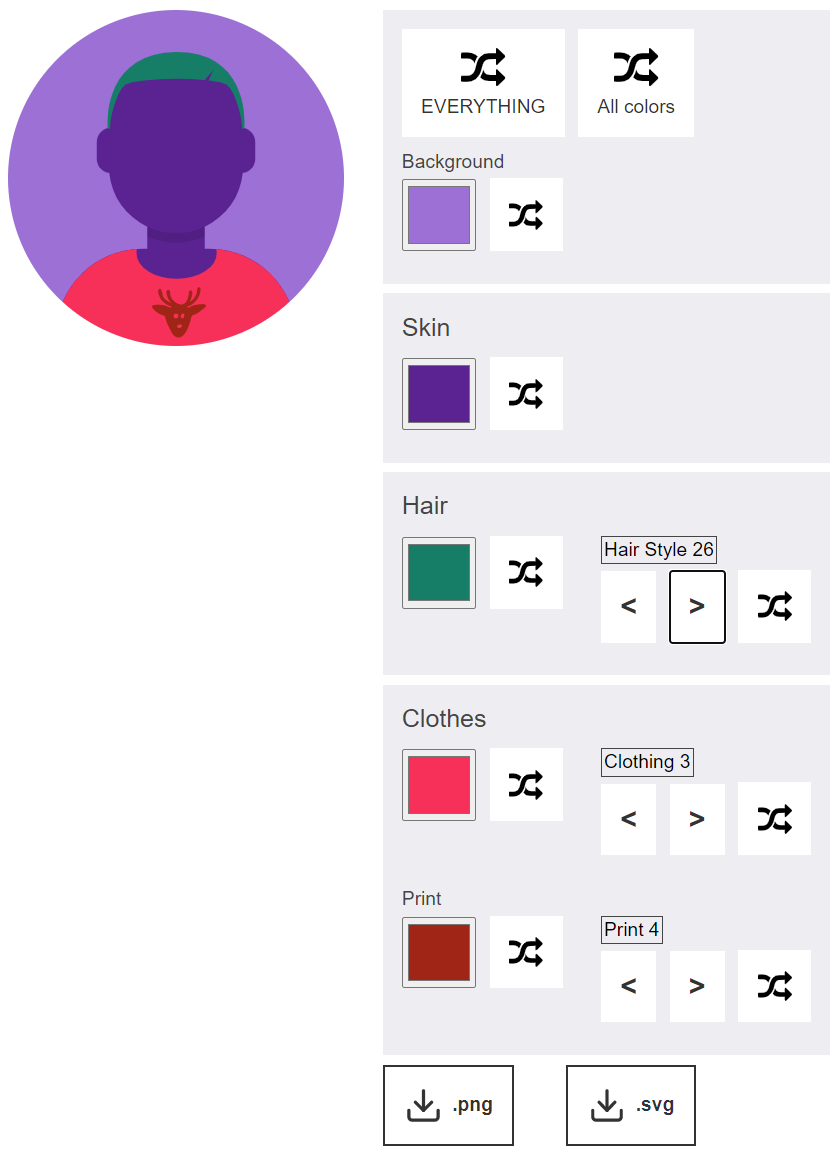
## Screenshots & Images
### User Interface
### Resulting Avatars examples




## Usage
Integrate the package script:
````html
````
Add the Angular Element with optional attributes to adapt the avatar generator.
````html
{
const mySvgUrl = event.detail;
console.log(mySvgUrl);
// do whatever you want here
});
````
## Attributes
All input attributes are optional and have a default. Possible inputs are:
| name | possible values | default | description |
| ------------- |------------- | ---- | ----- |
| `shape` | 'sqaure' or 'round' | 'round' | shape of the avatar image |
| `enable-background`| 'true' or 'false' | 'false' | Displays a colored background behind the avatar and lets the user customize the color |
| `enable-face` | 'true' or 'false' | 'false' | Displays eyebrows, eyes, nose, mouth, facial hair and glasses and lets the user customize the color and type |
| `display-download` | 'true' or 'false' | 'false' | Displays a download button below the controls so the user can save the svg file on their device |
| `texts` | JSON with all displayed text string. Structure below| see JSON below | Modify the display texts of the controls |
```json
{
"everything": "EVERYTHING",
"allColors": "All colors",
"background": "Background", // optional
"skin": "Skin",
"hair": "Hair",
"hairStyle": "Hair Style",
"accessory": "Accessory",
"clothes": "Clothes",
"clothing": "Clothing",
"print": "Print",
"eyebrows": "Eyebrows", // optional
"eyes": "Eyes", // optional
"nose": "Nose", // optional
"mouth": "Mouth", // optional
"facialHair": "FacialHair", // optional
"glasses": "Glasses" // optional
}
```
Keep attention that you integrate every property when using the `texts` attribute because it completely overwrites the default texts object.
## Info
Based on https://avataaars.com/
---
_Source: https://npm.io/package/custom-avatar-generator · Machine-readable twin of the npm.io package page. Health data is recomputed on every publish._