# daycaca
> a pure JavaScript lib to handle image via canvas
Latest version **1.0.11** (published 2018-10-09) · ISC license · 0 weekly downloads
## Install
```sh
npm install daycaca
pnpm add daycaca
yarn add daycaca
bun add daycaca
```
## Health
**Score 15/100 (F)** — status: abandoned.
Positive: no vulnerabilities.
Warnings: low downloads; no types; no esm support.
Negative: abandoned; low maintenance score.
## Facts
| | |
|---|---|
| Version | 1.0.11 |
| Published | 2018-10-09 |
| First published | 2018-01-08 |
| Weekly downloads | 0 |
| License | ISC |
| TypeScript types | none |
| Module format | CommonJS |
| Dependencies | 0 |
| Unpacked size | 39.3 KB |
| Known vulnerabilities | 0 |
| Install scripts | no |
| Author | Jack Pu |
| Maintainers | jack_pu |
| Keywords | image, canvas, rotate, compress |
## Links
- npm: https://www.npmjs.com/package/daycaca
- Repository: https://github.com/vcamvr/vr-player
- Homepage: https://github.com/JackPu/daycaca#readme
- Issues: https://github.com/JackPu/daycaca/issues
- npm.io page: https://npm.io/package/daycaca
## Alternatives
- [exif-parser](https://npm.io/package/exif-parser.md) — 3.8M weekly downloads
- [vite-plugin-compression](https://npm.io/package/vite-plugin-compression.md) — 569.5K weekly downloads
- [pica](https://npm.io/package/pica.md) — 442.4K weekly downloads
- [@reportportal/client-javascript](https://npm.io/package/@reportportal/client-javascript.md) — 408.8K weekly downloads
- [@tldraw/state](https://npm.io/package/@tldraw/state.md) — 316.0K weekly downloads
## Recent versions
- 1.0.11 (latest) — 2018-10-09
- 1.0.10 — 2018-10-08
- 1.0.9 — 2018-09-30
- 1.0.8 — 2018-09-28
- 1.0.7 — 2018-09-26
- 1.0.6 — 2018-06-11
- 1.0.5 — 2018-06-06
- 1.0.4 — 2018-06-06
- 1.0.3 — 2018-05-16
- 1.0.2 — 2018-04-04
- 1.0.1 — 2018-01-31
- 0.1.2 — 2018-01-19
- 0.1.1 — 2018-01-18
- 0.1.0 — 2018-01-08
## README
# daycaca
[](https://circleci.com/gh/JackPu/daycaca)
[]()
 A pure JavaScript library to handle image source via canvas.
[中文文档](./README.zh.md) | [English](./README.md) | [日本語](./README.jp.md)
[examples](http://events.jackpu.com/daycaca/)
## How to use
### Npm
``` bash
$ npm install daycaca -save
```
``` es6
// es6
import daycaca from 'daycaca';
// src specify an image src (url or base64)
daycaca.rotate(src, degress, (data, w, h) => {
// your code here
});
```
### CDN
``` js
```
## API
All API methods's argument `source` should be one type below:
+ an image url (Pay attention to [CORS](https://developer.mozilla.org/en-US/docs/Web/HTML/CORS_enabled_image) settings)
+ an IMG element
+ [a file object](https://developer.mozilla.org/en-US/docs/Web/API/File/Using_files_from_web_applications) Which use `input[type="file"]` value as source
### base64(source, callback)
Convert your image to base64.
``` js
const img = document.querySelector('img')
daycaca.base64(img, (data) => {
//... handle base64
})
```
### compress(source, quailty, callback)
Compress your image and minify the size of your image.
+ PNG need lossless compression; So the param `quality` may not work.
+ JPG/JPEG/BMP need lossy compression;
`quality` (1~100). 100 means that the image keeps the same quality.
``` js
const img = document.querySelector('img')
daycaca.compress(img, 0.5,(data) => {
//... handle base64
})
```
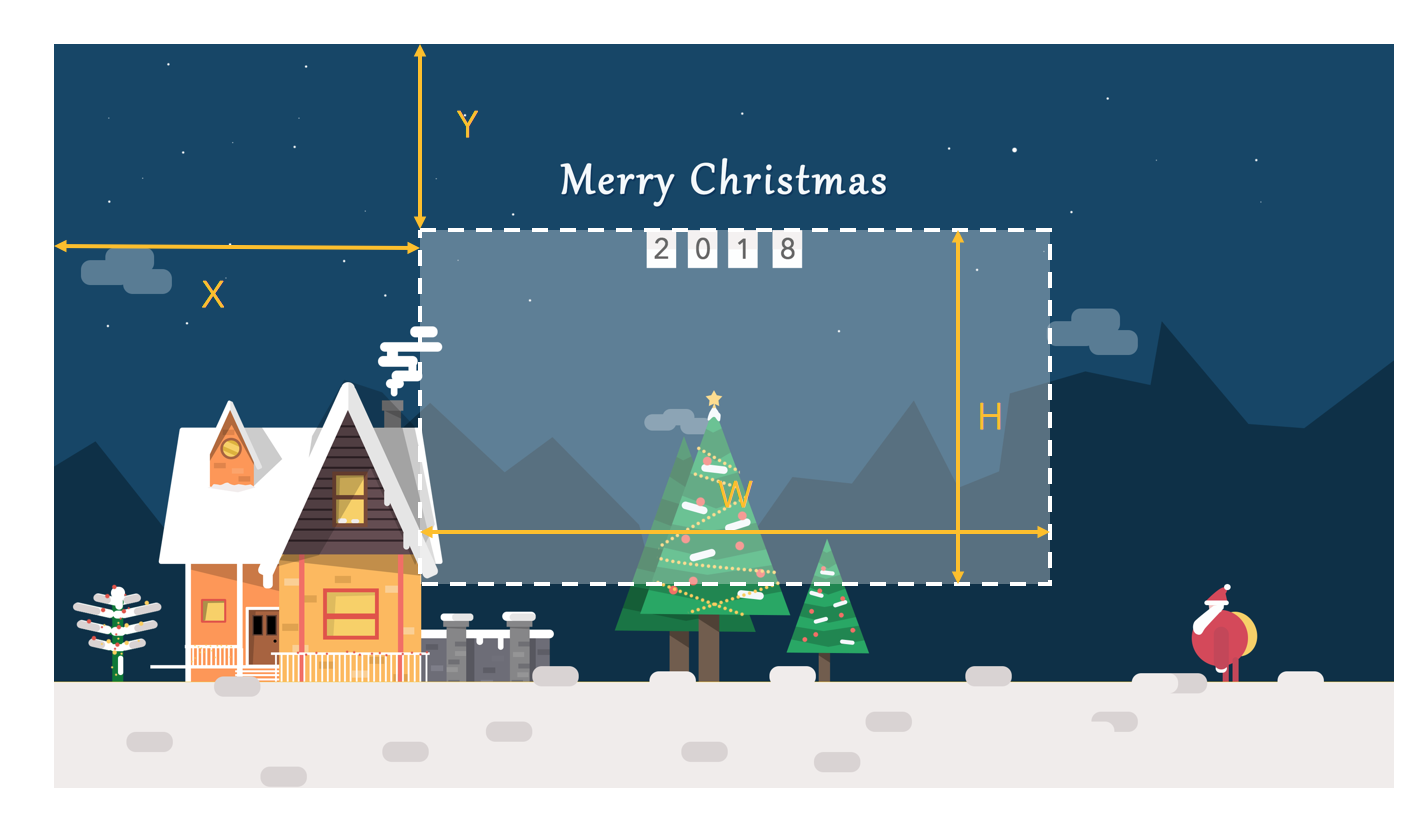
### crop(source, option, callback)
Crop your image to the size which you specify.
option {} :
+ x: The x-axis distance between the crop area and the image;
+ y: The y-axis distance between the crop area and the image;
+ w: The width of crop area;
+ h: The height of crop area
+ ratio: the scale ration of the image
+ fixedWidth: get the image with fixed width
+ fixedHieght: get the image with fixed height
A pure JavaScript library to handle image source via canvas.
[中文文档](./README.zh.md) | [English](./README.md) | [日本語](./README.jp.md)
[examples](http://events.jackpu.com/daycaca/)
## How to use
### Npm
``` bash
$ npm install daycaca -save
```
``` es6
// es6
import daycaca from 'daycaca';
// src specify an image src (url or base64)
daycaca.rotate(src, degress, (data, w, h) => {
// your code here
});
```
### CDN
``` js
```
## API
All API methods's argument `source` should be one type below:
+ an image url (Pay attention to [CORS](https://developer.mozilla.org/en-US/docs/Web/HTML/CORS_enabled_image) settings)
+ an IMG element
+ [a file object](https://developer.mozilla.org/en-US/docs/Web/API/File/Using_files_from_web_applications) Which use `input[type="file"]` value as source
### base64(source, callback)
Convert your image to base64.
``` js
const img = document.querySelector('img')
daycaca.base64(img, (data) => {
//... handle base64
})
```
### compress(source, quailty, callback)
Compress your image and minify the size of your image.
+ PNG need lossless compression; So the param `quality` may not work.
+ JPG/JPEG/BMP need lossy compression;
`quality` (1~100). 100 means that the image keeps the same quality.
``` js
const img = document.querySelector('img')
daycaca.compress(img, 0.5,(data) => {
//... handle base64
})
```
### crop(source, option, callback)
Crop your image to the size which you specify.
option {} :
+ x: The x-axis distance between the crop area and the image;
+ y: The y-axis distance between the crop area and the image;
+ w: The width of crop area;
+ h: The height of crop area
+ ratio: the scale ration of the image
+ fixedWidth: get the image with fixed width
+ fixedHieght: get the image with fixed height
 ``` js
const img = document.querySelector('img')
daycaca.reszie(img, {
x: 10,
y: 20,
w: 100,
h: 70
},(data) => {
//... handle base64
})
```
### rotate(source, degree, callback)
Rotate your image to any degree.
``` js
const img = document.querySelector('img')
daycaca.rotate(img, 90,(data) => {
//... handle base64
})
```
### reszie(source, ratio, callback)
Scale the image;
+ ratio (0~1): the scale ratio of the image. 1 means the image keep the same size;
``` js
const img = document.querySelector('img')
daycaca.reszie(img, 0.5,(data) => {
//... handle base64
})
```
## Contributions
Your contributions and suggestions are welcome 😄😄🌺🌺🎆🎆
## Contributors
+ @Annie Tanslations of Japanese documents;
## MIT License
---
_Source: https://npm.io/package/daycaca · Machine-readable twin of the npm.io package page. Health data is recomputed on every publish._
``` js
const img = document.querySelector('img')
daycaca.reszie(img, {
x: 10,
y: 20,
w: 100,
h: 70
},(data) => {
//... handle base64
})
```
### rotate(source, degree, callback)
Rotate your image to any degree.
``` js
const img = document.querySelector('img')
daycaca.rotate(img, 90,(data) => {
//... handle base64
})
```
### reszie(source, ratio, callback)
Scale the image;
+ ratio (0~1): the scale ratio of the image. 1 means the image keep the same size;
``` js
const img = document.querySelector('img')
daycaca.reszie(img, 0.5,(data) => {
//... handle base64
})
```
## Contributions
Your contributions and suggestions are welcome 😄😄🌺🌺🎆🎆
## Contributors
+ @Annie Tanslations of Japanese documents;
## MIT License
---
_Source: https://npm.io/package/daycaca · Machine-readable twin of the npm.io package page. Health data is recomputed on every publish._