# displayastree

> Simple way to display data as a tree structure.
Latest version **3.0.0** (published 2024-02-17) · MPL-2.0 license · 0 weekly downloads

## Install

```sh
npm install displayastree
pnpm add displayastree
yarn add displayastree
bun add displayastree
```

## Health

**Score 45/100 (D)** — status: abandoned.

Positive: has types; esm support; no vulnerabilities; high maintenance score; high quality score.

Warnings: low downloads.

Negative: abandoned.

## Facts

| | |
|---|---|
| Version | 3.0.0 |
| Published | 2024-02-17 |
| First published | 2021-01-16 |
| Weekly downloads | 0 |
| License | MPL-2.0 |
| TypeScript types | bundled |
| Module format | ESM + CommonJS |
| Node | >=18 |
| Dependencies | 0 |
| Unpacked size | 28.3 KB |
| Known vulnerabilities | 0 |
| Install scripts | no |
| GitHub stars | 6 |
| Author | Bas950 |
| Maintainers | timeraa, bas950, jumbo_1907 |
| Keywords | typescript, tree, data, display, list |

## Links

- npm: https://www.npmjs.com/package/displayastree
- Repository: https://github.com/Bas950/packages
- Homepage: https://github.com/Bas950/packages#readme
- Issues: https://github.com/Bas950/packages/issues
- npm.io page: https://npm.io/package/displayastree

## Alternatives

- [@openai/codex-sdk](https://npm.io/package/@openai/codex-sdk.md) — 731.4K weekly downloads
- [babel-plugin-transform-react-jsx](https://npm.io/package/babel-plugin-transform-react-jsx.md) — 565.0K weekly downloads
- [babel-helper-remove-or-void](https://npm.io/package/babel-helper-remove-or-void.md) — 508.5K weekly downloads
- [@pnpm/store-controller-types](https://npm.io/package/@pnpm/store-controller-types.md) — 186.9K weekly downloads
- [react-native-signature-canvas](https://npm.io/package/react-native-signature-canvas.md) — 155.6K weekly downloads

## Recent versions

- 3.0.0 (latest) — 2024-02-17
- 2.1.0 — 2023-04-27
- 2.0.0 — 2021-03-08
- 1.0.3 — 2021-01-16
- 1.0.2 — 2021-01-16
- 1.0.1 — 2021-01-16
- 1.0.0 — 2021-01-16

## README

<h1 align="center">
	DisplayAsTree
</h1>
<div align="center">
	<a href="https://www.npmjs.com/package/displayastree">
		<img src="https://img.shields.io/npm/v/displayastree.svg?logo=npm" alt="NPM Version"/>
	</a>
	<a href="https://github.com/Bas950/packages/actions/workflows/CI.yml">
		<img src="https://img.shields.io/github/actions/workflow/status/Bas950/packages/CI.yml?label=Test%20Package&logo=github" alt="CI Status"/>
	</a>
	<a href="https://github.com/Bas950/packages/tree/main/packages/DisplayAsTree"">
		<img src="https://img.shields.io/badge/coverage-100%25-success.svg?placeholder=$coverage-url$&logo=vitest&style=flat" alt="Coverage"/>
	</a>
</div>
<p align="center">
	Simple way to display data as a tree structure.
<p>
<br>

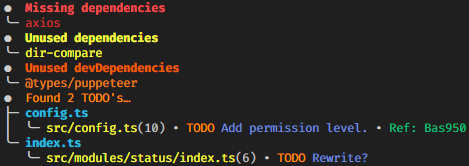
![Display As Tree](https://cdn.rcd.gg/displayastree/main.png)
<br>
_Screenshot taken from [DevScript](https://www.npmjs.com/package/ts-devscript) to be used as an example._

## Compatability

You are able to pass strings that are colored using [Chalk](https://www.npmjs.com/package/chalk).

## Installation

```bash
# global
npm i -g displayastree

# npm
npm i displayastree

# yarn
yarn add displayastree
```

## Usage

### Tree with inner sections:

```TypeScript
import { Tree, Branch } from "displayastree";

//* Chalk is not needed but is just used in this example.
import chalk from "chalk";

//* Make the main tree.
const tree = new Tree(chalk.hex("#FF8C00")("Found 2 TODO's"));

//* Make branches.
const branchOne = new Branch(chalk.cyan("config.ts")).addBranch([chalk.yellow("src/config.ts")]);
const branchTwo = new Branch(chalk.cyan("index.ts")).addBranch([chalk.yellow("src/modules/status/index.ts")]);

//* Add the branches to the main tree and log
tree.addBranch([branchOne, branchTwo]).log();
```

Will log:

<br>
![Display As Tree](https://cdn.rcd.gg/displayastree/usage1.png)

### Tree without inner sections:

```TypeScript
new Tree("A test").addBranch(["a", "b", "c"]).log();
```

Will log:
<br>
![Display As Tree](https://cdn.rcd.gg/displayastree/usage2.png)

## Options

Simply include the options while creating the Tree instance.

```Typescript
const tree = new Tree("Tree Name", { headChar: "* " });
```

| Options  | Type   | Description                                                     | Default |
| -------- | ------ | --------------------------------------------------------------- | ------- |
| headChar | string | String of the character that the tree will start with.          | `● `    |
| treeChar | string | String of the character that the tree will split with.          | `├─ `   |
| lineChar | string | String of the character that the tree will display at overlaps. | `│ `    |
| lastChar | string | String of the character that the tree will end with.            | `╰─ `   |

**Note**: treeChar, lineChar, and lastChar must have the same length.

---
_Source: https://npm.io/package/displayastree · Machine-readable twin of the npm.io package page. Health data is recomputed on every publish._
