# dnd.js
> drag and drop
Latest version **0.4.10** (published 2017-06-20) · ISC license · 0 weekly downloads
## Install
```sh
npm install dnd.js
pnpm add dnd.js
yarn add dnd.js
bun add dnd.js
```
## Health
**Score 15/100 (F)** — status: abandoned.
Positive: no vulnerabilities.
Warnings: low downloads; no types; no esm support; pre 1.0.
Negative: abandoned; low maintenance score.
## Facts
| | |
|---|---|
| Version | 0.4.10 |
| Published | 2017-06-20 |
| First published | 2017-03-30 |
| Weekly downloads | 0 |
| License | ISC |
| TypeScript types | none |
| Module format | CommonJS |
| Dependencies | 0 |
| Known vulnerabilities | 0 |
| Install scripts | no |
| GitHub stars | 235 |
| Author | qiuguohui |
| Maintainers | qiuguohui |
| Keywords | drag, drop, drag and drop, dnd, js |
## Links
- npm: https://www.npmjs.com/package/dnd.js
- Repository: https://github.com/qgh810/dnd
- Homepage: https://github.com/qgh810/dnd#readme
- Issues: https://github.com/qgh810/dnd/issues
- npm.io page: https://npm.io/package/dnd.js
## Alternatives
- [@mapbox/jsonlint-lines-primitives](https://npm.io/package/@mapbox/jsonlint-lines-primitives.md) — 5.3M weekly downloads
- [reftools](https://npm.io/package/reftools.md) — 3.5M weekly downloads
- [@hey-api/openapi-ts](https://npm.io/package/@hey-api/openapi-ts.md) — 3.5M weekly downloads
- [@mapbox/geojson-rewind](https://npm.io/package/@mapbox/geojson-rewind.md) — 2.4M weekly downloads
- [turbo-stream](https://npm.io/package/turbo-stream.md) — 1.7M weekly downloads
## Recent versions
- 0.4.10 (latest) — 2017-06-20
- 0.4.9 — 2017-06-19
- 0.4.8 — 2017-06-19
- 0.4.7 — 2017-06-19
- 0.4.6 — 2017-06-19
- 0.4.5 — 2017-06-19
- 0.4.4 — 2017-06-19
- 0.4.3 — 2017-06-18
- 0.4.2 — 2017-06-18
- 0.4.1 — 2017-05-24
- 0.4.0 — 2017-04-13
- 0.3.3 — 2017-04-01
- 0.3.2 — 2017-03-31
- 0.3.1 — 2017-03-31
- 0.3.0 — 2017-03-31
- … 15 more at https://npm.io/package/dnd.js/versions
## README
## dnd.js
##### 拖放库 drag and drop
[查看DEMO](http://qgh810.github.io/demo/dnd/index.html)
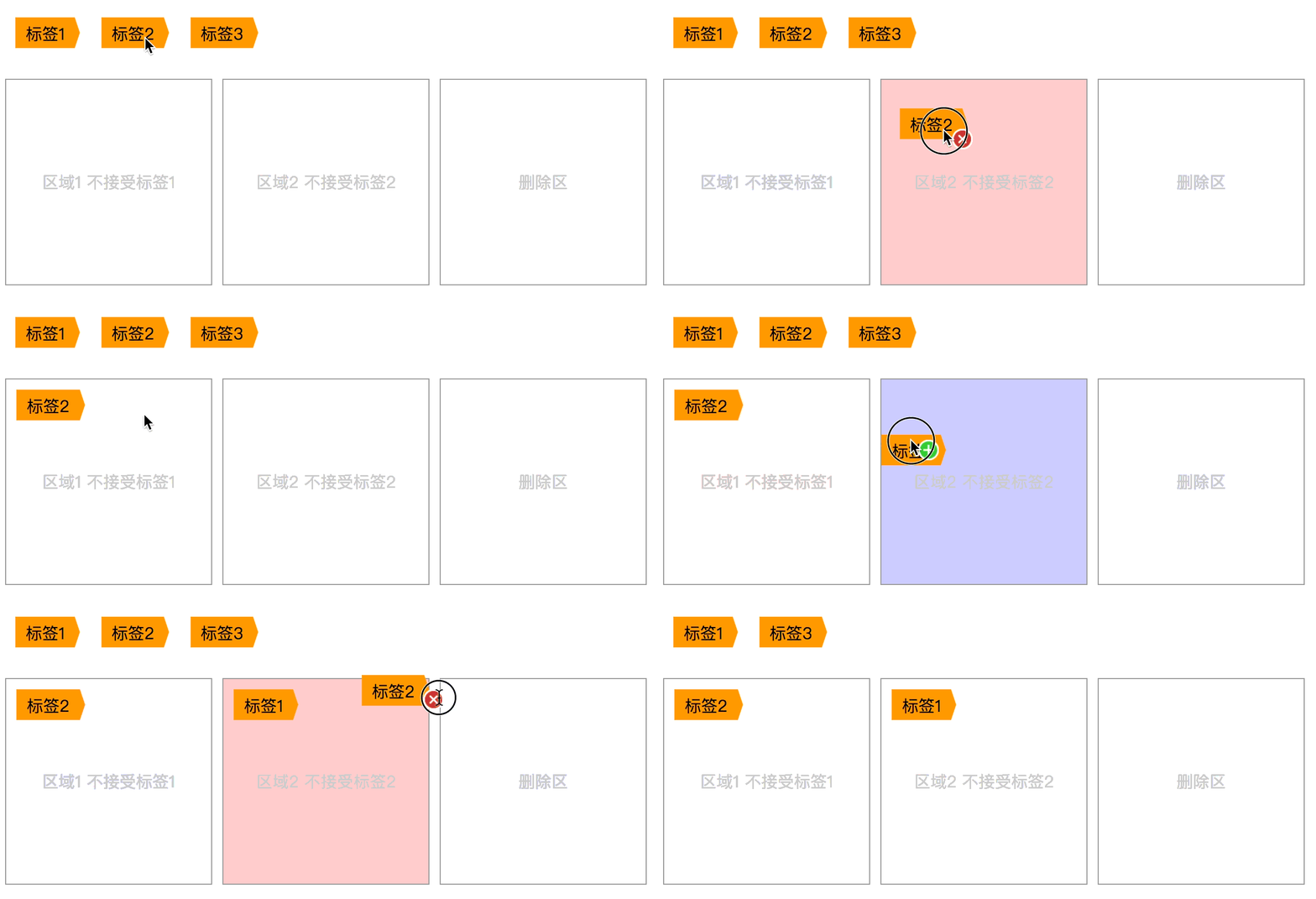
不依赖任何第三方库的拖放库,兼容低版本浏览器,兼容移动端,自带常用动画效果,[如果在vue项目中使用](https://github.com/qgh810/dnd/tree/master/vue),可以拷贝上面vue文件夹中已经封装好的组件直接使用.
 ### 安装方法
- 方式一
```bash
npm install dnd.js --save
```
- 方式二
```bash
下载项目中的dist/dnd.js, 然后用script标签插入到你的项目中, 如下
这种方式可以通过window.dnd访问
```
```html
```
### 使用方法
- 最简单的使用方法可以可以查看[最小demo](https://github.com/qgh810/dnd/blob/master/demo/demo-mini.html)
- 也可以查看[稍微复杂一点的demo](https://github.com/qgh810/dnd/blob/master/demo/demo1.html)
```js
import { Drag, Drop } from 'dnd.js'
new Drag(element, options)
new Drop(element, options)
```
- 如果是使用方式二引入的话, 可以这样使用
```js
var Drag = dnd.Drag
var Drop = dnd.Drop
new Drag(element, options)
new Drop(element, options)
```
- 最小demo代码展示
```html
最小化demo
### 安装方法
- 方式一
```bash
npm install dnd.js --save
```
- 方式二
```bash
下载项目中的dist/dnd.js, 然后用script标签插入到你的项目中, 如下
这种方式可以通过window.dnd访问
```
```html
```
### 使用方法
- 最简单的使用方法可以可以查看[最小demo](https://github.com/qgh810/dnd/blob/master/demo/demo-mini.html)
- 也可以查看[稍微复杂一点的demo](https://github.com/qgh810/dnd/blob/master/demo/demo1.html)
```js
import { Drag, Drop } from 'dnd.js'
new Drag(element, options)
new Drop(element, options)
```
- 如果是使用方式二引入的话, 可以这样使用
```js
var Drag = dnd.Drag
var Drop = dnd.Drop
new Drag(element, options)
new Drop(element, options)
```
- 最小demo代码展示
```html
最小化demo
拖动我到上方框框
```
### 参数说明
- 创建
```js
new Drag(element, options)
new Drop(element, options)
```
| 参数 | 是否必填 | 类型 | 说明 |
| :------------ |:---------------:| :---------------| :-----|
| element | 是 | String or htmlElementObject | 可以传入类名class 或者 id名 或者 dom节点 |
| options | 是 | Object | 相关参数和回调函数,具体说明看下面 |
- options说明 (Drag)
例如:
```js
let element = '.drag-container'
let options = {
data: '本次拖动希望传递给Drop对象的参数',
onDragStart: function (params) {
console.log('监听到拖动开始')
},
onDragEnd: function (params) {
console.log('监听到拖动结束')
}
}
new Drag(element, options)
```
##### options属性说明:
| 参数 | 是否必填 | 类型 | 说明 |
| :-------- |:-----:| :-----:| :-----|
| data | 否 | 任意 | 本次拖动希望传递给Drop对象的参数 |
| onDragStart | 否 | Function | 拖动开始回调函数 |
| onDragEnd | 否 | Function | 拖动结束回调函数 |
- options说明 (Drop)
例如:
```js
let element = '.drop-container'
let options = {
name: '当前Drop对象的名字',
onDragStart (params) {
console.log('监听到拖动开始')
},
onDragEnter (params) {
console.log('监听到被拖元素进入')
},
onDragOver (params) {
console.log('监听到被拖动元素在自己上方移动')
console.log('这个函数会被连续调用')
},
onDragLeave (params) {
console.log('监听被拖动元素离开')
},
onDrop (params) {
console.log('监听到被拖动元素在自己上方放下')
},
onDragEnd (params) {
console.log('监听到拖动结束')
}
}
new Drop(element, options)
```
##### options属性说明:
| 属性 | 是否必填 | 类型 | 说明 | 回调函数参数说明 |
| :-------- |:-----:| :-----:| :-----| :---|
| name | 否 | String | 定义当前Drop对象的名字 | - |
| onDragStart | 否 | Function | 拖动开始时调用 | 见下方说明 |
| onDragEnter | 否 | Function | 拖动进入时调用 | 见下方说明 |
| onDragOver | 否 | Function | 被拖动元素在自己上方移动时候调用, 这个函数会被连续调用 | 见下方说明 |
| onDragLeave | 否 | Function | 拖动离开时候调用 | 见下方说明 |
| onDrop | 是 | Function | 被拖动元素在自己上方放下时调用 | 见下方说明 |
| onDragEnd | 否 | Function | 拖动结束时候调用 | 见下方说明 |
##### 回调函数的参数params说明:
| 属性 | 类型 | 描述 |
| :----- | :----- | :----- |
| data | 不定 | 被拖动元素定义的data属性, 类型由Drag对象被创建的时候传入的data属性决定 |
| el | Object | 当前dom节点 |
| enter | Boolean | 是否进入当前范围的标志位, 布尔值 |
| methods | Object | 见下方 回调函数参数中的methods说明 |
| name | String | Drop名称, 在销毁当前Drag对象时候需要用到 |
| sourceNode | Object | 被拖动元素的dom节点 |
##### 回调函数的参数中的methods对象说明:
提供一些方法供回调函数调用
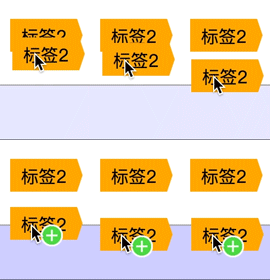
- showStateIcon: 显示状态图标
例如:
showStateIcon('add')
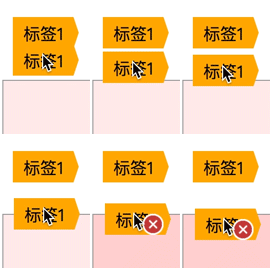
showStateIcon('error')
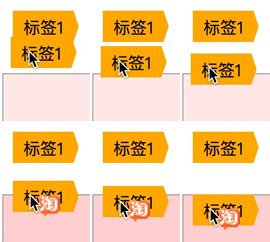
你也可以传入自己喜欢的图片 例如这样:
showStateIcon('https://ss2.bdstatic.com/lfoZeXSm1A5BphGlnYG/icon/10062.png')
还有 showStateIcon('delete') 和 showStateIcon('reject') 分别出现'删除'图标和'禁止'的图标
- hideStateIcon: 隐藏状态图标
- removeDragedNode: 移除跟随鼠标移动的被拖元素
例如:
removeDragedNode('fade')

removeDragedNode('back')
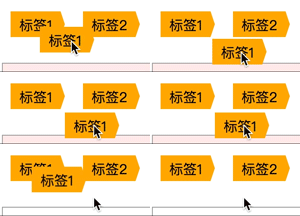
removeDragedNode('blost')

- getStateIconNode: 获取跟随鼠标移动的状态图标dom节点
- destroyDrop: 销毁当前Drop对象
| 方法名 | 示例 | 参数说明 | 描述 |
| :--- | :--- | :---- | :-- |
| showStateIcon | params.methods.showStateIcon('add') | 参数类型: String, 内置三种常用图标: 添加('add'), 错误('error'), 删除('delete'), 拒绝(reject),传入对应的名字即可, 也可以自定义图标,直接传入图片的完整地址 | 显示状态图标, 调用后会在鼠标旁边出现一个跟随鼠标移动的小图标, 如果要隐藏只需要调用hideStateIcon函数即可 |
| hideStateIcon | params.methods.hideStateIcon() | 无参数 | 隐藏跟随鼠标移动的状态图标(如果没有调用showStateIcon函数的话图标默认不显示) |
| removeDragedNode | params.methods.removeDragedNode(animationName, time) | animationName(动画类型), 参数类型:String, 非必填, 可选: fade / blost / back, time(动画时间, 单位毫秒), 参数类型: Number, 非必填 | 移除跟随鼠标移动的被拖元素, 如果没有参数则直接消失, 有参数表示执行消失动画后再消失 目前支持三种动画, 分别是: 褪色(fade), 爆炸(blost), 反弹(back), 三种动画对应不同也应用场景, 例如: removeDragedNode('blost', 300) |
| getStateIconNode | params.methods.getStateIconNode() | 无参数 | 返回跟随鼠标移动的状态图标dom节点 |
| destroyDrop | params.methods.destroyDrop({name}) | 参数类型: String, Drag对象的名字 | 销毁Drop对象,匹配所有名字跟传入参数一致的Drop对象并销毁, 销毁后将不能接收Drag对象 |
---
_Source: https://npm.io/package/dnd.js · Machine-readable twin of the npm.io package page. Health data is recomputed on every publish._