# dom-align-lowie8

> Align DOM Node Flexibly

Latest version **1.8.4** (published 2024-06-11) · 0 weekly downloads

## Install

```sh
npm install dom-align-lowie8
pnpm add dom-align-lowie8
yarn add dom-align-lowie8
bun add dom-align-lowie8
```

## Health

**Score 20/100 (F)** — status: abandoned.

Positive: esm support; no vulnerabilities.

Warnings: low downloads; no types.

Negative: abandoned; low maintenance score.

## Facts

| | |
|---|---|
| Version | 1.8.4 |
| Published | 2024-06-11 |
| First published | 2018-10-17 |
| Weekly downloads | 0 |
| TypeScript types | none |
| Module format | ESM + CommonJS |
| Dependencies | 0 |
| Unpacked size | 86.5 KB |
| Known vulnerabilities | 0 |
| Install scripts | no |
| Author | yiminghe@gmail.com |
| Maintainers | qjkiddy |
| Keywords | dom, align |

## Links

- npm: https://www.npmjs.com/package/dom-align-lowie8
- Homepage: http://github.com/yiminghe/dom-align
- npm.io page: https://npm.io/package/dom-align-lowie8

## Alternatives

- [babylon](https://npm.io/package/babylon.md) — 5.1M weekly downloads
- [csscolorparser](https://npm.io/package/csscolorparser.md) — 3.7M weekly downloads
- [expr-eval-fork](https://npm.io/package/expr-eval-fork.md) — 1.5M weekly downloads
- [@leeoniya/ufuzzy](https://npm.io/package/@leeoniya/ufuzzy.md) — 247.7K weekly downloads
- [xml-parser](https://npm.io/package/xml-parser.md) — 78.4K weekly downloads

## Recent versions

- 1.8.4 (latest) — 2024-06-11
- 1.8.0 — 2018-10-17

## README

# dom-align
---

align source html element with target html element flexibly.

[![NPM version][npm-image]][npm-url]
[![build status][travis-image]][travis-url]
[![Test coverage][coveralls-image]][coveralls-url]
[![gemnasium deps][gemnasium-image]][gemnasium-url]
[![npm download][download-image]][download-url]

[npm-image]: http://img.shields.io/npm/v/dom-align.svg?style=flat-square
[npm-url]: http://npmjs.org/package/dom-align
[travis-image]: https://img.shields.io/travis/yiminghe/dom-align.svg?style=flat-square
[travis-url]: https://travis-ci.org/yiminghe/dom-align
[coveralls-image]: https://img.shields.io/coveralls/yiminghe/dom-align.svg?style=flat-square
[coveralls-url]: https://coveralls.io/r/yiminghe/dom-align?branch=master
[gemnasium-image]: http://img.shields.io/gemnasium/yiminghe/dom-align.svg?style=flat-square
[gemnasium-url]: https://gemnasium.com/yiminghe/dom-align
[node-image]: https://img.shields.io/badge/node.js-%3E=_0.10-green.svg?style=flat-square
[node-url]: http://nodejs.org/download/
[download-image]: https://img.shields.io/npm/dm/dom-align.svg?style=flat-square
[download-url]: https://npmjs.org/package/dom-align

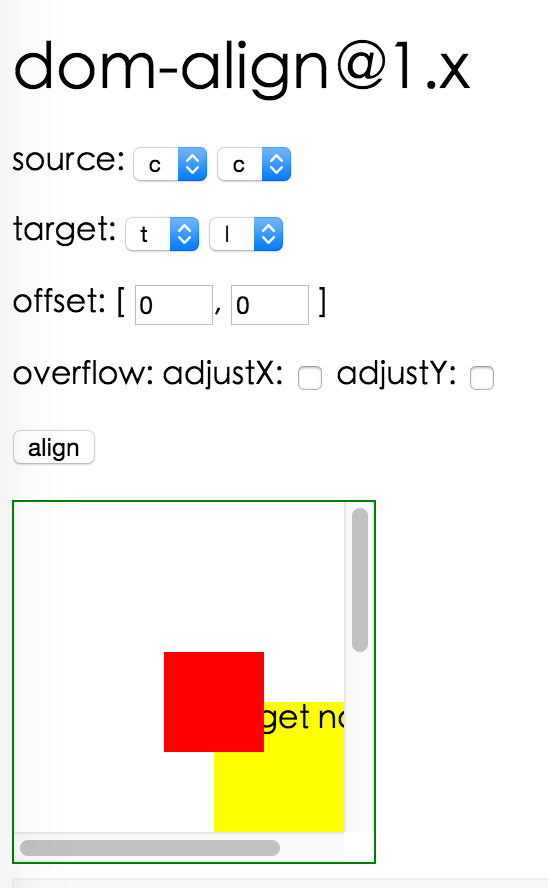
## Screenshot

<img height=444 src="http://gtms02.alicdn.com/tps/i2/TB1XIp2HXXXXXajaXXXgJfr8XXX-548-888.png">

## Install

[![dom-align](https://nodei.co/npm/dom-align.png)](https://npmjs.org/package/dom-align)

## Feature

* support IE9+ chrome firefox
* support align points and offset
* support auto adjust according to visible area

## Online Demo

* http://yiminghe.github.io/dom-align/

## Usage

```js
var domAlign = require('dom-align');
// use domAlign
// sourceNode's initial style should be position:absolute;left:-9999px;top:-9999px;
domAlign(sourceNode, targetNode, {
  points: ['tl', 'tr'], // align top left point of sourceNode with top right point of targetNode
  offset: [10, 20], // the offset sourceNode by 10px in x and 20px in y,
  targetOffset: ['30%','40%'], // the offset targetNode by 30% of targetNode width in x and 40% of targetNode height in y,
});
```

## API

### void domAlign(source: HTMLElement, target: HTMLElement, alignConfig: Object):Function

#### alignConfig object details

<table class="table table-bordered table-striped">
    <thead>
    <tr>
        <th style="width: 100px;">name</th>
        <th style="width: 50px;">type</th>
        <th>description</th>
    </tr>
    </thead>
    <tbody>
      <tr>
          <td>points</td>
          <td>String[2]</td>
          <td>move point of source node to align with point of target node, such as ['tr','cc'],
          align top right point of source node with center point of target node.
          point can be 't'(top), 'b'(bottom), 'c'(center), 'l'(left), 'r'(right)
      </td>
      </tr>
      <tr>
          <td>offset</td>
          <td>Number[2]</td>
          <td>offset source node by offset[0] in x and offset[1] in y. 
          If offset contains percentage string value, it is relative to sourceNode region.</td>
      </tr>
      <tr>
          <td>targetOffset</td>
          <td>Number[2]</td>
          <td>offset target node by offset[0] in x and offset[1] in y. 
          If targetOffset contains percentage string value, it is relative to targetNode region.</td>
      </tr>
      <tr>
          <td>overflow</td>
          <td>Object</td>
          <td>if adjustX field is true, then will adjust source node in x direction if source node is invisible.
          if adjustY field is true, then will adjust source node in y direction if source node is invisible.
          </td>
      </tr>
      <tr>
          <td>useCssRight</td>
          <td>Boolean</td>
          <td>whether use css right instead of left to position</td>
      </tr>
      <tr>
          <td>useCssBottom</td>
          <td>Boolean</td>
          <td>whether use css bottom instead of top to position</td>
      </tr>
      <tr>
          <td>useCssTransform</td>
          <td>Boolean</td>
          <td>whether use css transform instead of left/top/right/bottom to position if browser supports.
          Defaults to false.</td>
      </tr>
    </tbody>
</table>

## Development

```
npm install
npm start
```

## Example

http://localhost:8020/examples/

## Test Case

```
npm test
npm run chrome-test
```

## Coverage

```
npm run coverage
```

open coverage/ dir


## License

dom-align is released under the MIT license.

---
_Source: https://npm.io/package/dom-align-lowie8 · Machine-readable twin of the npm.io package page. Health data is recomputed on every publish._