# egg-react-webpack-boilerplate
> Egg React Server Side Render Examples
Latest version **5.1.0** (published 2023-04-01) · MIT license · 0 weekly downloads
## Install
```sh
npm install egg-react-webpack-boilerplate
pnpm add egg-react-webpack-boilerplate
yarn add egg-react-webpack-boilerplate
bun add egg-react-webpack-boilerplate
```
## Health
**Score 15/100 (F)** — status: abandoned.
Positive: no vulnerabilities.
Warnings: low downloads; no types; no esm support.
Negative: abandoned; low maintenance score.
## Facts
| | |
|---|---|
| Version | 5.1.0 |
| Published | 2023-04-01 |
| First published | 2017-08-02 |
| Weekly downloads | 0 |
| License | MIT |
| TypeScript types | none |
| Module format | CommonJS |
| Node | >=10.0.0 |
| Dependencies | 28 |
| Unpacked size | 1.8 MB |
| Known vulnerabilities | 0 (+24 in 2 direct dependencies) |
| Install scripts | no |
| GitHub stars | 660 |
| Author | hubcarl@126.com |
| Maintainers | hubcarl |
## Links
- npm: https://www.npmjs.com/package/egg-react-webpack-boilerplate
- Repository: https://github.com/easy-team/egg-react-webpack-boilerplate
- Issues: https://github.com/easy-team/egg-react-webpack-boilerplate/issues
- npm.io page: https://npm.io/package/egg-react-webpack-boilerplate
## Dependencies (28)
- [egg](https://npm.io/package/egg.md) ^2.1.0
- [antd](https://npm.io/package/antd.md) ^4
- [axios](https://npm.io/package/axios.md) ^0.21.1
- [lowdb](https://npm.io/package/lowdb.md) ^1.0.0
- [react](https://npm.io/package/react.md) ^16.0.0
- [redux](https://npm.io/package/redux.md) ^4.0.1
- [extend](https://npm.io/package/extend.md) ~3.0.0
- [lodash](https://npm.io/package/lodash.md) ^4.17.4
- [mockjs](https://npm.io/package/mockjs.md) ^1.0.1-beta3
- [moment](https://npm.io/package/moment.md) ^2.17.1
- [history](https://npm.io/package/history.md) ^4.7.2
- [shortid](https://npm.io/package/shortid.md) ^2.2.8
- [egg-cors](https://npm.io/package/egg-cors.md) ^2.0.0
- [lodash-id](https://npm.io/package/lodash-id.md) ^0.14.0
- [react-dom](https://npm.io/package/react-dom.md) ^16.0.0
- [egg-logger](https://npm.io/package/egg-logger.md) ^2.4.1
- [egg-scripts](https://npm.io/package/egg-scripts.md) ^2.8.1
- [react-redux](https://npm.io/package/react-redux.md) ^7.1.0
- [egg-validate](https://npm.io/package/egg-validate.md) ^2.0.2
- [react-router](https://npm.io/package/react-router.md) ^5.0.1
- [react-loadable](https://npm.io/package/react-loadable.md) ^5.5.0
- [querystring-es3](https://npm.io/package/querystring-es3.md) ^0.2.1
- [react-router-dom](https://npm.io/package/react-router-dom.md) ^5.0.1
- [@ant-design/icons](https://npm.io/package/@ant-design/icons.md) ^4.0.0
- [egg-view-nunjucks](https://npm.io/package/egg-view-nunjucks.md) ^2.0.0
- [egg-view-react-ssr](https://npm.io/package/egg-view-react-ssr.md) ^3.0.0
- [react-router-redux](https://npm.io/package/react-router-redux.md) ^4.0.8
- [react-router-config](https://npm.io/package/react-router-config.md) ^5.0.1
## Recent versions
- 5.1.0 (latest) — 2023-04-01
- 4.9.0 — 2020-01-27
- 4.8.0 — 2019-11-10
- 4.7.0 — 2019-10-13
- 4.6.0 — 2019-08-30
- 4.4.1 — 2019-07-18
- 4.4.0 — 2019-06-25
- 4.3.1 — 2018-10-11
- 4.3.0 — 2018-10-09
- 4.2.0 — 2018-09-05
- 4.1.0 — 2018-08-22
- 4.0.2 — 2018-06-29
- 4.0.1 — 2018-03-21
- 4.0.0 — 2018-03-12
- 3.6.5 — 2018-03-09
- … 14 more at https://npm.io/package/egg-react-webpack-boilerplate/versions
## README
# egg-react-webpack-boilerplate
基于 Egg + React + Webpack 服务端渲染 SSR (Server Side Render) 和 前端渲染 CSR (Client Side Render) 工程骨架项目。
- 线上访问: http://49.233.172.37:7001
- 文档请见: [Egg + React 工程解决方案](https://www.yuque.com/easy-team/egg-react)
## 截图


## 版本
> 功能性需求或者Bug问题, 欢迎大家 PR 完善, 如果你需要了解更多信息,请加QQ群: 433207205(备注:Node.js).
因该项目包含了多种实现, 提供多种例子实现,为防干扰, 特提供纯净版本分支用于实际项目开发, 请自行选用。
- Egg + React SSR多页面服务端渲染方案 [feature/green/multi](https://github.com/easy-team/egg-react-webpack-boilerplate/tree/feature/green/multi)
- Egg + React CSR 多页面前端渲染方案 [feature/green/html](https://github.com/easy-team/egg-react-webpack-boilerplate/tree/feature/green/html)
- Egg + React + React Router + Redux + React-Redux 单页面服务端渲染方案 [feature/green/spa](https://github.com/easy-team/egg-react-webpack-boilerplate/tree/feature/green/spa)
- Egg + AntD + React Router + Redux + React-Redux 单页面前端渲染asset方案 [feature/green/asset](https://github.com/easy-team/egg-react-webpack-boilerplate/tree/feature/green/asset)
- Egg + AntD + React Router + Redux + React-Redux 单页面服务端渲染方案 [antd](https://github.com/easy-team/egg-react-webpack-boilerplate/tree/antd)
- Egg + AntD + React Router + Redux + React-Redux 单页面管理后台前端渲染方案 [easy-admin](https://github.com/easy-team/egg-react-webpack-boilerplate/tree/easy-admin)
- Egg + AntD 按需配置和主题定制 [antd-theme](https://github.com/easy-team/egg-react-webpack-boilerplate/tree/antd-theme) 和 [文档](https://www.yuque.com/easy-team/egg-react/antd)
- Egg + React + TypeScript 项目请见[egg-react-typescript-boilerplate](https://github.com/easy-team/egg-react-typescript-boilerplate)
- Egg + Rax SSR多页面服务端渲染方案 [rax](https://github.com/easy-team/egg-react-webpack-boilerplate/tree/rax)
可以通过 [easywebpack-cli](https://github.com/easy-team/easywebpack-cli) 命令行初始化对应类型项目。
## 文档
- https://easyjs.cn
- https://www.yuque.com/easy-team/egg-react
- https://zhuanlan.zhihu.com/easyjs
## 特性
- 基于 React 多页面/单页面服务端渲染, 前端渲染以及 asyncData 同构实现
- 支持服务端渲染失败时, 自动降级为前端渲染模式; 支持 react-loadable 异步组件渲染
- 数据层面进行了简单设计,支持 FileDB,MySQL,Mongo 接口
- 支持 Node 和 前端代码修改 Webpack 时时编译和热更新
- 支持服务端渲染 `render` 和纯前端渲染 `renderClient`
- 支持自动根据 jsx 文件构建 Webpack entry 入口文件
- 支持 css, sass, scss, less, stylus
- 支持 css module , 且同时支持 css 和 css module 共存的情况
- 支持 react-router, react-redux 服务端渲染(SSR)和前端渲染(CSR)
- 支持 Webpack dll 自动化构建, 与多进程编译结合,构建速度减少 2/3
- Node 8 版本的 async 和 await 特性, Controller 采用 class 方式编写
- 支持SSR, CSR, Asset, 自定义多种渲染模式
## 依赖
- [easywebpack](https://github.com/easy-team/easywebpack) ^4.x.x
- [easywebpack-react](https://github.com/easy-team/easywebpack-react) ^4.x.x
- [egg-view-react-ssr](https://github.com/easy-team/egg-view-react-ssr) ^2.1.0
- [egg-webpack](https://github.com/easy-team/egg-webpack) ^4.x.x
- [egg-webpack-react](https://github.com/easy-team/egg-webpack-react) ^2.0.0
## 使用
#### 安装cli
```bash
npm install @easy-team/easywebpack-cli -g
```
#### 安装依赖
```bash
npm install
```
#### 本地开发
> 启动流程: https://www.yuque.com/easy-team/egg-react/build
```bash
npm run dev
```
应用访问: http://127.0.0.1:7001

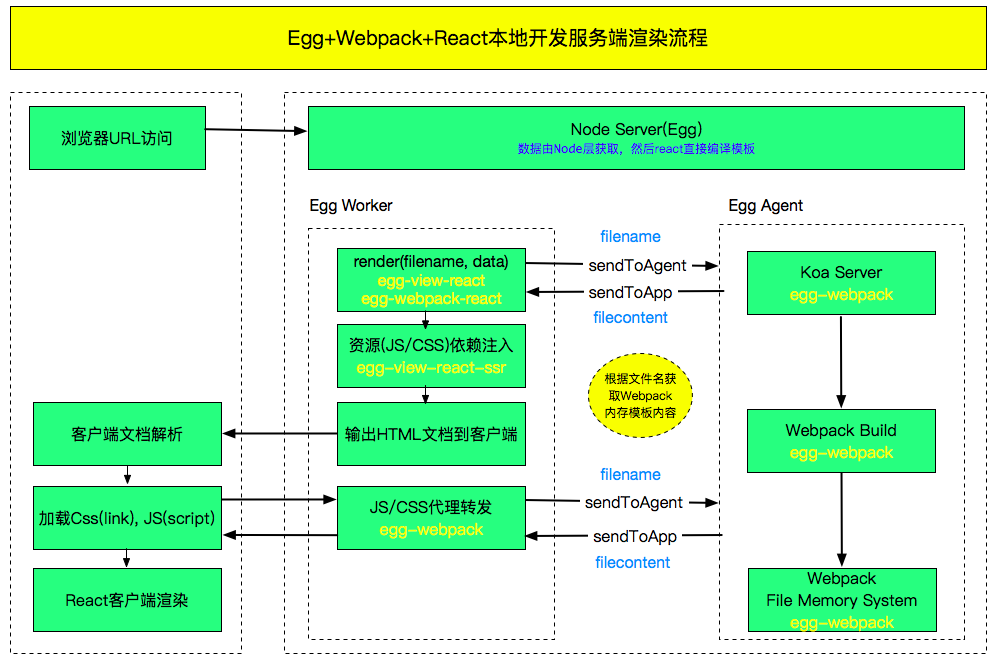
- 本地开发启动 Webpack 构建, 默认配置文件为项目根目录 `webpack.config.js` 文件。 SSR 需要配置两份 Webpack 配置,所以构建会同时启动两个 Webpack 构建服务。web 表示构建 JSBundle 给前端用,构建后文件目录 `public`, 默认端口 9000; node 表示构建 JSBundle 给 Node 端渲染用,构建后文件目录 `app/view`, 默认端口 9001.
- 本地构建是 Webpack 内存构建,文件不落地磁盘,所以 `app/view` 和 `public` 在本地开发时,是看不到文件的。 只有发布模式(npm run build)才能在这两个目录中看到构建后的内容。
#### 线上部署
> 部署细节请阅读:https://www.yuque.com/easy-team/egg-react/online
- 首先在本地或者ci构建好jsbundle文件
```bash
npm run build
```
- 然后,启动应用
```bash
npm start
```
### 配置说明
> https://www.yuque.com/easy-team/egg-react/config
```js
`config/config.local.js`
const easywebpack = require('@easy-team/easywebpack-react');
exports.webpack = {
webpackConfigList: easywebpack.getWebpackConfig()
};
```
#### 项目构建
```bash
// 直接运行(编译文件全部在内存里面,本地开发使用)
npm start
// 编译文件到磁盘打包使用(发布正式环境)
npm run build 或者 easy build
```
## 项目结构和基本规范
├── app
│ ├── controller
│ │ ├── test
│ │ │ └── test.js
│ ├── extend
│ ├── lib
│ ├── middleware
│ ├── mocks
│ ├── proxy
│ ├── router.js
│ ├── view
│ │ ├── about // 服务器编译的jsbundle文件
│ │ │ └── about.js
│ │ ├── home
│ │ │ └── home.js // 服务器编译的jsbundle文件
│ │ └── layout.js // 编译的layout文件
│ └── web // 前端工程目录
│ ├── asset // 存放公共js,css资源
│ ├── framework // 前端公共库和第三方库
│ │ └── entry
│ │ ├── loader.js // 根据jsx文件自动生成entry入口文件loader
│ ├── page // 前端页面和webpack构建目录, 也就是webpack打包配置entryDir
│ │ ├── home // 每个页面遵循目录名, js文件名, scss文件名, jsx文件名相同
│ │ │ ├── home.scss
│ │ │ ├── home.jsx
│ │ └── hello // 每个页面遵循目录名, js文件名, scss文件名, jsx文件名相同
│ │ ├── test.css // 服务器render渲染时, 传入 render('test/test.js', data)
│ │ └── test.jsx
│ ├── store
│ │ ├── app
│ │ │ ├── actions.js
│ │ │ ├── getters.js
│ │ │ ├── index.js
│ │ │ ├── mutation-type.js
│ │ │ └── mutations.js
│ │ └── store.js
│ └── component // 公共业务组件, 比如loading, toast等, 遵循目录名, js文件名, scss文件名, jsx文件名相同
│ ├── loading
│ │ ├── loading.scss
│ │ └── loading.jsx
│ ├── test
│ │ ├── test.jsx
│ │ └── test.scss
│ └── toast
│ ├── toast.scss
│ └── toast.jsx
├── config
│ ├── config.default.js
│ ├── config.local.js
│ ├── config.prod.js
│ ├── config.test.js
│ └── plugin.js
├── doc
├── index.js
├── webpack.config.js // easywebpack-cli 构建配置
├── public // webpack编译目录结构, render文件查找目录
│ ├── static
│ │ ├── css
│ │ │ ├── home
│ │ │ │ ├── home.07012d33.css
│ │ │ └── test
│ │ │ ├── test.4bbb32ce.css
│ │ ├── img
│ │ │ ├── change_top.4735c57.png
│ │ │ └── intro.0e66266.png
│ ├── test
│ │ └── test.js
│ └── vendor.js // 生成的公共打包库
## 功能实现
### 一.多页面服务器渲染同构实现
#### 1.编写jsx页面
在app/web/page 目录下面创建home目录, home.jsx, home.css文件.
- home.jsx 编写界面逻辑
```js
import React, { Component } from 'react';
import Header from 'component/layout/standard/header/header.jsx';
import List from 'component/home/list.jsx';
import './home.css';
export default class Home extends Component {
componentDidMount() {
console.log('----componentDidMount-----');
}
render() {
return ;
}
}
```
#### 2.多页面后端实现
- 创建controller文件home.js
```javascript
exports.index = function* (ctx) {
yield ctx.render('home/home.js', Model.getPage(1, 10));
};
```
- 添加路由配置
```javascript
app.get('/home', app.controller.home.home.index);
```
### 3.前端渲染
- 创建controller的home.js 添加如下代码
```javascript
exports.client = function* (ctx) {
yield ctx.renderClient('home/home.js', Model.getPage(1, 10));
};
```
- 添加路由配置
```javascript
app.get('/client', app.controller.home.home.client);
```
## Contributors ✨
Thanks goes to these wonderful people ([emoji key](https://allcontributors.org/docs/en/emoji-key)):
This project follows the [all-contributors](https://github.com/all-contributors/all-contributors) specification. Contributions of any kind welcome!
## License
[MIT](LICENSE)
---
_Source: https://npm.io/package/egg-react-webpack-boilerplate · Machine-readable twin of the npm.io package page. Health data is recomputed on every publish._


