# element-readonly-form-item
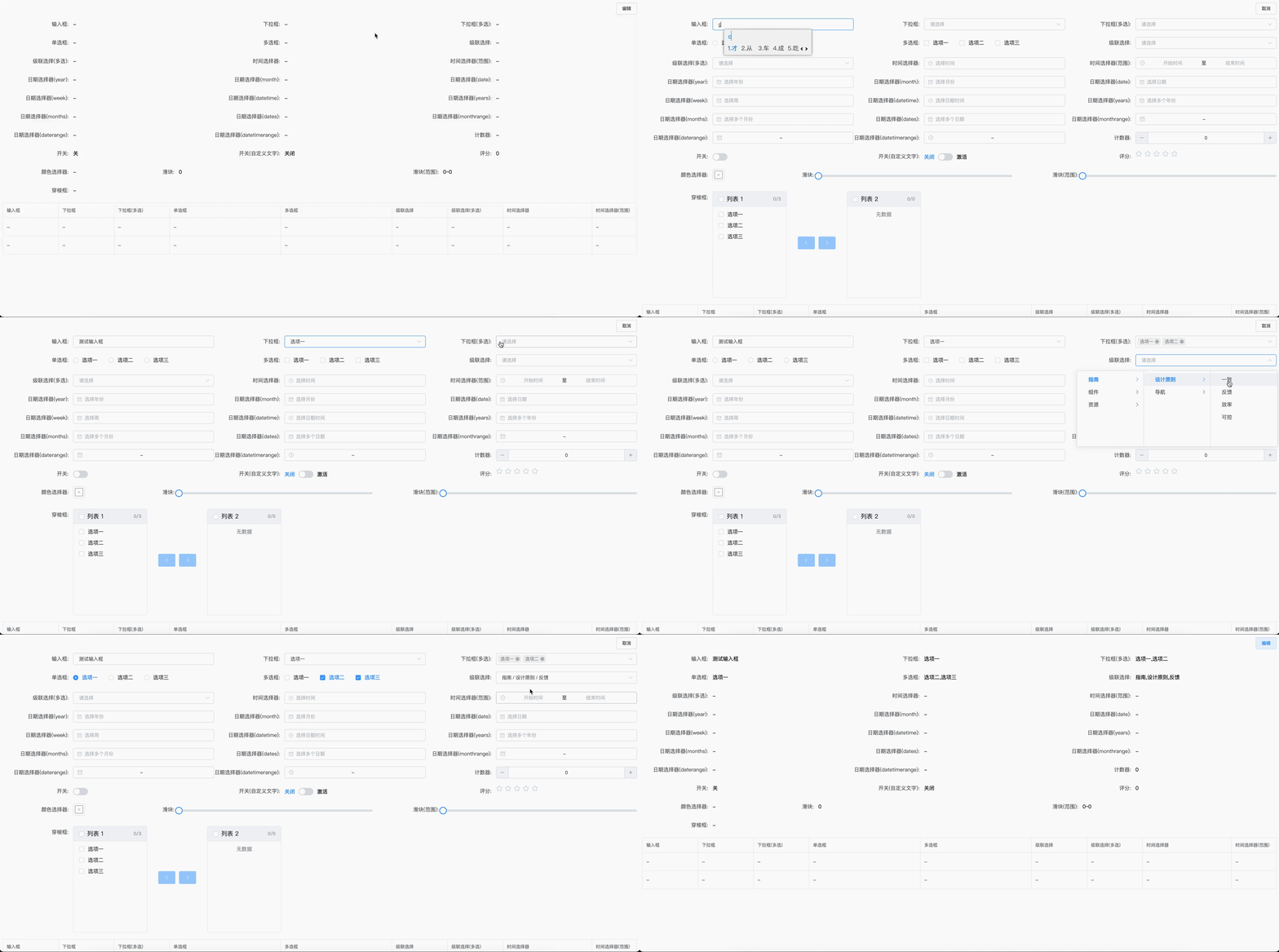
> 基于 ElementUI 的表单只读态控件,完美适配所有表单组件。主要用于新建页与详情页动态切换。支持 npm 与 cdn 方式的引入。
Latest version **1.11.0** (published 2023-08-30) · 0 weekly downloads
## Install
```sh
npm install element-readonly-form-item
pnpm add element-readonly-form-item
yarn add element-readonly-form-item
bun add element-readonly-form-item
```
## Health
**Score 20/100 (F)** — status: abandoned.
Positive: esm support; no vulnerabilities.
Warnings: low downloads; no types.
Negative: abandoned; low maintenance score.
## Facts
| | |
|---|---|
| Version | 1.11.0 |
| Published | 2023-08-30 |
| First published | 2023-06-18 |
| Weekly downloads | 0 |
| TypeScript types | none |
| Module format | ESM + CommonJS |
| Dependencies | 0 |
| Unpacked size | 263.8 KB |
| Known vulnerabilities | 0 |
| Install scripts | no |
| GitHub stars | 31 |
| Author | fuchengwei |
| Maintainers | fuchengwei |
| Keywords | ElementUI, Readonly, Vue, Form |
## Links
- npm: https://www.npmjs.com/package/element-readonly-form-item
- Repository: https://github.com/fuchengwei/element-readonly-form-item
- Issues: https://github.com/fuchengwei/element-readonly-form-item/issues
- npm.io page: https://npm.io/package/element-readonly-form-item
## Alternatives
- [mobx-react](https://npm.io/package/mobx-react.md) — 2.8M weekly downloads
- [rc-tree](https://npm.io/package/rc-tree.md) — 2.6M weekly downloads
- [@react-oauth/google](https://npm.io/package/@react-oauth/google.md) — 1.3M weekly downloads
- [@wagmi/connectors](https://npm.io/package/@wagmi/connectors.md) — 877.0K weekly downloads
- [vee-validate](https://npm.io/package/vee-validate.md) — 836.4K weekly downloads
## Recent versions
- 1.11.0 (latest) — 2023-08-30
- 1.10.0 — 2023-08-21
- 1.9.0 — 2023-08-21
- 1.8.1 — 2023-08-17
- 1.8.0 — 2023-07-27
- 1.7.0 — 2023-07-19
- 1.6.0 — 2023-07-18
- 1.5.0 — 2023-07-13
- 1.4.0 — 2023-07-13
- 1.3.0 — 2023-07-11
- 1.2.2 — 2023-06-23
- 1.2.1 — 2023-06-19
- 1.2.0 — 2023-06-18
- 1.1.0 — 2023-06-18
- 1.0.1 — 2023-06-18
- … 1 more at https://npm.io/package/element-readonly-form-item/versions
## README
# element-readonly-form-item
基于 ElementUI 的表单只读态控件,完美适配所有表单组件。主要用于新建页与详情页动态切换。支持 npm 与 cdn 方式的引入。
## GitHub
https://github.com/fuchengwei/element-readonly-form-item
## Npm
https://www.npmjs.com/package/element-readonly-form-item
### 演示地址(github)
[https://fuchengwei.github.io/element-readonly-form-item/example/index.html](https://fuchengwei.github.io/element-readonly-form-item/example/index.html)
## 安装
### 使用 npm 或 pnpm 安装
**我们推荐使用 npm 或 pnpm 的方式进行开发**,不仅可在开发环境轻松调试,也可放心地在生产环境打包部署使用,享受整个生态圈和工具链带来的诸多好处。
```shell
$ npm install element-readonly-form-item --save
```
```shell
$ pnpm add element-readonly-form-item --save
```
### 浏览器引入
在浏览器中使用 `script` 标签直接引入文件,并使用全局变量 `ReadonlyFormItem`。
我们在 npm 发布包内的 `element-readonly-form-item/dist`提供了 `readonly-form-item.es.js` `readonly-form-item.umd.js`。你也可以通过 [](https://www.jsdelivr.com/package/npm/element-readonly-form-item) 或 [UNPKG](https://unpkg.com/element-readonly-form-item/dist/) 进行下载。
```javascript
```
### 注意
1. 无论 npm 或者 cdn 引入都需要自行引入 [ElementUI](https://element.eleme.cn/)。
2. 为 el-form 组件扩展了 readonly 属性,可同时控制 el-form 组件内所有表单的 readonly 属性。
3. el-form-item 与 readonly-form-item 可同时使用,并不会互相影响。readonly-form-item 只是对 el-form-item 进一步抽屉与封装,支持所有 el-form-item 的属性与插槽配置,其中 prop 属性是必填的。
4. dateFormat 属性格式化字符串完全按照 element日期组件格式化标准来写。默认会读取绑定字段上的 format 属性。
### 示例
**npm 引入**
```javascript
import Vue from 'vue'
import ElementUI from 'element-ui'
import ReadonlyFormItem from 'element-readonly-form-item'
import App from './App.vue'
import 'element-ui/lib/theme-chalk/index.css'
Vue.use(ElementUI)
Vue.use(ReadonlyFormItem, { emptyText: '-' })
new Vue(App).$mount('#app')
```
## 快速上手
组件覆写了 el-form-item 对于 el-form-item 原有的属性、插槽都是支持的。
### 示例
```vue
```
### Props
支持 el-form-item 上所有属性与插槽,并且扩展了一下 props。
| 参数 | 说明 | 类型 | 是否必填 | 默认值 |
| :------------: | :----------------: | :-----: | :------: | :----: |
| value | 只读状态下显示值 | string | 否 | '' |
| readonly | 是否只读 | boolean | 否 | false |
| emptyText | 值为空时显示的内容 | string | 否 | '-' |
| separator | 值为数组时的分隔符 | string | 否 | ',' |
| rangeSeparator | 时间范围分隔符 | string | 否 | '~' |
| dateFormat | 日期类型格式化 | string | 否 | '' |
### 全局配置
在引入 ElementReadonlyFormItem 时,可以传入一个全局配置对象。该对象目前支持 emptyText、separator、rangeSeparator、dateFormat 属性。emptyText 用于改变组件的默认空文本内容,separator 设置值为数组时的分隔符,separator(默认值:','),rangeSeparator 设置时间范围分隔符,rangeSeparator(默认值:'~'),dateFormat 设置日期类控件格式化。按照引入 ElementReadonlyFormItem 的方式,具体操作如下:
```javascript
import Vue from 'vue'
import ReadonlyFormItem from 'element-readonly-form-item'
Vue.use(ReadonlyFormItem, { emptyText: '-', separator: ',' })
```
最后如果大家觉得还不错挺好用的话,麻烦给个 Star 😜😜😜。
---
_Source: https://npm.io/package/element-readonly-form-item · Machine-readable twin of the npm.io package page. Health data is recomputed on every publish._