# element-textarea

> 组件式输入框， 像文字一样增删自定义组件

Latest version **0.1.8** (published 2022-02-11) · MIT license · 0 weekly downloads

## Install

```sh
npm install element-textarea
pnpm add element-textarea
yarn add element-textarea
bun add element-textarea
```

## Health

**Score 15/100 (F)** — status: abandoned.

Positive: no vulnerabilities.

Warnings: low downloads; no types; no esm support; pre 1.0.

Negative: abandoned; low maintenance score.

## Facts

| | |
|---|---|
| Version | 0.1.8 |
| Published | 2022-02-11 |
| First published | 2022-02-07 |
| Weekly downloads | 0 |
| License | MIT |
| TypeScript types | none |
| Module format | CommonJS |
| Dependencies | 2 |
| Unpacked size | 213.3 KB |
| Known vulnerabilities | 0 (+1 in 1 direct dependencies) |
| Install scripts | no |
| Author | dahe |
| Maintainers | heyeye |
| Keywords | 自定义输入框, 像文字一样增删自定义组件, vue, vue插件 |

## Links

- npm: https://www.npmjs.com/package/element-textarea
- npm.io page: https://npm.io/package/element-textarea

## Dependencies (2)

- [vue](https://npm.io/package/vue.md) ^2.6.11
- [core-js](https://npm.io/package/core-js.md) ^3.6.5

## Recent versions

- 0.1.8 (latest) — 2022-02-11
- 0.1.7 — 2022-02-08
- 0.1.6 — 2022-02-08
- 0.1.4 — 2022-02-08
- 0.1.3 — 2022-02-08
- 0.1.2 — 2022-02-07
- 0.1.1 — 2022-02-07
- 0.1.0 — 2022-02-07

## README

# element-textarea
### 更新
0.1.8 新增左右按键调整输入位置

## 安装
```js
npm install --save element-textarea
```

## 引入
组件和样式均需引入
```js
import ElementTextarea from 'element-textarea'
import 'element-textarea/lib/element-textarea.css'
```

## 示例图
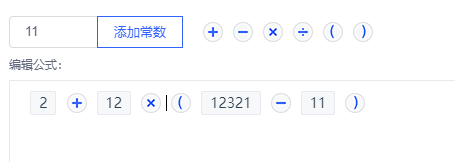
通过外部事件给文本框新增组件，组件自定义，可实现如下效果：
![示例图](https://img-blog.csdnimg.cn/f658d7c21d9a4cafa003ad6888580fd0.png)


## 示例代码
```html
<template>
    <div class="formula__content">
      <div class="content-input">
        <input placeholder="请输入" v-model="numInput" class="num-input" @keyup.13="addNum" />
        <button class="add-num" @click="addNum" :disabled="numInput === ''">添加元素</button>
      </div>
      <element-textarea class="content-textarea" v-model="eleItems" :insertIdx.sync="insertIdx">
        <template v-slot="{data}">
          <!-- 这里使用自定义组件 -->
          <div class="content-textarea__item">{{data.value}}</div>
        </template>
      </element-textarea>
    </div>
</template>

<script>
import ElementTextarea from 'element-textarea'
import 'element-textarea/lib/element-textarea.css'

export default {
  components: {
    ElementTextarea,
  },

  data() {
    return {
      numInput: '',
      eleItems: [],
      insertIdx: -1,
    }
  },

  methods: {
    // 获取uuid
    generateUUID() {
      var d = new Date().getTime();
      if (window.performance && typeof window.performance.now === "function") {
          d += performance.now(); //use high-precision timer if available
      }
      var uuid = 'xxxxxxxx-xxxx-4xxx-yxxx-xxxxxxxxxxxx'.replace(/[xy]/g, function (c) {
          var r = (d + Math.random() * 16) % 16 | 0;
          d = Math.floor(d / 16);
          return (c == 'x' ? r : (r & 0x3 | 0x8)).toString(16);
      });
      return uuid;
    }

    /**
     * 新增组件
     */
    addFormulaItem(type, value) {
      const uuid = this.generateUUID()
      const res = { uuid, type, value }

      // 定点插入和直接放到最后
      if (this.insertIdx < 0) {
        this.eleItems.push(res)
      } else {
        this.eleItems.splice(this.insertIdx, 0, res)
        // 最前面插入无需加1
        if (this.insertIdx !== 0) {
          this.insertIdx += 1
        }
      }
    },

    // 数字组件为例
    addNum() {
      if(this.numInput) {
        this.addFormulaItem('NUM', this.numInput)
        this.numInput = ''
      }
    },
  },

}
</script>

<style scoped>
.content-textarea {
  height: 400px;
  margin: 20px;
  padding: 20px;
}
.content-textarea__item {
  display: inline-block;
  height: 24px;
  line-height: 24px;
  padding: 0 8px;
  background: #ecf5ff;
  border: 1px solid #d9ecff;
  border-radius: 2px;
}
</style>
```

## 博客
[自定义公式输入框](https://blog.csdn.net/HYeeee/article/details/122496216)

---
_Source: https://npm.io/package/element-textarea · Machine-readable twin of the npm.io package page. Health data is recomputed on every publish._