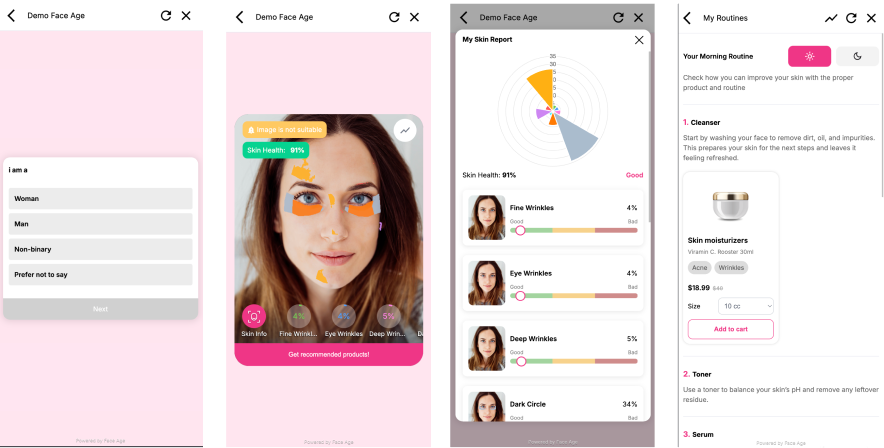
` on your page and initialize `FaceAge` with your license ID
2. **User scans** — via camera or image upload; the SDK runs AI analysis in the browser
3. **Results display** — skin age, damage score, and detected problems are shown
4. **Recommendations** — matched products and routines from your catalog appear automatically
5. **Your code reacts** — use the API and event callbacks to connect to your cart, CRM, or analytics
You only need a [Face Age Client ID](https://panel.getfaceage.com) to get started.
---
## Installation
### npm / yarn
```bash
npm install face-age --save
```
```bash
yarn add face-age --save
```
### CDN (script tag)
```html
```
### Framework Wrappers
Pre-built wrappers are available for component-based frameworks:
| Framework | Package |
|-----------|---------|
| React | [react-face-age](https://www.npmjs.com/package/react-face-age) |
| Vue 2 | [vue-face-age](https://www.npmjs.com/package/vue-face-age) |
| Vue 3 | [vue3-face-age](https://www.npmjs.com/package/vue3-face-age) |
---
## Quick Start
Add a container element to your HTML:
```html
```
Then initialize and render:
```js
import FaceAge from 'face-age';
const faceAge = new FaceAge({
elementId: 'FaceAge-module', // your container element ID
faceageId: '
', // get yours at panel.getfaceage.com
showProducts: true,
showRoutine: true,
});
faceAge.render();
```
> **Get your Client ID** at [panel.getfaceage.com](https://panel.getfaceage.com) — free account required.
### Full Configuration Example
```js
import FaceAge from 'face-age';
const faceAge = new FaceAge({
elementId: 'FaceAge-module',
faceageId: '',
displayModel: 'section', // 'widget' | 'section' | 'modal'
language: 'en',
height: '550px',
currency: '$',
// Quiz
quiz: true,
defaultQuiz: { email: 'user@example.com' },
// History
history: true,
// Products & routines
showProducts: true,
showRoutine: true,
showAddToCard: true,
showAddToCardAll: false,
routinesSupport: ['cleanser', 'serum', 'moisturizer'],
showEmptyRoutines: false,
// Skin problems to analyze
problems: ['fineWrinkles', 'eyeWrinkles', 'acne', 'pores'],
// Capture
showCamera: true,
showUpload: true,
// Legal & promotions
privacyUrl: 'https://example.com/privacy',
discount: { title: 'Use this code at checkout', code: 'FACEAGE20' },
// Display toggles
disableSkinHealth: false,
disableSkinAge: false,
disableImageAlert: false,
});
faceAge.render();
```
---
## Configuration Options
All options are passed to `new FaceAge(options)`.
### Core
| Option | Type | Default | Description |
|--------|------|---------|-------------|
| `elementId` | `String` | — | **Required** for `widget` and `section` display modes. ID of the container element. |
| `faceageId` | `String` | — | **Required.** Your Face Age license ID from the [panel](https://panel.getfaceage.com). |
| `displayModel` | `String` | `'section'` | Display mode: `'widget'`, `'section'`, or `'modal'`. |
| `language` | `String` | `'en'` | UI language code. See [supported languages](#supported-languages) below. |
| `width` | `String` | `'360px'` | Width of the widget — only applies when `displayModel` is `'widget'`. |
| `height` | `String` | `'800px'` / `'580px'` | Height of the widget — defaults differ for `section` vs `widget`. |
| `currency` | `String` | `'$'` | Currency symbol shown next to product prices. |
### Display Modes
| Mode | Behavior |
|------|----------|
| `'section'` | Renders inline, expanding to fill one content row on the page |
| `'widget'` | Renders as a fixed-size standalone panel (respects `width` and `height`) |
| `'modal'` | Opens as a full-screen overlay; no `elementId` required |
### Quiz
| Option | Type | Default | Description |
|--------|------|---------|-------------|
| `quiz` | `Boolean` | `true` | Show the pre-analysis quiz form. |
| `defaultQuiz` | `Object` | — | Pre-fill quiz fields. Example: `{ email: 'user@example.com' }`. |
### Products & Routines
| Option | Type | Default | Description |
|--------|------|---------|-------------|
| `showProducts` | `Boolean` | `false` | Show product recommendations after analysis. |
| `showRoutine` | `Boolean` | `false` | Show skincare routine groupings. |
| `showAddToCard` | `Boolean` | `true` | Show add-to-cart buttons on products. |
| `showAddToCardAll` | `Boolean` | `false` | Show a single "add all to cart" button when template supports it. |
| `routinesSupport` | `Array` | `[]` | Limit routines to specific groups, e.g. `['cleanser', 'serum', 'moisturizer']`. Empty = all groups. |
| `showEmptyRoutines` | `Boolean` | `false` | Show routine sections even when no product is matched. |
### Skin Analysis
| Option | Type | Default | Description |
|--------|------|---------|-------------|
| `problems` | `Array` | all 13 | Skin issues to detect and display. See full list below. |
| `showCamera` | `Boolean` | `true` | Allow users to capture a photo with their camera. |
| `showUpload` | `Boolean` | `true` | Allow users to upload an image from their device. |
| `disableSkinHealth` | `Boolean` | `false` | Hide the skin health/damage summary. Alias: `disable_skin_health`. |
| `disableSkinAge` | `Boolean` | `false` | Hide the skin age result. Alias: `disable_skin_age`. |
| `disableImageAlert` | `Boolean` | `false` | Disable the image quality warning. Alias: `disable_image_alert`. |
**Available `problems` values:**
`fineWrinkles` · `eyeWrinkles` · `deepWrinkles` · `darkCircle` · `eyeBag` · `pores` · `pigment` · `redness` · `oiliness` · `dryness` · `sagginess` · `dullness` · `acne`
### History
| Option | Type | Default | Description |
|--------|------|---------|-------------|
| `history` | `Boolean` | `false` | Enable previous-analysis history. Stored in `localStorage`/cookies by default, or inject via `faceAge.API.setHistoryData()`. |
### Promotions & Legal
| Option | Type | Default | Description |
|--------|------|---------|-------------|
| `privacyUrl` | `String` | `null` | URL to your privacy policy. Invalid URLs are silently ignored. |
| `discount` | `Object` | `null` | Show a copyable promo code. Example: `{ title: 'Code at checkout', code: 'SAVE20' }`. |
### Supported Languages
40 language codes are supported:
`ar` · `bg` · `bn` · `cs` · `da` · `de` · `el` · `en` · `es` · `et` · `fa` · `fi` · `fr` · `he` · `hi` · `hr` · `hu` · `id` · `it` · `ja` · `ko` · `lt` · `lv` · `ms` · `nl` · `no` · `pl` · `pt` · `ro` · `ru` · `sk` · `sr` · `sv` · `th` · `tl` · `tr` · `uk` · `ur` · `vi` · `zh`
Arabic (`ar`), Persian (`fa`), and Urdu (`ur`) automatically switch the UI to RTL layout.
---
## Analytics Integration
Face Age fires events automatically. Connect Google Analytics or Facebook Pixel by passing your IDs as options.
### Google Analytics / GTM
```js
const faceAge = new FaceAge({
elementId: 'FaceAge-module',
faceageId: '',
gtag: 'G-XXXXXXXXXX', // G-..., GT-..., or GTM-... format
gtagInsert: true, // auto-inject GTM script (default: true)
gtagDataLayer: window.dataLayer, // optional: use a custom dataLayer
});
```
### Facebook Pixel
```js
const faceAge = new FaceAge({
elementId: 'FaceAge-module',
faceageId: '',
fbPixel: '123456789012345', // your numeric Pixel ID
fbPixelInsert: true, // auto-inject Pixel script (default: true)
});
```
### Tracked Events
The following interactions are tracked automatically in both GA and Pixel:
| Event | Description |
|-------|-------------|
| Quiz start / completion | User begins or finishes the quiz |
| Quiz question views & choices | Each question view and answer selection |
| Skin analysis start | Analysis begins |
| Photo selection / capture | Image uploaded or camera used |
| Results view | Analysis results displayed |
| Product view / interaction | Product card viewed or clicked |
| Add to cart | Add-to-cart button clicked |
| Checkout | Checkout button clicked |
| Modal open / close | Modal opened or dismissed |
| Download report | PDF report download initiated |
---
## API Reference
After calling `faceAge.render()`, use `faceAge.API` to read results and interact with the SDK programmatically.
### Read Analysis Results
```js
faceAge.API.getAdvisorData((data) => {
console.log(data.analysis); // skin age, damage %, detected problems
console.log(data.activeSelections); // quiz answers
});
```
### Read Quiz Answers
```js
faceAge.API.getActiveSelections((data) => {
console.log(data); // { email, skinType, ... }
});
```
### Read the Submitted Image
```js
const image = faceAge.API.getImage();
```
### Read Available Routine Groups
```js
const groups = faceAge.API.getRoutineGroup();
```
### Set Custom Products
Push your own product catalog into the SDK — it will match products to detected skin problems automatically.
```js
faceAge.API.setCustomProducts([
{
id: 1,
url: 'https://yourstore.com/product',
image: 'https://yourstore.com/product.png',
title: 'Skin Moisturizer',
description: 'Vitamin C · 30ml', // optional
price: 40,
offerPrice: 18.99, // optional sale price
problems: ['acne', 'wrinkles'], // optional: target problems
routineGroups: { morning: ['cleanser', 'serum'] }, // optional
variables: { // optional: size/variant picker
size: {
title: 'Size',
option: [
{ label: '10 cc', value: '10', price: 40, offerPrice: 18.99 },
{ label: '25 cc', value: '25', price: 52 },
{ label: '35 cc', value: '35' },
],
},
},
},
]);
```
### History Management
**Restore history from your backend** (requires `history: true`):
```js
faceAge.API.setHistoryData({
analysis: {
analyze_ref_token: 'analyze_ref_abc123',
skinAge: 28,
damagePercentage: 12.4,
problems: [],
},
activeSelections: {
email: 'user@example.com',
skinType: 'combination',
},
meta: {
ts: Date.now(),
image: 'https://example.com/scan.jpg',
},
});
```
**Remove a history entry** by reference token. Pass `null` to clear all local history:
```js
faceAge.API.removeHistoryItem('analyze_ref_abc123').then((removed) => {
console.log('Removed:', removed);
});
```
### Generate PDF Report
Requires PDF access on your Face Age plan.
```js
faceAge.API.getReportPdf()
.then((report) => console.log('Report:', report))
.catch((err) => console.error('Failed:', err));
```
### Submit SDK Integration
Send the full analysis payload (skin results, products, quiz data, brand metadata) to the SDK-call integration endpoint. If no email is provided, Face Age falls back to `email` or `clientEmail` from quiz answers.
```js
// Basic
faceAge.API.submitSdkIntegration('user@example.com').then((res) => {
console.log('Submitted:', res);
});
// With extra metadata
faceAge.API.submitSdkIntegration('user@example.com', {
name: 'Jane Doe',
skinType: 'dry',
skinConcern: ['fineWrinkles', 'dryness'],
});
```
Quiz data is automatically normalized to `[{ question, answer }]` before submission.
---
## Events
Register callbacks to react to user interactions in real time.
| Event | Callback signature | Fires when |
|-------|--------------------|------------|
| `onClickProblem` | `(key: string)` | User taps a skin problem in the results |
| `onDisplayProducts` | `(data)` | Product list becomes visible |
| `onDisplayRoutines` | `(data)` | Routine list becomes visible |
| `onAddToCart` | `(data)` | User clicks add to cart |
| `onClickProduct` | `(product)` | User clicks a product card |
| `onResetData` | `()` | User clicks reset / start over |
| `onCloseModal` | `()` | User closes the modal |
| `onCheckout` | `(data)` | User clicks the checkout button |
**Example:**
```js
faceAge.onAddToCart((data) => {
// data contains product details
myCart.add(data);
});
faceAge.onCloseModal(() => {
// redirect to cart if items were added
if (myCart.hasItems()) window.location.href = '/cart';
});
faceAge.onClickProblem((key) => {
console.log('Problem selected:', key); // e.g. 'acne'
});
```
---
## Contact
| | |
|--|--|
| Website | [getfaceage.com](https://getfaceage.com/) |
| Dashboard | [panel.getfaceage.com](https://panel.getfaceage.com/) |
| Email | [dev@getfaceage.com](mailto:dev@getfaceage.com) |
---
_Source: https://npm.io/package/face-age · Machine-readable twin of the npm.io package page. Health data is recomputed on every publish._