# fame
> Provides git committer stats via command line.
Latest version **0.0.117** (published 2019-10-25) · SEE LICENSE IN license.md license · 0 weekly downloads
## Install
```sh
npm install fame
pnpm add fame
yarn add fame
bun add fame
```
Provides the command `fame`.
## Health
**Score 25/100 (F)** — status: abandoned.
Positive: has types; no vulnerabilities; high quality score.
Warnings: low downloads; no esm support; pre 1.0.
Negative: abandoned; low maintenance score.
## Facts
| | |
|---|---|
| Version | 0.0.117 |
| Published | 2019-10-25 |
| First published | 2014-03-23 |
| Weekly downloads | 0 |
| License | SEE LICENSE IN license.md |
| TypeScript types | bundled |
| Module format | CommonJS |
| Dependencies | 6 |
| Unpacked size | 51.3 KB |
| Known vulnerabilities | 0 |
| Install scripts | yes |
| Author | Olegzandr VD |
| Maintainers | oresoftware |
| Keywords | typescript, library, skeleton, scaffold |
## Links
- npm: https://www.npmjs.com/package/fame
- Repository: https://github.com/ORESoftware/fame
- Homepage: https://github.com/ORESoftware/fame#readme
- Issues: https://github.com/ORESoftware/fame/issues
- npm.io page: https://npm.io/package/fame
## Dependencies (6)
- [async](https://npm.io/package/async.md) ^2.6.0
- [chalk](https://npm.io/package/chalk.md) ^2.3.2
- [dashdash](https://npm.io/package/dashdash.md) ^1.14.1
- [cli-table](https://npm.io/package/cli-table.md) ^0.3.1
- [json-stdio](https://npm.io/package/json-stdio.md) 0.1.1011
- [@oresoftware/cli](https://npm.io/package/@oresoftware/cli.md) 0.0.104
## Alternatives
- [@openai/codex-sdk](https://npm.io/package/@openai/codex-sdk.md) — 731.4K weekly downloads
- [babel-plugin-transform-react-jsx](https://npm.io/package/babel-plugin-transform-react-jsx.md) — 565.0K weekly downloads
- [babel-helper-remove-or-void](https://npm.io/package/babel-helper-remove-or-void.md) — 508.5K weekly downloads
- [@pnpm/store-controller-types](https://npm.io/package/@pnpm/store-controller-types.md) — 186.9K weekly downloads
- [react-native-signature-canvas](https://npm.io/package/react-native-signature-canvas.md) — 155.6K weekly downloads
## Recent versions
- 0.0.117 (latest) — 2019-10-25
- 0.0.117-rc.3 — 2019-10-25
- 0.0.117-rc.2 — 2019-10-22
- 0.0.117-rc.1 — 2019-10-22
- 0.0.117-rc.0 — 2019-10-22
- 0.0.116 — 2019-08-20
- 0.0.115 — 2019-08-09
- 0.0.114 — 2019-08-02
- 0.0.113 — 2019-08-02
- 0.0.112 — 2019-08-02
- 0.0.111 — 2019-07-21
- 0.0.110 — 2018-09-04
- 0.0.109 — 2018-09-03
- 0.0.108 — 2018-09-03
- 0.0.107 — 2018-08-17
- … 4 more at https://npm.io/package/fame/versions
## README
## 🎟 Fame - a tool for displaying git log information by author
```diff
- Fame Fame Fame Fame Fame Fame Fame Fame Fame Fame Fame Fame Fame Fame Fame Fame Fame Fame Fame Fame
```
This command line tool is similar to `git fame`, but this is much faster.
People were complaining that the ruby/python tools were too slow, so I wrote this.
## Installation
```bash
$ npm install -g fame
```
> For latest version, use: `npm view fame version`
-----
----
## Basic Usage
By default, a table is printed to the console. If you want JSON output, use the --json flag.
```bash
fame --json
```
### Info for all commits by "alex"
```bash
fame --author=alex
```
### Info for all commits on dev branch by a particular author
```bash
fame --branch=dev --author=alex
```
### Info for all commits for multiple authors
```bash
fame --author=donnie --author=ronnie --author=jonnie
```
-----
### More options
Handling multiple email addresses for same person.
```shell
fame --add-user -e
```
now, when fame runs at the command line, it will pick up the info from this file ($HOME/fame.conf.json),
to combine info from the different emails.
You can add multiple emails like so:
```shell
fame -u -e -e
```
Sorting with --order and --sort options
You can sort using the --sort and --order options.
For example:
```bash
fame --sort=1 --order=asc # will sort by the the 2nd column, ascending
fame --sort=2,3 --order=desc # will sort by the the 3rd and 4th column, with the 3rd column the priority
```
Or for example, instead of numbers you can also just use the name (case-insensitive) of the column:
```bash
fame --sort='added lines, files modified' --order=asc
```
Comma-separated list, case-insensitive and whitespace-insensitive
Matching on files (ignoring files too)
### Info for all matching files
```bash
fame --match='\.js'
```
-----
### Info for all files that end with
```bash
fame --extension='.js' # better to just use the regex option tho
```
----
### Example
To match all .ts files but no .d.ts files, you would do:
```bash
fame --match='\.ts$' --not-match='\.d\.ts$'
```
Remember these strings are passed to `new RegExp()` so have to escpae the . etc.
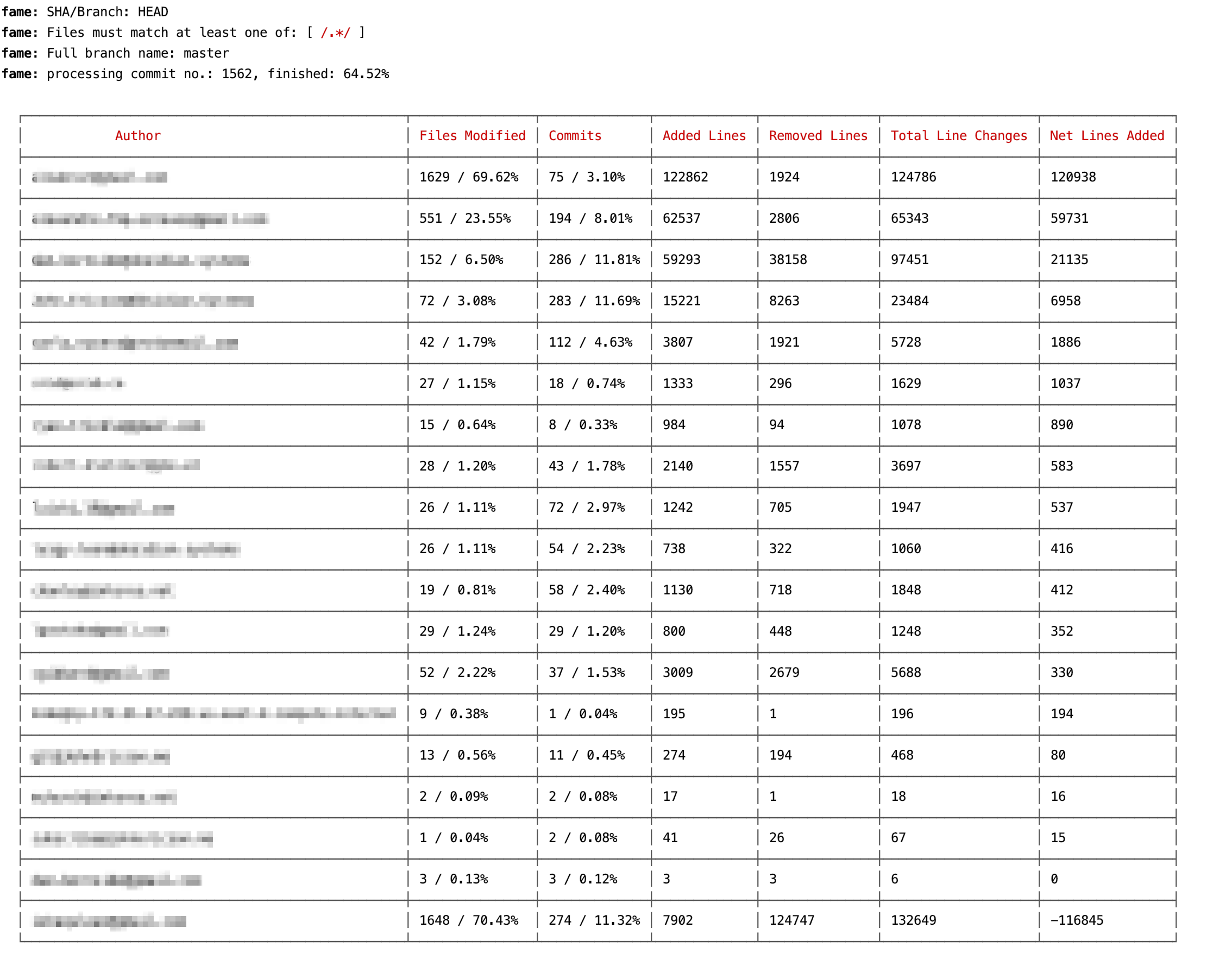
## Basic command line table output looks like this:
## Command line JSON output looks like this:
---
_Source: https://npm.io/package/fame · Machine-readable twin of the npm.io package page. Health data is recomputed on every publish._