# flow-chart-v2
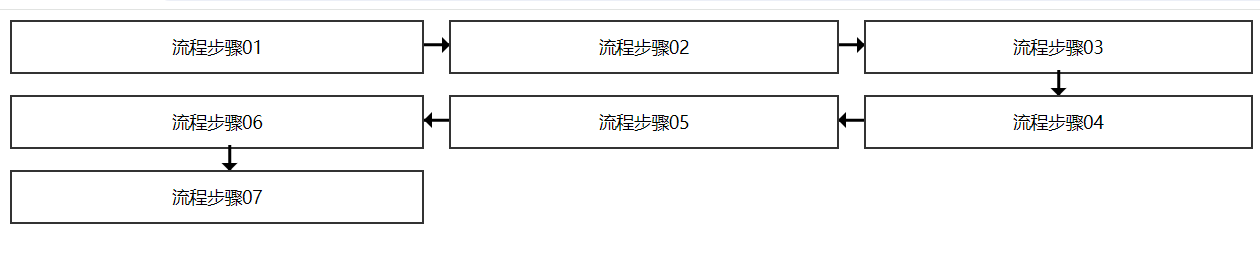
> > 流程图组件 基于 vue2 开发 主要用于显示和点击交互事件,未做过多封装
Latest version **0.0.3** (published 2024-03-23) · MIT license · 0 weekly downloads
## Install
```sh
npm install flow-chart-v2
pnpm add flow-chart-v2
yarn add flow-chart-v2
bun add flow-chart-v2
```
## Health
**Score 15/100 (F)** — status: abandoned.
Positive: no vulnerabilities.
Warnings: low downloads; no types; no esm support; pre 1.0.
Negative: abandoned; low maintenance score.
## Facts
| | |
|---|---|
| Version | 0.0.3 |
| Published | 2024-03-23 |
| First published | 2024-03-23 |
| Weekly downloads | 0 |
| License | MIT |
| TypeScript types | none |
| Module format | CommonJS |
| Dependencies | 3 |
| Unpacked size | 87.5 KB |
| Known vulnerabilities | 0 (+1 in 1 direct dependencies) |
| Install scripts | no |
| GitHub stars | 1 |
| Maintainers | hufei |
| Keywords | flow chart, vue流程图 |
## Links
- npm: https://www.npmjs.com/package/flow-chart-v2
- Repository: https://github.com/hufei1/flow-chart-v2
- Homepage: https://github.com/hufei1/flow-chart-v2#readme
- Issues: https://github.com/hufei1/flow-chart-v2/issues
- npm.io page: https://npm.io/package/flow-chart-v2
## Dependencies (3)
- [vue](https://npm.io/package/vue.md) ^2.6.14
- [core-js](https://npm.io/package/core-js.md) ^3.8.3
- [flow-chart-v2](https://npm.io/package/flow-chart-v2.md) ^0.0.2
## Alternatives
- [d3-force-3d](https://npm.io/package/d3-force-3d.md) — 1.0M weekly downloads
- [ng2-charts](https://npm.io/package/ng2-charts.md) — 486.8K weekly downloads
- [@arcgis/core](https://npm.io/package/@arcgis/core.md) — 257.8K weekly downloads
- [react-sparklines](https://npm.io/package/react-sparklines.md) — 249.3K weekly downloads
- [react-native-gifted-charts](https://npm.io/package/react-native-gifted-charts.md) — 182.3K weekly downloads
## Recent versions
- 0.0.3 (latest) — 2024-03-23
- 0.0.2 — 2024-03-23
- 0.0.1 — 2024-03-23
## README
## flow-chart-v2 流程图
> 流程图组件 基于 vue2 开发 主要用于显示和点击交互事件,未做过多封装
### 效果图
### 使用步骤
1. 安装依赖
```sh
npm i flow-chart-v2
```
2. main.js 中注册
```js
// main.js
import FlowChart from "flow-chart-static-vue";
import "flow-chart-static-vue/flow-chart/flow-chart.css";
Vue.use(FlowChart);
```
3.组件内使用
```vue
```
### props 配置项
| Property | Description | Type | Default | required |
| -------------- | ------------------ | -------- | ------- | -------- |
| chartList | 渲染数组 | `Array` | [] | 是 |
| chartNameField | 内容区字段名 | `String` | '' | 是 |
| chartKeyField | 渲染唯一 ID 字段名 | `string` | id | 是 |
| colunmNum | 每一列显示的格式 | `Number` | 4 | 否 |
### 自定义事件
| event | Description | Type | Default |
| --------- | ---------------- | ---------- | ------- |
| clickItem | 点击每一列的事件 | `Function` | 无 |
---
_Source: https://npm.io/package/flow-chart-v2 · Machine-readable twin of the npm.io package page. Health data is recomputed on every publish._