# fltrec

> FlightRecorder (fltrec) is a solution for quickly saving and updating mock data json responses from your APIs.

Latest version **1.0.11** (published 2019-09-29) · MIT license · 0 weekly downloads

## Install

```sh
npm install fltrec
pnpm add fltrec
yarn add fltrec
bun add fltrec
```

Provides the command `fltrec`.

## Health

**Score 15/100 (F)** — status: abandoned.

Positive: no vulnerabilities.

Warnings: low downloads; no types; no esm support.

Negative: abandoned; low maintenance score.

## Facts

| | |
|---|---|
| Version | 1.0.11 |
| Published | 2019-09-29 |
| First published | 2018-06-24 |
| Weekly downloads | 0 |
| License | MIT |
| TypeScript types | none |
| Module format | CommonJS |
| Dependencies | 7 |
| Unpacked size | 4.6 MB |
| Known vulnerabilities | 0 (+1 in 1 direct dependencies) |
| Install scripts | no |
| GitHub stars | 2 |
| Author | David Norman |
| Maintainers | normand1 |

## Links

- npm: https://www.npmjs.com/package/fltrec
- Repository: https://github.com/normand1/FlightRecorder
- Homepage: https://github.com/normand1/FlightRecorder#readme
- Issues: https://github.com/normand1/FlightRecorder/issues
- npm.io page: https://npm.io/package/fltrec

## Dependencies (7)

- [fs](https://npm.io/package/fs.md) 0.0.1-security
- [chalk](https://npm.io/package/chalk.md) ^2.4.1
- [mkdirp](https://npm.io/package/mkdirp.md) ^0.5.1
- [newman](https://npm.io/package/newman.md) ^3.9.4
- [jsonpath](https://npm.io/package/jsonpath.md) ^1.0.2
- [mustache](https://npm.io/package/mustache.md) ^2.3.0
- [commander](https://npm.io/package/commander.md) ^2.15.1

## Recent versions

- 1.0.11 (latest) — 2019-09-29
- 1.0.10 — 2019-09-22
- 1.0.9 — 2019-09-21
- 1.0.8 — 2019-03-17
- 1.0.7 — 2018-07-07
- 1.0.6 — 2018-06-29
- 1.0.5 — 2018-06-29
- 1.0.4 — 2018-06-25
- 1.0.3 — 2018-06-25
- 1.0.2 — 2018-06-25
- 1.0.1 — 2018-06-24
- 1.0.0 — 2018-06-24

## README

![alt text](https://raw.githubusercontent.com/normand1/FlightRecorder/master/ReadMeAssets/FlightRecLogo.png)


FlightRecorder (fltrec) is a solution for quickly saving and updating mock data json responses from your APIs.
FlightRecorder is built around the [Postman Newman CLI Tool](https://github.com/postmanlabs/newman).
Simply reference your postman collection and environment files while running FlightRecorder and your json responses will be saved to the output directory you've specified. Optionally, you can also use FlightRecorder to generate a mock server implementation for iOS (Swift) and Android (Kotlin) based on your postman collection and environment files.

## Why Use FlightRecorder?

### It's an easy way to create and update mock data for tests
There are a number of network request mocking frameworks available for both iOS and Android. FlightRecorder has built in support for [OHHTTPStubs](https://github.com/AliSoftware/OHHTTPStubs) and [okhttp/mockwebserver](https://github.com/square/okhttp/tree/master/mockwebserver)
These frameworks allow you to test your app in a reliable way regardless of server state. These mocking frameworks are especially useful when testing UI elements that display responses from a backend service. Using mock responses you can gaurantee that the response will be the same every time so it's easy to write tests against. However, the drawback to these mock responses are that they can get stale.  As useful as these tests can be, it's possible that things on the backend can change without you realizing it and leave your tests out of date. FlightRecorder provides an easy way to update all of you mock responses in one go.

### Uses Postman to automate mock response gathering

Getting all of the mock responses for a whole application can be tedious. However, if you create a postman collection (or already have one) to store all of the network requests your app makes you can regenerate your mock responses and server stubs with a single command!

## Installation 

`npm install fltrec -g`

## Dependencies


[Postman](https://www.getpostman.com/postman) is used to create the API documentation used by FlightRecorder to generate mock server stubs and save responses from the live API.

<details>
<summary>iOS</summary>

If you'd like to generate an automated mock server implementation for iOS you'll need [OHHTTPStubs](https://github.com/AliSoftware/OHHTTPStubs). You can see a sample implementation of OHHTTPStubs in the example project.
Passing the -m flag with "swift" (`-m swift`) will generate a MockNetworkRequestManager class for the referenced Postman Collection.

</details>

<details>
  
<summary>Android</summary>

If you'd like to generate an automated mock server implementation for Android you'll need [okhttp/mockwebserver](https://github.com/square/okhttp/tree/master/mockwebserver). You can see a sample implementation of okhttp/mockwebserver in the example project. Passing the -m flag with "kotlin" (`-m kotlin`) will generate a MockNetworkRequestManager class for the referenced Postman Collection.

</details>


## Demo

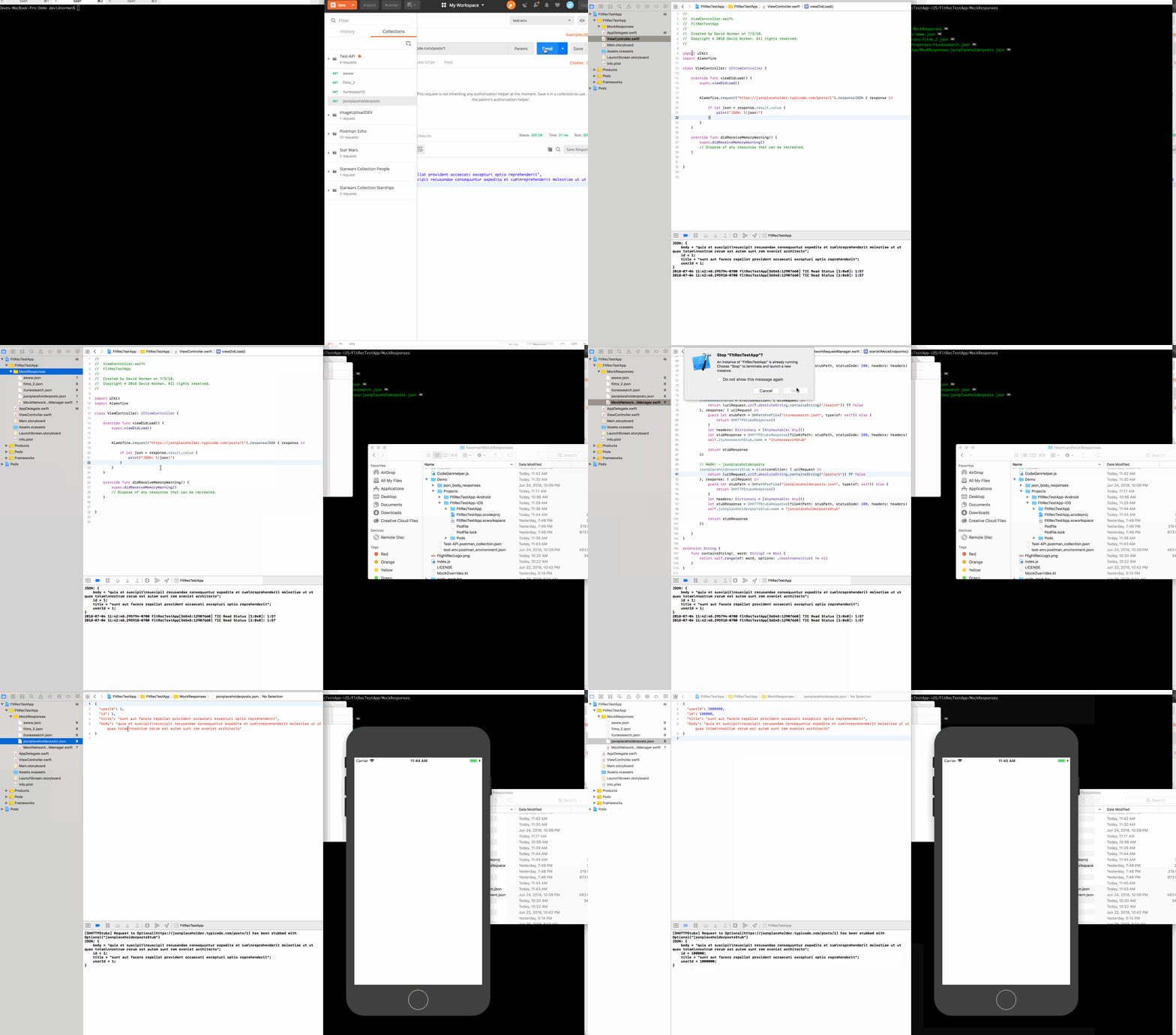
![alt text](https://raw.githubusercontent.com/normand1/FlightRecorder/master/ReadMeAssets/flt_rec_demo.gif)

## How To
```
Usage: collection [options]

Options:

-e, --environment <environment>        the relative path to the environment file
-o, --output <output>                  The path to the output directory where you would like to save the network request body responses
-v, --verbose                          verbose logging
-m, --mustache <mustache>              default mustache template [swift, kotlin] or the relative path to the mustache template file
-r, --requestManager <requestManager>  the path to the output directory for the MockNetworkRequestManager
-x, --extension <extension>            extension for mustache template output (e.g. swift, kt, etc...)
-h, --help                             output usage information
```

## Examples

Two sample projects are provided as example implementations of mock servers for both iOS and Android. The two implementations are different, but both implementations are made easily maintainable with the use of FlightRecorder.


<details>
<summary>iOS Example</summary>

1) Clone this repo and navigate to the `Demo/Projects/FltRecTestApp-iOS/` directory
2) Open the `FltRecTestApp.xcworkspace` workspace
3) In the MockResponses Xcode directory you will see a number of JSON files and the `MockNetworkRequestManager.swift` file

<img src="https://raw.githubusercontent.com/normand1/FlightRecorder/master/ReadMeAssets/iosexample1.png" alt="alt" width="200px"/>


4) These files have been generated by FlightRecorder and can be easily regenerated using this command:

```
fltrec collection Test-API.postman_collection.json -e test-env.postman_environment.json -m swift -o Projects/FltRecTestApp-iOS/FltRecTestApp/MockResponses
```

This command will use the Postman Collection and Environment file in the current directory to make the network requests specified in the collection (using the environment variables of the referenced Environment file) and save the JSON body responses to the specified output directory (Projects/FltRecTestApp-iOS/FltRecTestApp/MockResponses).
The `-m swift` flag also notifies flight recorder to generate an OHTTPMock implementation file called the MockNetworkRequestManager

5) The MockNetworkRequestManager is directed to start intercepting and replacing network request responses with the command in `AppDelegate.swift`
```
MockNetworkRequestManager.sharedManager.startAllMockEndpoints()
```

You can experiment with this feature by commenting and uncommenting startAllMockEndpoints() in the AppDelegate to switch from live network requests to mocked requests. You can also modify the `jsonplaceholderposts.json` file to see changes reflected in the mocked response. Running FltRec again will overwrite `jsonplaceholderposts.json` and make sure the mock response accurately reflects the response from the server.

</details>

<details>
  
<summary>Android Example</summary>

1) Clone this repo and navigate to the `Demo/Projects/FltRecTestApp-Android/` directory
2) Open the Android Studio Project
3) In the `res/raw` directory you will see a number of JSON files. 

<img src="https://raw.githubusercontent.com/normand1/FlightRecorder/master/ReadMeAssets/androidexample1.png" alt="alt" width="200px"/>

The MockNetworkRequestManager is in the `repository` directory.

These files have been generated by FlightRecorder and can be easily regenerated using this command:

```
fltrec collection ../../Test-API.postman_collection.json -e ../../test-env.postman_environment.json -o app/src/main/res/raw -r app/src/main/java/com/davidwnorman/flightrectestapp/repository -m kotlin
```

This command will use the Postman Collection and Environment file to make the network requests specified in the collection (using the environment variables of the referenced Environment file) and save the JSON body responses to the specified output directory (app/src/main/res/raw). The MockNetworkRequestManager is generated in the directory specified by the -r flag (app/src/main/java/com/davidwnorman/flightrectestapp/repository)
The `-m kotlin` flag also notifies flight recorder to generate a MockServer Class implementation file called the MockNetworkRequestManager

4) Inside the repository implementation FakeRepo there are two urls, one is commented out:
```
//var url = "https://jsonplaceholder.typicode.com/posts/1" // Real URL
var url = mockServer.server.url("posts/1").toString() // Mock Server URL
```

In order to toggle between making a real network request and the mock server you can comment or uncomment each url as needed.
You could also add a BuildConfig variable with which you could toggle between urls with a simple if else statement.

Something like...
```
            var url = "https://jsonplaceholder.typicode.com/posts/1"
            if (BuildConfig.USEMOCK) {
                url = mockServer.server.url("posts/1").toString()
            }
```

You can experiment with this feature by switching between the urls in `FakeRepo.kt` to switch from live network requests to mocked requests. You can also modify the `jsonplaceholderposts.json` file to see changes reflected in the mocked response. Running FltRec again will overwrite `jsonplaceholderposts.json` and make sure the mock response accurately reflects the response from the server.

</details>

---
_Source: https://npm.io/package/fltrec · Machine-readable twin of the npm.io package page. Health data is recomputed on every publish._