# fontpath-gl
> a stackgl implementation for fontpath rendering
Latest version **3.0.0** (published 2015-03-10) · MIT license · 0 weekly downloads
## Install
```sh
npm install fontpath-gl
pnpm add fontpath-gl
yarn add fontpath-gl
bun add fontpath-gl
```
## Health
**Score 15/100 (F)** — status: abandoned.
Positive: no vulnerabilities.
Warnings: low downloads; no types; no esm support.
Negative: abandoned; low maintenance score.
## Facts
| | |
|---|---|
| Version | 3.0.0 |
| Published | 2015-03-10 |
| First published | 2014-08-18 |
| Weekly downloads | 0 |
| License | MIT |
| TypeScript types | none |
| Module format | CommonJS |
| Dependencies | 7 |
| Known vulnerabilities | 0 |
| Install scripts | no |
| Author | Matt DesLauriers |
| Maintainers | mattdesl |
| Keywords | stackgl, gl-modules, gl, webgl, glsl, modules-gl, opengl, font, text, glyph, render, word, wrap, ttf, otf |
## Links
- npm: https://www.npmjs.com/package/fontpath-gl
- Repository: https://github.com/mattdesl/fontpath-gl
- Issues: https://github.com/mattdesl/fontpath-gl/issues
- npm.io page: https://npm.io/package/fontpath-gl
## Dependencies (7)
- [gl-mat4](https://npm.io/package/gl-mat4.md) ^1.0.0
- [inherits](https://npm.io/package/inherits.md) ^2.0.1
- [gl-basic-mesh](https://npm.io/package/gl-basic-mesh.md) ^1.0.1
- [gl-basic-shader](https://npm.io/package/gl-basic-shader.md) ^1.0.0
- [fontpath-shape2d](https://npm.io/package/fontpath-shape2d.md) 0.0.5
- [shape2d-triangulate](https://npm.io/package/shape2d-triangulate.md) 0.0.2
- [fontpath-simple-renderer](https://npm.io/package/fontpath-simple-renderer.md) ^4.0.0
## Alternatives
- [@fortawesome/react-fontawesome](https://npm.io/package/@fortawesome/react-fontawesome.md) — 2.2M weekly downloads
- [roboto-fontface](https://npm.io/package/roboto-fontface.md) — 196.0K weekly downloads
- [@react-native-vector-icons/common](https://npm.io/package/@react-native-vector-icons/common.md) — 150.4K weekly downloads
- [stockfish](https://npm.io/package/stockfish.md) — 27.0K weekly downloads
- [@procore/core-icons](https://npm.io/package/@procore/core-icons.md) — 4.6K weekly downloads
## Recent versions
- 3.0.0 (latest) — 2015-03-10
- 2.0.0 — 2014-10-18
- 1.0.2 — 2014-09-28
- 1.0.1 — 2014-08-18
- 1.0.0 — 2014-08-18
## README
# fontpath-gl
[](http://github.com/badges/stability-badges)
[](http://mattdesl.github.io/fontpath-gl/demo/index.html)
click to view demo
A 2D [fontpath renderer](https://github.com/mattdesl/fontpath-simple-renderer) for [stackgl](https://github.com/stackgl/). As opposed to [gl-render-text](https://www.npmjs.org/package/gl-render-text), which is texture based, this renderer is path-based.
Here is a quick overview of some pros to the fontpath approach:
- More control over line height, word wrapping, kerning, underlines, etc
- More accurate paths and metrics, matching the curves from TTF/OTF files
- More control for rich text animations and effects (such as triangulation)
- Better for scaling, changing, and re-wrapping text on the fly
- We don't need to worry about `@font-face` loading race conditions
Some downsides:
- Not robust for Complex Text Layout or non-Latin languages
- Not ideal for small (hinted) font sizes or bitmap-based fonts
- Not performant for large blocks of text since each glyph uses its own [gl-vao](https://www.npmjs.org/package/gl-vao)
- Triangulation with poly2tri is not always robust; fails with some fonts
- The fontpath tool is not yet very stable or well-tested
- Lack of anti-aliasing in some browsers, or when rendering to an offscreen buffer
## Usage
[](https://nodei.co/npm/fontpath-gl/)
The following will produce filled text, drawn with triangles.
```js
var MyFont = require('fontpath-test-fonts/lib/OpenSans-Regular.ttf')
var createText = require('fontpath-gl')
var mesh = createText(gl, {
text: 'lorem ipsum dolor',
font: MyFont,
fontSize: 150,
align: 'right'
wrapWidth: 150
})
mesh.projection = ortho
mesh.draw(x, y)
```
This inherits from [fontpath-simple-renderer](https://github.com/mattdesl/fontpath-simple-renderer), so the constructor options, functions and members are the same. Some additional features:
### `mesh = createText(gl[, options])`
In addition to the typical fontpath renderer options, you can also pass:
- `mode` a primitive type, defaults to `gl.TRIANGLES`
- `color` a RGBA color to tint the text, defaults to white `[1, 1, 1, 1]`
- `shader` a shader to use when rendering the glyphs, instead of the default. See [gl-basic-shader](https://www.npmjs.org/package/gl-basic-shader) for details on uniform/attribute names
- `simplifyAmount` in the case of the default poly2tri triangulator, this provides a means of simplifying the path to reduce the total number of vertices
### `mesh.color`
Upon rendering, this will set the `tint` uniform of the shader (available with default shader). This is useful for coloring the text.
#### `mesh.projection`
The projection 4x4 matrix for the text, applied to each glyph. Identity by default.
#### `mesh.view`
A 4x4 view matrix to apply to each glyph. Identity by default.
#### `mesh.mode`
The rendering mode, default `gl.TRIANGLES`.
#### `mesh.dispose()`
Disposes the mesh and its default shader. If you provided a shader during constructor, that shader will not be disposed.
## triangulation
[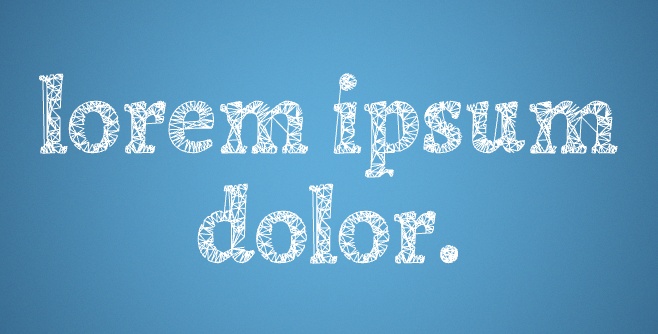](http://mattdesl.github.io/fontpath-gl/demo/wireframe.html)
click to view demo
This uses [fontpath-shape2d](https://www.npmjs.org/package/fontpath-shape2d) and [poly2tri](https://www.npmjs.org/package/poly2tri) to approximate the bezier curves and triangulate the glyphs. In some cases these may fail to triangulate, or produce undesirable results. [Tess2](https://github.com/memononen/tess2.js) is more robust in some cases, but it leads to a less pleasing wireframe and doesn't allow for steiner points.
To allow for custom triangulation without bloating the filesize with poly2tri, it has been broken off into a different file and only included with the `index.js` entry point. So, say you want to use Tess2 without the heavy poly2tri dependency, your code would have to look like this:
```js
//require the base class
var TextRenderer = require('fontpath-gl/base')
TextRenderer.prototype.triangulateGlyph = function (glyph) {
//... approximate glyph curves,
//... then triangulate with Tess2
//... you may also do some simplifying here
//return an object in the following format
return {
//xy positions, required
positions: new Float32Array([ x1,y1,x2,y2... ])
//indices, optional
cells: new Uint16Array([ i0,i1,i2... ])
}
}
module.exports = TextRenderer
```
`cells` is optional, but indexing will produce more efficient rendering.
You can also `require('fontpath-gl/triangulate')` which exposes the default `triangulateGlyph` function.
See the [demo](demo/) folder for an example of custom triangulation.
## roadmap
- underline rendering
- more efficient caching / packing of vertex data
- improve triangulation robustness
## License
MIT, see [LICENSE.md](http://github.com/mattdesl/fontpath-gl/blob/master/LICENSE.md) for details.
---
_Source: https://npm.io/package/fontpath-gl · Machine-readable twin of the npm.io package page. Health data is recomputed on every publish._