
# fuse-importer

> Swovo Fuse is a customizable and powerful CSV Importer that works with all front-end languages

Latest version **0.42.0** (published 2026-11-13) · 0 weekly downloads

## Install

```sh
npm install fuse-importer
pnpm add fuse-importer
yarn add fuse-importer
bun add fuse-importer
```

## Health

**Score 65/100 (B)** — status: active.

Positive: has types; esm support; no vulnerabilities; recently updated; high maintenance score.

Warnings: low downloads; pre 1.0.

## Facts

| | |
|---|---|
| Version | 0.42.0 |
| Published | 2026-11-13 |
| First published | 2022-03-09 |
| Weekly downloads | 0 |
| TypeScript types | bundled |
| Module format | ESM + CommonJS |
| Node | >=16.0.0 |
| Dependencies | 0 |
| Unpacked size | 57.6 KB |
| Known vulnerabilities | 0 |
| Install scripts | no |
| Maintainers | gabriel.siqueira.flatirons, mikefrederick, christianflatirons, gabrielpereira.flatirons, covas, bryanvillafane, kai_poynting |

## Links

- npm: https://www.npmjs.com/package/fuse-importer
- Repository: https://github.com/swovohq/fuse
- Homepage: https://github.com/swovohq/fuse#readme
- Issues: https://github.com/swovohq/fuse/issues
- npm.io page: https://npm.io/package/fuse-importer

## Recent versions

- 0.42.0 (latest) — 2026-11-13
- 0.43.0-staging.13.1 (staging) — 2026-11-24
- 0.33.1 (@staging) — 2024-07-11
- 1.0.3 (test) — 2024-04-22
- 0.40.3-testing (testing2) — 2024-03-28
- 0.40.2-testing (testing) — 2024-03-28
- 0.42.0-staging.11.1 — 2026-11-13
- 0.42.0-staging.10.1 — 2026-11-12
- 0.41.0-staging.9.1 — 2026-11-12
- 0.41.0-staging.8.1 — 2026-09-04
- 0.41.0 — 2026-09-02
- 0.40.2-staging.5.1 — 2026-09-02
- 0.40.2-staging.4.1 — 2026-09-01
- 0.40.2-staging.3.1 — 2026-09-01
- 0.40.2-staging.2.1 — 2026-08-27
- … 195 more at https://npm.io/package/fuse-importer/versions

## README

<div>
<center>
<a href="https://fuse.swovo.com/users/sign-up?utm_source=npmjs&utm_medium=Fuse+importer+logo&utm_campaign=NPM">
<img alt="Swovo Fuse" src="https://wp.swovo.com/wp-content/uploads/2026/08/swovo-fuse.png">
</a>
</center>
<br>
<br>
<p>
Swovo Fuse is a customizable and powerful CSV Importer that works with all front-end languages.
</p>
</div>

## Table of Contents

- [Installation](#installation)
- [Introduction](#introduction)
- [Registration](#registration)
- [Create Your First Importer](#create-your-first-template)
- [Getting started](#getting-started)
- [More Examples](#more-examples)
- [Usage](#usage)
  - [FuseImporter Hooks](#fuseimporter-hooks)
    - [`show`](#show)
    - [`close`](#close)
    - [`onClose`](#onclose)
    - [`onValidateRecord`](#onvalidaterecord)
    - [`formatRecord`](#formatrecord)
    - [`onSubmit`](#onsubmit)

## Installation

You can use Yarn, NPM, or a CDN to install the importer.

Install with npm:

```bash
npm install fuse-importer --save
```

Install with yarn:

```bash
yarn add fuse-importer
```

Install with CDN:

```html
<script type="text/javascript" src="https://unpkg.com/fuse-importer@latest.js"></script>
```

## Introduction

Swovo Fuse is our solution to the inevitable difficulties of getting customer data into your solution. We provide a white-labeled, customizable CSV and Spreadsheet import experience that is above all effective and flexible. Not only do we save you the time and effort of developing your own import solution, but we also ensure that setup and integration with your systems are a breeze.

To get started with our solution, you're going to need a free account and to create a template on our platform: [Swovo Fuse](https://fuse.swovo.com/users/sign-up?utm_source=npmjs&utm_medium=Swovo+Fuse+Get+Started&utm_campaign=NPM)

To use the importer you will need two keys:

- Your **Organization's API key**: You can find this at the top of the [Templates page](#create-your-first-template).
- Your **Importer's ID**: You can find this in the table on the [Templates page](#create-your-first-template).

For more information see our [full documentation.](https://fuse-docs.swovo.com?utm_source=npmjs&utm_medium=Fuse+importer+Full+Documentation&utm_campaign=NPM)

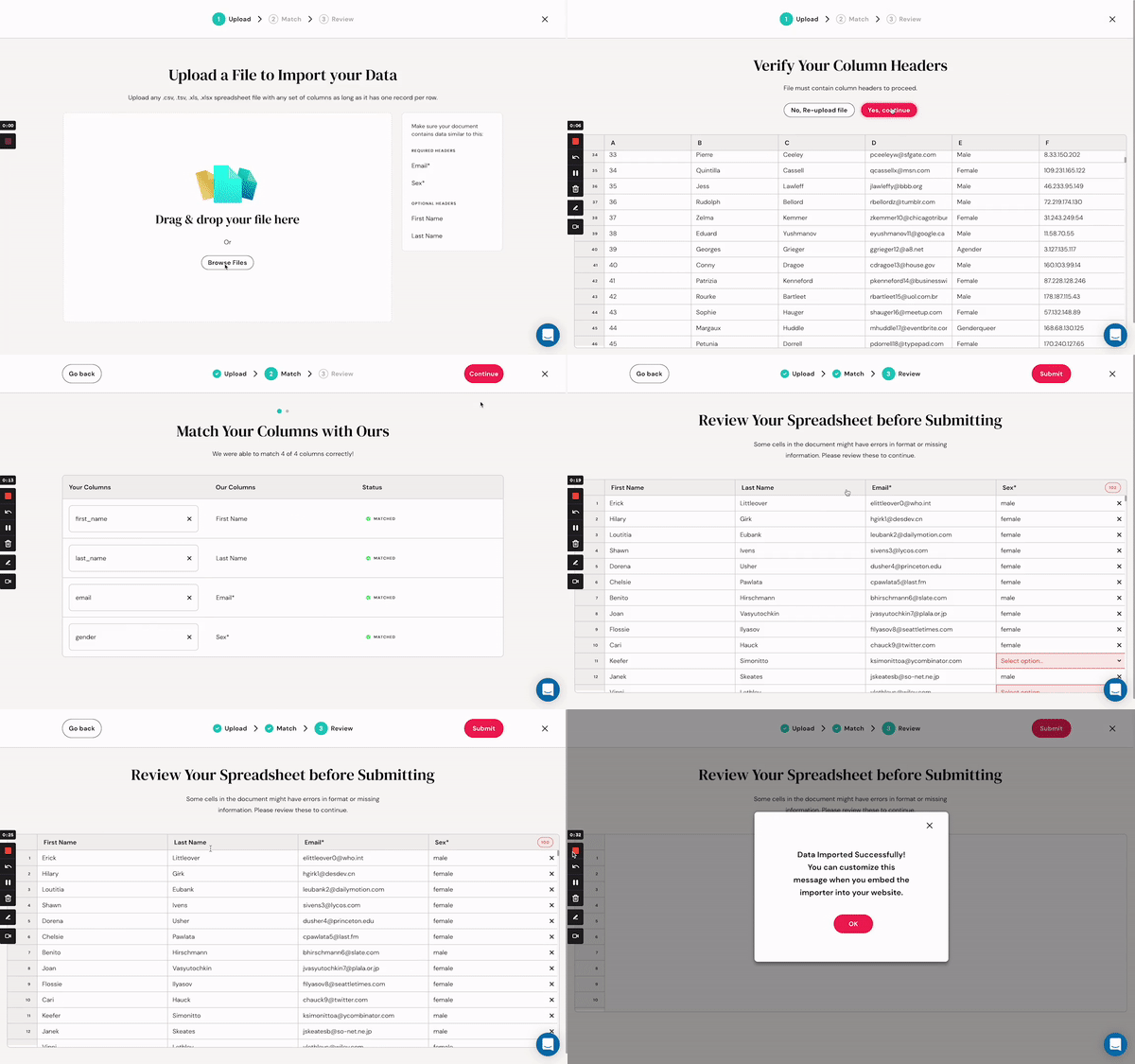
Check it out in action:
<div>
<center>
<img alt="Check it out in action" src="https://wp.swovo.com/wp-content/uploads/2022/07/ezgif-1-242e10926e.gif">
</center>
</div>

## Registration

If you don't have an account yet, you can go over the [Registration](https://fuse-docs.swovo.com/getting-started/registration?utm_source=npmjs&utm_medium=Registration&utm_campaign=NPM).

## Create Your First Importer

If you don’t have an Importer yet, you can go over [Create Your First Importer](https://fuse-docs.swovo.com/getting-started/create-your-first-template?utm_source=npmjs&utm_medium=Create+Your+First+Template&utm_campaign=NPM). Importer represents the fields and validations that your own system accepts, also known as your data schema.

## Getting started

```html
<!DOCTYPE html>
<html>
  <head>
    <script type="text/javascript" src="https://unpkg.com/fuse-importer@latest"></script>
    <script type="text/javascript">
      const organizationApiKey = "YOUR ORGANIZATIONS API KEY";
      const importerId = "YOUR IMPORTER ID";
      const importer = new FuseImporter({
        apiToken: organizationApiKey,
        templateSlug: importerId,
      });

      importer.onValidateRecord = async (record) => {
        // return no frontend validation errors or warnings
        return { errors: {}, warnings: {} };
      };

      importer.onSubmit = async (records) => {
        // an empty hash will tell us the import was successful!
        return {
          message: "Your data was imported successfully",
          errors: {},
        };
      };

      window.showFuseImporter = () => {
        if (organizationApiKey.indexOf("YOUR") !== -1 || importerId.indexOf("YOUR") !== -1) {
          window.confirm("You need to configure your organization api key and Importer id.");
          return;
        }
        importer.show();
      };
    </script>
  </head>

  <body>
    <button onclick="javascript:showFuseImporter()">Show Importer</button>
  </body>
</html>
```

## More Examples

- [Quickstart Examples](https://fuse-docs.swovo.com/installation/quickstart-examples?utm_source=npmjs&utm_medium=More+Examples+Quickstart+Examples&utm_campaign=NPM)
- [React.js](https://fuse-docs.swovo.com/use-cases/react.js-csv-importer?utm_source=npmjs&utm_medium=More+Examples+React&utm_campaign=NPM)
- [Angular](https://fuse-docs.swovo.com/use-cases/angular-csv-importer?utm_source=npmjs&utm_medium=More+Examples+Angular&utm_campaign=NPM)
- [Vue.js](https://fuse-docs.swovo.com/use-cases/vue.js-csv-importer?utm_source=npmjs&utm_medium=More+Examples+Vue&utm_campaign=NPM)

## Usage

```typescript
import FuseImporter from "fuse-importer";

const organizationApiKey = "YOUR ORGANIZATIONS API KEY";
const importerId = "YOUR IMPORTER ID";
const importer = new FuseImporter({
  apiToken: organizationApiKey,
  templateSlug: importerId,
});
```

### FuseImporter Hooks

Hooks allow you to show the importer, run validations, and submit records to your backend.

#### `show`

The show function does exactly what it sounds like; it launches the importer. Ensure you have initialized the importer properly beforehand. Use this function like so:

```typescript
importer.show();
```

#### `close`

The close function allows you to remove the importer from the view.

```typescript
importer.close();
```

#### `onClose`

The onClose function allows you to be notified when the importer is removed from the view.

```typescript
importer.onClose = () => {
  console.log("The importer was closed!");
};
```

#### `onValidateRecord`

The `onValidationRecord` hook is called for each row (record) that a customer uploads. It allows you to specify custom frontend validations and display error messages in the importer for the user to fix. When you create an importer, each column contains an `internal key`. These internal keys represent the

Return values:

- If the record has no errors, we expect you to return an empty object: `return { errors : {}, warnings: {} }`.
- If the record has validation errors/warnings, you can specify them like below.

```typescript
importer.onValidateRecord = async (record) => {
  const errors = {};
  const warnings = {};

  // force emails to include gmail
  if (!record.email?.includes("gmail")) {
    errors["email"] = "Email must be from Gmail";
  }

  // email should be from the domain.
  if (!record.email?.includes("@example.com")) {
    warnings["email"] = "Email is outside the domain";
  }

  return { errors: errors, warnings: warnings };
};
```

The differences between errors and warnings are:

- `warnings` will still allow you to submit the spreadsheet, unlike `errors`.
- `errors` have a higher priority than warnings, which means if a record has both, you will not be able to see warnings until you fix errors first.
- Any `errors` must be fixed before the user submits an importer. The user will not be able to submit without fixing all errors.

#### `formatRecord`

The `formatRecord` hook can be used to format data automatically on behalf of a user. For example, if you have a field called `first_name` and you know that your system always requires `first_name` to be capitalized, you can use this callback to uppercase all `first_name` records like so:

```typescript
importer.formatRecord = async (record) => {
  const newRecord = { ...record };

  // capitalize first letter in first_name
  if (typeof newRecord.first_name === "string") {
    newRecord.first_name = newRecord.first_name.charAt(0).toUpperCase() + newRecord.first_name.slice(1);
  }

  return newRecord;
};
```

#### `onSubmit`

`onSubmit` will pass all records to you after the user has made any necessary corrections to frontend validations. This callback expects you to submit the records to your backend in whatever way you typically would, we do not submit the records for you.

This callback also allows you to pass back any backend errors for specific rows. Each record passed to this callback will have a unique identifier under the key `record._meta.id`. In this case of a backend validation or error occurring, you can tell the importer to show a specific error to the user for a row. Note that after submission, only records with errors will remain visible to the user.

Return values:

- If there were no backend errors, pass back an empty errors object and a message to show to the user like so:

```typescript
importer.onSubmit = async (records) => {
  // submit to backend here
  let message = "Data imported successfully";
  return {
    message,
    errors: {},
  };
};
```

- If you find an error with a record in your backend, you can tell the importer to show the error to the user like so:

```typescript
importer.onSubmit = async (records) => {
  // submit to your backend here

  return {
    errors: {
      [records[0]._meta.id]: {
        email: "Email is already taken. Emails must be unique.",
        first_name: "First Name must be capitalized.",
      },
    },
  };
};
```

---
_Source: https://npm.io/package/fuse-importer · Machine-readable twin of the npm.io package page. Health data is recomputed on every publish._
