# getmediaelement
> This library generates HTML Audio/Video element with rich user-interface and advance media controls. It gives you full control over each control button; and its functionality!
Latest version **1.0.2** (published 2018-12-26) · MIT license · 0 weekly downloads
## Install
```sh
npm install getmediaelement
pnpm add getmediaelement
yarn add getmediaelement
bun add getmediaelement
```
## Health
**Score 20/100 (F)** — status: abandoned.
Positive: no vulnerabilities; popular repo.
Warnings: low downloads; no types; no esm support.
Negative: abandoned; low maintenance score.
## Facts
| | |
|---|---|
| Version | 1.0.2 |
| Published | 2018-12-26 |
| First published | 2018-12-26 |
| Weekly downloads | 0 |
| License | MIT |
| TypeScript types | none |
| Module format | CommonJS |
| Dependencies | 0 |
| Unpacked size | 64.3 KB |
| Known vulnerabilities | 0 |
| Install scripts | no |
| GitHub stars | 12052 |
| Author | Muaz Khan |
| Maintainers | muaz-khan |
| Keywords | webrtc, getMediaElement, webrtc-library, library, javascript, rtcweb, webrtc-experiment, javascript-library, muaz, muaz-khan |
## Links
- npm: https://www.npmjs.com/package/getmediaelement
- Repository: https://github.com/muaz-khan/WebRTC-Experiment
- Homepage: https://www.webrtc-experiment.com/getMediaElement/
- Issues: https://github.com/muaz-khan/WebRTC-Experiment/issues
- npm.io page: https://npm.io/package/getmediaelement
## Recent versions
- 1.0.2 (latest) — 2018-12-26
- 1.0.1 — 2018-12-26
- 1.0.0 — 2018-12-26
## README
## getMediaElement.js: A reusable library for all WebRTC applications! / [Demo](https://www.webrtc-experiment.com/getMediaElement/)
[](https://npmjs.org/package/getmediaelement) [](https://npmjs.org/package/getmediaelement)
This library generates HTML Audio/Video element with rich user-interface and advance media controls. It gives you full control over each control button; and its functionality!
```html
```
```sh
npm install getMediaElement
```
## A working example:
Audio+Video Stream:
```javascript
navigator.mediaDevices.getUserMedia({ audio: true, video: true }).then(function (audioVideoStream) {
var mediaElement = getMediaElement(audioVideoStream);
// append to HTML-BODY element
document.body.appendChild(mediaElement);
// you can acccess audio/video elements using "media" property
mediaElement.media.play();
});
```
If your media stream contains video tracks; then it will create HTMLVideoElement; otherwise; it will create HTMLAudioElement.
```javascript
// you can pass HTML Video Element
document.body.appendChild( getMediaElement(HTMLVideoElement) );
// you can pass HTML Audio Element
document.body.appendChild( getMediaElement(HTMLAudioElement) );
```
For audio-only element; you can pass "title":
```javascript
document.body.appendChild( getMediaElement(HTMLAudioElement) );
document.body.appendChild( getMediaElement(HTMLAudioElement, {
title: 'User Name',
buttons: [] // use this line only if you want to hide audio-recorder button
}) );
```
## Features
1. You can capture `onMuted` event; and disable audio/video tracks accordingly; or hold streams using "inactive" attribute in the SDP!
2. You can capture `onUnMuted` event; and enable audio/video tracks accordingly; or unhold streams using "sendrecv" attribute in the SDP!
3. You can capture `onRecordingStarted` and use RecordRTC to record audio/video streams.
4. You can capture `onRecordingStopped` and invoke `stopRecording` method of RecordRTC to stop audio/video recording. You can write recorded audio/video blobs to indexed-db using RecordRTC's newly introduced `writeToDisk` and `getFromDisk` methods.
5. You can capture `onZoomin` to understand that video is NOW in full-screen mode.
6. You can capture `onZoomout` to understand that video is NOW in normal mode.
7. You can capture `onTakeSnapshot` which will be fired if someone tries to take snapshot.
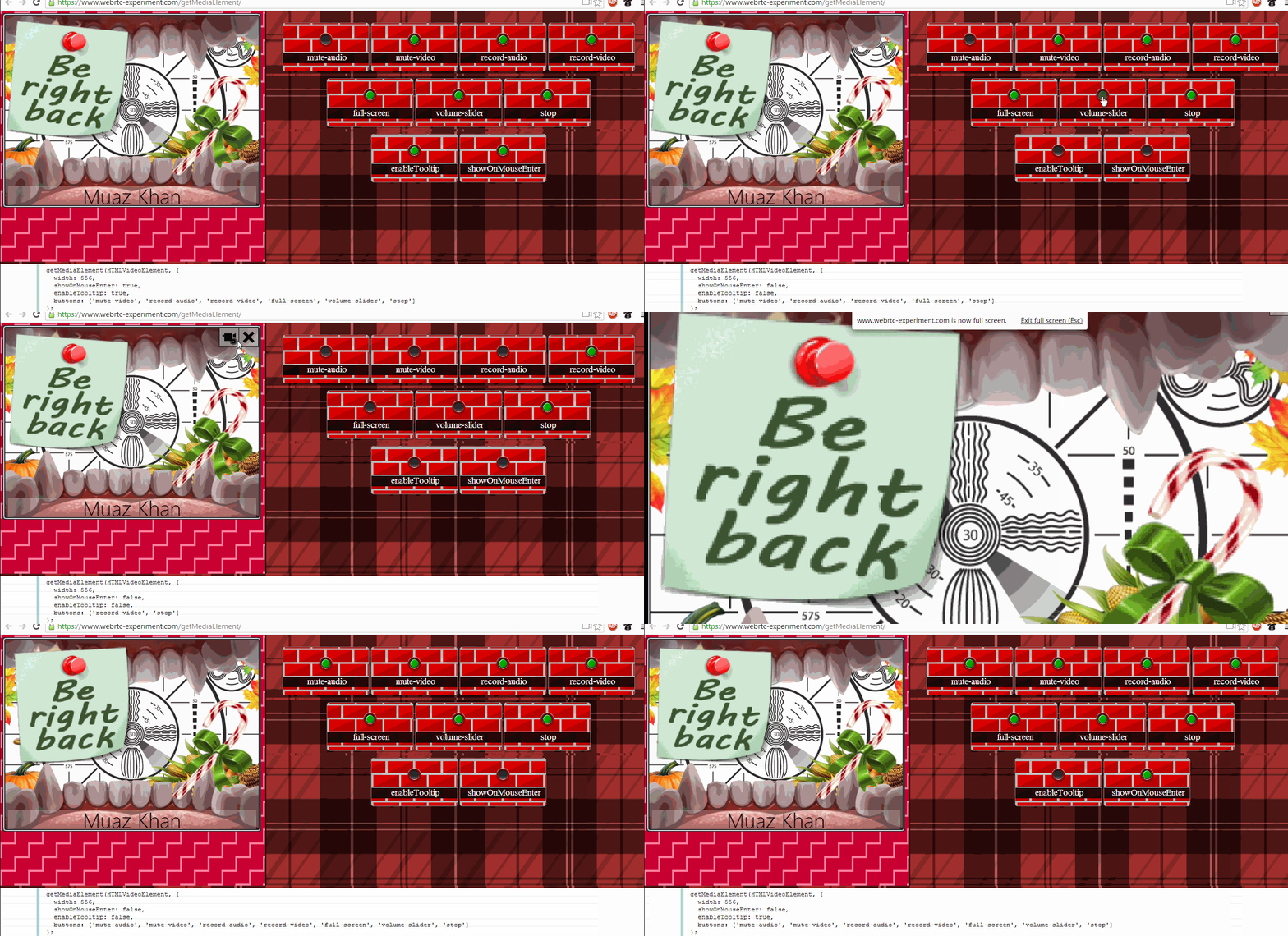
8. You can control `buttons` array to control which button should be displayed on media element.
9. You can use `toggle` method to change buttons' state at runtime!
10. You can manually pass "toggle" object to force default behaviour.
11. You can use `showOnMouseEnter` to control whether buttons should be displayed on mouse enter.
## Structure of getMediaElement.js
```javascript
var mediaElement = getMediaElement(HTMLVideoElement || HTMLVideoElement || MediaStream, {
// buttons you want to display
buttons: ['mute-audio', 'mute-video', 'record-audio', 'record-video', 'full-screen', 'volume-slider', 'stop'],
// to override default behaviour
toggle: ['mute-audio', 'mute-video', 'record-audio', 'record-video'],
// fired whe audio or video is muted
onMuted: function (type) { },
// fired whe audio or video is unmuted
onUnMuted: function (type) { },
// fired whe audio or video started recording
onRecordingStarted: function (type) { },
// fired whe audio or video stopped recording
onRecordingStopped: function (type) { },
// fired for full-screen mode
onZoomin: function () { },
// fired for leaving full-screen mode
onZoomout: function () { },
// fired when call is dropped; or user is ejected
onStopped: function () { },
// fired when take-snapshot button is clicked
onTakeSnapshot: function (snapshot) { },
width: 'media-element-width',
height: 'media-element-height',
showOnMouseEnter: true,
volume: 100
});
```
## getMediaElement objects takes two arguments:
1. HTMLVideoElement or HTMLAudioElement or MediaStream
2. Options
Second argument accepts following objects and events:
1. `buttons`; which is an array, allows you control media buttons to be displayed.
2. `width`; you can customize width of the media-container element by passing this object. Its default value is about "36%-of-screen".
3. `height`; you can customize height of the media-container element by passing this object. Its default value is "auto".
4. `onMuted`; which is fired if audio or video stream is muted. Remember, getMediaElement.js just mutes audio/video locally; you need to send websocket messages in `onMuted` event to remote party.
5. `onUnMuted`; which is reverse of `onMuted`.
6. `onRecordingStarted`; you can implement audio-recording options using RecordRTC!
7. `onRecordingStopped`; RecordRTC supports `stopRecording` method as well!
8. `onZoomin`; it is fired when media element is in full-screen mode.
9. `onZoomout`; it is fired when user leaves full-screen mode either by presssing `ESC` key; or by clicking a button.
10. `onTakeSnapshot`; it is fired when user clicks to take snapshot. Snapshot is passed over callback in PNG format.
## Possible options for `buttons` array
1. `mute-audio`
2. `mute-video`
3. `record-audio`
4. `record-video`
5. `full-screen`
6. `volume-slider`
7. `stop`
## Possible options for `toggle` array
1. `mute-audio`
2. `mute-video`
3. `record-audio`
4. `record-video`
## Difference between `toggle` array and `toggle` method
`toggle` method allows you toggle buttons at runtime:
```javascript
mediaElement.toggle('mute-audio');
```
However, `toggle` array is only be passed once as second argument:
```javascript
var mediaElement = getMediaElement(MediaStream, {
toggle: ['mute-audio', 'mute-video', 'record-audio', 'record-video']
});
```
## `toggle` method
```javascript
getMediaElement(firstArgument, secondArgument).toggle(options)
```
Using "toggle" method; you can customize media control buttons' state at runtime; e.g. Mute/UnMute or Zoom-in/Zoom-out etc.
```javascript
var mediaElement = getMediaElement(HTMLVideoElement);
// anytime, later
mediaElement.toggle(['mute-audio']);
mediaElement.toggle(['mute-audio', 'mute-video']);
```
"toggle" method accepts following values:
1. `mute-audio`
2. `mute-video`
3. `record-audio`
4. `record-video`
5. `stop`
"stop" be used to auto-remove media element:
```javascript
mediaElement.toggle(['stop']);
// or simply; as a string argument, instead of an array
mediaElement.toggle('stop');
```
## How to acccess HTMLAudioElement or HTMLVideoElement?
There is a `media` property that returns HTMLAudioElement or HTMLVideoElement:
```javascript
var mediaElement = getMediaElement(MediaStream, {
toggle: ['mute-audio', 'mute-video', 'record-audio', 'record-video']
});
// Lets play the Video
mediaElement.media.play();
// Lets pause the Audio
mediaElement.media.pause();
// Lets change width/height at runtime
mediaElement.style.width = mediaElement.media.videoWidth + 'px';
mediaElement.style.height = mediaElement.media.videoHeight + 'px';
```
## getMediaElement and [RTCMultiConnection.js](http://www.RTCMultiConnection.org/docs/)
```javascript
var videosContainer = document.body;
// www.RTCMultiConnection.org/docs/onstream/
rtcMultiConnection.onstream = function(e) {
var mediaElement = getMediaElement(e.mediaElement, {
width: (videosContainer.clientWidth / 2) - 50,
buttons: ['mute-audio', 'mute-video', 'record-audio', 'record-video', 'full-screen', 'volume-slider', 'stop', 'take-snapshot'],
toggle: e.type == 'local' ? ['mute-audio'] : [],
onMuted: function(type) {
// www.RTCMultiConnection.org/docs/mute/
rtcMultiConnection.streams[e.streamid].mute({
audio: type == 'audio',
video: type == 'video'
});
},
onUnMuted: function(type) {
// www.RTCMultiConnection.org/docs/unmute/
rtcMultiConnection.streams[e.streamid].unmute({
audio: type == 'audio',
video: type == 'video'
});
},
onRecordingStarted: function(type) {
// www.RTCMultiConnection.org/docs/startRecording/
rtcMultiConnection.streams[e.streamid].startRecording({
audio: type == 'audio',
video: type == 'video'
});
},
onRecordingStopped: function(type) {
// www.RTCMultiConnection.org/docs/stopRecording/
rtcMultiConnection.streams[e.streamid].stopRecording(function(blob) {
if (blob.audio) rtcMultiConnection.saveToDisk(blob.audio);
else if (blob.video) rtcMultiConnection.saveToDisk(blob.audio);
else rtcMultiConnection.saveToDisk(blob);
}, type);
},
onStopped: function() {
rtcMultiConnection.peers[e.userid].drop();
},
onTakeSnapshot: function() {
if (!e.stream.getVideoTracks().length) return;
// www.RTCMultiConnection.org/docs/takeSnapshot/
rtcMultiConnection.takeSnapshot(e.userid, function(snapshot) {
// on taking snapshot!
});
}
});
videosContainer.insertBefore(mediaElement, videosContainer.firstChild);
};
// www.RTCMultiConnection.org/docs/onstreamended/
rtcMultiConnection.onstreamended = function(e) {
if (e.mediaElement.parentNode && e.mediaElement.parentNode.parentNode && e.mediaElement.parentNode.parentNode.parentNode) {
e.mediaElement.parentNode.parentNode.parentNode.removeChild(e.mediaElement.parentNode.parentNode);
}
};
```
## License
[getMediaElement](https://github.com/muaz-khan/WebRTC-Experiment/tree/master/getMediaElement) is released under [MIT licence](https://www.webrtc-experiment.com/licence/) . Copyright (c) 2013 [Muaz Khan](https://plus.google.com/100325991024054712503).
---
_Source: https://npm.io/package/getmediaelement · Machine-readable twin of the npm.io package page. Health data is recomputed on every publish._
 ## A working example:
Audio+Video Stream:
```javascript
navigator.mediaDevices.getUserMedia({ audio: true, video: true }).then(function (audioVideoStream) {
var mediaElement = getMediaElement(audioVideoStream);
// append to HTML-BODY element
document.body.appendChild(mediaElement);
// you can acccess audio/video elements using "media" property
mediaElement.media.play();
});
```
If your media stream contains video tracks; then it will create HTMLVideoElement; otherwise; it will create HTMLAudioElement.
```javascript
// you can pass HTML Video Element
document.body.appendChild( getMediaElement(HTMLVideoElement) );
// you can pass HTML Audio Element
document.body.appendChild( getMediaElement(HTMLAudioElement) );
```
For audio-only element; you can pass "title":
```javascript
document.body.appendChild( getMediaElement(HTMLAudioElement) );
document.body.appendChild( getMediaElement(HTMLAudioElement, {
title: 'User Name',
buttons: [] // use this line only if you want to hide audio-recorder button
}) );
```
## Features
1. You can capture `onMuted` event; and disable audio/video tracks accordingly; or hold streams using "inactive" attribute in the SDP!
2. You can capture `onUnMuted` event; and enable audio/video tracks accordingly; or unhold streams using "sendrecv" attribute in the SDP!
3. You can capture `onRecordingStarted` and use RecordRTC to record audio/video streams.
4. You can capture `onRecordingStopped` and invoke `stopRecording` method of RecordRTC to stop audio/video recording. You can write recorded audio/video blobs to indexed-db using RecordRTC's newly introduced `writeToDisk` and `getFromDisk` methods.
5. You can capture `onZoomin` to understand that video is NOW in full-screen mode.
6. You can capture `onZoomout` to understand that video is NOW in normal mode.
7. You can capture `onTakeSnapshot` which will be fired if someone tries to take snapshot.
8. You can control `buttons` array to control which button should be displayed on media element.
9. You can use `toggle` method to change buttons' state at runtime!
10. You can manually pass "toggle" object to force default behaviour.
11. You can use `showOnMouseEnter` to control whether buttons should be displayed on mouse enter.
## Structure of getMediaElement.js
```javascript
var mediaElement = getMediaElement(HTMLVideoElement || HTMLVideoElement || MediaStream, {
// buttons you want to display
buttons: ['mute-audio', 'mute-video', 'record-audio', 'record-video', 'full-screen', 'volume-slider', 'stop'],
// to override default behaviour
toggle: ['mute-audio', 'mute-video', 'record-audio', 'record-video'],
// fired whe audio or video is muted
onMuted: function (type) { },
// fired whe audio or video is unmuted
onUnMuted: function (type) { },
// fired whe audio or video started recording
onRecordingStarted: function (type) { },
// fired whe audio or video stopped recording
onRecordingStopped: function (type) { },
// fired for full-screen mode
onZoomin: function () { },
// fired for leaving full-screen mode
onZoomout: function () { },
// fired when call is dropped; or user is ejected
onStopped: function () { },
// fired when take-snapshot button is clicked
onTakeSnapshot: function (snapshot) { },
width: 'media-element-width',
height: 'media-element-height',
showOnMouseEnter: true,
volume: 100
});
```
## getMediaElement objects takes two arguments:
1. HTMLVideoElement or HTMLAudioElement or MediaStream
2. Options
Second argument accepts following objects and events:
1. `buttons`; which is an array, allows you control media buttons to be displayed.
2. `width`; you can customize width of the media-container element by passing this object. Its default value is about "36%-of-screen".
3. `height`; you can customize height of the media-container element by passing this object. Its default value is "auto".
4. `onMuted`; which is fired if audio or video stream is muted. Remember, getMediaElement.js just mutes audio/video locally; you need to send websocket messages in `onMuted` event to remote party.
5. `onUnMuted`; which is reverse of `onMuted`.
6. `onRecordingStarted`; you can implement audio-recording options using RecordRTC!
7. `onRecordingStopped`; RecordRTC supports `stopRecording` method as well!
8. `onZoomin`; it is fired when media element is in full-screen mode.
9. `onZoomout`; it is fired when user leaves full-screen mode either by presssing `ESC` key; or by clicking a button.
10. `onTakeSnapshot`; it is fired when user clicks to take snapshot. Snapshot is passed over callback in PNG format.
## Possible options for `buttons` array
1. `mute-audio`
2. `mute-video`
3. `record-audio`
4. `record-video`
5. `full-screen`
6. `volume-slider`
7. `stop`
## Possible options for `toggle` array
1. `mute-audio`
2. `mute-video`
3. `record-audio`
4. `record-video`
## Difference between `toggle` array and `toggle` method
`toggle` method allows you toggle buttons at runtime:
```javascript
mediaElement.toggle('mute-audio');
```
However, `toggle` array is only be passed once as second argument:
```javascript
var mediaElement = getMediaElement(MediaStream, {
toggle: ['mute-audio', 'mute-video', 'record-audio', 'record-video']
});
```
## `toggle` method
```javascript
getMediaElement(firstArgument, secondArgument).toggle(options)
```
Using "toggle" method; you can customize media control buttons' state at runtime; e.g. Mute/UnMute or Zoom-in/Zoom-out etc.
```javascript
var mediaElement = getMediaElement(HTMLVideoElement);
// anytime, later
mediaElement.toggle(['mute-audio']);
mediaElement.toggle(['mute-audio', 'mute-video']);
```
"toggle" method accepts following values:
1. `mute-audio`
2. `mute-video`
3. `record-audio`
4. `record-video`
5. `stop`
"stop" be used to auto-remove media element:
```javascript
mediaElement.toggle(['stop']);
// or simply; as a string argument, instead of an array
mediaElement.toggle('stop');
```
## How to acccess HTMLAudioElement or HTMLVideoElement?
There is a `media` property that returns HTMLAudioElement or HTMLVideoElement:
```javascript
var mediaElement = getMediaElement(MediaStream, {
toggle: ['mute-audio', 'mute-video', 'record-audio', 'record-video']
});
// Lets play the Video
mediaElement.media.play();
// Lets pause the Audio
mediaElement.media.pause();
// Lets change width/height at runtime
mediaElement.style.width = mediaElement.media.videoWidth + 'px';
mediaElement.style.height = mediaElement.media.videoHeight + 'px';
```
## getMediaElement and [RTCMultiConnection.js](http://www.RTCMultiConnection.org/docs/)
```javascript
var videosContainer = document.body;
// www.RTCMultiConnection.org/docs/onstream/
rtcMultiConnection.onstream = function(e) {
var mediaElement = getMediaElement(e.mediaElement, {
width: (videosContainer.clientWidth / 2) - 50,
buttons: ['mute-audio', 'mute-video', 'record-audio', 'record-video', 'full-screen', 'volume-slider', 'stop', 'take-snapshot'],
toggle: e.type == 'local' ? ['mute-audio'] : [],
onMuted: function(type) {
// www.RTCMultiConnection.org/docs/mute/
rtcMultiConnection.streams[e.streamid].mute({
audio: type == 'audio',
video: type == 'video'
});
},
onUnMuted: function(type) {
// www.RTCMultiConnection.org/docs/unmute/
rtcMultiConnection.streams[e.streamid].unmute({
audio: type == 'audio',
video: type == 'video'
});
},
onRecordingStarted: function(type) {
// www.RTCMultiConnection.org/docs/startRecording/
rtcMultiConnection.streams[e.streamid].startRecording({
audio: type == 'audio',
video: type == 'video'
});
},
onRecordingStopped: function(type) {
// www.RTCMultiConnection.org/docs/stopRecording/
rtcMultiConnection.streams[e.streamid].stopRecording(function(blob) {
if (blob.audio) rtcMultiConnection.saveToDisk(blob.audio);
else if (blob.video) rtcMultiConnection.saveToDisk(blob.audio);
else rtcMultiConnection.saveToDisk(blob);
}, type);
},
onStopped: function() {
rtcMultiConnection.peers[e.userid].drop();
},
onTakeSnapshot: function() {
if (!e.stream.getVideoTracks().length) return;
// www.RTCMultiConnection.org/docs/takeSnapshot/
rtcMultiConnection.takeSnapshot(e.userid, function(snapshot) {
// on taking snapshot!
});
}
});
videosContainer.insertBefore(mediaElement, videosContainer.firstChild);
};
// www.RTCMultiConnection.org/docs/onstreamended/
rtcMultiConnection.onstreamended = function(e) {
if (e.mediaElement.parentNode && e.mediaElement.parentNode.parentNode && e.mediaElement.parentNode.parentNode.parentNode) {
e.mediaElement.parentNode.parentNode.parentNode.removeChild(e.mediaElement.parentNode.parentNode);
}
};
```
## License
[getMediaElement](https://github.com/muaz-khan/WebRTC-Experiment/tree/master/getMediaElement) is released under [MIT licence](https://www.webrtc-experiment.com/licence/) . Copyright (c) 2013 [Muaz Khan](https://plus.google.com/100325991024054712503).
---
_Source: https://npm.io/package/getmediaelement · Machine-readable twin of the npm.io package page. Health data is recomputed on every publish._
## A working example:
Audio+Video Stream:
```javascript
navigator.mediaDevices.getUserMedia({ audio: true, video: true }).then(function (audioVideoStream) {
var mediaElement = getMediaElement(audioVideoStream);
// append to HTML-BODY element
document.body.appendChild(mediaElement);
// you can acccess audio/video elements using "media" property
mediaElement.media.play();
});
```
If your media stream contains video tracks; then it will create HTMLVideoElement; otherwise; it will create HTMLAudioElement.
```javascript
// you can pass HTML Video Element
document.body.appendChild( getMediaElement(HTMLVideoElement) );
// you can pass HTML Audio Element
document.body.appendChild( getMediaElement(HTMLAudioElement) );
```
For audio-only element; you can pass "title":
```javascript
document.body.appendChild( getMediaElement(HTMLAudioElement) );
document.body.appendChild( getMediaElement(HTMLAudioElement, {
title: 'User Name',
buttons: [] // use this line only if you want to hide audio-recorder button
}) );
```
## Features
1. You can capture `onMuted` event; and disable audio/video tracks accordingly; or hold streams using "inactive" attribute in the SDP!
2. You can capture `onUnMuted` event; and enable audio/video tracks accordingly; or unhold streams using "sendrecv" attribute in the SDP!
3. You can capture `onRecordingStarted` and use RecordRTC to record audio/video streams.
4. You can capture `onRecordingStopped` and invoke `stopRecording` method of RecordRTC to stop audio/video recording. You can write recorded audio/video blobs to indexed-db using RecordRTC's newly introduced `writeToDisk` and `getFromDisk` methods.
5. You can capture `onZoomin` to understand that video is NOW in full-screen mode.
6. You can capture `onZoomout` to understand that video is NOW in normal mode.
7. You can capture `onTakeSnapshot` which will be fired if someone tries to take snapshot.
8. You can control `buttons` array to control which button should be displayed on media element.
9. You can use `toggle` method to change buttons' state at runtime!
10. You can manually pass "toggle" object to force default behaviour.
11. You can use `showOnMouseEnter` to control whether buttons should be displayed on mouse enter.
## Structure of getMediaElement.js
```javascript
var mediaElement = getMediaElement(HTMLVideoElement || HTMLVideoElement || MediaStream, {
// buttons you want to display
buttons: ['mute-audio', 'mute-video', 'record-audio', 'record-video', 'full-screen', 'volume-slider', 'stop'],
// to override default behaviour
toggle: ['mute-audio', 'mute-video', 'record-audio', 'record-video'],
// fired whe audio or video is muted
onMuted: function (type) { },
// fired whe audio or video is unmuted
onUnMuted: function (type) { },
// fired whe audio or video started recording
onRecordingStarted: function (type) { },
// fired whe audio or video stopped recording
onRecordingStopped: function (type) { },
// fired for full-screen mode
onZoomin: function () { },
// fired for leaving full-screen mode
onZoomout: function () { },
// fired when call is dropped; or user is ejected
onStopped: function () { },
// fired when take-snapshot button is clicked
onTakeSnapshot: function (snapshot) { },
width: 'media-element-width',
height: 'media-element-height',
showOnMouseEnter: true,
volume: 100
});
```
## getMediaElement objects takes two arguments:
1. HTMLVideoElement or HTMLAudioElement or MediaStream
2. Options
Second argument accepts following objects and events:
1. `buttons`; which is an array, allows you control media buttons to be displayed.
2. `width`; you can customize width of the media-container element by passing this object. Its default value is about "36%-of-screen".
3. `height`; you can customize height of the media-container element by passing this object. Its default value is "auto".
4. `onMuted`; which is fired if audio or video stream is muted. Remember, getMediaElement.js just mutes audio/video locally; you need to send websocket messages in `onMuted` event to remote party.
5. `onUnMuted`; which is reverse of `onMuted`.
6. `onRecordingStarted`; you can implement audio-recording options using RecordRTC!
7. `onRecordingStopped`; RecordRTC supports `stopRecording` method as well!
8. `onZoomin`; it is fired when media element is in full-screen mode.
9. `onZoomout`; it is fired when user leaves full-screen mode either by presssing `ESC` key; or by clicking a button.
10. `onTakeSnapshot`; it is fired when user clicks to take snapshot. Snapshot is passed over callback in PNG format.
## Possible options for `buttons` array
1. `mute-audio`
2. `mute-video`
3. `record-audio`
4. `record-video`
5. `full-screen`
6. `volume-slider`
7. `stop`
## Possible options for `toggle` array
1. `mute-audio`
2. `mute-video`
3. `record-audio`
4. `record-video`
## Difference between `toggle` array and `toggle` method
`toggle` method allows you toggle buttons at runtime:
```javascript
mediaElement.toggle('mute-audio');
```
However, `toggle` array is only be passed once as second argument:
```javascript
var mediaElement = getMediaElement(MediaStream, {
toggle: ['mute-audio', 'mute-video', 'record-audio', 'record-video']
});
```
## `toggle` method
```javascript
getMediaElement(firstArgument, secondArgument).toggle(options)
```
Using "toggle" method; you can customize media control buttons' state at runtime; e.g. Mute/UnMute or Zoom-in/Zoom-out etc.
```javascript
var mediaElement = getMediaElement(HTMLVideoElement);
// anytime, later
mediaElement.toggle(['mute-audio']);
mediaElement.toggle(['mute-audio', 'mute-video']);
```
"toggle" method accepts following values:
1. `mute-audio`
2. `mute-video`
3. `record-audio`
4. `record-video`
5. `stop`
"stop" be used to auto-remove media element:
```javascript
mediaElement.toggle(['stop']);
// or simply; as a string argument, instead of an array
mediaElement.toggle('stop');
```
## How to acccess HTMLAudioElement or HTMLVideoElement?
There is a `media` property that returns HTMLAudioElement or HTMLVideoElement:
```javascript
var mediaElement = getMediaElement(MediaStream, {
toggle: ['mute-audio', 'mute-video', 'record-audio', 'record-video']
});
// Lets play the Video
mediaElement.media.play();
// Lets pause the Audio
mediaElement.media.pause();
// Lets change width/height at runtime
mediaElement.style.width = mediaElement.media.videoWidth + 'px';
mediaElement.style.height = mediaElement.media.videoHeight + 'px';
```
## getMediaElement and [RTCMultiConnection.js](http://www.RTCMultiConnection.org/docs/)
```javascript
var videosContainer = document.body;
// www.RTCMultiConnection.org/docs/onstream/
rtcMultiConnection.onstream = function(e) {
var mediaElement = getMediaElement(e.mediaElement, {
width: (videosContainer.clientWidth / 2) - 50,
buttons: ['mute-audio', 'mute-video', 'record-audio', 'record-video', 'full-screen', 'volume-slider', 'stop', 'take-snapshot'],
toggle: e.type == 'local' ? ['mute-audio'] : [],
onMuted: function(type) {
// www.RTCMultiConnection.org/docs/mute/
rtcMultiConnection.streams[e.streamid].mute({
audio: type == 'audio',
video: type == 'video'
});
},
onUnMuted: function(type) {
// www.RTCMultiConnection.org/docs/unmute/
rtcMultiConnection.streams[e.streamid].unmute({
audio: type == 'audio',
video: type == 'video'
});
},
onRecordingStarted: function(type) {
// www.RTCMultiConnection.org/docs/startRecording/
rtcMultiConnection.streams[e.streamid].startRecording({
audio: type == 'audio',
video: type == 'video'
});
},
onRecordingStopped: function(type) {
// www.RTCMultiConnection.org/docs/stopRecording/
rtcMultiConnection.streams[e.streamid].stopRecording(function(blob) {
if (blob.audio) rtcMultiConnection.saveToDisk(blob.audio);
else if (blob.video) rtcMultiConnection.saveToDisk(blob.audio);
else rtcMultiConnection.saveToDisk(blob);
}, type);
},
onStopped: function() {
rtcMultiConnection.peers[e.userid].drop();
},
onTakeSnapshot: function() {
if (!e.stream.getVideoTracks().length) return;
// www.RTCMultiConnection.org/docs/takeSnapshot/
rtcMultiConnection.takeSnapshot(e.userid, function(snapshot) {
// on taking snapshot!
});
}
});
videosContainer.insertBefore(mediaElement, videosContainer.firstChild);
};
// www.RTCMultiConnection.org/docs/onstreamended/
rtcMultiConnection.onstreamended = function(e) {
if (e.mediaElement.parentNode && e.mediaElement.parentNode.parentNode && e.mediaElement.parentNode.parentNode.parentNode) {
e.mediaElement.parentNode.parentNode.parentNode.removeChild(e.mediaElement.parentNode.parentNode);
}
};
```
## License
[getMediaElement](https://github.com/muaz-khan/WebRTC-Experiment/tree/master/getMediaElement) is released under [MIT licence](https://www.webrtc-experiment.com/licence/) . Copyright (c) 2013 [Muaz Khan](https://plus.google.com/100325991024054712503).
---
_Source: https://npm.io/package/getmediaelement · Machine-readable twin of the npm.io package page. Health data is recomputed on every publish._