# git-cm
> a simple version of the git commit
Latest version **1.1.2** (published 2023-09-15) · ISC license · 0 weekly downloads
## Install
```sh
npm install git-cm
pnpm add git-cm
yarn add git-cm
bun add git-cm
```
Provides the commands `cm`, `git-cm`.
## Health
**Score 15/100 (F)** — status: abandoned.
Positive: no vulnerabilities.
Warnings: low downloads; no types; no esm support.
Negative: abandoned; low maintenance score.
## Facts
| | |
|---|---|
| Version | 1.1.2 |
| Published | 2023-09-15 |
| First published | 2023-09-03 |
| Weekly downloads | 0 |
| License | ISC |
| TypeScript types | none |
| Module format | CommonJS |
| Dependencies | 9 |
| Unpacked size | 1.2 MB |
| Known vulnerabilities | 0 |
| Install scripts | no |
| Author | chenyajin |
| Maintainers | yajinchen |
| Keywords | git, commit, message, cli |
## Links
- npm: https://www.npmjs.com/package/git-cm
- Homepage: https://github.com/chenyajin/git-cm#readme
- Issues: https://github.com/chenyajin/git-cm/issues
- npm.io page: https://npm.io/package/git-cm
## Dependencies (9)
- [ora](https://npm.io/package/ora.md) 5.4.1
- [axios](https://npm.io/package/axios.md) ^1.4.0
- [chalk](https://npm.io/package/chalk.md) ~4.1.2
- [yargs](https://npm.io/package/yargs.md) ^17.7.2
- [dedent](https://npm.io/package/dedent.md) 0.7.0
- [copy-dir](https://npm.io/package/copy-dir.md) ^1.3.0
- [fs-extra](https://npm.io/package/fs-extra.md) ^11.1.1
- [inquirer](https://npm.io/package/inquirer.md) 8.2.5
- [mustache](https://npm.io/package/mustache.md) ^4.2.0
## Alternatives
- [@salesforce/cli](https://npm.io/package/@salesforce/cli.md) — 389.7K weekly downloads
- [@mintlify/cli](https://npm.io/package/@mintlify/cli.md) — 208.9K weekly downloads
- [@grafana/e2e-selectors](https://npm.io/package/@grafana/e2e-selectors.md) — 128.7K weekly downloads
- [mintlify](https://npm.io/package/mintlify.md) — 112.0K weekly downloads
- [@intlayer/cli](https://npm.io/package/@intlayer/cli.md) — 22.8K weekly downloads
## Recent versions
- 1.1.2 (latest) — 2023-09-15
- 1.1.1 — 2023-09-15
- 1.1.0 — 2023-09-07
- 1.0.0 — 2023-09-03
## README
git-cm 👋



- [English](https://github.com/chenyajin/git-cm/blob/main/README.md)
- [简体中文](https://github.com/chenyajin/git-cm/blob/main/README-zh.md)
> A lightweight, independent, 0 configurations git commit message tool
>
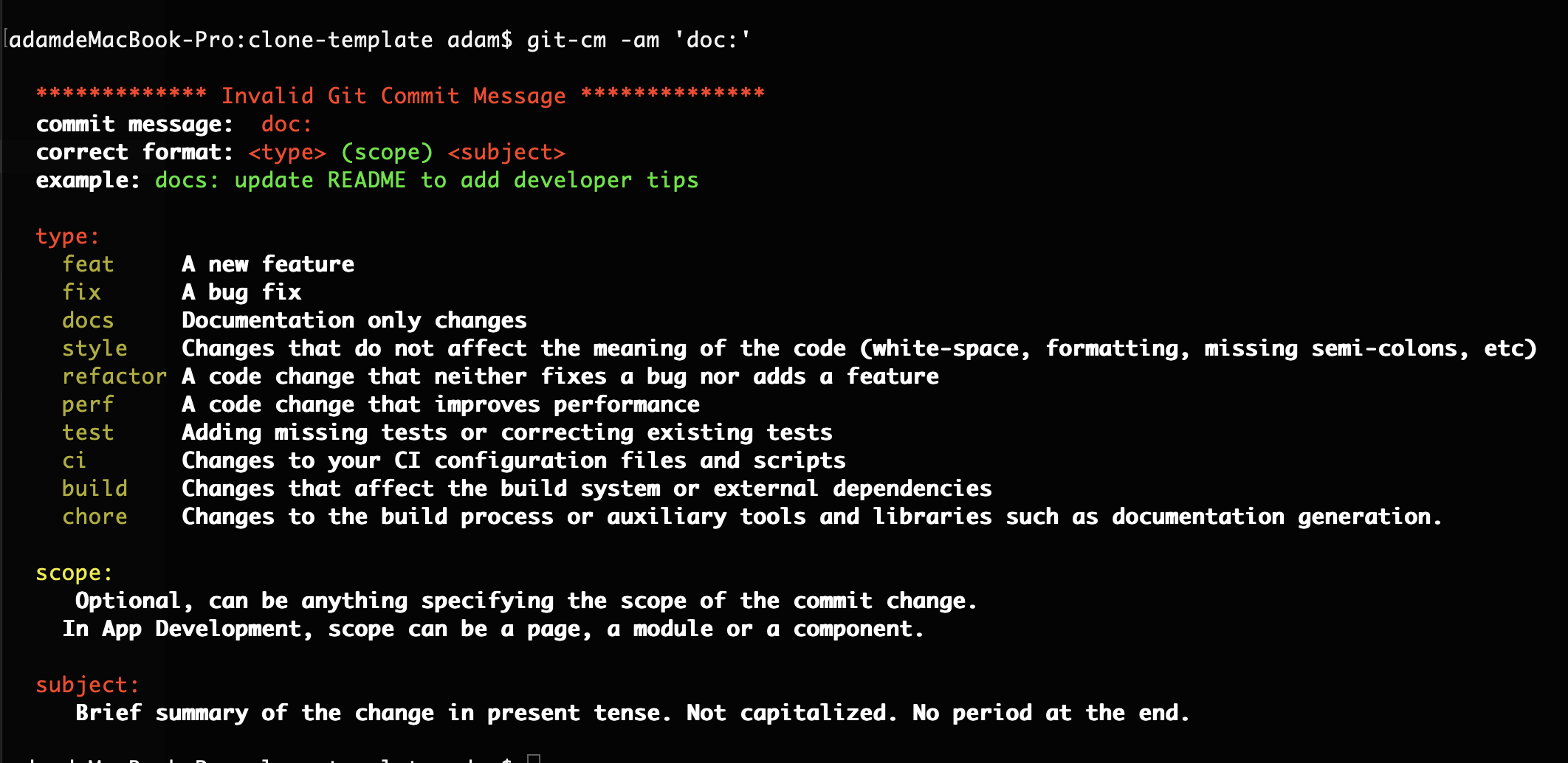
> ✨ Allow one-time input of the commit message and then verify it to ensure compliance with [AngularJS's commit message convention](https://github.com/angular/angular.js/blob/master/DEVELOPERS.md#-git-commit-guidelines).
>
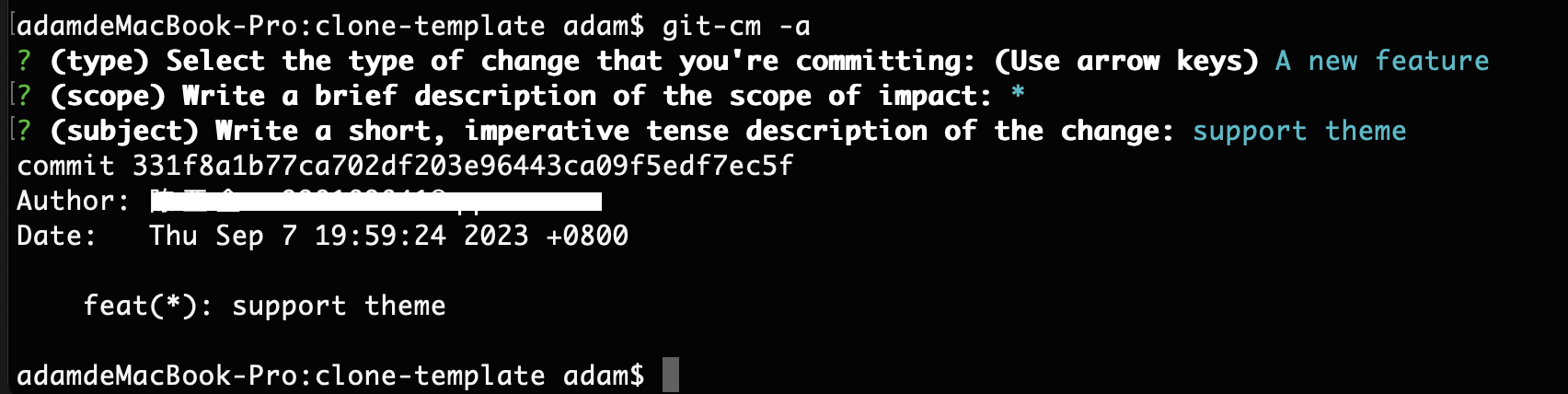
> ✨ Allow customization of your commit information through inquiry
>
> ✨ Allow adding configuration files in the project and customizing your git commit message,or using default configurations.
## Installing the command line tool
Installation is as simple as running the following command (if you see `EACCES` error, reading [fixing npm permissions](https://docs.npmjs.com/getting-started/fixing-npm-permissions) may help):
```sh
npm install -g git-cm
```
## Using the command line tool
Simply use `git-cm` or `cm` instead of `git commit` when committing.
Supported command line options
```sh
git-cm
git-cm -a
git-cm -m 'type(scope): subject'
git-cm -am 'type(scope): subject'
```
or as an npm script:
```json
...
"scripts": {
"commit": "git-cm"
}
```
---
when you use `git-cm`, without a committing message, you'll be prompted to fill out any required commit fields at commit time with a format of the default configuration file.
you can see the format of the default configuration file in [gitcommitrc.json](https://github.com/chenyajin/git-cm/blob/main/gitcommitrc.json)
Of course, you can also create `gitcommitrc.json` file below in the root directory of your project, to overwriting the default file.
when you use `git-cm`, with a committing message, such as `git-cm -m 'type(scope): subject'`, the message will be verified, whether to use [AngularJS's commit message convention](https://github.com/angular/angular.js/blob/master/DEVELOPERS.md#-git-commit-guidelines).
---
## Recommended Commit Message Format
```
():
│ │ │
│ │ └─⫸ Summary in present tense. Not capitalized. No period at the end.
│ │
│ └─⫸ Commit Scope: Optional, can be anything specifying the scope of the commit change.
| In App Development, scope can be a page, a module or a component.
│
└─⫸ Commit Type: feat|fix|docs|style|refactor|test|chore|perf|ci|build|chore
```
The `` and `` fields are mandatory, the `()` field is optional.
❌ Bad:
> update README to add how to install
✅ Good:
> docs: update README to add how to install
✅ Good (commit message with scope):
> docs(README): update README to add how to install
The default commit `type`s can be extended or modified by [gitcommitrc.json](https://github.com/chenyajin/git-cm/blob/main/README.md#gitcommitrc.json).
## Zero Configurations
**Configurations Not Required!** If it has to be customized we have the guide below.
The default `type`s includes **feat**, **fix**, **docs**, **style**, **refactor**, **test**, **chore**, **perf**, **ci**, **build** and **chore**.
The default `max-len` is 100 which means the commit message cannot be longer than 100 characters. All the settings can be modified in gitcommitrc.json.
### gitcommitrc.json
Except for default types, you can add, overwrite.
For example if you have this `gitcommitrc.json` file below in the root directory of your project:
you can see the format of the example configuration file in [gitcommitrc-example.json](https://github.com/chenyajin/git-cm/blob/main/gitcommitrc-example.json)
More advanced settings
```json
{
"types": [
{
"value": "feat",
"name": "A new feature "
},
{
"value": "fix",
"name": "A bug fix "
},
{
"value": "docs",
"name": "Documentation only changes "
},
{
"value": "style",
"name": "Changes that do not affect the meaning of the code (white-space, formatting, missing semi-colons, etc) "
},
{
"value": "refactor",
"name": "A code change that neither fixes a bug nor adds a feature "
},
{
"value": "perf",
"name": "A code change that improves performance"
},
{
"value": "test",
"name": "Adding missing tests or correcting existing tests"
},
{
"value": "ci",
"name": "Changes to your CI configuration files and scripts"
},
{
"value": "build",
"name": "Changes that affect the build system or external dependencies"
},
{
"value": "chore",
"name": "Changes to the build process or auxiliary tools and libraries such as documentation generation."
}
],
"messages": {
"type": "(type) Select the type of change that you're committing: (Use arrow keys)",
"scope": "(scope) Write a brief description of the scope of impact:",
"subject": "(subject) Write a short, imperative tense description of the change:",
"body": "(body) Provide a longer description of change, Wrap with :\n",
"footer": "(footer) List any breaking changes:"
},
"maxLen": 100,
"minLen": 0,
"subjectLimit": 50,
"skipQuestions": ["body", "footer"],
"scopeRequired": false,
"lang": "en-US"
}
```
## Features
1. Visualization, low cost to Learn.
2. Independent, zero configurations.
3. Support for local configuration files and customizing your git commit message.
4. Prompt error msg precisely, friendly to commit message format unfamiliar developers.
5. i18n: **en-US**, **zh-CN** supported.
6. The linter is customizable for your team by configuring local files.
```
```
---
_Source: https://npm.io/package/git-cm · Machine-readable twin of the npm.io package page. Health data is recomputed on every publish._