# haosj
> Rabbit cute
Latest version **1.3.1** (published 2022-01-21) · MIT license · 0 weekly downloads
## Install
```sh
npm install haosj
pnpm add haosj
yarn add haosj
bun add haosj
```
## Health
**Score 30/100 (F)** — status: abandoned.
Positive: has types; esm support; no vulnerabilities; high quality score.
Warnings: low downloads.
Negative: abandoned; low maintenance score.
## Facts
| | |
|---|---|
| Version | 1.3.1 |
| Published | 2022-01-21 |
| First published | 2021-08-22 |
| Weekly downloads | 0 |
| License | MIT |
| TypeScript types | bundled |
| Module format | ESM + CommonJS |
| Node | >= 15 |
| Dependencies | 3 |
| Unpacked size | 126 KB |
| Known vulnerabilities | 0 |
| Install scripts | no |
| GitHub stars | 2 |
| Author | Sittipat Tepsutar |
| Maintainers | karnhao |
| Keywords | hao, karnhao, subject, rabbit, sittipat |
## Links
- npm: https://www.npmjs.com/package/haosj
- Repository: https://github.com/karnhao/haosj
- Homepage: https://github.com/karnhao/haosj#readme
- Issues: https://github.com/karnhao/haosj/issues
- npm.io page: https://npm.io/package/haosj
## Dependencies (3)
- [node-fetch](https://npm.io/package/node-fetch.md) ^2.6.1
- [@types/node](https://npm.io/package/@types/node.md) ^16.7.1
- [@types/node-fetch](https://npm.io/package/@types/node-fetch.md) ^2.5.12
## Recent versions
- 1.3.1 (latest) — 2022-01-21
- 1.3.0 — 2022-01-20
- 1.2.5 — 2021-11-03
- 1.2.4 — 2021-10-23
- 1.2.3 — 2021-10-02
- 1.2.2 — 2021-09-27
- 1.2.1 — 2021-09-20
- 1.2.0 — 2021-09-15
- 1.1.2 — 2021-09-10
- 1.1.1 — 2021-08-29
- 1.1.0 — 2021-08-23
- 0.1.9 — 2021-08-23
- 0.1.8 — 2021-08-23
- 0.1.7 — 2021-08-23
- 0.1.6 — 2021-08-22
- … 6 more at https://npm.io/package/haosj/versions
## README
Haosj (HaoSubject)


โดย สิทธิภัทท์ เทพสุธา ที่ชอบกระต่าย🐇มากๆ
### ติดตั้ง
```
npm i haosj
```
## เกี่ยวกับ HaoSubject
ระบบนี้จะอ่านข้อมูลวิชา[แบบนี้](https://raw.githubusercontent.com/karnhao/HaoWidget/main/subject_data/6-10/6-10.json) แล้วคำนวนสิ่งต่างๆให้เลย ทำให้เขียนโปรแกรมง่ายขึ้นเพียงแค่เรียกใช้ฟังก์ชันและ method ที่มีอยู่แล้ว
ตัวอย่างการใช้งาน :
```js
import haosj, { useUrlData } from "haosj";
//ให้ c คือห้องเรียนที่โหลดข้อมูลดิบจากที่อยู่ตัวอย่าง
let c = await haosj.useExampleUrlData();
//ใช้ subject คือวิชาในวันจันทร์คาบที่ 4
let subject = c.get(1).getSubject(3);
//แสดงชื่อและห้องเรียนของวิชา
console.log(subject.getName());
console.log(subject.getRoomId());
```
ตัวอย่างการสร้างห้องเรียนจาก object :
```js
//สร้างห้องเรียนจาก object
let c = haosj.getClassByObj({
classId: "c72610",
className: "ม.6/10 รุ่น 72 โรงเรียนสารวิทยา",
nullSubject: {
name: "❌ไม่มี"
},
subjectDays: {
_1: {
startTime: 500,
subjectList: [
{
name: "Math",
width: 50
},
{
name: "Physic",
width: 100
}
]
}
}
});
```
## Property อำนวยความสะดวก
Property อำนวยความสะดวกที่อยู่ในห้องเรียน(ต้อง update ด้วย)มีดังนี้ :
* currentDate - วันปัจจุบัน
* currentDay - วันที่เป็นเลข 0 ถึง 6 โดย 0 คือวันอาทิตย์ 1 คือวันจันทร์ ... 6 คือวันเสาร์
* currentMinutes - เวลาที่เป็นนาทีนับตั้งแต่ 00:00 นาฬิกาจนถึงปัจจุบัน
* currentSubjectDay - วัตถุที่บรรจุรายวิชาในวันนั้นๆในวันปัจจุบัน
* currentPariod - คาบปัจจุบัน
* currentSubject - วิชาปัจจุบัน
## สำคัญ
คุณจำเป็นจะต้อง update ข้อมูลให้กับห้องเรียนก่อน เพราะว่าระบบจะได้ update property ที่อำนวยความสะดวกให้ด้วย:
```js
update(yourBoolean?, subject_data?);
```
yourBoolean เป็นประพจน์ที่จะใส่หรือไม่ใส่ก็ได้ เมื่อไม่ใส่จะเป็นเท็จโดยอัตโนมัติ ถ้าเป็นจริงระบบจะ console log รายละเอียดในฟังก์ชันนี้มา และ subject_data คือข้อมูลวิชาดิบแบบ json ถ้าใส่ไปห้องเรียนจะไปใช้ข้อมูลใหม่แทน ถ้าไม่ใส่ก็จะยังใช้ข้อมูลเดิมแต่ property ต่างๆก็จะถูก update. ฟังก์ชันนี้จะเรียกใช้ `ClassData.setData(...)` โดยอัตโนมัติ ดังนั้นคุณไม่จำเป็นต้องใช้ `ClassData.setData(...)` เลย แล้วคุณยังสามารถใช้ `update(...)` แทนการใช้ `ClassData.setData(...)`.
## ฟังก์ชันอำนวยความสะดวก
```js
// โหลดข้อมูลวิชาแล้ว update ให้เลยอัตโนมัติ (เป็น asynchonous ฟังก์ชัน) ส่งออก Promise<ข้อมูลดิบ>
useUrlData(url);
// โหลดข้อมูลวิชาจาก https://raw.githubusercontent.com/karnhao/HaoWidget/main/subject_data/6-10/6-10.json แล้ว update ให้เลยอัตโนมัติ (เป็น asynchonous ฟังก์ชัน) ส่งออก Promise<ข้อมูลดิบ>
useExampleUrlData(url);
```
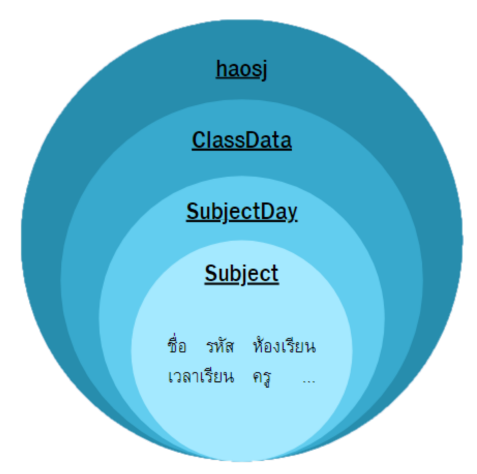
## Accessing Data การเข้าถึงข้อมูลต่างๆ
---
_Source: https://npm.io/package/haosj · Machine-readable twin of the npm.io package page. Health data is recomputed on every publish._