# hexo-generator-github
> Github generator for Hexo.
Latest version **1.0.1** (published 2019-11-06) · MIT license · 0 weekly downloads
## Install
```sh
npm install hexo-generator-github
pnpm add hexo-generator-github
yarn add hexo-generator-github
bun add hexo-generator-github
```
## Health
**Score 15/100 (F)** — status: abandoned.
Positive: no vulnerabilities.
Warnings: low downloads; no types; no esm support.
Negative: abandoned; low maintenance score.
## Facts
| | |
|---|---|
| Version | 1.0.1 |
| Published | 2019-11-06 |
| First published | 2016-05-30 |
| Weekly downloads | 0 |
| License | MIT |
| TypeScript types | none |
| Module format | CommonJS |
| Node | >= 0.10.0 |
| Dependencies | 2 |
| Unpacked size | 208.9 KB |
| Known vulnerabilities | 0 (+25 in 1 direct dependencies) |
| Install scripts | no |
| GitHub stars | 9 |
| Author | Jamling |
| Maintainers | jamling |
| Keywords | hexo, generator, github |
## Links
- npm: https://www.npmjs.com/package/hexo-generator-github
- Repository: https://github.com/Jamling/hexo-generator-github
- Homepage: https://www.ieclipse.cn/p
- Issues: https://github.com/Jamling/hexo-generator-github/issues
- npm.io page: https://npm.io/package/hexo-generator-github
## Dependencies (2)
- [axios](https://npm.io/package/axios.md) ^0.19.0
- [lodash](https://npm.io/package/lodash.md) ^4.6.1
## Alternatives
- [postcss-color-hex-alpha](https://npm.io/package/postcss-color-hex-alpha.md) — 6.4M weekly downloads
- [randomcolor](https://npm.io/package/randomcolor.md) — 348.0K weekly downloads
- [bows](https://npm.io/package/bows.md) — 1.3K weekly downloads
- [ep_prefer_color_scheme](https://npm.io/package/ep_prefer_color_scheme.md) — 260 weekly downloads
- [coc-yank](https://npm.io/package/coc-yank.md) — 61 weekly downloads
## Recent versions
- 1.0.1 (latest) — 2019-11-06
- 1.0.0 — 2019-11-04
- 0.1.0 — 2016-07-19
- 0.0.3 — 2016-06-02
- 0.0.1 — 2016-05-30
## README
## hexo-generator-github
[](https://travis-ci.org/Jamling/hexo-generator-github)
[](https://www.npmjs.com/package/hexo-generator-github)
[](https://www.npmjs.com/package/hexo-generator-github)
[](https://www.npmjs.com/package/hexo-generator-github)
[](https://github.com/Jamling/hexo-generator-github/releases/latest)
A generator used to generate page for [Hexo] from your exists Github project file.
## Installation
``` bash
$ npm install hexo-generator-github --save
```
## Usage
hexo-generator-github can be used as helper/generator/console plugin. `hexo server` and `hexo generate` will call the generator of this plugin; A console command is provided to run this generator.
``` bash
$ hexo github [-r --replace]
```
If `-r` or `--replace` option assigned, the generator will call github api and replace the existing github contents cache.
## Config
``` yaml
github:
debug: true # enable debug to log github api request/response
user: Jamling # your github user name
timeout: 60000 # set the github api request timeout
token: your_token # enable Authorization for github api request, the api request limit will grow up from 60 to 5000
cache_dir: gh_cache # the response of github api will store under the directory.
repos: # request following repositories, otherwise, all repositories (limit 100) of user will be requested.
- SmartIM4Eclipse
- SmartIM4IntelliJ
- hexo-theme-nova
- hexo-generator-i18n
- hexo-generator-github
- hexo-generator-index2
- hexo-filter-highlight
- Android-ORM
- eclipse-explorer
- QuickAF
navs: # project page left default nav menu, you can config for each project in ${blog}/_data/projects.yml
overview: index.html
index: index.html
start: start.html
release: release.html
download: download.html
userguide: userguide.html
change: change.html
```
- **debug**: Whether print debug info
- **cache_dir**: Github response cache dir, you can run `hexo github -r` to remove all cache or remove files in cache manually to refresh cache again
- **user**: Github user name
- **repos**: Result repositories, return all(limit 100) repositories of user if **undefined** in _config.yml
- **token**: See 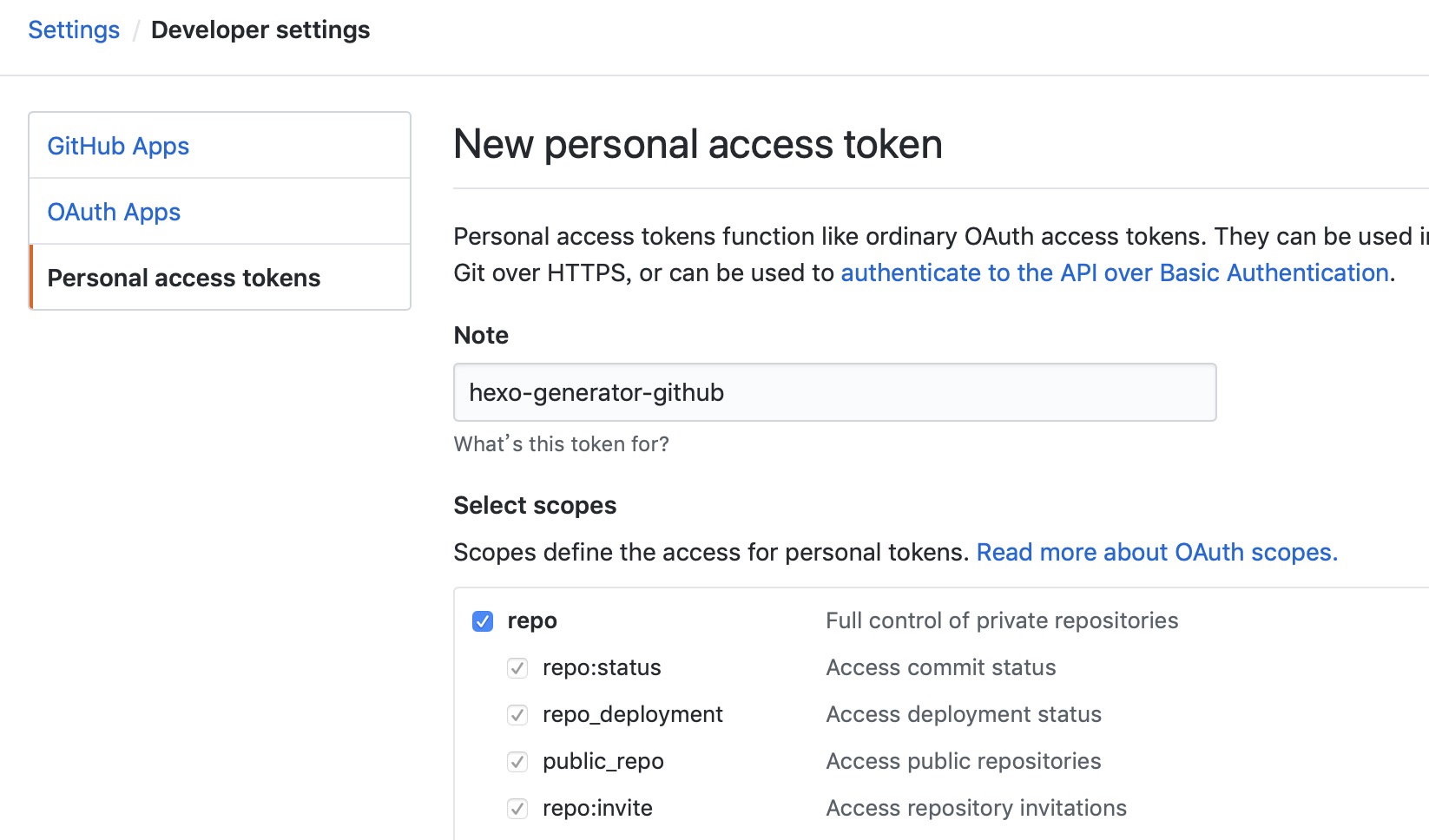 to generate token to grown up github api request limitation
## Front-matter
A `gh` front-matter is nessary in your page to generate github response.
- gh.user the github user, default is github.user in _config.yml, see [gh_opts](#gh_opts)
- gh.repo the github repo, default is fetched from url, see [gh_opts](#gh_opts)
- gh.type
- get_repos get repositories from github, see [gh_repos](#gh_repos)
- get_contents get markdown file under repository, see [gh_contents](#gh_contents)
- get_releases get releases under repository, see [gh_releases](#gh_releases)
## Helpers
### gh_opts
Return full page.gh.
If no user assigned in page gh front-matter, the user will set from hexo.config.github.user
If no repo assigned in page gh front-matter, the repo will set from page.path
Sample:
- page.path = p/Android-ORM/ => gh.repo = Android-ORM
- page.path = en/p/Android-ORM/ => gh.repo = Android-ORM (The hexo.config.language must contains **en** in _config.yml)
### gh_repos
Return array of github user's repos
``` htmlbars
{%- for p in gh_repos() %}
{% endfor %}
```
Option | Description | Default
--- | --- | ---
`user` | Github user | config.github.user
### gh_contents
Return github (**markdown file**) contents of repository
``` js
{% set page.content = gh_contents() %}
```
So the page content will be replaced of content of github.
Option | Description | Default
--- | --- | ---
`user` | Github user | config.github.user
`repo` | Github repo | page.gh.repo
`path` | Github content path | README
`ref` | Github reference | master
### gh_releases
Return array of github repo releases
``` htmlbars
{% for p in gh_releases() %}
{% endfor %}
```
Option | Description | Default
--- | --- | ---
`user` | Github user | config.github.user
`repo` | Github repo | page.gh.repo
### gh_edit_link
Return edit link string of github contents
``` js
{{ gh_edit_link() }}
```
### gh_aside_nav
Return project content navigator tree
``` js
$('#project_tree').treeview({
enableLinks: true,
color: '#428bca',
expandIcon: 'icon nova-arrow-right2',
collapseIcon: 'icon nova-arrow-down2',
//levels: 3,
//node-icon: '',
//selectedColor: '#ff0000',
onNodeSelected: function(event, data) {
if (data.state.selected){
return;
}
},
data: {{ gh_aside_nav({parent_color:'#337ab7'}) }}
});
```
Option | Description | Default
--- | --- | ---
`user` | Github user | config.github.user
`repo` | Github repo | page.gh.repo
`path` | Github content path | README
`ref` | Github reference | master
## Reference
- [Github Developer](https://developer.github.com/): see more properties of github response.
- [hexo-theme-nova](https://github.com/Jamling/hexo-theme-nova): the nova theme used this plugin to generate project pages.
## License
MIT
[Hexo]: http://hexo.io/
---
_Source: https://npm.io/package/hexo-generator-github · Machine-readable twin of the npm.io package page. Health data is recomputed on every publish._