# homebridge-advanced-timer
> homebridge advanced timer, with homekit and iOS shortcut, you could do much more things.
Latest version **1.1.1** (published 2021-01-14) · MIT license · 0 weekly downloads
## Install
```sh
npm install homebridge-advanced-timer
pnpm add homebridge-advanced-timer
yarn add homebridge-advanced-timer
bun add homebridge-advanced-timer
```
## Health
**Score 15/100 (F)** — status: abandoned.
Positive: no vulnerabilities.
Warnings: low downloads; no types; no esm support.
Negative: abandoned; low maintenance score.
## Facts
| | |
|---|---|
| Version | 1.1.1 |
| Published | 2021-01-14 |
| First published | 2021-01-11 |
| Weekly downloads | 0 |
| License | MIT |
| TypeScript types | none |
| Module format | CommonJS |
| Node | >=12.0.0 |
| Dependencies | 0 |
| Unpacked size | 96.4 KB |
| Known vulnerabilities | 0 |
| Install scripts | no |
| GitHub stars | 17 |
| Author | elfive@elfive.cn |
| Maintainers | elfive |
| Keywords | timer, homebridge, homebridge-plugin |
## Links
- npm: https://www.npmjs.com/package/homebridge-advanced-timer
- Repository: https://github.com/elfive/homebridge-advanced-timer
- Homepage: https://github.com/elfive/homebridge-advanced-timer#readme
- Issues: https://github.com/elfive/homebridge-advanced-timer/issues
- npm.io page: https://npm.io/package/homebridge-advanced-timer
## Alternatives
- [@sindresorhus/slugify](https://npm.io/package/@sindresorhus/slugify.md) — 3.7M weekly downloads
- [solid-js](https://npm.io/package/solid-js.md) — 2.7M weekly downloads
- [expo-glass-effect](https://npm.io/package/expo-glass-effect.md) — 2.5M weekly downloads
- [nanoassert](https://npm.io/package/nanoassert.md) — 780.8K weekly downloads
- [@ffmpeg/ffmpeg](https://npm.io/package/@ffmpeg/ffmpeg.md) — 529.5K weekly downloads
## Recent versions
- 1.1.1 (latest) — 2021-01-14
- 1.1.0 — 2021-01-13
- 1.0.4 — 2021-01-12
- 1.0.3 — 2021-01-12
- 1.0.2 — 2021-01-11
- 1.0.1 — 2021-01-11
- 1.0.0 — 2021-01-11
## README
## homebridge-advanced-timer



Setup Guide | Contribute
## 1) Description
advanced timer, get full use of iOS automation.
### features
- controled by a Homekit switch, easy to control.
- setting up interval plan, and can loop infinite or loop certain cycles.
### limitations
- after homebridge restart, can only start from the loop beginning
- ......
### examples
- every 30 mins, heat your room for 10 mins.
- check home temperature every 5 mins, and change heater target temperature.
- ......
## 2) Configure
### trigger mode
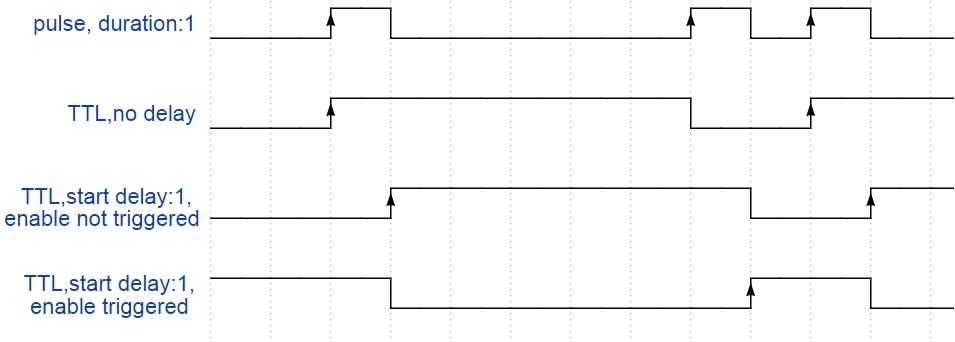
*note: trigger plan(intervals): 2,6*
### config.json field
| field name | type | required | default | range | description |
| :------------------------: | :----: | :------: | :-------------: | :---------: | ------------------------------------------------------------ |
| accessory | string | yes | 'advanced_timer' | 'advanced_timer' | MUST BE 'advanced_timer' |
| name | string | yes | 'AdvancedTimer' | --- | device name shows in HomeKit. we don't need it, but homebridge need it. |
| intervals | string | yes | --- | --- | Comma-separated trigger plan, every interval(in second), if pulse trigger mode is selected, all interval value should longer than trigger_duration below. |
| repeat | int | no | 0 | 0 to 86400 | How many trigger plan cycles repeat, 0 for infinite loop. |
| enable_name | string | no | 'Enable' | --- | Timer enable switch name shows in HomeKit |
| trigger_name | string | no | 'Trigger' | --- | Timer trigger indicator name shows in HomeKit. |
| trigger_type | int | no | 1 | 0, 1 | like electronic, trigger type has two different type:
0: Pulse
1: TTL |
| pulse_trigger_duration | int | no | 3 | 1 to 3 | Each time a trigger signal last duration, in second,
only works in Pulse trigger type |
| start_delay
(unit: second) | int | no | 0 | 0 to 86400 | After timer enable status set to enable, delay before trigger plan starts, only works in TTL trigger type. |
| stop_delay
(unit: second) | int | no | 0 | 0 to 86400 | Delay after trigger plan stops or after timer enable status set to disable, only works in TTL trigger type. |
| enable_status_when_start | int | no | 2 | 0, 1, 2 | Enable status after Homebridge start.
0: OFF,
1: ON,
2: Last Status. |
| trigger_status_when_start | int | no | 2 | 0, 1, 2 | Enable status after Homebridge start.
0: OFF,
1: ON,
2: Last Status. |
| trigger_status_while_enabled | int | no | 0 | 0, 1, 2 | Trigger status while service enabled.
0: Not Triggered,
1: Triggered,
2: Last Status. |
| trigger_status_while_disabled | int | no | 0 | 0, 1, 2 | Trigger status while service disabled.
0: Not Triggered,
1: Triggered,
2: Last Status. |
### example of config.json file
```json
"accessories": [
{
"name": "heater_timer",
// trigger plan:
// trigger after 5s then trigger after 10s, means trigger at 5s and 15s
"intervals": "5,10",
// repeat trigger plan for 4 times
"repeat": 4,
"enable_name": "Enable",
"trigger_name": "Trigger",
"enabled_status_after_restart": 2,
"trigger_duration": 3,
"accessory": "advanced_timer"
}
]
```
## 3) How to contribute
everyone is welcome to contribute to this plugin. PR/issue/debug all are welcome.
or you can send me an e-mail: elfive@elfive.cn
---
_Source: https://npm.io/package/homebridge-advanced-timer · Machine-readable twin of the npm.io package page. Health data is recomputed on every publish._