# hxy-ui

> 基于 vue-cli4 的组件库:hxy-ui

Latest version **0.1.6** (published 2020-11-07) · 0 weekly downloads

## Install

```sh
npm install hxy-ui
pnpm add hxy-ui
yarn add hxy-ui
bun add hxy-ui
```

## Health

**Score 10/100 (F)** — status: abandoned.

Positive: no vulnerabilities.

Warnings: low downloads; no types; no esm support; low quality score; pre 1.0.

Negative: abandoned; low maintenance score.

## Facts

| | |
|---|---|
| Version | 0.1.6 |
| Published | 2020-11-07 |
| First published | 2020-11-07 |
| Weekly downloads | 0 |
| TypeScript types | none |
| Module format | CommonJS |
| Dependencies | 2 |
| Unpacked size | 406.9 KB |
| Known vulnerabilities | 0 (+1 in 1 direct dependencies) |
| Install scripts | no |
| Author | hxy |
| Maintainers | hxy_ |
| Keywords | hxy-ui |

## Links

- npm: https://www.npmjs.com/package/hxy-ui
- npm.io page: https://npm.io/package/hxy-ui

## Dependencies (2)

- [vue](https://npm.io/package/vue.md) ^2.6.11
- [core-js](https://npm.io/package/core-js.md) ^3.6.5

## Recent versions

- 0.1.6 (latest) — 2020-11-07
- 0.1.5 — 2020-11-07
- 0.1.4 — 2020-11-07
- 0.1.3 — 2020-11-07
- 0.1.2 — 2020-11-07
- 0.1.1 — 2020-11-07
- 0.1.0 — 2020-11-07

## README

# hxy-ui 
[小小窝](https://hxyxyz.top)

### 通过vue/cli4封装的ui库

<br>
<br>
<br>


## 一.UI库组件列表
### 1. HxyForm

<br>
<br>
<br>
<br>
<br>

## 二.组件的参数
### 1. HxyForm
```html
<hxy-form :hxyFormStyle="hxyFormStyle" @hxyFormSub="hxyFormSub"></hxy-form>
```
#### Props：

##### hxyFormStyle
类型: `Object` <br>
必需: `false`  <br>
默认: `{ width: "200px",height: "100px", }`<br>
说明: hxyFormStyle参数可以控制HxyForm组件的样式<br>
参考代码:
```html
<hxy-form :hxyFormStyle="hxyFormStyle"></hxy-form>
```
```js
  data() {
    return {
      hxyFormStyle: {
        width: "300px",
        height: "100px",
        backgroundColor: "red",
      },
    };
  },
```

#### Events
#### hxyFormSub 
参数: `date` <br>
返回参数是一个Object,里面包含`user`与`password`<br>
`user`:表单填写的用户名<br>
`password`:表单填写的密码 <br>

参考代码:
```html
<template>
  <div id="app">
    <hxy-form :hxyFormStyle="hxyFormStyle" @hxyFormSub="hxyFormSub"></hxy-form>
  </div>
</template>

<script>
//局部引用 => 按需引用
 import { HxyForm } from 'hxy-ui'  
 import "hxy-ui/lib/hxy-ui.css";
export default {
  name: "App",
  components: {
    HxyForm
  },
  data() {
    return {
      hxyFormStyle: {
        width: "300px",
        height: "100px",
      },
    };
  },
  methods:{
    hxyFormSub(date){
      alert(date.user)
      alert(date.password)
    }
  }
};
</script>
```
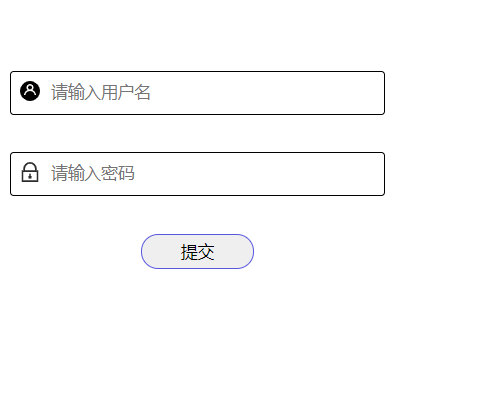
#### 展示效果
![hxy-ui5.png](https://img.hxyxyz.top/images/2020/11/08/hxy-ui5.png)

<br>
<br>
<br>
<br>
<br>

###  三、ui库安装使用
#### 下载
```bash
npm install -s hxy-ui
```
#### 全局注册组件
```bash
 //main.js
 import hxyui from "hxy-ui"; 
 // 导入默认样式
 import "hxy-ui/lib/hxy-ui.css";
 Vue.use(hxyui);
 ```
 > #### 使用组件
 在组件中直接使用
 ```html
  <!-- App.vue-->
   <hxy-form :hxyFormStyle="hxyFormStyle" @hxyFormSub="hxyFormSub"></hxy-form>
 ```
 demo:
 ```html
 <template>
  <div id="app">
    <hxy-form :hxyFormStyle="hxyFormStyle" @hxyFormSub="hxyFormSub"></hxy-form>
  </div>
</template>

<script>
//  import { HxyForm } from 'hxy-ui'  
//  import "hxy-ui/lib/hxy-ui.css";
export default {
  name: "App",
  components: {
    // HxyForm
  },
  data() {
    return {
      hxyFormStyle: {
        width: "500px",
        height: "100px",
      },
    };
  },
  methods:{
    hxyFormSub(data){
      alert(data.user)
      alert(data.password)
    }
  }
};
</script>

<style >
#app {
  font-family: Avenir, Helvetica, Arial, sans-serif;
  -webkit-font-smoothing: antialiased;
  -moz-osx-font-smoothing: grayscale;
  text-align: center;
  color: #2c3e50;
  margin-top: 60px;
}
</style>
 ```
 #### 局部注册组件/按需注册(HxyForm为例子)
在组件中按需注册HxyFrom组件<br>
  导入 
```bash
 //App.vue
 import { HxyForm } from 'hxy-ui'  
 // 导入默认样式
 import "hxy-ui/lib/hxy-ui.css";
```
  注册 
```js
 components: {
    HxyForm
  },
```
  使用
  ```html
    <hxy-form :hxyFormStyle="hxyFormStyle" @hxyFormSub="hxyFormSub"></hxy-form>
  ```
 demo:
 ```html
 <template>
  <div id="app">
    <hxy-form :hxyFormStyle="hxyFormStyle" @hxyFormSub="hxyFormSub"></hxy-form>
  </div>
</template>

<script>
//局部引用 => 按需引用
 import { HxyForm } from 'hxy-ui'  
 import "hxy-ui/lib/hxy-ui.css";
export default {
  name: "App",
  components: {
    HxyForm
  },
  data() {
    return {
      hxyFormStyle: {
        width: "500px",
        height: "100px",
      },
    };
  },
  methods:{
    hxyFormSub(data){
      alert(data.user)
      alert(data.password)
    }
  }
};
</script>

<style >
#app {
  font-family: Avenir, Helvetica, Arial, sans-serif;
  -webkit-font-smoothing: antialiased;
  -moz-osx-font-smoothing: grayscale;
  text-align: center;
  color: #2c3e50;
  margin-top: 60px;
}
</style>
 ```

---
_Source: https://npm.io/package/hxy-ui · Machine-readable twin of the npm.io package page. Health data is recomputed on every publish._