# hxz-chunk-upload
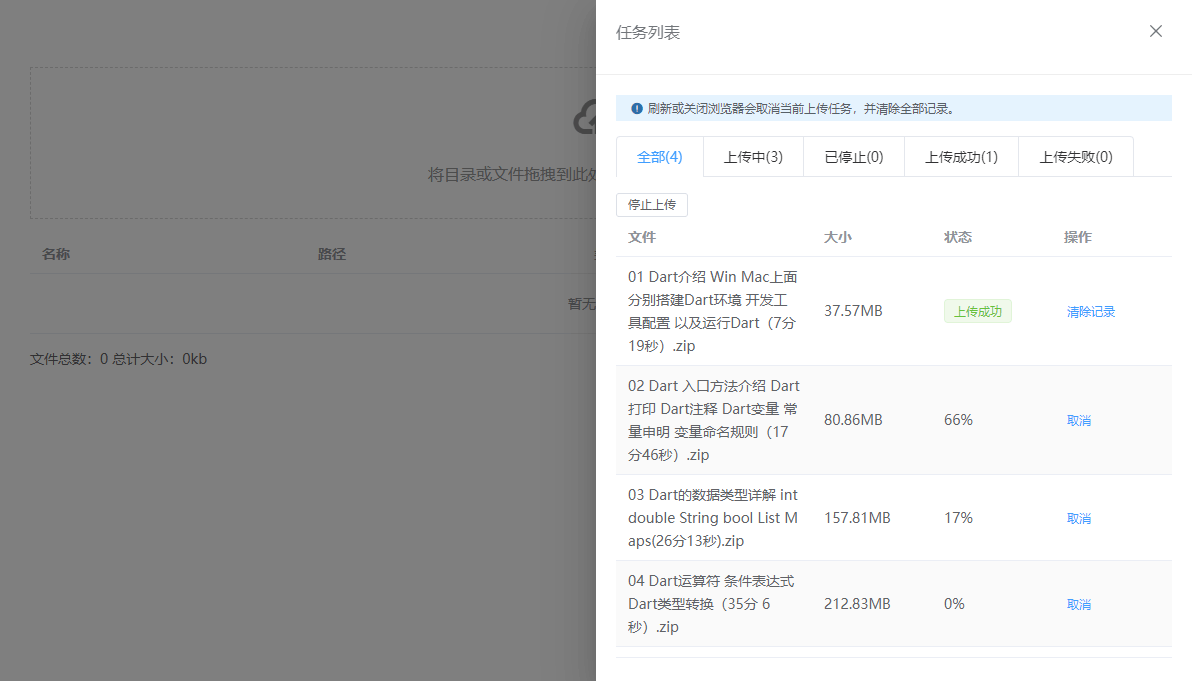
> vue3分片上传插件,支持单文件上传,多文件上传;显示文件列表,显示每个文件的上传进度;支持因暂停上传或网络问题导致的上传中断的断点续传,支持文件秒传(需后端配合),支持添加资源的label
Latest version **1.2.1** (published 2023-12-13) · MIT license · 0 weekly downloads
## Install
```sh
npm install hxz-chunk-upload
pnpm add hxz-chunk-upload
yarn add hxz-chunk-upload
bun add hxz-chunk-upload
```
## Health
**Score 20/100 (F)** — status: abandoned.
Positive: esm support; no vulnerabilities.
Warnings: low downloads; no types.
Negative: abandoned; low maintenance score.
## Facts
| | |
|---|---|
| Version | 1.2.1 |
| Published | 2023-12-13 |
| First published | 2023-02-13 |
| Weekly downloads | 0 |
| License | MIT |
| TypeScript types | none |
| Module format | ESM + CommonJS |
| Dependencies | 3 |
| Unpacked size | 8.4 MB |
| Known vulnerabilities | 0 |
| Install scripts | no |
| Author | hxz1412350 |
| Maintainers | hxz141hxz |
| Keywords | hxz-chunk-upload, upload, chunk-upload |
## Links
- npm: https://www.npmjs.com/package/hxz-chunk-upload
- Homepage: http://www.5imoban.net/texiao/form/202302134998.html
- npm.io page: https://npm.io/package/hxz-chunk-upload
## Dependencies (3)
- [vue](https://npm.io/package/vue.md) ^3.0.0
- [spark-md5](https://npm.io/package/spark-md5.md) ^3.0.2
- [element-plus](https://npm.io/package/element-plus.md) ^2.2.28
## Recent versions
- 1.2.1 (latest) — 2023-12-13
- 1.2.0 — 2023-12-08
- 1.1.5 — 2023-12-08
- 1.1.4 — 2023-07-17
- 1.1.3 — 2023-07-17
- 1.1.2 — 2023-07-07
- 1.1.1 — 2023-07-07
- 1.1.0 — 2023-07-07
- 1.0.3 — 2023-03-13
- 1.0.2 — 2023-02-13
- 1.0.1 — 2023-02-13
- 1.0.0 — 2023-02-13
## README
# hxz-chunk-upload
>vue3分片上传插件,支持单文件上传,多文件上传;支持拖拽文件或文件夹;显示文件列表,显示每个文件的上传进度;支持因暂停上传或网络问题导致的上传中断的断点续传。
>上传完成后,点击确定按钮,会将所有上传文件的上传信息emit到外部。
>接口如果通过比对文件的md5,检测到文件已经上传,直接status返回2,即可实现秒传功能。
## 打包发布
```
npm run build
npm publish
```
## 安装
```
// 安装element-plus,如果已安装,忽略
npm install element-plus --save
// 安装 spark-md5
npm install --save spark-md5
// 安装本插件
npm install hxz-chunk-upload --save
```
## 全局使用element-plus
```
import ElementPlus from 'element-plus'
import 'element-plus/dist/index.css'
app.use(ElementPlus)
```
## 局部引入本插件(建议)
```
// 引入本插件
import { hxzChunkUpload } from "hxz-chunk-upload"
import 'hxz-chunk-upload/dist/yxChunkNext.css'
// 在components中加入本插件
components: {hxzChunkUpload},
```
## 全局引入本插件
```
// 引入本插件
import { hxzChunkUpload } from "hxz-chunk-upload"
import 'hxz-chunk-upload/dist/yxChunkNext.css'
app.use(hxzChunkUpload)
```
## 使用插件
```
// 在template中加入本插件
```
## 参数
参数名 | 默认值 | 类型 | 解释
:---: | :---: | :---: | :---:
action | '' | String | 上传接口地址
appendData | null | Object | 上传接口额外参数,会被解析到formData里。
folderName | '' | String | 目录名
headers | null | Object | header携带参数
maxSize | 1000 | Number | 单个文件最大尺寸(MB)
shardSize | 1000 | Number | 分片大小(KB)
height | 150 | Number | 拖拽区域的高度
tableHeight | '500px' | String | 文件列表的表格高度
multiple | true | Boolean | 是否多文件上传
accept | '*' | String | [文件类型](http://www.5imoban.net/jiaocheng/html/202302025197.html)
name | 'file' | String | 上传的文件字段名
disabled | false | Boolean | 是否禁用
showProgressText | false | Boolean | 是否显示进度条文字
setTags | false | Boolean | 设置资源的TAGS
## 上传接口参数
参数名 | 类型 | 解释
:---: | :---: | :---:
folderName | String | 目录名
fileData | binary | 分片二进制数据
fileName | String | 文件名
file_size | Number | 文件大小(字节)
file_chunksize | Number | 分片大小(字节)
file_suffix | String | 后缀名
fileTotal | Number | 总分片数
fileMd5 | String | 文件MD5,凭借这个合并文件
fileIndex | Number | 1--非最后一个分片 2--最后一个分片
## 上传接口应按照如下返回
```
{
"status": 200,
"message": "success",
"data": {
"message": "", // 提示信息
"url": "", // 文件url,当合并分片后,返回
"file_index": 1, // 分片索引,从1开始,数值型
"status": 1 // 1--非最后一个分片,2--最后一个分片(合并分片后返回2),字符串型、数值型皆可
}
}
```
## 事件
事件名 | 事件参数 | 参数类型 | 解释
:---: | :---: | :---: | :---:
closeUpload | null | | 取消按钮的点击事件
confirmUpload | uploadedInfoList | array | 确定按钮的点击事件,参数格式:[{"id": "", "url": "", "file_index": 10, "status": 2 }]
## 使用示例
### 效果:
### 代码:
```
```
---
_Source: https://npm.io/package/hxz-chunk-upload · Machine-readable twin of the npm.io package page. Health data is recomputed on every publish._