# infinite-tree
> A browser-ready tree library that can efficiently display a large amount of data using infinite scrolling.
Latest version **1.18.0** (published 2024-06-14) · MIT license · 0 weekly downloads
## Install
```sh
npm install infinite-tree
pnpm add infinite-tree
yarn add infinite-tree
bun add infinite-tree
```
## Health
**Score 15/100 (F)** — status: abandoned.
Positive: no vulnerabilities.
Warnings: low downloads; no types; no esm support.
Negative: abandoned; low maintenance score.
## Facts
| | |
|---|---|
| Version | 1.18.0 |
| Published | 2024-06-14 |
| First published | 2016-03-29 |
| Weekly downloads | 0 |
| License | MIT |
| TypeScript types | none |
| Module format | CommonJS |
| Dependencies | 7 |
| Unpacked size | 7.8 MB |
| Known vulnerabilities | 0 |
| Install scripts | no |
| GitHub stars | 187 |
| Author | Cheton Wu |
| Maintainers | cheton |
| Keywords | flat, flatten, flattree, large, scroll, tree |
## Links
- npm: https://www.npmjs.com/package/infinite-tree
- Repository: https://github.com/cheton/infinite-tree
- npm.io page: https://npm.io/package/infinite-tree
## Dependencies (7)
- [events](https://npm.io/package/events.md) ^3.3.0
- [is-dom](https://npm.io/package/is-dom.md) ^1.1.0
- [flattree](https://npm.io/package/flattree.md) ^0.11.1
- [html5-tag](https://npm.io/package/html5-tag.md) ^0.3.0
- [classnames](https://npm.io/package/classnames.md) ^2.2.5
- [escape-html](https://npm.io/package/escape-html.md) ^1.0.3
- [element-class](https://npm.io/package/element-class.md) ^0.2.2
## Recent versions
- 1.18.0 (latest) — 2024-06-14
- 1.17.1 — 2022-07-01
- 1.17.0 — 2021-11-21
- 1.16.2 — 2018-07-06
- 1.16.1 — 2018-06-01
- 1.16.0 — 2018-03-24
- 1.15.0 — 2018-02-12
- 1.14.9 — 2018-01-31
- 1.14.8 — 2018-01-31
- 1.14.7 — 2018-01-30
- 1.14.6 — 2018-01-29
- 1.14.5 — 2018-01-25
- 1.14.4 — 2018-01-24
- 1.14.3 — 2018-01-22
- 1.14.2 — 2018-01-20
- … 55 more at https://npm.io/package/infinite-tree/versions
## README
# Infinite Tree [](https://travis-ci.org/cheton/infinite-tree) [](https://coveralls.io/github/cheton/infinite-tree?branch=master)
[](https://www.npmjs.com/package/infinite-tree)
A browser-ready tree library that can efficiently display a large tree with smooth scrolling.
Demo: http://cheton.github.io/infinite-tree
[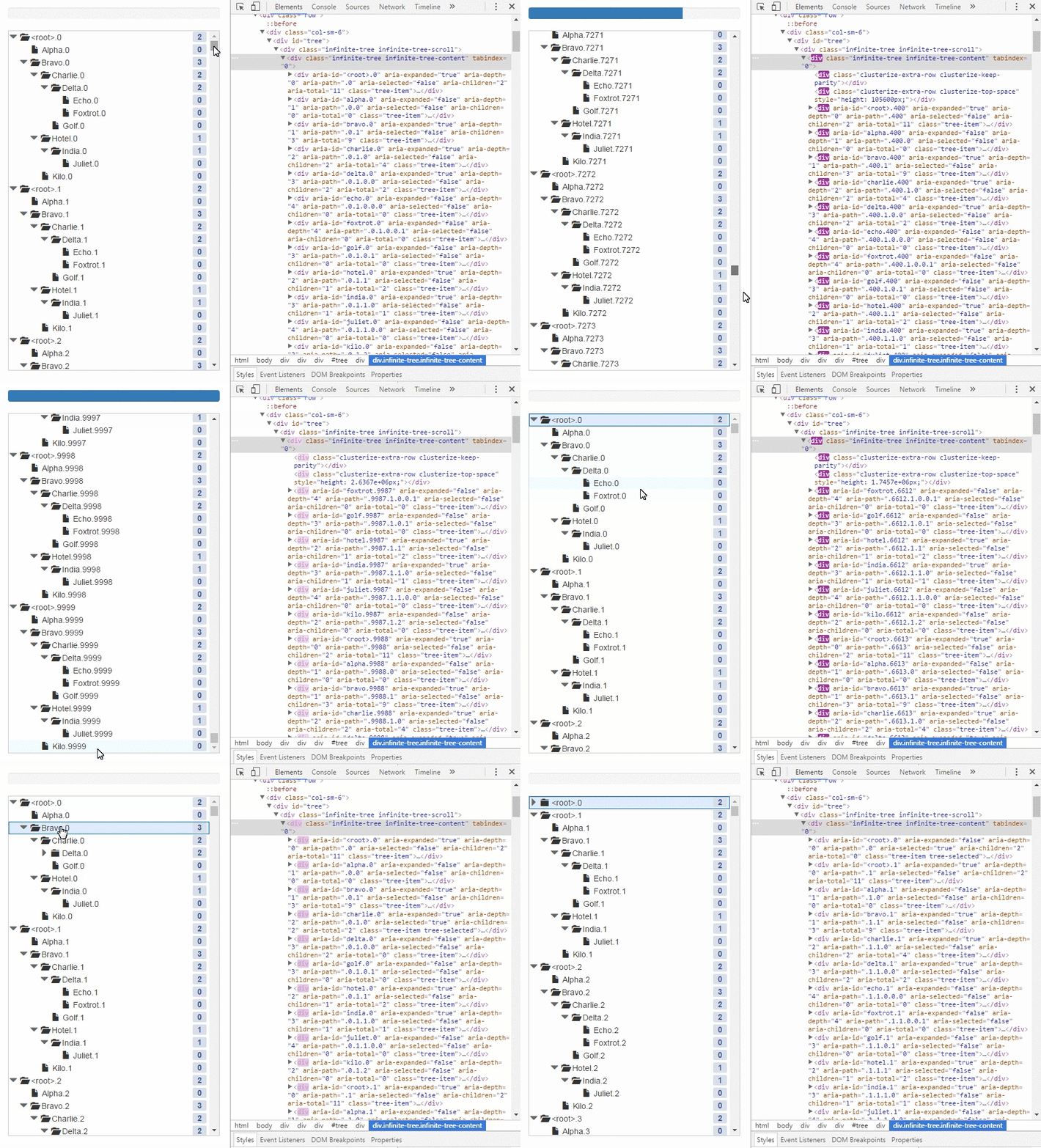](http://cheton.github.io/infinite-tree)
## Features
* High performance infinite scroll with large data set
* [Customizable renderer](https://github.com/cheton/infinite-tree/wiki/Options#rowrenderer) to render the tree in any form
* [Load nodes on demand](https://github.com/cheton/infinite-tree/wiki/Options#loadnodes)
* Native HTML5 drag and drop API
* A rich set of [APIs](https://github.com/cheton/infinite-tree#api-documentation)
* No jQuery
## Browser Support

Chrome | 
Edge | 
Firefox | 
IE | 
Opera | 
Safari
--- | --- | --- | --- | --- | --- |
Yes | Yes | Yes| 8+ | Yes | Yes |
Need to include [es5-shim](https://github.com/es-shims/es5-shim#example-of-applying-es-compatability-shims-in-a-browser-project) polyfill for IE8
## React Support
Check out react-infinite-tree at https://github.com/cheton/react-infinite-tree.
## Installation
```bash
npm install --save infinite-tree
```
## Usage
```js
const InfiniteTree = require('infinite-tree');
// when using webpack and browserify
require('infinite-tree/dist/infinite-tree.css');
const data = {
id: 'fruit',
name: 'Fruit',
children: [{
id: 'apple',
name: 'Apple'
}, {
id: 'banana',
name: 'Banana',
children: [{
id: 'cherry',
name: 'Cherry',
loadOnDemand: true
}]
}]
};
const tree = new InfiniteTree({
el: document.querySelector('#tree'),
data: data,
autoOpen: true, // Defaults to false
droppable: { // Defaults to false
hoverClass: 'infinite-tree-droppable-hover',
accept: function(event, options) {
return true;
},
drop: function(event, options) {
}
},
shouldLoadNodes: function(parentNode) {
if (!parentNode.hasChildren() && parentNode.loadOnDemand) {
return true;
}
return false;
},
loadNodes: function(parentNode, next) {
// Loading...
const nodes = [];
nodes.length = 1000;
for (let i = 0; i < nodes.length; ++i) {
nodes[i] = {
id: `${parentNode.id}.${i}`,
name: `${parentNode.name}.${i}`,
loadOnDemand: true
};
}
next(null, nodes, function() {
// Completed
});
},
nodeIdAttr: 'data-id', // the node id attribute
rowRenderer: function(node, treeOptions) { // Customizable renderer
return '' + node.name + '
';
},
shouldSelectNode: function(node) { // Determine if the node is selectable
if (!node || (node === tree.getSelectedNode())) {
return false; // Prevent from deselecting the current node
}
return true;
}
});
```
#### Functions Usage
Learn more: [Tree](https://github.com/cheton/infinite-tree/wiki/Functions:-Tree) / [Node](https://github.com/cheton/infinite-tree/wiki/Functions:-Node)
```js
const node = tree.getNodeById('fruit');
// → Node { id: 'fruit', ... }
tree.selectNode(node);
// → true
console.log(node.getFirstChild());
// → Node { id: 'apple', ... }
console.log(node.getFirstChild().getNextSibling());
// → Node { id: 'banana', ... }
console.log(node.getFirstChild().getPreviousSibling());
// → null
```
#### Events Usage
Learn more: [Events](https://github.com/cheton/infinite-tree/wiki/Events)
```js
tree.on('click', function(event) {});
tree.on('doubleClick', function(event) {});
tree.on('keyDown', function(event) {});
tree.on('keyUp', function(event) {});
tree.on('clusterWillChange', function() {});
tree.on('clusterDidChange', function() {});
tree.on('contentWillUpdate', function() {});
tree.on('contentDidUpdate', function() {});
tree.on('openNode', function(Node) {});
tree.on('closeNode', function(Node) {});
tree.on('selectNode', function(Node) {});
tree.on('checkNode', function(Node) {});
tree.on('willOpenNode', function(Node) {});
tree.on('willCloseNode', function(Node) {});
tree.on('willSelectNode', function(Node) {});
tree.on('willCheckNode', function(Node) {});
```
## API Documentation
* [Options](https://github.com/cheton/infinite-tree/wiki/Options)
* [Functions: Tree](https://github.com/cheton/infinite-tree/wiki/Functions:-Tree)
* [Functions: Node](https://github.com/cheton/infinite-tree/wiki/Functions:-Node)
* [Events](https://github.com/cheton/infinite-tree/wiki/Events)
## FAQ
### Index
* [Creating tree nodes with checkboxes](#creating-tree-nodes-with-checkboxes)
* [How to attach click event listeners to nodes?](#how-to-attach-click-event-listeners-to-nodes)
* [How to use keyboard shortcuts to navigate through nodes?](#how-to-use-keyboard-shortcuts-to-navigate-through-nodes)
* [How to filter nodes?](#how-to-filter-nodes)
* [How to select multiple nodes using the ctrl key (or meta key)?](#how-to-select-multiple-nodes-using-the-ctrl-key-or-meta-key)
#### Creating tree nodes with checkboxes
Sets the checked attribute in your rowRenderer:
```js
const tag = require('html5-tag');
const checkbox = tag('input', {
type: 'checkbox',
checked: node.state.checked,
'class': 'checkbox',
'data-indeterminate': node.state.indeterminate
});
```
In your tree, add 'click', 'contentDidUpdate', 'clusterDidChange' event listeners as below:
```js
// `indeterminate` doesn't have a DOM attribute equivalent, so you need to update DOM on the fly.
const updateIndeterminateState = (tree) => {
const checkboxes = tree.contentElement.querySelectorAll('input[type="checkbox"]');
for (let i = 0; i < checkboxes.length; ++i) {
const checkbox = checkboxes[i];
if (checkbox.hasAttribute('data-indeterminate')) {
checkbox.indeterminate = true;
} else {
checkbox.indeterminate = false;
}
}
};
tree.on('click', function(node) {
const currentNode = tree.getNodeFromPoint(event.clientX, event.clientY);
if (!currentNode) {
return;
}
if (event.target.className === 'checkbox') {
event.stopPropagation();
tree.checkNode(currentNode);
return;
}
});
tree.on('contentDidUpdate', () => {
updateIndeterminateState(tree);
});
tree.on('clusterDidChange', () => {
updateIndeterminateState(tree);
});
```
#### How to attach click event listeners to nodes?
Use event delegation [[1](http://javascript.info/tutorial/event-delegation), [2](http://davidwalsh.name/event-delegate)]
```js
const el = document.querySelector('#tree');
const tree = new InfiniteTree(el, { /* options */ });
tree.on('click', function(event) {
const target = event.target || event.srcElement; // IE8
let nodeTarget = target;
while (nodeTarget && nodeTarget.parentElement !== tree.contentElement) {
nodeTarget = nodeTarget.parentElement;
}
// Call event.stopPropagation() if you want to prevent the execution of
// default tree operations like selectNode, openNode, and closeNode.
event.stopPropagation(); // [optional]
// Matches the specified group of selectors.
const selectors = '.dropdown .btn';
if (nodeTarget.querySelector(selectors) !== target) {
return;
}
// do stuff with the target element.
console.log(target);
};
```
Event delegation with jQuery:
```js
const el = document.querySelector('#tree');
const tree = new InfiniteTree(el, { /* options */ });
// jQuery
$(tree.contentElement).on('click', '.dropdown .btn', function(event) {
// Call event.stopPropagation() if you want to prevent the execution of
// default tree operations like selectNode, openNode, and closeNode.
event.stopPropagation();
// do stuff with the target element.
console.log(event.target);
});
```
#### How to use keyboard shortcuts to navigate through nodes?
```js
tree.on('keyDown', (event) => {
// Prevent the default scroll
event.preventDefault();
const node = tree.getSelectedNode();
const nodeIndex = tree.getSelectedIndex();
if (event.keyCode === 37) { // Left
tree.closeNode(node);
} else if (event.keyCode === 38) { // Up
if (tree.filtered) { // filtered mode
let prevNode = node;
for (let i = nodeIndex - 1; i >= 0; --i) {
if (tree.nodes[i].state.filtered) {
prevNode = tree.nodes[i];
break;
}
}
tree.selectNode(prevNode);
} else {
const prevNode = tree.nodes[nodeIndex - 1] || node;
tree.selectNode(prevNode);
}
} else if (event.keyCode === 39) { // Right
tree.openNode(node);
} else if (event.keyCode === 40) { // Down
if (tree.filtered) { // filtered mode
let nextNode = node;
for (let i = nodeIndex + 1; i < tree.nodes.length; ++i) {
if (tree.nodes[i].state.filtered) {
nextNode = tree.nodes[i];
break;
}
}
tree.selectNode(nextNode);
} else {
const nextNode = tree.nodes[nodeIndex + 1] || node;
tree.selectNode(nextNode);
}
}
});
```
#### How to filter nodes?
In your row renderer, returns undefined or an empty string to filter out unwanted nodes (i.e. `node.state.filtered === false`):
```js
import tag from 'html5-tag';
const renderer = (node, treeOptions) => {
if (node.state.filtered === false) {
return;
}
// Do something
return tag('div', treeNodeAttributes, treeNode);
};
```
##### Usage
```js
tree.filter(predicate, options)
```
Use a string or a function to test each node of the tree. Otherwise, it will render nothing after filtering (e.g. tree.filter(), tree.filter(null), tree.flter(0), tree.filter({}), etc.). If the predicate is an empty string, all nodes will be filtered. If the predicate is a function, returns true to keep the node, false otherwise.
##### Filter by string
```js
const keyword = 'text-to-filter';
const filterOptions = {
caseSensitive: false,
exactMatch: false,
filterPath: 'props.name', // Defaults to 'name'
includeAncestors: true,
includeDescendants: true
};
tree.filter(keyword, filterOptions);
```
##### Filter by function
```js
const keyword = 'text-to-filter';
const filterOptions = {
includeAncestors: true,
includeDescendants: true
};
tree.filter(function(node) {
const name = node.name || '';
return name.toLowerCase().indexOf(keyword) >= 0;
});
```
##### Turn off filter
Calls `tree.unfilter()` to turn off filter.
```js
tree.unfilter();
```
#### How to select multiple nodes using the ctrl key (or meta key)?
You need to maintain an array of selected nodes by yourself. See below for details:
```js
let selectedNodes = [];
tree.on('click', (event) => {
// Return the node at the specified point
const currentNode = tree.getNodeFromPoint(event.clientX, event.clientY);
if (!currentNode) {
return;
}
const multipleSelectionMode = event.ctrlKey || event.metaKey;
if (!multipleSelectionMode) {
if (selectedNodes.length > 0) {
// Call event.stopPropagation() to stop event bubbling
event.stopPropagation();
// Empty an array of selected nodes
selectedNodes.forEach(selectedNode => {
selectedNode.state.selected = false;
tree.updateNode(selectedNode, {}, { shallowRendering: true });
});
selectedNodes = [];
// Select current node
tree.state.selectedNode = currentNode;
currentNode.state.selected = true;
tree.updateNode(currentNode, {}, { shallowRendering: true });
}
return;
}
// Call event.stopPropagation() to stop event bubbling
event.stopPropagation();
const selectedNode = tree.getSelectedNode();
if (selectedNodes.length === 0 && selectedNode) {
selectedNodes.push(selectedNode);
tree.state.selectedNode = null;
}
const index = selectedNodes.indexOf(currentNode);
// Remove current node if the array length of selected nodes is greater than 1
if (index >= 0 && selectedNodes.length > 1) {
currentNode.state.selected = false;
selectedNodes.splice(index, 1);
tree.updateNode(currentNode, {}, { shallowRendering: true });
}
// Add current node to the selected nodes
if (index < 0) {
currentNode.state.selected = true;
selectedNodes.push(currentNode);
tree.updateNode(currentNode, {}, { shallowRendering: true });
}
});
```
## License
MIT
---
_Source: https://npm.io/package/infinite-tree · Machine-readable twin of the npm.io package page. Health data is recomputed on every publish._