# ja-contextmenu
> VanillaJS contextmenu in ESModule
Latest version **1.11.0** (published 2026-02-09) · MIT license · 0 weekly downloads
## Install
```sh
npm install ja-contextmenu
pnpm add ja-contextmenu
yarn add ja-contextmenu
bun add ja-contextmenu
```
## Health
**Score 60/100 (C)** — status: stable.
Positive: has types; esm support; no vulnerabilities; high quality score.
Warnings: low downloads.
## Facts
| | |
|---|---|
| Version | 1.11.0 |
| Published | 2026-02-09 |
| First published | 2022-03-09 |
| Weekly downloads | 0 |
| License | MIT |
| TypeScript types | bundled |
| Module format | ESM + CommonJS |
| Dependencies | 0 |
| Unpacked size | 156 KB |
| Known vulnerabilities | 0 |
| Install scripts | no |
| GitHub stars | 2 |
| Author | JA+ |
| Maintainers | japlus |
| Keywords | contextmenu, js, ts, esm, vanilla, es6, typescript, browser, ESModule |
## Links
- npm: https://www.npmjs.com/package/ja-contextmenu
- Repository: https://github.com/ja-plus/jaContextMenu
- Homepage: https://github.com/ja-plus/jaContextMenu#readme
- Issues: https://github.com/ja-plus/jaContextMenu/issues
- npm.io page: https://npm.io/package/ja-contextmenu
## Alternatives
- [@mapbox/jsonlint-lines-primitives](https://npm.io/package/@mapbox/jsonlint-lines-primitives.md) — 5.3M weekly downloads
- [reftools](https://npm.io/package/reftools.md) — 3.5M weekly downloads
- [@hey-api/openapi-ts](https://npm.io/package/@hey-api/openapi-ts.md) — 3.5M weekly downloads
- [@mapbox/geojson-rewind](https://npm.io/package/@mapbox/geojson-rewind.md) — 2.4M weekly downloads
- [turbo-stream](https://npm.io/package/turbo-stream.md) — 1.7M weekly downloads
## Recent versions
- 1.11.0 (latest) — 2026-02-09
- 1.10.6 — 2025-06-04
- 1.10.5 — 2025-01-07
- 1.10.4 — 2024-12-14
- 1.10.3 — 2024-12-02
- 1.10.1 — 2024-12-02
- 1.10.0 — 2024-11-24
- 1.9.0 — 2024-11-21
- 1.8.3 — 2024-11-11
- 1.8.2 — 2024-09-09
- 1.8.1 — 2024-09-09
- 1.8.0 — 2024-08-30
- 1.7.5 — 2024-08-16
- 1.7.4 — 2024-08-15
- 1.7.3 — 2024-06-06
- … 24 more at https://npm.io/package/ja-contextmenu/versions
## README
# ja-contextmenu




Demo: npm run dev (this project)
basic:
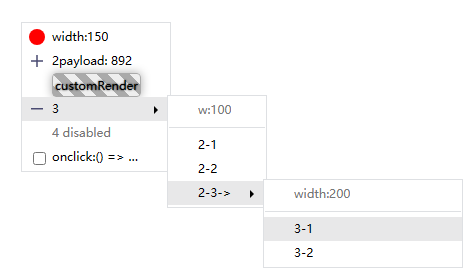
special situation:

## Brief introduction
* Native js right-click menu encapsulation. It can also be used for the onclick event to open the menu.
* The default style is completed by inserting the style tag through js, paying attention to the class namespace.。
* Only the most basic styles are provided.
* TypeScript ✔
* default z-index = 5000;
* [Gitee](https://gitee.com/japlus/ja-context-menu)
* [中文🇨🇳](https://gitee.com/japlus/ja-context-menu/blob/master/README.zh.md)
## Usage
> npm i ja-contextmenu
```js
import ContextMenu from 'ja-contextmenu';
const contextMenu = new ContextMenu();
const menuOption = {
item:[
{ label:'go', onclick(e, payload){...} }
]
};
const menu = contextMenu.create(menuOption);
window.addEventListener('contextmenu', e => { menu.show(e, payload) });
// async create menu
const menu2 = contextMenu.createAsync(menuOption);
window.addEventListener('click', e => { menu2().show(e, payload) });
```
## Attention
Please delete the "^"before the version number of ja-contextmenu in package.json after installation to prevent the unexpected automatic update of npm.
(eg: "ja-contextmenu":"`^`1.3.0" => "ja-contextmenu":"1.3.0")
Limited energy, there is no guarantee that the use mode will not be changed when the small version is updated.
## Feature Log
- [x] `ContextMenuOption['arrowIcon']`, `MenuItemOption['arrowIcon']`(v1.10.3)
- [x] `MenuItemOption['arrowIcon']` custom sub menu arrow right (v1.10.2)
- [x] `MenuItemOption['customItem']` support callback (v1.10.1)
- [x] Sub menu height > page height, auto scroll (v1.9.0)
- [x] If the bottom position of the submenu is not enough, the bottom of the menu aligns with the bottom of the page.(v1.9.0)
- [x] `menu.show` can set menu default position (v1.8.3)
- [x] ContextMenu.createAsync async create menu (v1.7.2)
- [x] MenuItemOption.onclick return true. click item not close menu. (v1.6.0)
- [x] MenuItemOption.icon support HTMLElement. (v1.6.0)
- [x] MenuItemOption.show: boolean。Control MenuItem show. (v1.5.0)
- [x] click close,capture:true.
- [x] Items with submenus cannot be clicked.
- [x] Support configuration class.
- [x] Support configuration class icon.
- [x] Hide when scrolling
- [x] Use position:fixed
- [x] title/tip formatter
- [x] Support incoming DOM,custom MenuItem
## Example
```javascript
import ContextMenu, { h } from 'ja-contextmenu'; // types.d.ts supported
// import ContextMenu from 'ja-contextmenu/src/index.ts'
const contextMenu = new ContextMenu({
width: 200, // default: 200
fixMenuWhenScroll: false, // (position:fixed) default:false
hideMenuWhenScroll: true // default:true
});
const menuOption = {
items: [
{
label: 'menu1', // name
icon: './assets/images/ico.png', // icon url | HTMLElement
class: 'customClass', // item class, default: ''
tip: 'tip1', // Prompt text to the right of option, default: ''
show: true, // default: true
disabled: false, // default: false
onclick(e, payload) {
// payload is the parameter passed in by calling the menu.show method.
console.log('menu1 click', payload);
// return true; // not close menu
},
},
{ type: '---' }, //
split line
{
// support function
label: payload => 'menu2',
icon: payload => 'icon href2',
arrowIcon: payload => h('div', '>'),
class: payload => 'class2',
tip: payload => 'tip2',
show: payload => true,
disabled: payload => true
children: {
width: 120, // default = parent menu width
items: [
{
label: 'sub menu1',
onclick: (e, payload) => {
console.log('sub menu1 click', payload)
}
},{
class: 'li-class-name',
customItem: document.createElement('div')
},{
// I encapsulated the function h of createElement.
customItem: h('div',[
h('span', {
// {[element.key]:value}
textContent: 'hello', // element.textContent = 'hello'
style:{
fontWeight:'bolder'.// element.style.fontWeight = 'holder'
cssText: 'font-size:14px;' // element.style.cssText = 'font-size:14px;'
},
className:'class-name',
}),
h('span.class-name#id',' world')
])
}
]
}
},
],
}
let menu = contextMenu.create(menuOption);
document.body.oncontextmenu = (e) => {
let payload = 'payload data: callback when click items';
menu.show(e, payload);
};
// or
someButton.onclick = (e) => {
e.position = ['left','top'];
menu.show(e);
}
// menu.hide();
// menu.destroy();
// menu = null;
```
## ContextMenu constructor
> new ContextMenu(option: `ContextMenuOption`);
### ContextMenuOption
| key: type | default | desc |
| ---- | ---- | ---- |
| width: number | 200 | Menu width |
| fixMenuWhenScroll: boolean | false | Is the menu fixed when scrolling(hideMenuWhenScroll=false) |
| hideMenuWhenScroll: boolean | true | Whether to close the menu when scrolling. |
| arrowIcon: MenuItemOption['arrowIcon'] | -- | Custom all sub menu's arrow,created by this contextMenu instance. |
## ContextMenu instance method
### create\(option: `MenuOption`): `MenuWrapper`
Create a menu and return a MenuWrapper object.
#### MenuOption
| param: type | default | desc |
| ---- | ---- | ---- |
| width?: number| 200 | Menu width. If the submenu is not configured, the width of the parent menu will be inherited. |
| class?: string\|(payload)=>string | -- | Menu ul class |
| arrowIcon: MenuItemOption['arrowIcon'] | -- | this menu's arrow right icon (will inherit parent's menu's arrowIcon) |
| items: `MenuItemOption` | -- | List configuration item |
#### MenuItemOption
| param: type | default | desc |
| ---- | ---- | ---- |
| icon?: string\|HTMLElement\|(payload)=>string\|HTMLElement | -- | icon url |
| arrowIcon:HTMLElement \| (payload) => HTMLElement | -- | this items's arrow right icon |
| class?: string\|(payload)=>string | -- | Menu item 'li' class |
| label?: string\|(payload)=>string | -- | Item text |
| tip?: string\|(payload)=>string | -- | Prompt text to the right of menu item |
| show?: boolean\|(payload)=>boolean | true | Whether to show |
| disabled?: boolean\|(payload)=>boolean | false | Whether to disabled |
| type?: `MenuItemType` | -- | value '---' \| 'hr' => <hr> split line |
| customItem?: `HTMLElement` | -- | Custom Menu Item |
| onclick?: function(event, payload):boolean| -- | Click the event callback, and the parameter payload is the parameter passed in when calling the showMenu. return true does not close the menu after clicking.|
| children?: `MenuOption` | -- | Submenu configuration
## MenuWrapper
```ts
const menu:MenuWrapper = contextMenu.create(...)
```
### 1.show(pos: { x: number, y: number, position: [PanelPositionEnum, PanelPositionEnum] }, payload?: any): {position: [PanelPositionEnum, PanelPositionEnum]}
Show menu
* pos: `PointerEvent` | `MouseEvent` | T extends { x: number, y: number }
- x: number
- y: number
- position: [PanelPositionEnum, PanelPositionEnum] x轴和y轴展示位置
* payload: Return in the onclick callback of the click menu.
* return: position: x position, y position.
### 2.hide()
### 3.destroy()
### 4.calcPosition(pos: { x: number, y: number, position: [PanelPositionEnum, PanelPositionEnum] }): { x: number, y: number, position: [PanelPositionEnum, PanelPositionEnum] }
Calculate the position of the menu, return the position of the menu and the position of the menu relative to the document.
## PanelPositionEnum
```ts
enum PanelPositionEnum {
TOP = 'top',
BOTTOM = 'bottom',
LEFT = 'left',
RIGHT = 'right',
}
```
## Typescript Demo
```ts
import ContextMenu from 'ja-contextmenu';
const contextMenu = new ContextMenu();
// Generic - PayloadType
const menu = contextMenu.create({
width: 100,
items: [
{
label: 'label',
onclick(e, payload:number) { // type
console.log(payload);
},
},
],
});
menu.show({x: 100,y:100}, 1) // payload type :number
menu.show({x: 100,y:100}) // payload type :undefined
//menu.show({x: 100,y:100}, '2') // payload type error not number
```
## About Project
* **demo**: npm run dev
Demo code in `/test` folder
* build prod: npm run bd
* src/utils/h.ts => document.createElement()
---
_Source: https://npm.io/package/ja-contextmenu · Machine-readable twin of the npm.io package page. Health data is recomputed on every publish._