# jadwal
> Personal to-do list, organized as a simple, yet effective tool for task management
Latest version **1.0.4** (published 2025-01-04) · MIT license · 0 weekly downloads
## Install
```sh
npm install jadwal
pnpm add jadwal
yarn add jadwal
bun add jadwal
```
Provides the command `jadwal`.
## Health
**Score 25/100 (F)** — status: maintenance-mode.
Positive: no vulnerabilities.
Warnings: low downloads; no types; no esm support.
Negative: stale; low maintenance score.
## Facts
| | |
|---|---|
| Version | 1.0.4 |
| Published | 2025-01-04 |
| First published | 2024-08-24 |
| Weekly downloads | 0 |
| License | MIT |
| TypeScript types | none |
| Module format | CommonJS |
| Dependencies | 5 |
| Unpacked size | 36.6 KB |
| Known vulnerabilities | 0 |
| Install scripts | no |
| GitHub stars | 0 |
| Author | thesuhu |
| Maintainers | thesuhu |
| Keywords | task, todo, jadwal, list, schedule |
## Links
- npm: https://www.npmjs.com/package/jadwal
- Repository: https://github.com/thesuhu/jadwal
- Homepage: https://github.com/thesuhu/jadwal#readme
- Issues: https://github.com/thesuhu/jadwal/issues
- npm.io page: https://npm.io/package/jadwal
## Dependencies (5)
- [dotenv](https://npm.io/package/dotenv.md) ^16.4.5
- [fs-extra](https://npm.io/package/fs-extra.md) ^11.2.0
- [simple-git](https://npm.io/package/simple-git.md) ^3.25.0
- [readline-sync](https://npm.io/package/readline-sync.md) ^1.4.10
- [@thesuhu/colorconsole](https://npm.io/package/@thesuhu/colorconsole.md) ^1.0.5
## Recent versions
- 1.0.4 (latest) — 2025-01-04
- 1.0.3 — 2024-10-19
- 1.0.2 — 2024-10-02
- 1.0.1 — 2024-09-24
- 1.0.0 — 2024-08-24
## README
# Jadwal (To Do)
[](https://www.npmjs.com/package/jadwal)
[](https://github.com/thesuhu/jadwal/blob/master/LICENSE)
Personal to-do list, organized as a simple, yet effective tool for task management. Using `todo.txt` file to store data with [todo.txt](https://github.com/todotxt/todo.txt) format rule.
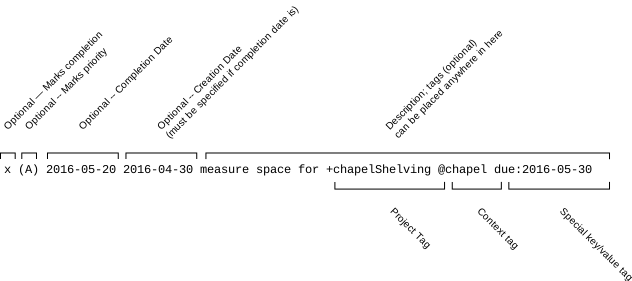 ## Environtment
To store your to-do list, create personal `Git` project and create `todo.txt` file in your project with `main` branch name. Clone it to your local directory.
Add environment to your system:
### Unix/Linux/macOS
Temporary (for the current session):
```sh
export LOCAL_REPO=/path/to/local/repo
export REMOTE_GIT=https://github.com/username/todo-repo.git
```
Permanent (persists across sessions):
Add the following lines to your shell's configuration file (e.g., `~/.bashrc` or `~/.zshrc`):
```sh
export LOCAL_REPO=/path/to/local/repo
export REMOTE_GIT=https://github.com/username/todo-repo.git
```
Then, either restart your terminal or run source `~/.bashrc` (or `source ~/.zshrc`) to apply the changes.
### Windows
Temporary (for the current session), using the Command Prompt (CMD):
```cmd
set LOCAL_REPO=C:\path\to\local\repo
set REMOTE_GIT=https://github.com/username/todo-repo.git
```
Temporary (for the current session), using the PowerShell:
```powershell
$env:LOCAL_REPO = "C:\path\to\local\repo"
$env:REMOTE_GIT = "https://github.com/username/todo-repo.git"
```
Permanent (persists across sessions), using the Command Prompt (CMD):
```cmd
setx LOCAL_REPO "C:\path\to\local\repo" /m
setx REMOTE_GIT "https://github.com/username/todo-repo.git" /m
```
Permanent (persists across sessions), using the PowerShell:
```powershell
[Environment]::SetEnvironmentVariable("LOCAL_REPO", "C:\path\to\local\repo", "User")
[Environment]::SetEnvironmentVariable("REMOTE_GIT", "https://github.com/username/todo-repo.git", "User")
```
## Install
`NPM` must be installed on your system, then install it with global parameters:
```sh
npm i -g jadwal
```
## Usage
Once the `jadwal` package is installed, the following commands are available:
`jadwal add` - Add a new todo. Use jadwal help add for detailed usage.
Examples:
### Unix/Linux/macOS
Using long options:
```sh
jadwal add --description "Finish report" \
--priority A \
--creation-date 2024-09-20 \
--completion-date 2024-09-30 \
--project Work \
--context Office \
--special-tag reminder:2024-09-25
```
Using short options:
```sh
jadwal add \
-d "Finish report" \
-p A \
-c 2024-09-20 \
-P Work \
-t Office \
-s reminder:2024-09-25
```
### Windows
```powershell
jadwal add --description "Finish report" ^
--priority A ^
--creation-date 2024-09-20 ^
--project Work ^
--context Office ^
--special-tag reminder:2024-09-25
```
Using short options:
```powershell
jadwal add ^
-d "Finish report" ^
-p A ^
-c 2024-09-20 ^
-P Work ^
-t Office ^
-s reminder:2024-09-25
```
Both examples will add a new todo with the following attributes:
- Description: "Finish report"
- Priority: A
- Creation Date: January 15, 2023
- Completion Date: September 30, 2024
- Project Tag: Work
- Context Tag: Office
- Special Tag: reminder:2024-09-25
`jadwal update` - Update an existing todo. Use jadwal help update for detailed usage. Below is example to update data with adding completion data, new description and priority attributes. And don't forget to provide `old description` as key for updating existing data.
```sh
jadwal update \
-d "Update finish report" \
-p B \
-c 2024-09-20 \
-o "Finish report"
```
For long option and Windows commands, see the example in `add` section above.
`jadwal delete` - Delete a todo. Use jadwal help delete for detailed usage.
`jadwal list` - List all todos.
`jadwal done` - Mark a todo as done.
`jadwal sync` - Sync todos with Git.
`jadwal reveal` - Reveal todo.txt in explorer.
`jadwal help` - Show the general help message.
`jadwal help ` - Show detailed help for a specific command (e.g., `jadwal help add`).
## License
[MIT](https://github.com/thesuhu/jadwal/blob/master/LICENSE)
---
_Source: https://npm.io/package/jadwal · Machine-readable twin of the npm.io package page. Health data is recomputed on every publish._
## Environtment
To store your to-do list, create personal `Git` project and create `todo.txt` file in your project with `main` branch name. Clone it to your local directory.
Add environment to your system:
### Unix/Linux/macOS
Temporary (for the current session):
```sh
export LOCAL_REPO=/path/to/local/repo
export REMOTE_GIT=https://github.com/username/todo-repo.git
```
Permanent (persists across sessions):
Add the following lines to your shell's configuration file (e.g., `~/.bashrc` or `~/.zshrc`):
```sh
export LOCAL_REPO=/path/to/local/repo
export REMOTE_GIT=https://github.com/username/todo-repo.git
```
Then, either restart your terminal or run source `~/.bashrc` (or `source ~/.zshrc`) to apply the changes.
### Windows
Temporary (for the current session), using the Command Prompt (CMD):
```cmd
set LOCAL_REPO=C:\path\to\local\repo
set REMOTE_GIT=https://github.com/username/todo-repo.git
```
Temporary (for the current session), using the PowerShell:
```powershell
$env:LOCAL_REPO = "C:\path\to\local\repo"
$env:REMOTE_GIT = "https://github.com/username/todo-repo.git"
```
Permanent (persists across sessions), using the Command Prompt (CMD):
```cmd
setx LOCAL_REPO "C:\path\to\local\repo" /m
setx REMOTE_GIT "https://github.com/username/todo-repo.git" /m
```
Permanent (persists across sessions), using the PowerShell:
```powershell
[Environment]::SetEnvironmentVariable("LOCAL_REPO", "C:\path\to\local\repo", "User")
[Environment]::SetEnvironmentVariable("REMOTE_GIT", "https://github.com/username/todo-repo.git", "User")
```
## Install
`NPM` must be installed on your system, then install it with global parameters:
```sh
npm i -g jadwal
```
## Usage
Once the `jadwal` package is installed, the following commands are available:
`jadwal add` - Add a new todo. Use jadwal help add for detailed usage.
Examples:
### Unix/Linux/macOS
Using long options:
```sh
jadwal add --description "Finish report" \
--priority A \
--creation-date 2024-09-20 \
--completion-date 2024-09-30 \
--project Work \
--context Office \
--special-tag reminder:2024-09-25
```
Using short options:
```sh
jadwal add \
-d "Finish report" \
-p A \
-c 2024-09-20 \
-P Work \
-t Office \
-s reminder:2024-09-25
```
### Windows
```powershell
jadwal add --description "Finish report" ^
--priority A ^
--creation-date 2024-09-20 ^
--project Work ^
--context Office ^
--special-tag reminder:2024-09-25
```
Using short options:
```powershell
jadwal add ^
-d "Finish report" ^
-p A ^
-c 2024-09-20 ^
-P Work ^
-t Office ^
-s reminder:2024-09-25
```
Both examples will add a new todo with the following attributes:
- Description: "Finish report"
- Priority: A
- Creation Date: January 15, 2023
- Completion Date: September 30, 2024
- Project Tag: Work
- Context Tag: Office
- Special Tag: reminder:2024-09-25
`jadwal update` - Update an existing todo. Use jadwal help update for detailed usage. Below is example to update data with adding completion data, new description and priority attributes. And don't forget to provide `old description` as key for updating existing data.
```sh
jadwal update \
-d "Update finish report" \
-p B \
-c 2024-09-20 \
-o "Finish report"
```
For long option and Windows commands, see the example in `add` section above.
`jadwal delete` - Delete a todo. Use jadwal help delete for detailed usage.
`jadwal list` - List all todos.
`jadwal done` - Mark a todo as done.
`jadwal sync` - Sync todos with Git.
`jadwal reveal` - Reveal todo.txt in explorer.
`jadwal help` - Show the general help message.
`jadwal help ` - Show detailed help for a specific command (e.g., `jadwal help add`).
## License
[MIT](https://github.com/thesuhu/jadwal/blob/master/LICENSE)
---
_Source: https://npm.io/package/jadwal · Machine-readable twin of the npm.io package page. Health data is recomputed on every publish._