# js-year-calendar
> A fully customizable year calendar widget
Latest version **2.0.0** (published 2021-08-24) · Apache-2.0 license · 0 weekly downloads
## Install
```sh
npm install js-year-calendar
pnpm add js-year-calendar
yarn add js-year-calendar
bun add js-year-calendar
```
## Health
**Score 15/100 (F)** — status: abandoned.
Positive: no vulnerabilities.
Warnings: low downloads; no types; no esm support.
Negative: abandoned; low maintenance score.
## Facts
| | |
|---|---|
| Version | 2.0.0 |
| Published | 2021-08-24 |
| First published | 2019-03-06 |
| Weekly downloads | 0 |
| License | Apache-2.0 |
| TypeScript types | none |
| Module format | CommonJS |
| Dependencies | 0 |
| Unpacked size | 189.7 KB |
| Known vulnerabilities | 0 |
| Install scripts | no |
| GitHub stars | 197 |
| Author | Paul-DS |
| Maintainers | paul-ds |
| Keywords | calendar, year, javascript, widget |
## Links
- npm: https://www.npmjs.com/package/js-year-calendar
- Repository: https://github.com/year-calendar/js-year-calendar
- Homepage: https://year-calendar.github.io/
- Issues: https://github.com/year-calendar/js-year-calendar/issues
- npm.io page: https://npm.io/package/js-year-calendar
## Alternatives
- [@sindresorhus/slugify](https://npm.io/package/@sindresorhus/slugify.md) — 3.7M weekly downloads
- [solid-js](https://npm.io/package/solid-js.md) — 2.7M weekly downloads
- [expo-glass-effect](https://npm.io/package/expo-glass-effect.md) — 2.5M weekly downloads
- [nanoassert](https://npm.io/package/nanoassert.md) — 780.8K weekly downloads
- [@ffmpeg/ffmpeg](https://npm.io/package/@ffmpeg/ffmpeg.md) — 529.5K weekly downloads
## Recent versions
- 2.0.0 (latest) — 2021-08-24
- 2.0.0-alpha.3 (next) — 2021-08-22
- 2.0.0-alpha.2 — 2020-06-20
- 2.0.0-alpha.1 — 2020-04-05
- 1.0.2 — 2020-04-05
- 1.0.2-alpha.1 — 2020-04-04
- 1.0.1 — 2020-03-29
- 1.0.0 — 2020-03-28
- 1.0.0-alpha.7 — 2019-08-13
- 1.0.0-alpha.6 — 2019-03-25
- 1.0.0-alpha.5 — 2019-03-25
- 1.0.0-alpha.4 — 2019-03-13
- 1.0.0-alpha.3 — 2019-03-13
- 1.0.0-alpha.2 — 2019-03-07
- 1.0.0-alpha.1 — 2019-03-06
## README
# js-year-calendar
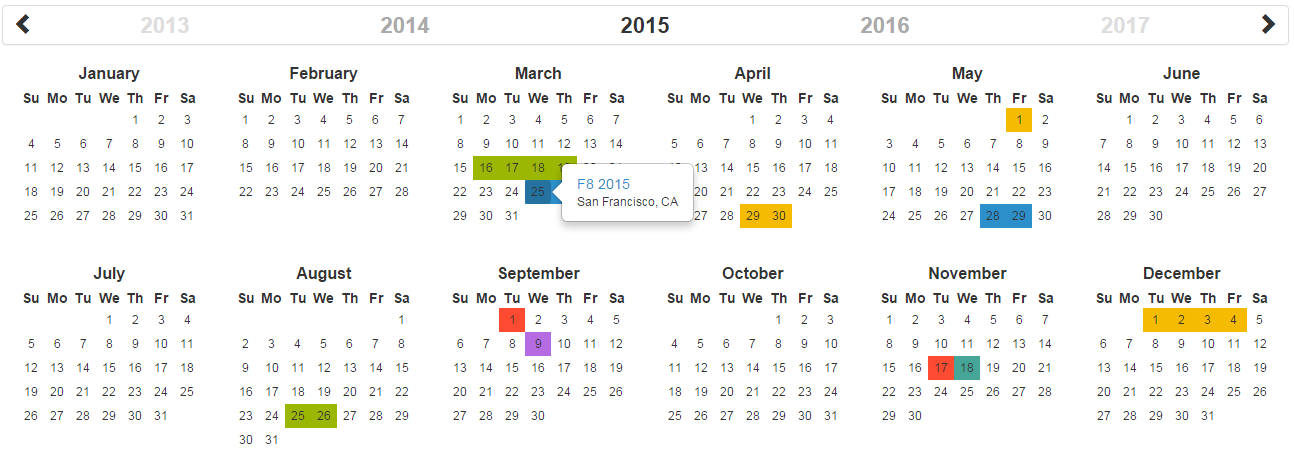
A fully customizable year calendar widget
[](https://circleci.com/gh/year-calendar/js-year-calendar/tree/master)
[](https://codecov.io/gh/year-calendar/js-year-calendar)
[](https://www.npmjs.com/package/js-year-calendar)
This library is also available for:
[](https://github.com/year-calendar/rc-year-calendar)
[](https://github.com/year-calendar/v-year-calendar)
## Requirements
This plugin uses pure javascript. No library is required.
## Installation
You can get the widget using the following methods:
- From the [GitHub repository](https://github.com/year-calendar/js-year-calendar/releases)
- From the Node package manager, using the following command: `npm install js-year-calendar`
- From Yarn, using the following command: `yarn add js-year-calendar`
- From the CDN, by adding the following script directly in your HTML page:
``
AND
``
## Initialization
If you're using javascript modules, don't forget to import the library:
```
import Calendar from 'js-year-calendar';
import 'js-year-calendar/dist/js-year-calendar.css';
```
## Usage
You can create a calendar using the following javascript code :
```
new Calendar('.calendar')
```
Or
```
new Calendar(document.querySelector('.calendar'));
```
Where `.calendar` is the selector of a `DIV` element that should contain your calendar.
You can also use the following HTML if you don't want to use javascript to initialize the calendar
```
```
The calendar will be automatically created when the page will finish loading
## Using options
You can specify options to customize the calendar:
```
new Calendar('.calendar', {
style: 'background',
minDate: new Date()
})
```
You can find the exhaustive list of options in the [documentation](https://year-calendar.github.io/js-year-calendar/documentation).
## Language
If you want to use the calendar in a different language, you should import the locale file corresponding to the language you want to use, and then set the `language` prop of the calendar:
```
import Calendar from 'js-year-calendar';
import 'js-year-calendar/locales/js-year-calendar.fr';
```
OR
```
```
Then
```
new Calendar('.calendar', {
language: 'fr'
})
```
The list of available languages is available [here](https://github.com/year-calendar/js-year-calendar/tree/master/locales)
## Updating calendar
You can update the calendar after being instantiated:
```
const calendar = new Calendar('.calendar');
calendar.setStyle('background');
calendar.setMaxDate(new Date());
```
You can find the exhaustive list of methods in the [documentation](https://year-calendar.github.io/js-year-calendar/documentation).
## Events
You can bind events to the calendar at initialization
```
const calendar = new Calendar('.calendar', {
clickDay: function(e) {
alert('Click on day ' + e.date.toString());
}
});
```
or later
```
new Calendar('.calendar');
document.querySelector('.calendar').addEventListener('clickDay', function(e) {
alert('Click on day ' + e.date.toString());
});
```
You can find the exhaustive list of events in the [documentation](https://year-calendar.github.io/js-year-calendar/documentation).
## Migrating v1.x to v2.x
If you are using the dataSource option as a function (callback or promise), the first parameter has changed:
```
new Calendar('#calendar', {
dataSource: (year) => {
console.log(year);
}
}
```
becomes
```
new Calendar('#calendar', {
dataSource: (period) => {
console.log(period.year);
}
}
```
For more details, check [this PR](https://github.com/year-calendar/js-year-calendar/pull/32)
## Migrating from bootstrap-year-calendar
This widget is based on the [bootstrap-year-calendar](https://github.com/Paul-DS/bootstrap-year-calendar) widget.
If you were using this widget, these are the modifications to apply to successfully migrate your project:
### Initialization
The project doesn't use jQuery anymore, so the initialization of the calendar will be using pure Javascript.
The old code:
```
$('.calendar').calendar({ /* Options */ })
```
Will be replaced by:
```
new Calendar('.calendar', { /* Options */ });
```
Or
```
new Calendar($('.calendar').get(0), { /* Options */ });
// Use ".get(0)" to get the DOM element from the jQuery element
```
### Get the calendar from the DOM element
Given that the widget doesn't rely on jQuery, it won't be possible to get the calendar instance from the DOM element anymore:
```
$('.calendar').data('calendar').set...();
```
You will have to store the instance of the calendar by yourself:
```
const calendar = new Calendar('.calendar');
...
calendar.set...();
```
## What next
Check the [documentation](https://year-calendar.github.io/js-year-calendar/documentation) and [examples](https://year-calendar.github.io/rc-year-calendar/examples) pages to discover all the functionalities.
---
_Source: https://npm.io/package/js-year-calendar · Machine-readable twin of the npm.io package page. Health data is recomputed on every publish._