# kay-query
> [](https://badge.fury.io/js/polyrhythm)[ ^6.5.5
- [lodash.ismatch](https://npm.io/package/lodash.ismatch.md) ^4.4.0
## Recent versions
- 8.27.2006 (latest) — 2021-03-17
## README
[](https://badge.fury.io/js/polyrhythm)[](https://www.npmjs.com/package/polyrhythm)
[](https://travis-ci.org/deanius/polyrhythm)
[](https://codeclimate.com/github/deanius/polyrhythm/maintainability)
[](https://github.com/ellerbrock/typescript-badges/) [](https://twitter.com/deaniusdev)
# polyrhythm 🎵🎶
`polyrhythm` is a way to avoid async race conditions, particularly those that arise when building UIs, in JavaScript. It can replace Redux middleware like Redux Saga, and is a framework-free library that supercharges your timing and resource-management. And it's under 4Kb.
Its API is a synthesis of ideas from:
- 💜RxJS. Older than Promises, nearly as old as JQuery.
- 💜Redux-Observable, Redux Saga, Redux Thunk. Async.
- 💙Macromedia Flash. Mutliple timelines.
- 💙JQuery. [#on](https://api.jquery.com/on/) and [#trigger](https://api.jquery.com/trigger/).
For use in a React context, [polyrhythm-react](https://github.com/deanius/polyrhythm-react) exports all in this library, plus React hooks for interfacing with it.
## Installation
```
npm install polyrhythm
```
# What Is It?
`polyrhythm` is a TypeScript library that is a framework-independent coordinator of multiple streams of async using RxJS Observables.
The goal of `polyrhythm` is to be a centralized control of timing for sync or async operations in your app.
Because of it's pub-sub/event-bus design, your app remains inherently scalable because originators of events don't know about consumers, or vice versa. If a single subscriber errs out, neither the publisher nor other subscribers are affected. Your UI layer remains simple— its only job is to trigger/originate events. All the logic remains separated from the UI layer by the event bus. Testing of most of your app's effects can be done without going through your UI layer.
`polyrhythm` envisions a set of primitives can compose into beautiful Web Apps and User Experiences more simply and flexibly than current JavaScript tools allow for. All thie with a tiny bundle size, and an API that is delightfully simple.
# Where Can I Use It?
The framework-independent primitives of `polyrhythm` can be used anywhere. It adds only 3Kb to your bundle, so it's worth a try. It is test-covered, provides types, is production-tested and performance-tested.
# How Does It Help Me Build Apps?
A polyrhythm app, sync or async, can be built out of 6 or fewer primitives:
- `trigger` - Puts an event on the event bus, and must be called at least once in your app. Generally all a UI Event Handler needs to do is call `trigger` with an event type and a payload.
Example — `addEventListener('click', ()=>{ trigger('timer/start') })`
- `filter` - Adds a function to be called on every matching `trigger`. The filter function will be called synchronously in the call-stack of `trigger`, can modify its events, and can prevent events from being further handled by throwing an Error.
For metadata — `filter('timer/start', event => { event.payload.startedAt = Date.now()) })`
Validation — `filter('form/submit', ({ payload }) => { isValid(payload) || throw new Error() })`
- `listen` - Adds a function to be called on every matching `trigger`, once all filters have passed. Allows you to return an Observable of its side-effects, and/or future event triggerings, and configure its overlap behavior / concurrency declaratively.
AJAX: `listen('profile/fetch', ({ payload }) => get('/user/' + payload.id)).tap(user => trigger('profile/complete', user.profile))`
- `query` - Provides an Observable of matching events from the event bus. Useful when you need to create a derived Observable for further processing, or for controlling/terminating another Observable. Example: `interval(1000).takeUntil(query('user/activity'))`
## Observable creators
- `after` - Defers a function call into an Observable of that function call, after a delay. This is the simplest way to get a cancelable side-effect, and can be used in places that expect either a `Promise` or an `Observable`.
Promise — `await after(10000, () => modal('Your session has expired'))`
Observable — `interval(1000).takeUntil(after(10000))`
`
- `concat` - Combines Observables by sequentially starting them as each previous one finishes. This only works on Observables which are deferred, not Promises which are begun at their time of creation.
Sequence — `login().then(() => concat(after(9000, 'Your session is about to expire'), after(1000, 'Your session has expired')).subscribe(modal))`
You can use Observables from any source in `polyrhythm`, not just those created with `concat` and `after`. For maximum flexibility, use the `Observable` constructor to wrap any async operation - and use them anywhere you need more control over the Observables behavior. Be sure to return a cleanup function from the Observable constructor
```js
listen('user/activity', () => {
return concat(
new Observable(notify => { // equivalent to after(9000, "Your session is about to expire")
const id = setTimeout(() => {
notify.next("Your session is about to expire");
notify.complete(); // tells `concat` we're done- Observables may call next() many times
}, 9000);
return () => clearTimeout(id); // a cancelation function allowing this timeout to be 'replaced' with a new one
}),
after(1000, () => "Your session has expired"));
}, { mode: 'replace' });
});
```
More Explanation
According to Pub-Sub, there are publishers and subscribers. In `polyrhythm` there are event **Originators** (publishers) which call `trigger`, and **Handlers** which `filter`, or `listen` in one of several concurrency modes.
## Event Originators
**Events** are `trigger`-ed by an **Originator**.
## The Channel
An instance of an event-bus is called a **Channel**. There's a default channel, to which top-level exports `filter`, `trigger`, and `listen` are bound.
## Handlers
**Handlers** are either **Filters** or **Listeners**. Both specify:
- A function to run
- An event criteria for when to run the function
The difference is how they execute, and their relative decoupling of isolation.
**Filters** are run synchronously with `trigger()` prior to events arriving on the event bus.
_IMPORTANT: **Filters** can modify events. And their exceptions propogate up to the **Originator**. So one of their uses is to prevent **Listeners** from responding._
**Listeners** are run when events make it through all filters.
**Listeners** are often **Originators**, when they `trigger` new events.
**Listeners** are how to do async. They return Promises, or **Tasks**— RxJS Observables.
A **Task** is a cancelable, unstarted object which the listener may run, or cancel upon a new event.
**Listeners** can be provided a concurrency `mode` to control what happens when events come in fast, so that the execution of their **Task**s overlap. Modes include common strategies like enqueueing or canceling the previous.
_IMPORTANT: The app is protected from each **Listener** as though by a fuse. `polyrhythm` intercepts uncaught exceptions and terminates only the offending listener._
---
# Declare Your Timing, Don't Code It
Most of the time, app code around timing is extremely hard to change. It can be a large impact to the codebase to add `async` to a function declaration, or turn a function into a generator with `function*() {}`. That impact can 'hard-code' in latency or unadaptable behaviors. And relying on framework features like the timing difference between `useEffect` and `useLayoutEffect` can make code vulnerable to framework changes, and make it harder to test.
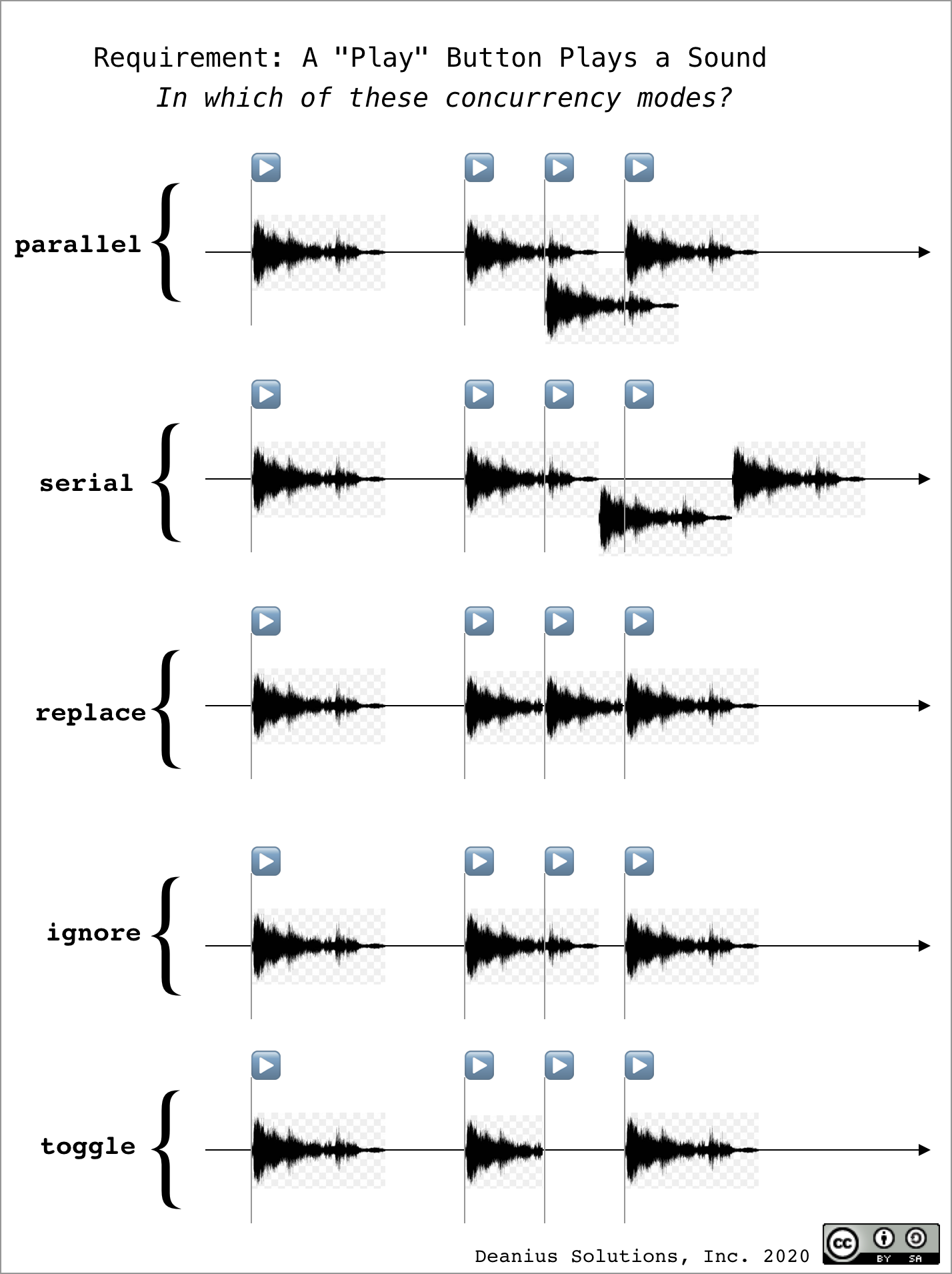
`polyrhythm` gives you 5 concurrency modes you can plug in trivially as configuration parameters. See it's effect on the "Increment Async" behavior in the [Redux Counter Example](https://codesandbox.io/s/poly-redux-counter-solved-m5cm0).
The listener option `mode` allows you to control the concurrency behavior of a listener declaratively, and is important for making polyrhythm so adaptible to desired timing outcomes. For an autocomplete or session timeout, the `replace` mode is appropriate. For other use cases, `serial`, `parallel` or `ignore` may be appropriate.
`listen('user/activity', () => concat(after(9000, 'Your session is about to expire'), after(1000, 'Your session has expired')), { mode: 'replace' })`
If async effects were sounds, this diagram shows how they might overlap/queue/cancel each other.
 > Watch a [Loom Video on these concurrency modes](https://www.loom.com/share/3736003a75bd497eab062c97af0113fc)
This ensures that the exact syntax of your code, and your timing information, are decoupled - the one is not expressed in terms of the other. This let's you write fewer lines, more direct and declarative, and generally more managable code.
---
## Examples - What Can You Build With It?
- The [Redux Counter Example](https://codesandbox.io/s/poly-redux-counter-solved-m5cm0)
- The [Redux Todos Example](https://codesandbox.io/s/polyrhythm-redux-todos-ltigo)
- A `requestAnimationFrame`-based [Game Loop](https://codesandbox.io/s/poly-game-loop-xirgs?file=/src/index.js)
- Seven GUIs Solutions [1-Counter](https://codesandbox.io/s/7guis-1-counter-17pxb) | [2-Temperature](https://codesandbox.io/s/7guis-2-temperature-bnjbf) | [3-Flight](https://codesandbox.io/s/7guis-3-flight-c6wre) | [4-CRUD](https://codesandbox.io/s/7guis-4-crud-7wjut) | [5-Timer](https://codesandbox.io/s/7guis-5-timer-xgop9) _(more info at [7 GUIs](https://eugenkiss.github.io/7guis/tasks))_
- The [Chat UI Example](https://codesandbox.io/s/poly-chat-imw2z) with TypingIndicator
- See [All CodeSandbox Demos](https://codesandbox.io/search?refinementList%5Bnpm_dependencies.dependency%5D%5B0%5D=`polyrhythm`&page=1&configure%5BhitsPerPage%5D=12)
# FAQ
**Got TypeScript typings?**
But of course!
**How large?**
16Kb parsed size, 4Kb Gzipped
**In Production Use?**
Yes.
**What does it do sync, async? With what Error-Propogation and Cancelability? How does it work?**
See [The test suite](/test/channel.test.ts) for details.
**How fast is it?**
Nearly as fast as RxJS. The [Travis CI build output](https://travis-ci.org/github/deanius/polyrhythm) contains some benchmarks.
---
# Example: Ping Pong 🏓
Let's incrementally build the ping pong example app with `polyrhythm`.
[Finished version CodeSandbox](https://codesandbox.io/s/polyrhythm-ping-pong-r6zk5)
## 1) Log all events, and trigger **ping**
```js
const { filter, trigger, log } = require();
// **** Behavior (criteria, fn) ****** //
filter(true, log);
// **** Events (type, payload) ****** //
trigger('ping', 'Hello World');
// **** Effects ({ type, payload }) ****** //
function log({ type, payload }) {
console.log(type, payload ? payload : '');
}
// Output:
// ping Hello World
```
Here's an app where a `filter` (one of 2 kinds of listeners) logs all events to the console, and the app `trigger`s a single event of `type: 'ping'`.
**Explained:** Filters are functions that run before events go on the event bus. This makes filters great for logging, as you typically need some log output to tell you what caused an error, if an error occurs later. This filter's criteria is simply `true`, so it runs for all events. Strings, arrays of strings, Regex and boolean-functions are also valid kinds of criteria. The filter handler `log` recieves the event as an argument, so we destructure the `type` and `payload` from it, and send it to the console.
We `trigger` a `ping`, passing `type` and `payload` arguments. This reduces boilerplate a bit compared to Redux' `dispatch({ type: 'ping' })`. But `trigger` will work with a pre-assembled event too. Now let's play some pong..
## 2) Respond to **ping** with **pong**
If we just want to respond to a **ping** event with a **pong** event, we could do so in a filter. But filters should be reserved for synchronous side-effect functions like logging, changing state, or dispatching an event/action to a store. So let's instead use `listen` to create a **Listener**.
```js
const { filter, listen, log, trigger } = require('polyrhythm');
filter(true, log);
listen('ping', () => {
trigger('pong');
});
trigger('ping');
// Output:
// ping
// pong
```
We now have a **ping** event, and a **pong** reply. Now that we have a game, let's make it last longer.
## 3) Return Async From an Event Handler
Normally in JavaScript things go fine—until we make something async. But `polyrhythm` has a solution for that, a simple utility function called `after`. I like to call `after` _"the `setTimeout` you always wanted"_.
Let's suppose we want to trigger a **pong** event, but only after 1 second. We need to define the **Task** that represents "a triggering of a `pong`, after 1 second".
```js
const { filter, listen, log, after, trigger } = require('polyrhythm');
filter(true, log);
listen('ping', () => {
return after(1000, () => trigger('pong'));
});
trigger('ping');
// Output: (1000 msec between)
// ping
// pong
```
In plain, readable code, `after` returns an Observable of the function call you pass as its 2nd argument, with the delay you specify as its 1st argument. Read aloud, it says exactly what it does: _"After 1000 milliseconds, trigger `pong`"_
**TIP:** An object returned by `after` can be directly `await`-ed inside an async functions, as shown here:
```js
async function sneeze() {
await after(1000, () => log('Ah..'));
await after(1000, () => log('..ah..'));
await after(1000, () => log('..choo!'));
}
```
**IMPORTANT:** All Observables, including those returned by `after`, are lazy. If you fail to return them to `polyrhythm`, or call `toPromise()`, `then()`, or `subscribe()` on them, they will not run!
But back to ping-pong, let's respond both to **ping** and **pong** now...
## 4) Ping-Pong forever!
Following this pattern of adding listeners, we can enhance the behavior of the app by adding another listener to `ping` it right back:
```js
const { filter, listen, log, after, trigger } = require('polyrhythm');
filter(true, log);
listen('ping', () => {
return after(1000, () => trigger('pong'));
});
listen('pong', () => {
return after(1000, () => trigger('ping'));
});
trigger('ping');
// Output: (1000 msec between each)
// ping
// pong
// ping
// pong (etc...)
```
It works! But we can clean this code up. While we could use a Regex to match either **ping** or **pong**, a string array does the job just as well, and is more grep-pable. We'll write a `returnBall` function that can `trigger` either **ping** or **pong**, and wire it up.
```js
filter(true, log);
listen(['ping', 'pong'], returnBall);
trigger('ping');
function returnBall({ type }) {
return after(1000, () => trigger(type === 'ping' ? 'pong' : 'ping'));
}
```
Now we have an infinite game, without even containing a loop in our app! Though we're dispensing with traditional control structures like loops, we're also not inheriting their inability to handle async, so our app's code will be more flexible and readable.
In ping-pong, running forever may be what is desired. But when it's not, or when parts of the app are shutdown, we'll want to turn off listeners safely.
## 5) Shutdown Safely (Game Over!)
While each listener can be individually shut down, when it's time to shut down the app (or in Hot Module Reloading scenarios), it's good to have a way to remove all listeners. The `reset` function does just this. Let's end the game after 4 seconds, then print "done".
```js
const { filter, listen, log, after, reset, trigger } = require('polyrhythm');
filter(true, log);
listen(['ping', 'pong'], returnBall);
trigger('ping');
after(4000, reset).then(() => console.log('Done!'));
//Output:
// ping
// pong
// ping
// pong
// Done!
```
Now that's a concise and readable description!.
The function `after` returned an Observable of calling `reset()` after 4 seconds. Then we called `then()` on it, which caused `toPromise()` to be invoked, which kicked off its subscription. And we're done!
**TIP:** To shut down an individual listener, `listen` returns a **Subscription** that is disposable in the usual RxJS fashion:
```js
filter(true, log);
listen('ping', () => {
return after(1000, () => trigger('pong'));
});
const player2 = listen('pong', () => {
return after(1000, () => trigger('ping'));
});
trigger('ping');
after(4000, () => player2.unsubscribe()).then(() => console.log('Done!'));
//Output:
// ping
// pong
// ping
// pong
// Done!
```
Calling `unsubscribe()` causes the 2nd Actor/Player to leave the game, effectively ending the match, and completing the ping-pong example!
---
# Further Reading
The following were inspiring principles for developing `polyrhythm`, and are definitely worth reading up on in their own right:
- [Command Object Pattern](https://en.wikipedia.org/wiki/Command_pattern#:~:text=In%20object%2Doriented%20programming%2C%20the,values%20for%20the%20method%20parameters.)
- [Pub Sub Pattern](https://en.wikipedia.org/wiki/Publish%E2%80%93subscribe_pattern)
- [Actor Model](https://en.wikipedia.org/wiki/Actor_model)
- [Event Sourcing / CQRS](https://en.wikipedia.org/wiki/Command%E2%80%93query_separation#Command_query_responsibility_segregation)
- [Flux Standard Action](https://github.com/redux-utilities/flux-standard-action) | [Redux](https://redux.js.org)
- [TC39 Observable proposal](https://github.com/tc39/proposal-observable)
- [ReactiveX](http://reactivex.io/)
- [RxJS Concurrency operators](https://rxjs-dev.firebaseapp.com/)
- [Turning the Database Inside Out (Samza/Kafka)](https://www.confluent.io/blog/turning-the-database-inside-out-with-apache-samza/)
- [Svelte](https://svelte.dev/)
- [Elm](https://elm-lang.org/)
---
_Source: https://npm.io/package/kay-query · Machine-readable twin of the npm.io package page. Health data is recomputed on every publish._