# lancelot-animated-buttons
> Animated buttons for React.js
Latest version **1.0.6** (published 2021-04-09) · MIT license · 0 weekly downloads
## Install
```sh
npm install lancelot-animated-buttons
pnpm add lancelot-animated-buttons
yarn add lancelot-animated-buttons
bun add lancelot-animated-buttons
```
## Health
**Score 20/100 (F)** — status: abandoned.
Positive: esm support; no vulnerabilities.
Warnings: low downloads; no types.
Negative: abandoned; low maintenance score.
## Facts
| | |
|---|---|
| Version | 1.0.6 |
| Published | 2021-04-09 |
| First published | 2021-04-09 |
| Weekly downloads | 0 |
| License | MIT |
| TypeScript types | none |
| Module format | ESM + CommonJS |
| Node | >=10 |
| Dependencies | 2 |
| Unpacked size | 103.6 KB |
| Known vulnerabilities | 0 |
| Install scripts | no |
| Author | Elson Ramos |
| Maintainers | elson_ramos |
## Links
- npm: https://www.npmjs.com/package/lancelot-animated-buttons
- Repository: https://github.com/elson_ramos/lancelot-animated-buttons
- Homepage: https://github.com/elson_ramos/lancelot-animated-buttons#readme
- Issues: https://github.com/elson_ramos/lancelot-animated-buttons/issues
- npm.io page: https://npm.io/package/lancelot-animated-buttons
## Dependencies (2)
- [aphrodite](https://npm.io/package/aphrodite.md) ^2.4.0
- [prop-types](https://npm.io/package/prop-types.md) ^15.7.2
## Recent versions
- 1.0.6 (latest) — 2021-04-09
- 1.0.5 — 2021-04-09
## README
# lancelot-animated-buttons
> Animated buttoms for React.js
[](https://www.npmjs.com/package/lancelot-animated-buttons) [](https://standardjs.com)
## Install
```bash
npm install --save lancelot-animated-buttons
```
## Usage
### 1. Animated Ellipsis button
```jsx
import React from 'react'
import {LancelotEllipsisButton} from 'lancelot-animated-buttons'
const index = (props) => {
return (
)
}
```
#### Result
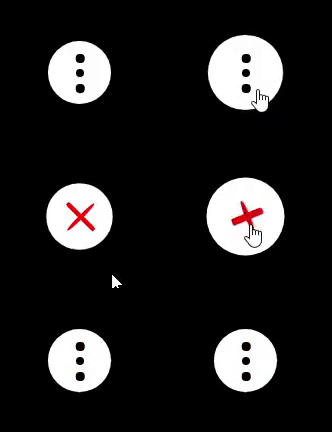
### Customization
The table below shows the properties to customize the button:
| Property | Purpose | Type | Possible values | Default |
| ------------- |:-------------:|:------------:|:---------------:|:------------:|
| animationTime | Duration of the rotation effect after clicking in seconds |number |any positive number |.5 |
| background | Background color of the button |string |colors |White |
| buttonSize | Size of the button |number |1-10 |3 |
| checked | Button checked or not |boolean |true/false |false |
| clicked | To call function when clicked |function |function |null |
| crossColor | Color of the cross |string |colors |red |
| cursor | Type of cursor when hovering |string |Cursor types (help, wait, pointer, grab, etc) |pointer |
| disableHoverEffect | To disable (if true) the effect when mouse is over |boolen |true/false |false |
| ellipsisColor | Color of the ellipsis |string |colors |Black |
| hoverEffectTime | Duration of the effect when hovering in seconds |number |any positive number |.5 |
| rotationIntensity | intensity of the rotation when clicked |number |1-10 |3 |
### Example of customization
```jsx
console.log("Lancelot!")}
crossColor="#9dfa78"
disableHoverEffect
ellipsisColor="red"
rotationIntensity={10}
/>
```
#### Result
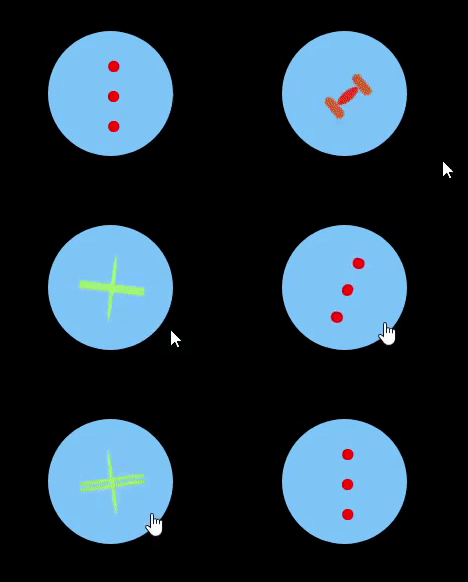
### 2. Animated Hamburguer button
```jsx
import React from 'react'
import {LancelotHamburguerButton} from 'lancelot-animated-buttons'
const index = (props) => {
return (
)
}
```
#### Result

### Customization
The table below shows the properties to customize the button:
| Property | Purpose | Type | Possible values | Default |
| ------------- |:-------------:|:------------:|:---------------:|:------------:|
| animationTime | Duration of the rotation effect after clicking in seconds |number |any positive number |.5 |
| background | Background color of the button |string |colors |White |
| buttonSize | Size of the button |number |1-10 |3 |
| checked | Button checked or not |boolean |true/false |false |
| clicked | To call function when clicked |function |function |null |
| crossColor | Color of the cross |string |colors |red |
| cursor | Type of cursor when hovering |string |Cursor types (help, wait, pointer, grab, etc) |pointer |
| disableHoverEffect | To disable (if true) the effect when mouse is over |boolen |true/false |false |
| hamburguerColor | Color of the hamburguer |string |colors |Black |
| hoverEffectTime | Duration of the effect when hovering in seconds |number |any positive number |.5 |
| rotationIntensity | intensity of the rotation when clicked |number |1-10 |3 |
### Example of customization
```jsx
console.log("Lancelot!")}
crossColor="#238a0e"
disableHoverEffect
hamburguerColor="purple"
rotationIntensity={10}
/>
```
#### Result

## License
MIT © [Elson Ramos](https://github.com/Elson0509)
---
_Source: https://npm.io/package/lancelot-animated-buttons · Machine-readable twin of the npm.io package page. Health data is recomputed on every publish._