# lets-validate-a11y
> The Lets Validate A11y tool simplifies the process of assessing accessibility issues by generating user-friendly reports, enabling users to efficiently address identified problems across multiple URLs or files.
Latest version **1.0.7** (published 2024-08-28) · ISC license · 0 weekly downloads
## Install
```sh
npm install lets-validate-a11y
pnpm add lets-validate-a11y
yarn add lets-validate-a11y
bun add lets-validate-a11y
```
Provides the commands `init`, `analysis`.
## Health
**Score 30/100 (F)** — status: abandoned.
Positive: has types; esm support; no vulnerabilities; high quality score.
Warnings: low downloads.
Negative: abandoned; low maintenance score.
## Facts
| | |
|---|---|
| Version | 1.0.7 |
| Published | 2024-08-28 |
| First published | 2023-05-06 |
| Weekly downloads | 0 |
| License | ISC |
| TypeScript types | bundled |
| Module format | ESM + CommonJS |
| Node | >=20.5.1 |
| Dependencies | 10 |
| Unpacked size | 15.2 KB |
| Known vulnerabilities | 0 |
| Install scripts | no |
| GitHub stars | 0 |
| Author | Rohit Shrivastava |
| Maintainers | rohit0122 |
| Keywords | accessibility, a11y, axe, tools, axe-core, report, html, eslint, debug, testing |
## Links
- npm: https://www.npmjs.com/package/lets-validate-a11y
- Repository: https://github.com/rohit0122/lets-validate-a11y
- Homepage: https://github.com/rohit0122/lets-validate-a11y#readme
- Issues: https://github.com/rohit0122/lets-validate-a11y/issues
- npm.io page: https://npm.io/package/lets-validate-a11y
## Dependencies (10)
- [glob](https://npm.io/package/glob.md) ^11.0.0
- [yaml](https://npm.io/package/yaml.md) ^2.5.0
- [chalk](https://npm.io/package/chalk.md) ^5.3.0
- [file-url](https://npm.io/package/file-url.md) ^4.0.0
- [puppeteer](https://npm.io/package/puppeteer.md) ^23.1.1
- [chromedriver](https://npm.io/package/chromedriver.md) ^128.0.0
- [axe-html-reporter](https://npm.io/package/axe-html-reporter.md) ^2.2.10
- [selenium-webdriver](https://npm.io/package/selenium-webdriver.md) ^4.23.0
- [@axe-core/puppeteer](https://npm.io/package/@axe-core/puppeteer.md) ^4.10.0
- [@axe-core/webdriverjs](https://npm.io/package/@axe-core/webdriverjs.md) ^4.10.0
## Alternatives
- [@tsparticles/shape-image](https://npm.io/package/@tsparticles/shape-image.md) — 303.7K weekly downloads
- [@tsparticles/shape-line](https://npm.io/package/@tsparticles/shape-line.md) — 233.7K weekly downloads
- [stringify-attributes](https://npm.io/package/stringify-attributes.md) — 58.6K weekly downloads
- [mobile-drag-drop](https://npm.io/package/mobile-drag-drop.md) — 46.3K weekly downloads
- [@comunica/actor-rdf-parse-html](https://npm.io/package/@comunica/actor-rdf-parse-html.md) — 29.2K weekly downloads
## Recent versions
- 1.0.7 (latest) — 2024-08-28
- 1.0.6 — 2024-08-28
- 1.0.5 — 2024-08-26
- 1.0.4 — 2023-05-06
- 1.0.3 — 2023-05-06
- 1.0.2 — 2023-05-06
- 1.0.1 — 2023-05-06
- 1.0.0 — 2023-05-06
## README
# Let's Validate A11Y [](https://www.npmjs.com/package/lets-validate-a11y)
User-friendly and straightforward, enhanced by the "Let's Validate A11y" tool and supported by the AXE-Core CLI.
This tool enables you to assess accessibility issues across multiple URLs or files and produces a report in a user-friendly HTML format, allowing you to concentrate on resolving the identified problems.
## Installation
Use the package manager [npm](https://nodejs.org/en/download) to install Lets Lighthouse.
```bash
npm i lets-validate-a11y
```
## Simple setup
### The command provided below will create the necessary project folders and populate them with placeholder data.
```bash
npm run init
```
## Heart of the project
To use this tool, you'll need to modify the configuration structure outlined in the config.yaml file.
Create a config.yaml file *(if it does not already exist)* alongside your project's package.json file.
***Note: _In the YAML file, Whitespace indentation is used to indicate nesting and overall structure._***
Here is the read about [YAML](https://docs.fileformat.com/programming/yaml/#syntax)
```
config:
#use when you want the script to find HTML by itself using the given path, default to false.
#Example Value: /Users/rohit.shrivastava/Desktop/
findHtmlFromHere: false
ignoreFileAndFolders:
- node_modules
- example.html
- test.com
#skipped if the above path is set. This parameter will help the script to run only on given path/URLs.
filesToValidateA11y:
- https://www.google.com
- /Users/rohit.shrivastava/Desktop/test-file.html
- /Users/rohit.shrivastava/Desktop/content/quizcontentfragment/element.html
disableRules:
- document-title
- html-has-lang
- landmark-one-main
- page-has-heading-one
- duplicate-id
headless: true
```
## Usage
### Command 1
```bash
# Execute the below command to start accessibility analysis on
# multiple URLs/files(uses config.yaml)
npm run analysis
```
The command provided will generate the *artifacts* directory within the root of your project.
All analyses are documented in HTML format, as illustrated in the attached screenshot.
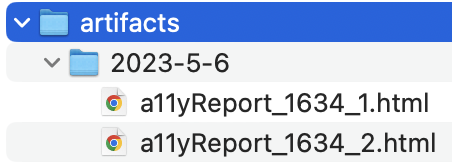 Access the HTML Report to review the accessibility issues associated with specific URLs or files directly in your browser as outlined below.
 ## Contributing
Contributions in the form of pull requests are encouraged. For significant modifications, please initiate a discussion by opening an issue to outline your proposed changes.
Kindly ensure that tests are updated as necessary.
## License
[MIT](https://choosealicense.com/licenses/mit/)
---
_Source: https://npm.io/package/lets-validate-a11y · Machine-readable twin of the npm.io package page. Health data is recomputed on every publish._
## Contributing
Contributions in the form of pull requests are encouraged. For significant modifications, please initiate a discussion by opening an issue to outline your proposed changes.
Kindly ensure that tests are updated as necessary.
## License
[MIT](https://choosealicense.com/licenses/mit/)
---
_Source: https://npm.io/package/lets-validate-a11y · Machine-readable twin of the npm.io package page. Health data is recomputed on every publish._