# lit-portal
> The `` component enables you to seamlessly _teleport_ your HTML to a different part of the DOM, while retaining all the benefits of [Lit](https://lit.dev) framework's state management, shadow DOM encapsulation, and other features. With this c
Latest version **1.0.5** (published 2023-04-25) · 0 weekly downloads
## Install
```sh
npm install lit-portal
pnpm add lit-portal
yarn add lit-portal
bun add lit-portal
```
## Health
**Score 25/100 (F)** — status: abandoned.
Positive: has types; esm support; no vulnerabilities.
Warnings: low downloads.
Negative: abandoned; low maintenance score.
## Facts
| | |
|---|---|
| Version | 1.0.5 |
| Published | 2023-04-25 |
| First published | 2023-04-22 |
| Weekly downloads | 0 |
| TypeScript types | bundled |
| Module format | ESM + CommonJS |
| Dependencies | 0 |
| Unpacked size | 11.8 KB |
| Known vulnerabilities | 0 |
| Install scripts | no |
| Author | Ronak Manglani |
| Maintainers | ronak_lm |
## Links
- npm: https://www.npmjs.com/package/lit-portal
- npm.io page: https://npm.io/package/lit-portal
## Recent versions
- 1.0.5 (latest) — 2023-04-25
- 1.0.4 — 2023-04-23
- 1.0.3 — 2023-04-23
- 1.0.2 — 2023-04-22
- 1.0.1 — 2023-04-22
- 1.0.0 — 2023-04-22
## README
# Lit Portal
The `` component enables you to seamlessly _teleport_ your HTML to a different part of the DOM, while retaining all the benefits of [Lit](https://lit.dev) framework's state management, shadow DOM encapsulation, and other features. With this component, you can easily create dynamic UI elements such as modals, notifications, tooltips, and more.
## Install
#### npm
npm i lit-portal
#### yarn
yarn add lit-portal
## Usage
1. Write the import statement
2. Use **``** component with the **`to`** property to specify where you want the contents to be _portaled_ to.
3. Use **`.body`** property to specify the contents.
```javascript
import { LitElement, html } from "lit";
import { customElement } from "lit/decorators.js";
import "lit-portal";
@customElement("my-page")
export class MyPage extends LitElement {
render() {
return html`
This Renders Inline
This renders in a div with the ID "portal-root"`}
>
`;
}
}
```
### Props
- **to**
- Type: `string`
- Optional: Yes
- Notes:
- If you do not specify this property, the contents will be portaled to the end (before the ` ` tag)
- If the ID provided is not present in the DOM, a div will be created with that ID and added to the end (before the `` tag)
- If this property is changed dynamically, the elements will be unmounted / removed from the old destination and remounted into the new destination. _Any state within them will be lost_ and life cycle methods like `disconnectedCallback` will be run on the old instance and `connectedCallback` will be run on the new instance.
- **containerClass**
- Type: `string`
- Optional: Yes
- Notes: This class name will be given to the container div that will contain your body.
- **.body**
- Type: [`TemplateResult`](https://lit.dev/docs/api/templates/#TemplateResult)
- Notes:
- Use the [`html`](https://lit.dev/docs/api/templates/#html) function to render.
- Make sure to add `.` before body otherwise you'll just see `[object Object]` as the output.
## Limitations & Quirks
- **Shadow DOM Issues**
- This component uses `document.getElementById()` to find the destination (`to`) element and render the body within it. If your destination is within a shadow root, `getElementById()` returns `null`. This is the default behavior in shadow DOMs and there is no feasible work around to this. Your destination MUST be in `document` and not within a shadow root.
- The `.body` that you pass itself can have a shadow DOM. So you won't need to make any changes within your existing shadow DOM components that are being portaled. Only the destination shouldn't be in a shadow DOM.
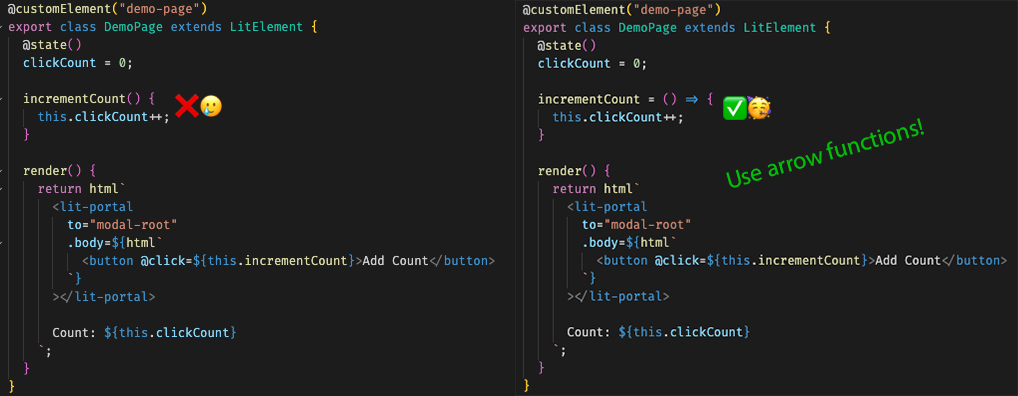
- **Use Arrow Functions For Events**
- For any event listeners attached within the `.body`, make sure they are arrow functions otherwise `this` doesn't work. A sample code below for your reference:
- 
- **Container Wrapped**
- You can use the `