# menneu

> Ménneu - Component-based extensible document processor

Latest version **0.5.2** (published 2020-12-05) · ISC license · 0 weekly downloads

## Install

```sh
npm install menneu
pnpm add menneu
yarn add menneu
bun add menneu
```

Provides the command `menneu`.

## Health

**Score 30/100 (F)** — status: abandoned.

Positive: has types; esm support; no vulnerabilities; high quality score.

Warnings: low downloads; pre 1.0.

Negative: abandoned; low maintenance score.

## Facts

| | |
|---|---|
| Version | 0.5.2 |
| Published | 2020-12-05 |
| First published | 2018-09-07 |
| Weekly downloads | 0 |
| License | ISC |
| TypeScript types | bundled |
| Module format | ESM + CommonJS |
| Node | >=10.0 |
| Dependencies | 34 |
| Unpacked size | 2.4 MB |
| Known vulnerabilities | 0 (+1 in 1 direct dependencies) |
| Install scripts | no |
| GitHub stars | 7 |
| Author | shellyln |
| Maintainers | shellyln |
| Keywords | markdown, md, html, pdf, barcode, QR, chart, UML, lisp, Liyad, LSX, Ménneu, react, redagate, markdown-it, puppeteer |

## Links

- npm: https://www.npmjs.com/package/menneu
- Repository: https://github.com/shellyln/menneu
- Homepage: https://shellyln.github.io/
- Issues: https://github.com/shellyln/menneu/issues
- npm.io page: https://npm.io/package/menneu

## Dependencies (34)

- [liyad](https://npm.io/package/liyad.md) ^0.6.0
- [react](https://npm.io/package/react.md) ^17.0.1
- [buffer](https://npm.io/package/buffer.md) ^6.0.3
- [moment](https://npm.io/package/moment.md) ^2.29.1
- [chart.js](https://npm.io/package/chart.js.md) ^2.9.4
- [paper-css](https://npm.io/package/paper-css.md) ^0.4.1
- [puppeteer](https://npm.io/package/puppeteer.md) ^5.5.0
- [react-dom](https://npm.io/package/react-dom.md) ^17.0.1
- [red-agate](https://npm.io/package/red-agate.md) ^0.5.0
- [markdown-it](https://npm.io/package/markdown-it.md) ^12.0.2
- [highlight.js](https://npm.io/package/highlight.js.md) ^10.4.1
- [normalize.css](https://npm.io/package/normalize.css.md) ^8.0.1
- [red-agate-math](https://npm.io/package/red-agate-math.md) ^0.5.0
- [red-agate-util](https://npm.io/package/red-agate-util.md) ^0.5.0
- [markdown-it-ins](https://npm.io/package/markdown-it-ins.md) ^3.0.0
- [markdown-it-sub](https://npm.io/package/markdown-it-sub.md) ^1.0.0
- [markdown-it-sup](https://npm.io/package/markdown-it-sup.md) ^1.0.0
- [markdown-it-abbr](https://npm.io/package/markdown-it-abbr.md) ^1.0.4
- [markdown-it-mark](https://npm.io/package/markdown-it-mark.md) ^3.0.0
- [markdown-it-math](https://npm.io/package/markdown-it-math.md) 4.1.1
- [markdown-it-emoji](https://npm.io/package/markdown-it-emoji.md) ^2.0.0
- [red-agate-barcode](https://npm.io/package/red-agate-barcode.md) ^0.5.0
- [markdown-it-anchor](https://npm.io/package/markdown-it-anchor.md) ^6.0.1
- [markdown-it-imsize](https://npm.io/package/markdown-it-imsize.md) ^2.0.1
- [github-markdown-css](https://npm.io/package/github-markdown-css.md) ^4.0.0
- [markdown-it-deflist](https://npm.io/package/markdown-it-deflist.md) ^2.1.0
- [markdown-it-checkbox](https://npm.io/package/markdown-it-checkbox.md) ^1.1.0
- [markdown-it-footnote](https://npm.io/package/markdown-it-footnote.md) ^3.0.2
- [markdown-it-plantuml](https://npm.io/package/markdown-it-plantuml.md) ^1.4.1
- [red-agate-react-host](https://npm.io/package/red-agate-react-host.md) ^0.5.0
- [red-agate-svg-canvas](https://npm.io/package/red-agate-svg-canvas.md) ^0.5.0
- [markdown-it-container](https://npm.io/package/markdown-it-container.md) ^3.0.0
- [chartjs-plugin-datalabels](https://npm.io/package/chartjs-plugin-datalabels.md) ^0.7.0
- [markdown-it-table-of-contents](https://npm.io/package/markdown-it-table-of-contents.md) ^0.5.1

## Alternatives

- [@cantoo/pdf-lib](https://npm.io/package/@cantoo/pdf-lib.md) — 297.9K weekly downloads
- [datatables.net-buttons](https://npm.io/package/datatables.net-buttons.md) — 200.1K weekly downloads
- [@ckeditor/ckeditor5-export-pdf](https://npm.io/package/@ckeditor/ckeditor5-export-pdf.md) — 167.0K weekly downloads
- [scanbot-web-sdk](https://npm.io/package/scanbot-web-sdk.md) — 15.0K weekly downloads
- [@syncfusion/ej2-angular-pdfviewer](https://npm.io/package/@syncfusion/ej2-angular-pdfviewer.md) — 8.8K weekly downloads

## Recent versions

- 0.5.2 (latest) — 2020-12-05
- 0.5.1 — 2020-12-04
- 0.5.0 — 2020-12-04
- 0.4.0 — 2020-11-22
- 0.3.0 — 2020-10-31
- 0.2.3 — 2020-07-28
- 0.2.2 — 2020-04-28
- 0.2.1 — 2020-04-22
- 0.2.0 — 2020-02-04
- 0.1.7 — 2019-11-30
- 0.1.6 — 2019-09-08
- 0.1.5 — 2019-09-02
- 0.1.4 — 2019-08-31
- 0.1.3 — 2019-08-12
- 0.1.2 — 2019-07-13
- … 66 more at https://npm.io/package/menneu/versions

## README

# Ménneu
## Component-based extensible document processor

✒️Render the { markdown | lsx | html } document templates into a ✨beautiful✨ { pdf | html | image }📑📊📈📰📄 formats.

[![Ménneu](https://shellyln.github.io/assets/image/ménneu-logo.svg)](https://github.com/shellyln/menneu/)


[![npm](https://img.shields.io/npm/v/menneu.svg)](https://www.npmjs.com/package/menneu)
[![GitHub release](https://img.shields.io/github/release/shellyln/menneu.svg)](https://github.com/shellyln/menneu/releases)
[![.github/workflows/test.yml](https://github.com/shellyln/menneu/workflows/.github/workflows/test.yml/badge.svg)](https://github.com/shellyln/menneu/actions)
[![GitHub forks](https://img.shields.io/github/forks/shellyln/menneu.svg?style=social&label=Fork)](https://github.com/shellyln/menneu/fork)
[![GitHub stars](https://img.shields.io/github/stars/shellyln/menneu.svg?style=social&label=Star)](https://github.com/shellyln/menneu)


You can easily build the complex documents written in [Markdown](https://github.com/markdown-it/markdown-it), HTML and [LSX](https://github.com/shellyln/liyad#what-is-lsx)
that including images, [charts](https://www.chartjs.org/), [UML diagrams](http://plantuml.com/), [barcodes and 2d codes (QR Code)](https://github.com/shellyln/red-agate/tree/master/packages/red-agate-barcode).  
And get the output as a PDF, PNG and JPEG rendered by [Puppeteer](https://github.com/GoogleChrome/puppeteer), or the HTML that packed into the single file.

Furthermore, you can insert the data from the file into the document with the control statements.

----
## Examples

<table align="center">
  <tbody>
    <tr align="center">
      <td style="width:33%">
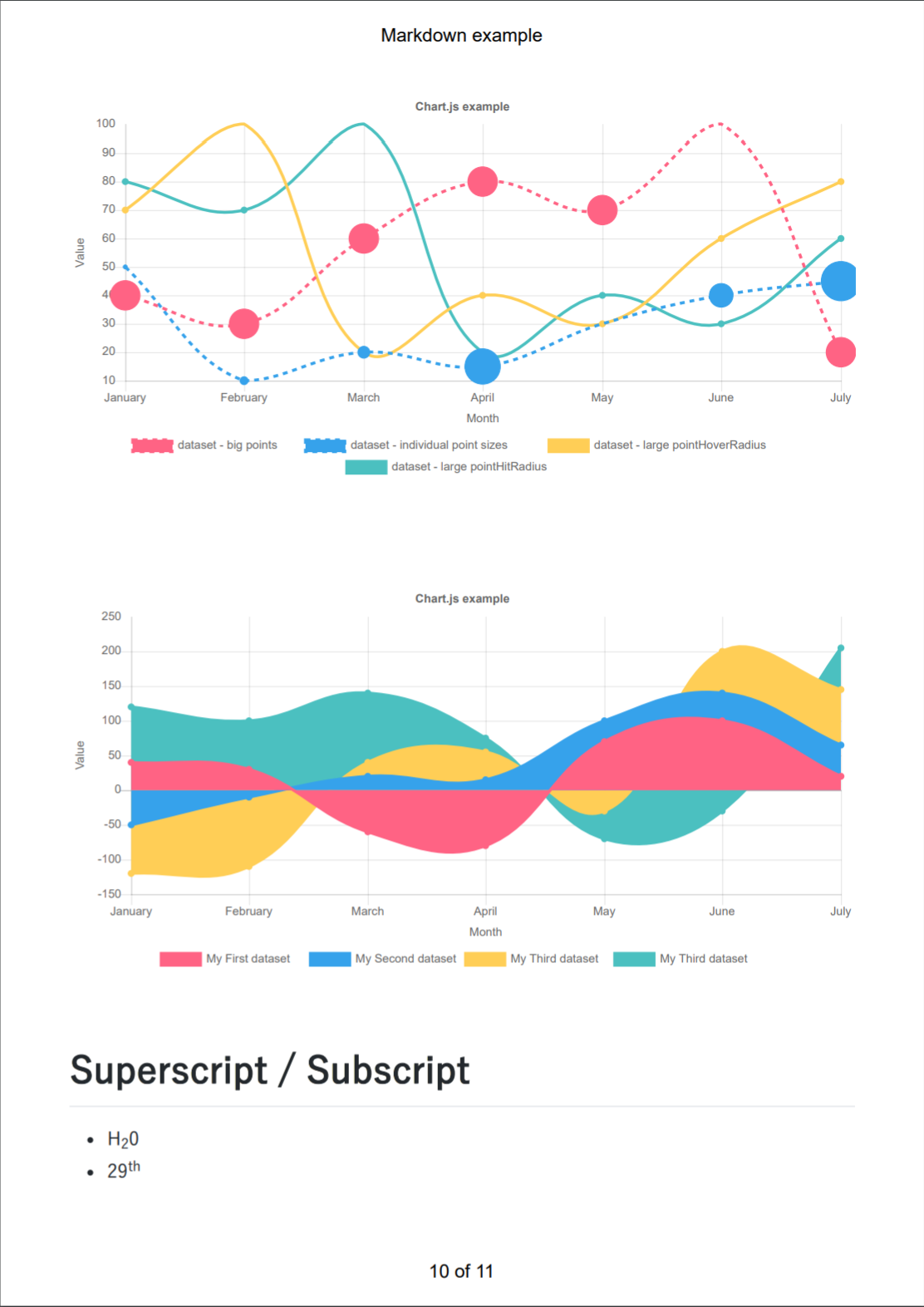
        <a href="https://shellyln.github.io/menneu/assets/pdf/example-markdown.pdf">
          <img src="https://shellyln.github.io/menneu/assets/pdf/example-markdown.png" style="max-width:100%;">
        </a>
        Markdown Demo
        <a href="https://github.com/shellyln/menneu/tree/master/examples/markdown-demo">
          source
        </a>
        /
        <a href="https://shellyln.github.io/menneu/assets/pdf/example-markdown.pdf">
          pdf
        </a>
      </td>
      <td width="33%">
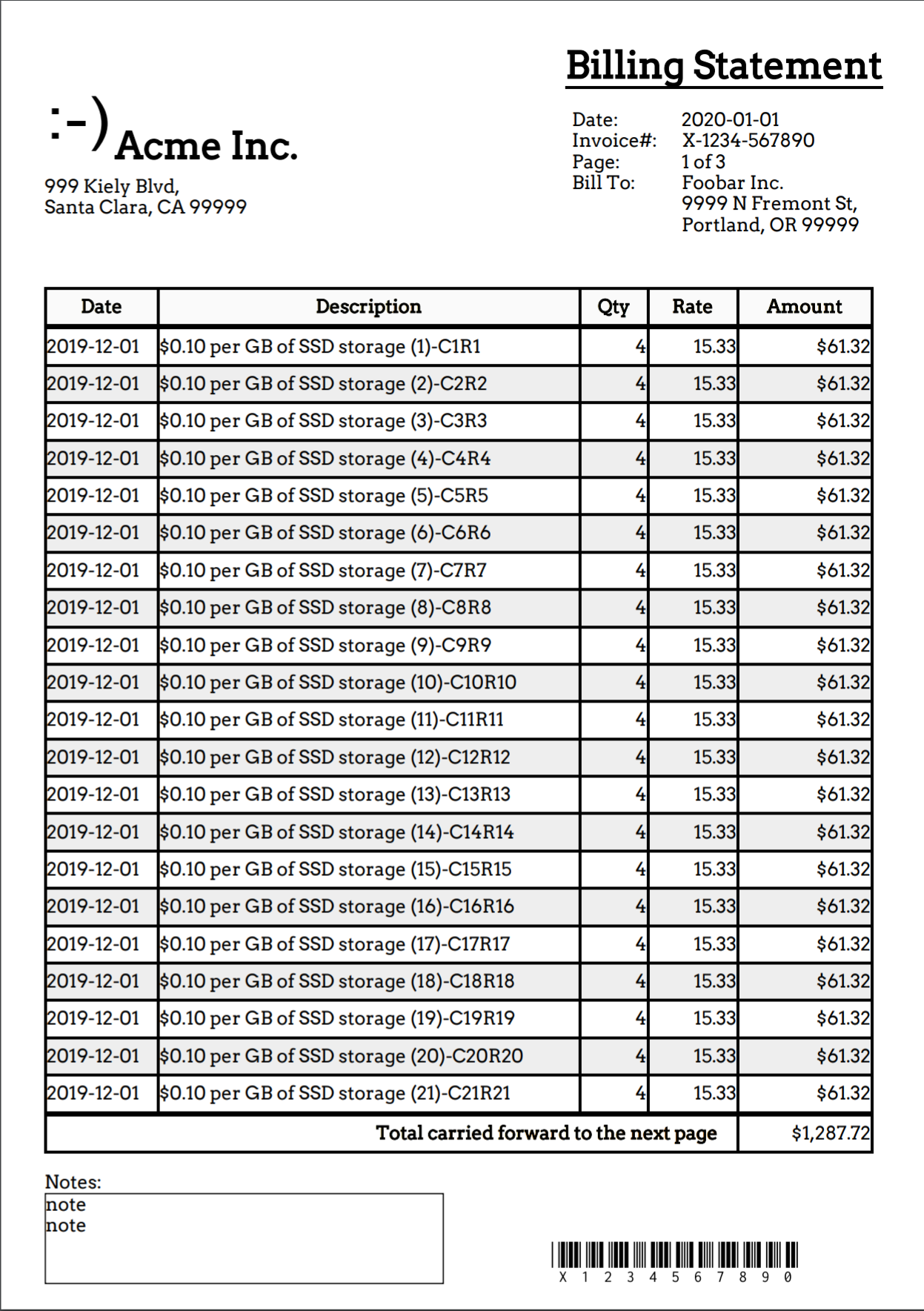
        <a href="https://shellyln.github.io/menneu/assets/pdf/example-bill.pdf">
          <img src="https://shellyln.github.io/menneu/assets/pdf/example-bill.png" style="max-width:100%;">
        </a>
        Billing Statement
        <a href="https://github.com/shellyln/menneu/tree/master/examples/billing">
          source
        </a>
        /
        <a href="https://shellyln.github.io/menneu/assets/pdf/example-bill.pdf">
          pdf
        </a>
      </td>
      <td width="33%">
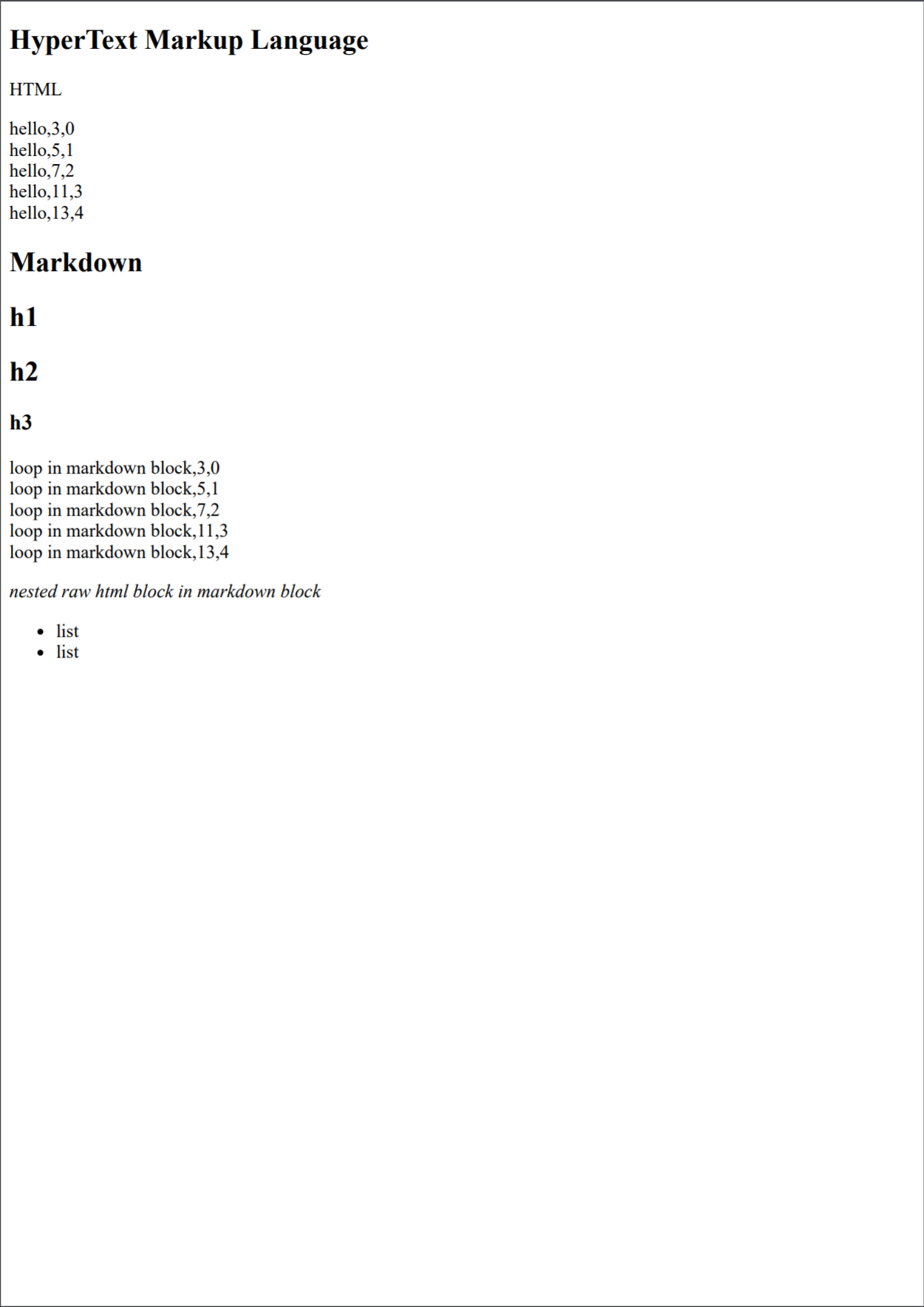
        <a href="https://shellyln.github.io/menneu/assets/pdf/example-html.pdf">
          <img src="https://shellyln.github.io/menneu/assets/pdf/example-html.png" style="max-width:100%;">
        </a>
        HTML Demo
        <a href="https://github.com/shellyln/menneu/tree/master/examples/html-demo">
          source
        </a>
        /
        <a href="https://shellyln.github.io/menneu/assets/pdf/example-html.pdf">
          pdf
        </a>
      </td>
    </tr>
    <tr>
      <td style="text-align:center">
        Testing the basic and extended markdown syntaxes.
      </td>
      <td style="text-align:center">
        Reporting example that markuped up with Lisp LSX syntax.
      </td>
      <td style="text-align:center">
        Testing the html template that embedding Lisp LSX.
      </td>
    </tr>
  </tbody>
</table>

## Real world examples

* [mdne - Markdown Neo Edit](https://www.npmjs.com/package/mdne)   
  A simple markdown and code editor powered by Markdown-it, Ace and Carlo.

* [Ménneu Reporting App for kintone](https://github.com/shellyln/menneu-reporting-app-for-kintone)  
  Create ✨beautiful✨ 📑📊reports📈📰 easily with Ménneu + kintone.  
  You can easily build the complex documents written in Markdown,
  HTML and LSX that including 🖼images, 📊charts, 🔷UML diagrams,
  barcodes and 2d codes (QR Code).
    * [Kanban board for kintone](https://github.com/shellyln/kanban-board-for-kintone)

----

## Getting started

### Use CLI:

install via NPM:
```bash
$ npm install -g menneu
```

and run Ménneu:
```bash
$ menneu README.md --raw -o README.pdf
```

### Add shortcuts to Windows file explorer right-click 'Send to' menu
##### Prerequirements
```bash
$ npm install -g menneu
```
##### Install
Download the source archive from [https://github.com/shellyln/menneu/archive/master.zip](https://github.com/shellyln/menneu/archive/master.zip) and extract it.

```cmd
> cd menneu\shell-ext\windows
> make-sendto-shortcuts.cmd
```

### Use APIs:

install via NPM:
```bash
$ npm install menneu --save
```

and import Ménneu in your code:
```ts
// index.mjs
import './extension'; // * To import without using webpack,
                      //   use node with the
                      //   `--experimental-modules --no-warnings` options.
                      // * If `node>=12`, `--es-module-specifier-resolution=node`
                      //   option is additionally required.
import { render } from 'menneu/modules';
import fs from 'fs';
import util from 'util';
const writeFileAsync = util.promisify(fs.writeFile);

(async () => {
    try {
        const buf = await render('# Hello!', {}, {
            rawInput: true,
            inputFormat: 'md',
            dataFormat: 'object',
            outputFormat: 'pdf',
        });
        await writeFileAsync('./hello.pdf', buf);
    } catch (e) {
        console.log(e);
    }
})();
```

```ts
// extension.js
const fs = require('fs');

require.extensions['.css'] = function (module, filename) {
    module.exports = fs.readFileSync(filename, 'utf8');
};
```

> NOTE: To build it, you should use `webpack` + `raw-loader` (or other packagers and/or plugins) to load CSS as string.   
>
> You can also import from the `.mjs` file on a node with the `--experimental-modules --no-warnings` options enabled,  
> and import `menneu/modules/*` paths.
>> If you run it on `node>=12`, `--es-module-specifier-resolution=node` option is additionally required.

See these [(1)](https://github.com/shellyln/menneu-api-usage-on-esm) [(2)](https://github.com/shellyln/mdne) examples.


> NOTICE:  
> Use with `webpack >= 5`
>
> If you get the error:
>
> ```
> Module not found: Error: Can't resolve '(importing/path/to/filename)'
> in '(path/to/node_modules/path/to/dirname)'
> Did you mean '(filename).js'?`
> ```
>
> Add following setting to your `webpack.config.js`.
>
> ```js
> {
>     test: /\.m?js/,
>     resolve: {
>         fullySpecified: false,
>     },
> },
> ```
>
> On `webpack >= 5`, the extension in the request is mandatory for it to be fully specified
> if the origin is a '*.mjs' file or a '*.js' file where the package.json contains '"type": "module"'.


### Use APIs on the browsers:

Install via NPM, or download UMD from [release](https://github.com/shellyln/menneu/releases) page.

> #### If you wish to use UMD single file on browser, Please write as below:
> * index.html
>     ```html
>     <!DOCTYPE html>
>     <head><meta charset="UTF-8">
>     <script src="./menneu.min.js"></script><script>
>     (async() => {
>         try {
>             const buf = await menneu.render('# Hello!', {}, {
>                 rawInput: true,
>                 inputFormat: 'md',
>                 dataFormat: 'object',
>                 outputFormat: 'html',
>             });
>             console.log((new TextDecoder).decode(buf));
>         } catch (e) {
>             console.log(e);
>         }
>     })();
>     </script></head>
>     ```

> #### If you wish to use UMD single file on Node.js w/o installing react, Please write as below:
> * menneu-umd-bootstrap.js
>    ```js
>    // Usage: echo "# Hello" | node ./menneu-umd-bootstrap.js - -of html
>
>    const Module = require('module');
>    const loader = Module._load;
>    Module._load = (request, parent) => {
>        if (request === 'react' || request === 'react-dom' || request === 'react-dom/server') {
>            return ({});
>        }
>        return loader(request, parent);
>    };
>
>    const menneu = require('./menneu.min.js');
>    menneu.run();
>    ```

----

## Playground

https://shellyln.github.io/menneu/playground.html


## Express starter with the browser

[Ménneu Markdown Notebook](https://github.com/shellyln/menneu-md-notebook)  
Edit markdown locally w/o installing any apps.


## GUI Editor

[mdne - Markdown Neo Edit](https://www.npmjs.com/package/mdne)  
A simple markdown and code editor powered by Ace and Carlo.

----


## CLI
```
menneu -h
menneu --help

menneu InputFilePath [OPTIONS]
menneu - [OPTIONS]
```

* `InputFilePath`
    * Path to input document template file.
    * If `-` is set, read from `STDIN`.
    * If `-i` or `--in` is set in the *OPTIONS*, *InputFilePath* points a path of data file.

#### Options
* `-h`, `--help`
    * Show this help.
* `-i` *InFilePath*, `--in` *InFilePath*
    * *InFilePath*: Path to input document template file.
* `-if` *InFormatName*, `--in-format` *InFormatName*
    * *InFormatName* : `lsx` | `lisp` | `md` | `markdown` | `html` | `htm`
    * Input document template file format.
    * This format is set automatically from template file's extension.
        * If it is not set, Defailt is `md`.
* `--raw`
    * Disable Lisp block expansion.
        * This option can be set for `md` | `markdown` | `html` | `htm` .
* `-c` *ConfigJsonOrJsPath*, `--config` *ConfigJsonOrJsPath*
    * *ConfigJsonOrJsPath* : Path to `menneu.config.js` | `menneu.config.json` .
    * Default is `menneu.config.js` | `menneu.config.json` that is in the same directory to input file.
        * If no `menneu.config.js` | `menneu.config.json` files is in the same directory to input file,
          use `menneu.config.js` | `menneu.config.json` in the current working directory.
* `-df` *DataDormatName*, `--data-format` *DataDormatName*
    * *DataDormatName* : `json` | `lisp`
    * The file format of the data applied to the document template.
    * This format is set automatically from data file's extension.
        * If it is not set, defailt is `json`.
* `-d` *DataPath*
    * *DataPath* : Path to data file.
* `-of` *OutFormatName*, `--out-format` *OutFormatName*
    * *OutFormatName* : `html` | `pdf` | `png` | `jpeg`
    * Output file format.
    * This format is set automatically from output file's extension.
        * If it is not set, defailt is `pdf`.
* `-o` *OutPath*, `--out` *OutPath*
    * *OutPath*: Path to output file.
    * If this option is not present, it is output to `STDOUT`.
* `-t` *TempDir*, `--tmpdir` *TempDir*
    * *TempDir*: Path to temporary directory that to generate the temporary html file passing to the Puppeteer.
* `-ti`, `--tmp-indir`
    * Set *TempDir* to the parent directory of the input document file.
        * It is default option.
* `-tc`, `--tmp-cwd`
    * Set *TempDir* to the current working directory.
* `-to`, `--tmp-os`
    * Set *TempDir* to the system temporary directory.
* `-tm`, `--tmp-mem`
    * No temporary directory is used. Pass a data URL to the Puppeteer.
* `--dark-theme`
    * Use dark theme to render markdown.
* `--watch`
    * Watch changes of the parent directory of `InputFilePath` forever.
    * If changes are detected, update the output.


----


## Config file
`.js` or `.json` are available.

```js
const escapeHtml = (s) => s
    .replace(/&/g, "&amp;")
    .replace(/</g, "&lt;")
    .replace(/>/g, "&gt;")
    .replace(/"/g, "&quot;")
    .replace(/'/g, "&#39;");

module.exports = {
    title: 'example',               // Document title of markdown.

    // bodyStyle: '',               // <body> style of markdown.
    markdownBodyStyle:              // "markdownBody" <div> style of markdown.
        'font-family: "Yu Gothic Medium", "Microsoft JhengHei", arial, sans-serif;',

    // tocIncludeLevel: [1, 2],     // Headings levels to use (2 for h2:s etc)
                                    //   https://github.com/Oktavilla/markdown-it-table-of-contents/blob/master/README.md#options

    // rawInput: true,              // Disable Lisp block expansion.

    // inputFormat: 'md',           // Input document template file format. (md | html | lsx)
    // dataFormat: 'json',          // The file format of the data applied to the document template. (json | lisp)
    // outputFormat: 'pdf',         // Output file format. (pdf | html | png | jpeg)

    // darkTheme: true,             // Use dark theme to render markdown.

    // launchOptions:               // Puppeteer's option. See "puppeteer.launch(options)".
    //     { headless: false },     //   https://github.com/GoogleChrome/puppeteer/blob/v1.8.0/docs/api.md#puppeteerlaunchoptions
    // navigateOptions: {},         // Puppeteer's option. See "page.goto(url, options)".
                                    //   https://github.com/GoogleChrome/puppeteer/blob/master/docs/api.md#pagegotourl-options
    // imageOptions: {},            // Puppeteer's option. See "page.screenshot([options])".
                                    //   https://github.com/GoogleChrome/puppeteer/blob/master/docs/api.md#pagescreenshotoptions
    pdfOptions: {                   // Puppeteer's option. See "page.pdf(options)".
                                    //   https://github.com/GoogleChrome/puppeteer/blob/master/docs/api.md#pagepdfoptions
        width: '210mm',
        height: '297mm',
        printBackground: true,
        landscape: false,
        preferCSSPageSize: false,
        displayHeaderFooter: true,
        headerTemplate: `
            <div style="margin: 0mm auto -10mm; text-align: center; font-size: 9pt;">
                <span class="title"></span>
            </div>`,
        footerTemplate: `
            <div style="margin: 10mm auto 0mm; text-align: center; font-size: 9pt;">
                <span class="pageNumber"></span> of <span class="totalPages"></span>
            </div>`,
    },

    globals: {                      // Lisp global variables.
        "$now": () => (new Date).toLocaleDateString('en-US'),
        "$to-locale-string": (...args) => args.slice(-1)[0].toLocaleString(...(args.slice(0, -1))),
        "$dir": (...args) => console.dir(...args),
        "qwerty": "asdfgh",
    },

    // noDefaultComponents: true,   // Disable default components.
    components: {                   // Additional RedAgate components.
                                    // See also https://github.com/shellyln/red-agate/tree/master/packages/red-agate
        Greeting: (props) => `Hello, ${props.to}! ${props.children}`,
    },

    // noDefaultMarkdownPlugins:    // Disable default markdown-it plugins.
    //     true,
    // markdownPlugins:             // Additional markdown-it plugins.
    //     [{ plugin: require('markdown-it-'), options: [] }],

    markdownCustomContainers: [{    // See https://github.com/markdown-it/markdown-it-container
        name: 'content',
    }, {
        name: 'spoiler',
        validate: (params) => {
            return params.trim().match(/^spoiler\s+(.*)$/);
        },
        render: (tokens, idx) => {
            const m = tokens[idx].info.trim().match(/^spoiler\s+(.*)$/);
            if (tokens[idx].nesting === 1) {
                // opening tag
                return '<details><summary>' + escapeHtml(m[1]) + '</summary>\n';
            } else {
                // closing tag
                return '</details>\n';
            }
        },
    }],

    // replacementMacros: [{
    //     re: /\!\!\!([\s\S]+?)\!\!\!/g,
    //     fn: 'lsx', // evaluate input as LSX script
    // }, {
    //     re: /\$\$\$\{(.)([\s\S]+?)\}\$\$\$/g,
    //     fn: async (m, p0, p1) =>
    //         `<span style="background-color: green;"><strong>${p0}</strong>${p1}</span>`,
    //     async: true,
    // }, {
    //     re: /\$\{(.)([\s\S]+?)\}/g,
    //     fn: (m, p0, p1) =>
    //         `<span style="background-color: pink;"><strong>${p0}</strong>${p1}</span>`,
    // }],

    // plantUmlServerUrl:           // markdown-it-plantuml server URL
    //     'https://www.example.com/plantuml',
    // tocIncludeLevel:             // markdown-it-table-of-contents TOC levels
    //     [1, 2, 3],
};
```

You can also export configuration by using the function.
```js
module.exports = (env) => {
    // env is following object:
    // {
    //     styles: {
    //         normalizeCss:       string,
    //         markdownCss:        string,
    //         markdownDarkCss:    string,
    //         highlightCss:       string,
    //         paperCss:           string,
    //     },
    //     moment:                 object,
    //     Liyad:                  object,
    //     RedAgateUtil:           object,
    //     RedAgateSvgCanvas:      object,
    //     RedAgateMath:           object,
    //     RedAgate:               object,
    //     React:                  object,
    //     ReactDom:               object,
    //     components:             object,
    //     highlightJs:            object,
    //     markdownit:             object,
    //     markdownitPlugins: {
    //         markdownitContaier: object,
    //         markdownitEmoji:    object,
    //         markdownitSub:      object,
    //         markdownitSup:      object,
    //         markdownitIns:      object,
    //         markdownitMark:     object,
    //         markdownitCheckbox: object,
    //         markdownitPlantuml: object,
    //         markdownitMath:     object,
    //         markdownitImsize:   object,
    //         markdownitAnchor:   object,
    //         markdownitToc:      object,
    //         markdownitFootnote: object,
    //         markdownitDeflist:  object,
    //         markdownitAbbr:     object,
    //     },
    //     getMarkdownIt:          function,
    //     getMarkdownRoot:        function,
    // }

    // The function should return the configuration object.
    return {
        ...
    };
};
```

----


## Features

### Render markdown into HTML and PDF.

Markdown is parsed into HTML by [markdown-it](https://github.com/markdown-it/markdown-it)
and converting from HTML into PDF by [puppeteer](https://github.com/GoogleChrome/puppeteer) .

Following markdown-it plugins are available by default:
* [markdown-it-anchor](https://github.com/valeriangalliat/markdown-it-anchor)
* [markdown-it-checkbox](https://github.com/mcecot/markdown-it-checkbox)
* [markdown-it-container](https://github.com/markdown-it/markdown-it-container)
* [markdown-it-emoji](https://github.com/markdown-it/markdown-it-emoji)
* [markdown-it-imsize](https://github.com/tatsy/markdown-it-imsize)
* [markdown-it-math](https://github.com/runarberg/markdown-it-math)
* [markdown-it-plantuml](https://github.com/gmunguia/markdown-it-plantuml)
* [markdown-it-table-of-contents](https://github.com/Oktavilla/markdown-it-table-of-contents)
* [markdown-it-sub](https://github.com/markdown-it/markdown-it-sub)
* [markdown-it-sup](https://github.com/markdown-it/markdown-it-sup)
* [markdown-it-ins](https://github.com/markdown-it/markdown-it-ins)
* [markdown-it-mark](https://github.com/markdown-it/markdown-it-mark)
* [markdown-it-footnote](https://github.com/markdown-it/markdown-it-footnote)
* [markdown-it-deflist](https://github.com/markdown-it/markdown-it-deflist)
* [markdown-it-abbr](https://github.com/markdown-it/markdown-it-abbr)

You can append other plugins by configureing the `menneu.config.js` .

HTML source files are also available.

### Render LSX template into HTML and PDF.

See [Liyad](https://github.com/shellyln/liyad) for more informations about Lisp and [LSX](https://github.com/shellyln/liyad#what-is-lsx) syntax and operators.


### Lisp block expansion

In the markdown or HTML documents, you can start `Lisp` block.
The block starts with `%%%(` and ends with pair parenthesis `)` .
* You should escape following characters in the document:
    * `\` -> `\\`
    * `"""` -> `\"\"\"`
    * `%%%` -> `\%\%\%`


#### Conditional branch
```markdown
%%%($last                           ;; "$last" is a function that evaluate parameters, and returns last parameter.
    ($set ($data isMorning) false)
    ($set ($data name) "World")
    nil                             ;; "nil" is zero length array. it will replace to zero length string by document processor.
)

%%%($=if ($get $data isMorning)
"""Markdown
## Good morning, %%%($get $data name)!
""")

%%%($=if ($not ($get $data isMorning))
"""Markdown
## Hello, %%%($get $data name)!
""")
```
is equivalent to

```markdown
## Hello, World!
```


#### Repeating
```markdown
# Greeting

%%%($=for ($list "World" "Jane" "Joe")
"""Markdown
## Hello, %%%($get $data)!
""")

Good morning!
```

is equivalent to

```markdown
# Greeting

## Hello, World!
## Hello, Jane!
## Hello, Joe!

Good morning!
```


#### Variables

* The data file is parsed and set to `$data` variable.

Data file:
```json
{
    "foo": 1,
    "bar": "World"
}
```

Document template:
```markdown
## Hello, %%%($get $data bar)!
```

Result:
```html
<h2>Hello, World!</h2>
```

* To define the variable, use `$let` function in the Lisp block.

Document template:
```markdown
%%%($let a "A")
%%%($get a)
```

Result:
```html
<p>A</p>
```

* To set the value to the variable, use `$set` function in the Lisp block.

Document template:
```markdown
%%%($let a "A")
%%%($set a "B")
%%%($get a)
```

Result:
```html
<p>B</p>
```

* To set the value to the object property or array index, you can also use `$set` function.

Document template:
```markdown
%%%($let a (#    ;; "#" is object literal function.
    (foo 1)
    (bar ($list "World" "Jane" "Joe")) ))

%%%($set (a bar 1) "John")
%%%($get a bar 1)
```

Result:
```html
<p>John</p>
```

#### Functions

Document template:
```markdown
%%%($last
    ($defun fac (n)
        ($if (== n 0)
            1
            (* n ($self (- n 1))) ) )
    nil)

Factorial of 3 is %%%(fac 3).
```

Result:
```html
<p>Factorial of 3 is 6.</p>
```


#### LSX DOM elements
You can markup standard HTML and SVG tags witten in [LSX](https://github.com/shellyln/liyad#what-is-lsx) notation.

Document template:
```markdown
%%%(style (@ (dangerouslySetInnerHTML ".content { font-style: italic; color: red; }")))
```

Result:
```html
<style>.content { font-style: italic; color: red; }</style>
```


#### Components
You also can markup with [RedAgate](https://github.com/shellyln/red-agate) tag-lib components.

Document template:
```lisp
%%%(Greeting (@ (to "Menneu")) "Good morning!")
%%%(Svg (@ (width  100)
           (height 100)
           (unit "mm") )
    (Canvas (-> (ctx) (::ctx@moveTo  10  10)
                      (::ctx@lineTo 190 190)
                      (::ctx:strokeStyle="rgba(255,128,0,0.2)")
                      (::ctx@stroke)
                      (::ctx@beginPath) ))
    (Rect   (@  (x 5)
                (y 67)
                (width  70)
                (height 11)
                (strokeColor "blue")
                (stroke) ))
    (Qr     (@  (x 5)
                (y 7)
                (cellSize 0.8)
                (data "Hello") ))
    (Code128(@  (x 35)
                (y  7)
                (elementWidth 0.66)
                (height 15)
                (quietHeight 0)
                (textHeight 7)
                (font "7px 'OCRB'")
                (data "Hello") ))
    (Gtin13 (@  (x 10)
                (y 37)
                (elementWidth 0.66)
                (height 15)
                (quietHeight 0)
                (textHeight 7)
                (font "7px 'OCRB'")
                (data "123456789012") )) )
```

`menneu.config.js`:
```js
module.exports = {
    ...
    components: {
        Greeting: (props) => `Hello, ${props.to}! ${props.children}`,
    },
    ...
};
```

Result:
```html
<p>Hello, Menneu! Good morning!</p>
<svg xmlns="http://www.w3.org/2000/svg" xmlns:xlink="http://www.w3.org/1999/xlink" version="1.1" width="100mm" height="100mm" viewBox="0 0 100 100">
...
</svg>
```

Following components are available by default:
* Utilities
    * [Do](https://github.com/shellyln/red-agate/blob/master/packages/red-agate/src/red-agate/taglib.ts)
    * [Facet](https://github.com/shellyln/red-agate/blob/master/packages/red-agate/src/red-agate/taglib.ts)
* Resource bundlers
    * [Asset](https://github.com/shellyln/red-agate/blob/master/packages/red-agate/src/red-agate/bundler.ts)
    * [Image](https://github.com/shellyln/red-agate/blob/master/packages/red-agate/src/red-agate/bundler.ts)
    * [Script](https://github.com/shellyln/red-agate/blob/master/packages/red-agate/src/red-agate/bundler.ts)
    * [Style](https://github.com/shellyln/red-agate/blob/master/packages/red-agate/src/red-agate/bundler.ts)
    * [Font](https://github.com/shellyln/red-agate/blob/master/packages/red-agate/src/red-agate/bundler.ts)
    * [SingleFont](https://github.com/shellyln/red-agate/blob/master/packages/red-agate/src/red-agate/bundler.ts)
* HTML and XML
    * [Html4_01_Strict](https://github.com/shellyln/red-agate/blob/master/packages/red-agate/src/red-agate/html.tsx)
    * [Html4_01_Transitional](https://github.com/shellyln/red-agate/blob/master/packages/red-agate/src/red-agate/html.tsx)
    * [Html4_01_Frameset](https://github.com/shellyln/red-agate/blob/master/packages/red-agate/src/red-agate/html.tsx)
    * [Xhtml1_0_Strict](https://github.com/shellyln/red-agate/blob/master/packages/red-agate/src/red-agate/html.tsx)
    * [Xhtml1_0_Transitional](https://github.com/shellyln/red-agate/blob/master/packages/red-agate/src/red-agate/html.tsx)
    * [Xhtml1_0_Frameset](https://github.com/shellyln/red-agate/blob/master/packages/red-agate/src/red-agate/html.tsx)
    * [Html5](https://github.com/shellyln/red-agate/blob/master/packages/red-agate/src/red-agate/html.tsx)
    * [Xml](https://github.com/shellyln/red-agate/blob/master/packages/red-agate/src/red-agate/html.tsx)
    * [HtmlImposition](https://github.com/shellyln/red-agate/blob/master/packages/red-agate/src/red-agate/html.tsx)
* SVG and Canvas
    * [Svg](https://github.com/shellyln/red-agate/blob/master/packages/red-agate/src/red-agate/svg.tsx)
    * [Ambient](https://github.com/shellyln/red-agate/blob/master/packages/red-agate/src/red-agate/svg.tsx)
    * [Arc](https://github.com/shellyln/red-agate/blob/master/packages/red-agate/src/red-agate/svg.tsx)
    * [Canvas](https://github.com/shellyln/red-agate/blob/master/packages/red-agate/src/red-agate/svg.tsx)
    * [Circle](https://github.com/shellyln/red-agate/blob/master/packages/red-agate/src/red-agate/svg.tsx)
    * [Curve](https://github.com/shellyln/red-agate/blob/master/packages/red-agate/src/red-agate/svg.tsx)
    * [GridLine](https://github.com/shellyln/red-agate/blob/master/packages/red-agate/src/red-agate/svg.tsx)
    * [Group](https://github.com/shellyln/red-agate/blob/master/packages/red-agate/src/red-agate/svg.tsx)
    * [Line](https://github.com/shellyln/red-agate/blob/master/packages/red-agate/src/red-agate/svg.tsx)
    * [Path](https://github.com/shellyln/red-agate/blob/master/packages/red-agate/src/red-agate/svg.tsx)
    * [Pie](https://github.com/shellyln/red-agate/blob/master/packages/red-agate/src/red-agate/svg.tsx)
    * [Polygon](https://github.com/shellyln/red-agate/blob/master/packages/red-agate/src/red-agate/svg.tsx)
    * [Rect](https://github.com/shellyln/red-agate/blob/master/packages/red-agate/src/red-agate/svg.tsx)
    * [RoundRect](https://github.com/shellyln/red-agate/blob/master/packages/red-agate/src/red-agate/svg.tsx)
    * [SvgAssetFragment](https://github.com/shellyln/red-agate/blob/master/packages/red-agate/src/red-agate/svg.tsx)
    * [SvgFragment](https://github.com/shellyln/red-agate/blob/master/packages/red-agate/src/red-agate/svg.tsx)
    * [Text](https://github.com/shellyln/red-agate/blob/master/packages/red-agate/src/red-agate/svg.tsx)
    * [SvgImposition](https://github.com/shellyln/red-agate/blob/master/packages/red-agate/src/red-agate/svg.tsx)
* Printer marks
    * [PrinterMarks](https://github.com/shellyln/red-agate/blob/master/packages/red-agate/src/red-agate/printing.ts)
* Barcodes and 2D codes
    * [Code128](https://github.com/shellyln/red-agate/blob/master/packages/red-agate-barcode/src/barcode/Code128.ts)
    * [Code39](https://github.com/shellyln/red-agate/blob/master/packages/red-agate-barcode/src/barcode/Code39.ts)
    * [Ean13](https://github.com/shellyln/red-agate/blob/master/packages/red-agate-barcode/src/barcode/Ean.ts) / Gtin13
    * [Ean8](https://github.com/shellyln/red-agate/blob/master/packages/red-agate-barcode/src/barcode/Ean.ts) / Gtin8
    * [Ean5](https://github.com/shellyln/red-agate/blob/master/packages/red-agate-barcode/src/barcode/Ean.ts)
    * [Ean2](https://github.com/shellyln/red-agate/blob/master/packages/red-agate-barcode/src/barcode/Ean.ts)
    * [UpcA](https://github.com/shellyln/red-agate/blob/master/packages/red-agate-barcode/src/barcode/Ean.ts)
    * [UpcE](https://github.com/shellyln/red-agate/blob/master/packages/red-agate-barcode/src/barcode/Ean.ts)
    * [Itf](https://github.com/shellyln/red-agate/blob/master/packages/red-agate-barcode/src/barcode/Itf.ts)
    * [JapanPostal](https://github.com/shellyln/red-agate/blob/master/packages/red-agate-barcode/src/barcode/JapanPostal.ts)
    * [Nw7](https://github.com/shellyln/red-agate/blob/master/packages/red-agate-barcode/src/barcode/Nw7.ts)
    * [Qr](https://github.com/shellyln/red-agate/blob/master/packages/red-agate-barcode/src/barcode/Qr.ts)
* Markdown
    * [MarkdownRoot](https://github.com/shellyln/menneu/blob/master/src/components/Markdown.ts)
    * [Markdown](https://github.com/shellyln/menneu/blob/master/src/components/Markdown.ts)
        * This is using the [markdown-it](https://github.com/markdown-it/markdown-it).
* HTML fragments
    * [RawHtml](https://github.com/shellyln/menneu/blob/master/src/components/RawHtml.ts)
* Math ML
    * [Math](https://github.com/shellyln/menneu/blob/master/src/components/Math.tsx)
        * This is using the [markdown-it-math](https://www.npmjs.com/package/markdown-it-math).
    * [Mml](https://github.com/shellyln/menneu/blob/master/src/components/Math.tsx)
* Charts and UML graphs
    * [Chart](https://github.com/shellyln/menneu/blob/master/src/components/Chart.tsx)
        * This is using the [Chart.js](https://github.com/chartjs/Chart.js) and [chartjs-plugin-datalabels](https://github.com/chartjs/chartjs-plugin-datalabels).
    * [PlantUml](https://github.com/shellyln/menneu/blob/master/src/components/PlantUml.tsx)
        * This is using the [markdown-it-plantuml](https://www.npmjs.com/package/markdown-it-plantuml).
    * [PlantUmlLite](https://github.com/shellyln/menneu/blob/master/src/components/PlantUml.tsx)
* Style sheets
    * [NormalizeCss](https://github.com/shellyln/menneu/blob/master/src/components/styles.tsx)
        * Include a [Normalize.css](https://necolas.github.io/normalize.css/) stylesheet into the document.
    * [MarkdownCss](https://github.com/shellyln/menneu/blob/master/src/components/styles.tsx)
        * Include a [github-markdown-css](https://github.com/sindresorhus/github-markdown-css) stylesheet into the document.
    * [HighlightCss](https://github.com/shellyln/menneu/blob/master/src/components/styles.tsx)
        * Include a [highlight.js](https://highlightjs.org/) stylesheet into the document.
    * [PaperCss](https://github.com/shellyln/menneu/blob/master/src/components/styles.tsx)
        * Include a [paper-css](https://github.com/cognitom/paper-css) stylesheet into the document.


----


## APIs

### render()
```ts
export async function render(source: string, data: any, options: RenderOptions): Promise<Buffer>;
```
Render the document from document template.

* returns : Buffer of output document.
* `source` : Document template.
* `data` : Data (json string | lisp string | object)
* `options` : Render options.


### processDocument()
```ts
export async function processDocument(config: CliConfig): Promise<Buffer>;
```
Read input file or STDIN, read config file, render and output document into file or STDOUT.

* returns : Buffer of output document.
* `config` : Configurations that specified by command line options.

### run()
```ts
export async function run();
```
Main of CLI app.  
Parse command line options and call processDocument().

### parameters types :
```ts
export interface MarkdownOptions {
    noDefaultMarkdownPlugins?: boolean;
    markdownPlugins?: Array<{
        plugin: any,
        options: any[],
    }>;

    markdownCustomContainers?: Array<{
        name: string,
        validate?: (params: string) => boolean,
        render?: (tokens: any[], index: number) => string,
        marker?: string,
    }>;
}

export interface FormatOptions {
    rawInput?: boolean;
    inputFormat: 'markdown' | 'md' | 'html' | 'htm' | 'lsx' | 'lisp';
    dataFormat: 'lisp' | 'json' | 'object';
    outputFormat: 'html' | 'pdf' | 'png' | 'jpeg';
}

export interface RenderOptions extends MarkdownOptions, FormatOptions {
    title?: string;

    navigateOptions?: any;
    imageOptions?: any;
    pdfOptions?: any;

    globals?: object;

    noDefaultComponents?: boolean;
    components?: object;
}

export interface CliConfig extends FormatOptions {
    useStdin: boolean;
    inputPath?: string;

    configPath?: string;
    configFormat: 'js' | 'json' | 'object';

    dataPath?: string;

    useStdout: boolean;
    outputPath?: string;

    watch?: boolean;
}
```


----


## License
[ISC](https://github.com/shellyln/menneu/blob/master/LICENSE.md)  
Copyright (c) 2018 - 2020 Shellyl_N and Authors.

## Bundled softwares' license
* [github-markdown-css](https://github.com/sindresorhus/github-markdown-css): [license](https://github.com/sindresorhus/github-markdown-css/blob/gh-pages/license) (MIT)
* [highlight.js](https://github.com/highlightjs/highlight.js): [license](https://github.com/highlightjs/highlight.js/blob/master/LICENSE) (BSD 3-Clause)
* [normalize.css](https://github.com/necolas/normalize.css/): [license](https://github.com/necolas/normalize.css/blob/master/LICENSE.md) (MIT)

---
_Source: https://npm.io/package/menneu · Machine-readable twin of the npm.io package page. Health data is recomputed on every publish._