# messaging-api-viber
> Messaging API client for Viber
Latest version **1.1.0** (published 2021-10-04) · MIT license · 0 weekly downloads
## Install
```sh
npm install messaging-api-viber
pnpm add messaging-api-viber
yarn add messaging-api-viber
bun add messaging-api-viber
```
## Health
**Score 20/100 (F)** — status: abandoned.
Positive: has types; no vulnerabilities.
Warnings: low downloads; no esm support.
Negative: abandoned; low maintenance score.
## Facts
| | |
|---|---|
| Version | 1.1.0 |
| Published | 2021-10-04 |
| First published | 2017-10-11 |
| Weekly downloads | 0 |
| License | MIT |
| TypeScript types | bundled |
| Module format | CommonJS |
| Node | >=10 |
| Dependencies | 6 |
| Unpacked size | 218.7 KB |
| Known vulnerabilities | 0 (+23 in 1 direct dependencies) |
| Install scripts | no |
| GitHub stars | 1937 |
| Maintainers | chentsulin, kpman, tw0517tw |
| Keywords | bot, chatbot, messaging-apis, viber |
## Links
- npm: https://www.npmjs.com/package/messaging-api-viber
- Repository: https://github.com/Yoctol/messaging-apis
- Homepage: https://github.com/Yoctol/messaging-apis#readme
- Issues: https://github.com/Yoctol/messaging-apis/issues
- npm.io page: https://npm.io/package/messaging-api-viber
## Dependencies (6)
- [axios](https://npm.io/package/axios.md) ^0.21.1
- [warning](https://npm.io/package/warning.md) ^4.0.3
- [axios-error](https://npm.io/package/axios-error.md) ^1.0.4
- [ts-invariant](https://npm.io/package/ts-invariant.md) ^0.4.4
- [@types/warning](https://npm.io/package/@types/warning.md) ^3.0.0
- [messaging-api-common](https://npm.io/package/messaging-api-common.md) ^1.0.4
## Recent versions
- 1.1.0 (latest) — 2021-10-04
- 1.0.0-beta.33 (next) — 2020-07-22
- 1.0.6 — 2021-09-02
- 1.0.4 — 2021-01-11
- 1.0.1 — 2020-09-21
- 1.0.0 — 2020-09-07
- 1.0.0-beta.31 — 2020-07-01
- 1.0.0-beta.29 — 2020-06-29
- 1.0.0-beta.27 — 2020-06-23
- 1.0.0-beta.26 — 2020-06-16
- 1.0.0-beta.25 — 2020-06-11
- 1.0.0-beta.24 — 2020-06-11
- 1.0.0-beta.23 — 2020-05-18
- 0.7.18 — 2020-04-08
- 0.7.17 — 2020-04-08
- … 46 more at https://npm.io/package/messaging-api-viber/versions
## README
# messaging-api-viber
> Messaging API client for Viber
 ## Table of Contents
- [Installation](#installation)
- [Usage](#usage)
- [API Reference](#api-reference)
- [Webhook API](#webhook-api)
- [Send API](#send-api)
- [Keyboards](#keyboards)
- [Broadcast API](#broadcast-api)
- [Get Account Info](#get-account-info)
- [Get User Details](#get-user-details)
- [Get Online](#get-online)
- [Debug Tips](#debug-tips)
- [Testing](#testing)
## Installation
```sh
npm i --save messaging-api-viber
```
or
```sh
yarn add messaging-api-viber
```
## Table of Contents
- [Installation](#installation)
- [Usage](#usage)
- [API Reference](#api-reference)
- [Webhook API](#webhook-api)
- [Send API](#send-api)
- [Keyboards](#keyboards)
- [Broadcast API](#broadcast-api)
- [Get Account Info](#get-account-info)
- [Get User Details](#get-user-details)
- [Get Online](#get-online)
- [Debug Tips](#debug-tips)
- [Testing](#testing)
## Installation
```sh
npm i --save messaging-api-viber
```
or
```sh
yarn add messaging-api-viber
```
## Usage
### Initialize
```js
const { ViberClient } = require('messaging-api-viber');
// get authToken from the "edit info" screen of your Public Account.
const client = new ViberClient({
accessToken: authToken,
sender: {
name: 'Sender',
},
});
```
### Error Handling
`messaging-api-viber` uses [axios](https://github.com/axios/axios) as HTTP client. We use [axios-error](https://github.com/Yoctol/messaging-apis/tree/master/packages/axios-error) package to wrap API error instances for better formatting error messages. Directly calling `console.log` with the error instance will return formatted message. If you'd like to get the axios `request`, `response`, or `config`, you can still get them via those keys on the error instance.
```js
client.setWebhook(url).catch((error) => {
console.log(error); // formatted error message
console.log(error.stack); // error stack trace
console.log(error.config); // axios request config
console.log(error.request); // HTTP request
console.log(error.response); // HTTP response
});
```
## API Reference
All methods return a Promise.
### Webhook API
- [setWebhook](https://yoctol.github.io/messaging-apis/latest/classes/messaging_api_viber.viberclient-1.html#setwebhook)
- [removeWebhook](https://yoctol.github.io/messaging-apis/latest/classes/messaging_api_viber.viberclient-1.html#removewebhook)
### Send API
- [sendMessage](https://yoctol.github.io/messaging-apis/latest/classes/messaging_api_viber.viberclient-1.html#sendmessage)
- [sendText](https://yoctol.github.io/messaging-apis/latest/classes/messaging_api_viber.viberclient-1.html#sendtext)
- [sendPicture](https://yoctol.github.io/messaging-apis/latest/classes/messaging_api_viber.viberclient-1.html#sendpicture)
- [sendVideo](https://yoctol.github.io/messaging-apis/latest/classes/messaging_api_viber.viberclient-1.html#sendvideo)
- [sendFile](https://yoctol.github.io/messaging-apis/latest/classes/messaging_api_viber.viberclient-1.html#sendfile)
- [sendContact](https://yoctol.github.io/messaging-apis/latest/classes/messaging_api_viber.viberclient-1.html#sendcontact)
- [sendLocation](https://yoctol.github.io/messaging-apis/latest/classes/messaging_api_viber.viberclient-1.html#sendlocation)
- [sendURL](https://yoctol.github.io/messaging-apis/latest/classes/messaging_api_viber.viberclient-1.html#sendurl)
- [sendSticker](https://yoctol.github.io/messaging-apis/latest/classes/messaging_api_viber.viberclient-1.html#sendsticker)
- [sendCarouselContent](https://yoctol.github.io/messaging-apis/latest/classes/messaging_api_viber.viberclient-1.html#sendcarouselcontent)
### Keyboards - [Official Docs](https://developers.viber.com/docs/api/rest-bot-api/#keyboards)
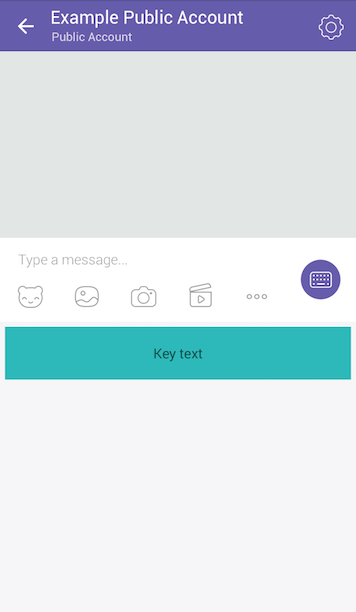
The Viber API allows sending a custom keyboard using the send_message API, to supply the user with a set of predefined replies or actions. Keyboards can be attached to any message type and be sent and displayed together. To attach a keyboard to a message simply add the keyboard’s parameters to the options:
```js
client.sendText(USER_ID, 'Hello', {
keyboard: {
type: 'keyboard',
defaultHeight: true,
bgColor: '#FFFFFF',
buttons: [
{
columns: 6,
rows: 1,
bgColor: '#2db9b9',
bgMediaType: 'gif',
bgMedia: 'http://www.url.by/test.gif',
bgLoop: true,
actionType: 'open-url',
actionBody: 'www.tut.by',
image: 'www.tut.by/img.jpg',
text: 'Key text',
textVAlign: 'middle',
textHAlign: 'center',
textOpacity: 60,
textSize: 'regular',
},
],
},
});
```
### Broadcast API - [Official Docs](https://developers.viber.com/docs/api/rest-bot-api/#broadcast-message)
Those API methods use the same parameters as the send methods with a few variations described below. You should specify a list of receivers instead of a single receiver.
- [broadcastMessage](https://yoctol.github.io/messaging-apis/latest/classes/messaging_api_viber.viberclient-1.html#broadcastmessage)
- [broadcastText](https://yoctol.github.io/messaging-apis/latest/classes/messaging_api_viber.viberclient-1.html#broadcasttext)
- [broadcastPicture](https://yoctol.github.io/messaging-apis/latest/classes/messaging_api_viber.viberclient-1.html#broadcastpicture)
- [broadcastVideo](https://yoctol.github.io/messaging-apis/latest/classes/messaging_api_viber.viberclient-1.html#broadcastvideo)
- [broadcastFile](https://yoctol.github.io/messaging-apis/latest/classes/messaging_api_viber.viberclient-1.html#broadcastfile)
- [broadcastContact](https://yoctol.github.io/messaging-apis/latest/classes/messaging_api_viber.viberclient-1.html#broadcastcontact)
- [broadcastLocation](https://yoctol.github.io/messaging-apis/latest/classes/messaging_api_viber.viberclient-1.html#broadcastlocation)
- [broadcastURL](https://yoctol.github.io/messaging-apis/latest/classes/messaging_api_viber.viberclient-1.html#broadcasturl)
- [broadcastSticker](https://yoctol.github.io/messaging-apis/latest/classes/messaging_api_viber.viberclient-1.html#broadcaststicker)
- [broadcastCarouselContent](https://yoctol.github.io/messaging-apis/latest/classes/messaging_api_viber.viberclient-1.html#broadcastcarouselcontent)
| Param | Type | Description |
| ------------- | --------------- | ------------------------------------------------------------------------------------------------------------------------------------------------------------------ |
| broadcastList | `Array` | This mandatory parameter defines the recipients for the message. Every user must be subscribed and have a valid user id. The maximum list length is 300 receivers. |
Example:
```js
await client.broadcastText(
[
'pttm25kSGUo1919sBORWyA==',
'2yBSIsbzs7sSrh4oLm2hdQ==',
'EGAZ3SZRi6zW1D0uNYhQHg==',
'kBQYX9LrGyF5mm8JTxdmpw==',
],
'a broadcast to everybody'
);
// {
// messageToken: 40808912438712,
// status: 0,
// statusMessage: 'ok',
// failedList: [
// {
// receiver: 'pttm25kSGUo1919sBORWyA==',
// status: 6,
// statusMessage: 'Not subscribed',
// },
// {
// receiver: 'EGAZ3SZRi6zW1D0uNYhQHg==',
// status: 5,
// statusMessage: 'Not found',
// },
// ],
// }
```
### Get Account Info
- [getAccountInfo](https://yoctol.github.io/messaging-apis/latest/classes/messaging_api_viber.viberclient-1.html#getaccountinfo)
### Get User Details
- [getUserDetails](https://yoctol.github.io/messaging-apis/latest/classes/messaging_api_viber.viberclient-1.html#getuserdetails)
### Get Online
- [getOnlineStatus](https://yoctol.github.io/messaging-apis/latest/classes/messaging_api_viber.viberclient-1.html#getonlinestatus)
## Debug Tips
### Log Requests Details
To enable default request debugger, use following `DEBUG` env variable:
```sh
DEBUG=messaging-api:request
```
If you want to use a custom request logging function, just provide your own `onRequest`:
```js
const client = new ViberClient({
accessToken: ACCESS_TOKEN,
onRequest: ({ method, url, headers, body }) => {
/* */
},
});
```
## Testing
### Point Requests to Your Dummy Server
To avoid sending requests to real Viber server, specify the `origin` option when constructing your client:
```js
const { ViberClient } = require('messaging-api-viber');
const client = new ViberClient({
accessToken: ACCESS_TOKEN,
origin: 'https://mydummytestserver.com',
});
```
> Warning: Don't do this on your production server.
---
_Source: https://npm.io/package/messaging-api-viber · Machine-readable twin of the npm.io package page. Health data is recomputed on every publish._