# mongo-http
> A thin wrapper on Mongodb Atlas Data API using native fetch API
Latest version **0.0.20** (published 2023-08-28) · ISC license · 0 weekly downloads
## Install
```sh
npm install mongo-http
pnpm add mongo-http
yarn add mongo-http
bun add mongo-http
```
## Health
**Score 25/100 (F)** — status: abandoned.
Positive: has types; no vulnerabilities; high quality score.
Warnings: low downloads; no esm support; pre 1.0.
Negative: abandoned; low maintenance score.
## Facts
| | |
|---|---|
| Version | 0.0.20 |
| Published | 2023-08-28 |
| First published | 2022-11-16 |
| Weekly downloads | 0 |
| License | ISC |
| TypeScript types | bundled |
| Module format | CommonJS |
| Dependencies | 1 |
| Unpacked size | 79.2 KB |
| Known vulnerabilities | 0 |
| Install scripts | no |
| GitHub stars | 30 |
| Author | Patrick Chiu |
| Maintainers | patrick-kw-chiu |
| Keywords | mongo, mongodb, http, async, serverless, cloudflare workers, deno, typescript |
## Links
- npm: https://www.npmjs.com/package/mongo-http
- Repository: https://github.com/patrick-kw-chiu/mongo-http.js
- Homepage: https://github.com/patrick-kw-chiu/mongo-http.js#readme
- Issues: https://github.com/patrick-kw-chiu/mongo-http.js/issues
- npm.io page: https://npm.io/package/mongo-http
## Dependencies (1)
- [bson](https://npm.io/package/bson.md) ^4.7.0
## Alternatives
- [angular-pipes](https://npm.io/package/angular-pipes.md) — 5.6K weekly downloads
- [@ng-web-apis/midi](https://npm.io/package/@ng-web-apis/midi.md) — 2.6K weekly downloads
- [happn-3](https://npm.io/package/happn-3.md) — 1.6K weekly downloads
- [@opensip-cli/lang-go](https://npm.io/package/@opensip-cli/lang-go.md) — 1.2K weekly downloads
- [mongoose-typescript](https://npm.io/package/mongoose-typescript.md) — 85 weekly downloads
## Recent versions
- 0.0.20 (latest) — 2023-08-28
- 0.0.19 — 2023-04-07
- 0.0.17 — 2023-01-04
- 0.0.16 — 2023-01-04
- 0.0.15 — 2023-01-04
- 0.0.14 — 2023-01-04
- 0.0.13 — 2022-12-12
- 0.0.12 — 2022-11-27
- 0.0.11 — 2022-11-26
- 0.0.10 — 2022-11-26
- 0.0.9 — 2022-11-21
- 0.0.8 — 2022-11-18
- 0.0.7 — 2022-11-17
- 0.0.6 — 2022-11-17
- 0.0.5 — 2022-11-17
- … 4 more at https://npm.io/package/mongo-http/versions
## README
# mongo-http.js
## About
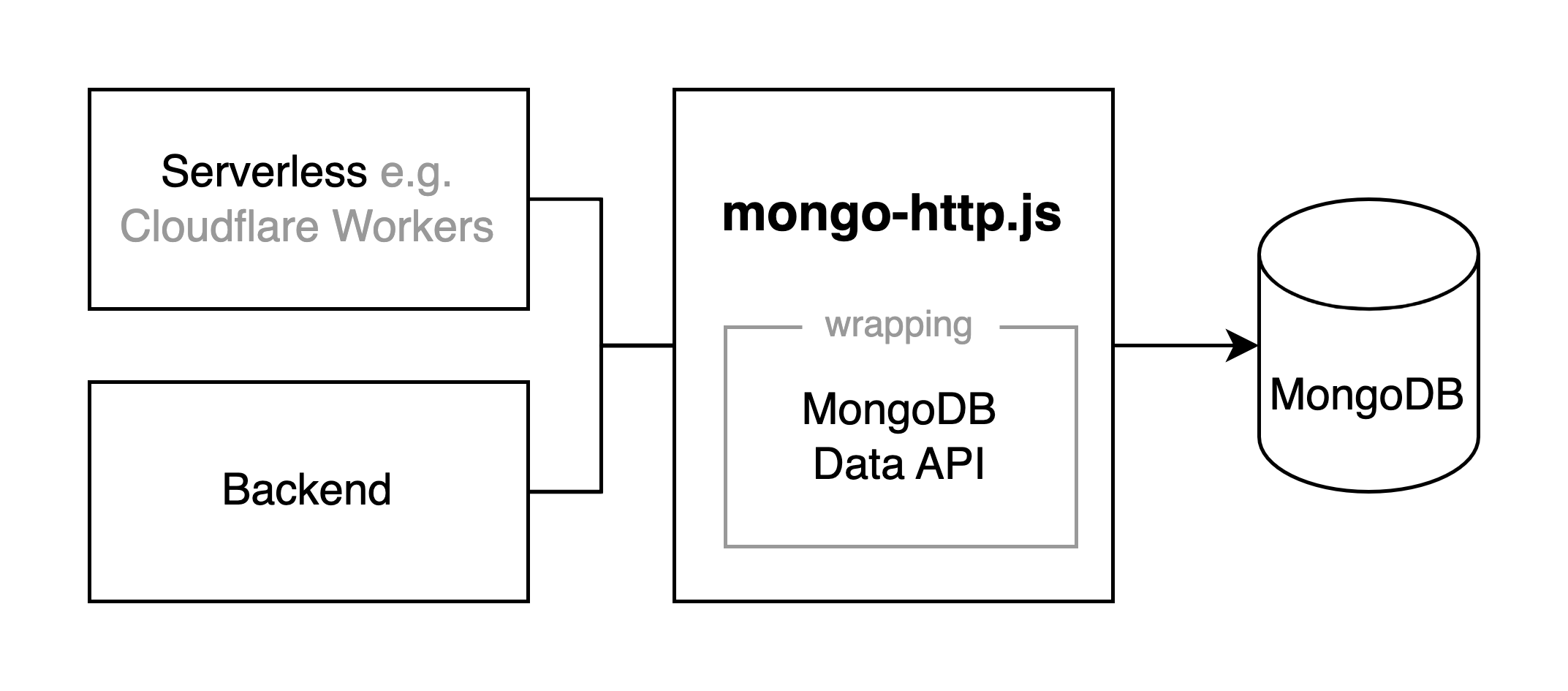
A thin wrapper on [Mongodb Atlas Data API](https://www.mongodb.com/docs/atlas/api/data-api/) using native [fetch](https://developer.mozilla.org/en-US/docs/Web/API/Fetch_API) API. This library serves the usecase where
- TCP connections over Mongodb Atlas is not possible (e.g. Serverless runtime like Cloudflare Workers), while still wanting to use similar MongoDB driver syntax.
- It can also be used in serverless runtimes which the reuse of a MongoDB connection [may not always be available](https://www.mongodb.com/developer/languages/javascript/developing-web-application-netlify-serverless-functions-mongodb/#conclusion) or [require manual caching](https://www.mongodb.com/developer/languages/javascript/integrate-mongodb-vercel-functions-serverless-experience/#conclusion)
- Sadly, it cannot be used in the browser side yet, due to [CORS](https://developer.mozilla.org/en-US/docs/Web/HTTP/CORS). Here is a [thread](https://feedback.mongodb.com/forums/945334-atlas-app-services/suggestions/44666878-please-support-cors-from-the-data-api) to request the CORS feature
## Table of Contents
1. [About](#about)
2. [Setup](#setup)
1. [Get the App ID and API Key from Mongodb Atlas](#1-setup-mongodb-atlas-to-get-the-app-id-and-api-key-and-app-region)
2. [Installation](#2-installation)
3. [Initialization](#3-initialization)
3. [API](#api)
1. [findOne](#findone-filter-projection-)
2. [find](#find-filter-projection-sort-limit-skip-)
3. [insertOne](#insertonedocument)
4. [insertMany](#insertmanydocuments)
5. [updateOne](#updateone-filter-update-upsert-)
6. [updateMany](#updatemany-filter-update-upsert-)
7. [replaceOne](#replaceone-filter-replacement-upsert-)
8. [deleteOne](#deleteone-filter-)
9. [deleteMany](#deletemany-filter-)
10. [aggregate](#aggregate-pipeline-)
## Setup
### 1. Setup MongoDB Atlas to get the App ID and API Key (and App Region)
Follow [MongoDB Atlas tutorial](https://www.mongodb.com/docs/atlas/api/data-api/#get-started).
#### Get the App ID here

#### **🚨 Importart 🚨**: If you select **"Local (single region)"** when you enable Data API

**Make sure to pass the App Region as well!**

#### And Get the API Key here

### 2. Installation
`npm install mongo-http --save`
### 3. Initialization
Depending on your needs, you can **_either_** initialize a client, database, or collection
#### You can initialize a client for connecting to multiple databases
```javascript
import { initClient } from 'mongo-http';
const client = initClient({
appId: process.env.appId,
apiKey: process.env.apiKey,
// Important! Pass `appRegion` if you deploy Data API as "Local (single region)"
// See above "1. Setup MongoDB Atlas to get the App ID and API Key (and App Region)"
appRegion: process.env.appRegion,
});
const db = client.database({ databaseName: process.env.databaseName });
const result = await db.collection('articles').find({
filter: {
$or: [{ categories: { $in: ['javascript', 'reactjs', 'nodejs', 'mongodb'] } }],
},
});
```
#### ... Or, Initialize a database
```javascript
import { initDatabase } from 'mongo-http';
const db = initDatabase({
appId: process.env.appId,
apiKey: process.env.apiKey,
// Important! Pass `appRegion` if you deploy Data API as "Local (single region)"
// See above "1. Setup MongoDB Atlas to get the App ID and API Key (and App Region)"
appRegion: process.env.appRegion,
databaseName: process.env.databaseName || '',
});
const result = await db.collection('articles').find({});
```
#### ... Or, Initialize a collection
```javascript
import { initCollection } from 'mongo-http';
const articlesCollection = initCollection({
appId: process.env.appId,
apiKey: process.env.apiKey,
// Important! Pass `appRegion` if you deploy Data API as "Local (single region)"
// See above "1. Setup MongoDB Atlas to get the App ID and API Key (and App Region)"
appRegion: process.env.appRegion,
databaseName: process.env.databaseName,
collectionName: 'articles',
});
const result = await articlesCollection.find({});
```
## API
### .findOne({ filter, projection })
#### Example
```javascript
const { isSuccess, document, error } = await db.collection('articles').findOne({
filter: {
$or: [{ creator: 'Patrick Chiu' }, { title: 'Migrating a Node.js App to Cloudflare Workers From Heroku' }],
},
projection: { title: 1, creator: 1, guid: 1, categories: 1 },
});
```
#### Parameter
| Parameter | Type | Default Value | Description |
| ---------- | ------ | ------------- | ------------------------------------------------------------------------------------------------------------------------------------------------------------------------------------------------------------------------------------------------------------------------------ |
| filter | object | {} | A [MongoDB Query Filter](https://www.mongodb.com/docs/manual/tutorial/query-documents/). The `findOne` action returns the first document in the collection that matches this filter.
If you do not specify a `filter`, the action matches all document in the collection. |
| projection | object | {} | A [MongoDB Query Projection](https://www.mongodb.com/docs/manual/tutorial/project-fields-from-query-results/). Depending on the projection, the returned document will either omit specific fields or include only specified fields or values) |
#### Return
| Field | Type | Description |
| --------- | ------------- | --------------------------------------------------------------------------------------- |
| isSuccess | boolean | Whether the database operation successful or not |
| document | object / null | If a document is matched, an object is returned
If not matched, a null is returned |
| error | error / null | Error information |
### .find({ filter, projection, sort, limit, skip })
#### Example
```javascript
const { isSuccess, documents, error } = await db.collection('articles').find({
filter: {
$or: [{ categories: { $in: ['javascript', 'nodejs'] } }],
},
projection: { title: 1, creator: 1, guid: 1, categories: 1 },
sort: { createdAt: -1 },
limit: 50,
skip: 100,
});
```
#### Parameter
| Parameter | Type | Default value | Description |
| ---------- | ------ | ------------- | -------------------------------------------------------------------------------------------------------------------------------------------------------------------------------------------------------------------------------------------------------------------------------------------------------------------------------------------------------------------------------------------------------------------------------------------------------------------- |
| filter | object | {} | A [MongoDB Query Filter](https://www.mongodb.com/docs/manual/tutorial/query-documents/). The find action returns documents in the collection that match this filter.
If you do not specify a `filter`, the action matches all document in the collection.
If the filter matches more documents than the specified `limit`, the action only returns a subset of them. You can use `skip` in subsequent queries to return later documents in the result set. |
| projection | object | {} | A [MongoDB Query Projection](https://www.mongodb.com/docs/manual/tutorial/project-fields-from-query-results/). Depending on the projection, the returned document will either omit specific fields or include only specified fields or values) |
| sort | object | {} | A [MongoDB Sort Expression](https://www.mongodb.com/docs/manual/reference/operator/aggregation/sort/). Matched documents are returned in ascending or descending order of the fields specified in the expression. |
| limit | number | 1000 | The maximum number of matched documents to include in the returned result set. Each request may return up to 50,000 documents. |
| skip | number | 0 | The number of matched documents to skip before adding matched documents to the result set. |
#### Return
| Field | Type | Description |
| --------- | -------------------------------- | ------------------------------------------------------------------------------------------------------------ |
| isSuccess | boolean | Whether the database operation successful or not |
| documents | array of object(s) / empty array | If document(s) are matched, an array of object(s) is returned
If no matches, an empty array is returned |
| error | error / null | Error information |
### .insertOne(document)
#### Example
```javascript
const { isSuccess, insertedId, error } = await db.collection('tags').insertOne({
cachedAt: '2022-11-25T17:44:59.981+00:00',
tags: ['startup', 'programming', 'digital-nomad', 'passive-income', 'python'],
});
```
#### Parameter
| Parameter | Type | Default value | Description |
| --------- | ------ | ------------- | ----------------------------------------------------------------------------------------------------------------------- |
| document | object | {} | An [EJSON](https://www.mongodb.com/docs/manualreference/mongodb-extended-json/) document to insert into the collection. |
#### Return
| Field | Type | Description |
| ---------- | ------------ | ------------------------------------------------ |
| isSuccess | boolean | Whether the database operation successful or not |
| insertedId | string | ID of the newly inserted document |
| error | error / null | Error information |
### .insertMany(documents)
#### Example
```javascript
const { isSuccess, insertedIds, error } = await db.collection('tags').insertMany([
{
date: '2022-11-01T00:00:00.000+00:00',
tags: ['startup', 'programming', 'digital-nomad', 'passive-income', 'python'],
},
{
date: '2022-12-01T00:00:00.000+00:00',
tags: ['goblin-mode', 'new-year', 'economic-crisis'],
},
]);
```
#### Parameter
| Parameter | Type | Default value | Description |
| --------- | ------------------ | ------------- | --------------------------------------------------------------------------------------------------------------------------------------------- |
| documents | array of object(s) | [] | An array of one or more [EJSON](https://www.mongodb.com/docs/manualreference/mongodb-extended-json/) documents to insert into the collection. |
#### Return
| Field | Type | Description |
| ----------- | ------------------ | ------------------------------------------------------------- |
| isSuccess | boolean | Whether the database operation successful or not |
| insertedIds | array of string(s) | `_id` values of all inserted documents as an array of strings |
| error | error / null | Error information |
### .updateOne({ filter, update, upsert })
#### Example
```javascript
const { isSuccess, matchedCount, modifiedCount, upsertedId, error } = await db.collection('tags').updateOne({
filter: {
_id: { $oid: '638199c045955b5e9701be1f' },
},
update: {
date: '2022-11-25T00:00:00.000+00:00',
tags: ['startup', 'programming', 'digital-nomad', 'passive-income', 'python', 'something-else'],
},
upsert: true,
});
```
#### Parameter
| Parameter | Type | Default value | Description |
| --------- | ------- | ------------- | -------------------------------------------------------------------------------------------------------------------------------------------------------------------------------------------------------- |
| filter | object | {} | A [MongoDB Query Filter](https://www.mongodb.com/docs/manual/tutorial/query-documents/). The `updateOne` action modifies the first document in the collection that matches this filter. |
| update | object | {} | A [MongoDB Update Expression](https://www.mongodb.com/docs/manual/tutorial/update-documents/) that specifies how to modify the matched document |
| upsert | boolean | false | The `upsert` flag only applies if no documents match the specified `filter`. If `true`, the `updateOne` action inserts a new document that matches the filter with the specified `update` applied to it. |
#### Return
| Field | Type | Description |
| ------------- | ------------ | -------------------------------------------------- |
| isSuccess | boolean | Whether the database operation successful or not |
| matchedCount | number | The number of documents that the filter matched |
| modifiedCount | number | The number of matching documents that were updated |
| upsertedId | string | ID of the newly inserted document |
| error | error / null | Error information |
### .updateMany({ filter, update, upsert })
#### Example
```javascript
const { isSuccess, matchedCount, modifiedCount, upsertedId, error } = await db.collection('users').updateMany({
filter: {
lastLoginAt: { $lt: '2023-01-01' },
},
update: {
isActive: false,
},
upsert: true,
});
```
#### Parameter
| Parameter | Type | Default value | Description |
| --------- | ------- | ------------- | --------------------------------------------------------------------------------------------------------------------------------------------------------------------------------------------------------- |
| filter | object | {} | A [MongoDB Query Filter](https://www.mongodb.com/docs/manual/tutorial/query-documents/). The `updateMany` action modifies all documents in the collection that match this filter. |
| update | object | {} | A [MongoDB Update Expression](https://www.mongodb.com/docs/manual/tutorial/update-documents/) that specifies how to modify matched documents. |
| upsert | boolean | false | The `upsert` flag only applies if no documents match the specified `filter`. If `true`, the `updateMany` action inserts a new document that matches the filter with the specified `update` applied to it. |
#### Return
| Field | Type | Description |
| ------------- | ------------ | -------------------------------------------------- |
| isSuccess | boolean | Whether the database operation successful or not |
| matchedCount | number | The number of documents that the filter matched |
| modifiedCount | number | The number of matching documents that were updated |
| upsertedId | string | ID of the newly inserted document |
| error | error / null | Error information |
### .replaceOne({ filter, replacement, upsert })
#### Example
```javascript
const { isSuccess, matchedCount, modifiedCount, upsertedId, error } = await db.collection('tags').replaceOne({
filter: {
_id: { $oid: '638199c045955b5e9701be1f' },
},
replacement: {
date: '2022-11-25T00:00:00.000+00:00',
tags: ['startup', 'programming', 'digital-nomad', 'passive-income', 'python', 'something-else'],
},
upsert: true,
});
```
#### Parameter
| Parameter | Type | Default value | Description |
| ----------- | ------- | ------------- | ------------------------------------------------------------------------------------------------------------------------------------------------------------------------------------------ |
| filter | object | {} | A [MongoDB Query Filter](https://www.mongodb.com/docs/manual/tutorial/query-documents/). The `replaceOne` action overwrites the first document in the collection that matches this filter. |
| replacement | object | {} | An [EJSON](https://www.mongodb.com/docs/manualreference/mongodb-extended-json/) document that overwrites the matched document. |
| upsert | boolean | false | The `upsert` flag only applies if no documents match the specified `filter`. If `true`, the `replaceOne` action inserts the `replacement` document. |
#### Return
| Field | Type | Description |
| ------------- | ------------ | -------------------------------------------------- |
| isSuccess | boolean | Whether the database operation successful or not |
| matchedCount | number | The number of documents that the filter matched |
| modifiedCount | number | The number of matching documents that were updated |
| upsertedId | string | ID of the newly inserted document |
| error | error / null | Error information |
### .deleteOne({ filter })
#### Example
```javascript
const { isSuccess, deletedCount, error } = await db.collection('tags').deleteOne({
filter: {
date: '2022-12-01T00:00:00.000+00:00',
},
});
```
#### Parameter
| Parameter | Type | Default value | Description |
| --------- | ------ | ------------- | -------------------------------------------------------------------------------------------------------------------------------------------------------------------------------------- |
| filter | object | {} | A [MongoDB Query Filter](https://www.mongodb.com/docs/manual/tutorial/query-documents/). The `deleteOne` action deletes the first document in the collection that matches this filter. |
#### Return
| Field | Type | Description |
| ------------ | ------------ | ------------------------------------------------ |
| isSuccess | boolean | Whether the database operation successful or not |
| deletedCount | number | The number of deleted documents |
| error | error / null | Error information |
### .deleteMany({ filter })
#### Example
```javascript
const { isSuccess, deletedCount, error } = await db.collection('tags').deleteMany({
filter: {
date: { $gte: '2022-12-01' },
},
});
```
#### Parameter
| Parameter | Type | Default value | Description |
| --------- | ------ | ------------- | -------------------------------------------------------------------------------------------------------------------------------------------------------------------------------- |
| filter | object | {} | A [MongoDB Query Filter](https://www.mongodb.com/docs/manual/tutorial/query-documents/). The `deleteMany` action deletes all documents in the collection that match this filter. |
#### Return
| Field | Type | Description |
| ------------ | ------------ | ------------------------------------------------ |
| isSuccess | boolean | Whether the database operation successful or not |
| deletedCount | number | The number of deleted documents |
| error | error / null | Error information |
### .aggregate({ pipeline })
#### Example
```javascript
const { isSuccess, documents, error } = await db.collection('users').aggregate({
pipeline: [
{ $match: { userId: 'f95cfc82f512' } },
{
$lookup: {
from: 'notifications',
localField: 'userId',
foreignField: 'userId2',
as: 'notification',
},
},
{ $unwind: '$notification' },
],
});
```
#### Parameter
| Parameter | Type | Default value | Description |
| --------- | ---------------- | ------------- | ------------------------------------------------------------------------------------------------- |
| pipeline | array of objects | [] | A [MongoDB Aggregation Pipeline](https://www.mongodb.com/docs/manual/core/aggregation-pipeline/). |
#### Return
| Field | Type | Description |
| --------- | -------------------------------- | ------------------------------------------------------------------------------------------------------------ |
| isSuccess | boolean | Whether the database operation successful or not |
| documents | array of object(s) / empty array | If document(s) are matched, an array of object(s) is returned
If no matches, an empty array is returned |
| error | error / null | Error information |
---
_Source: https://npm.io/package/mongo-http · Machine-readable twin of the npm.io package page. Health data is recomputed on every publish._