# mozaik-ext-multijson
> Mozaïk multi source json extension
Latest version **0.0.14** (published 2016-11-07) · 0 weekly downloads
## Install
```sh
npm install mozaik-ext-multijson
pnpm add mozaik-ext-multijson
yarn add mozaik-ext-multijson
bun add mozaik-ext-multijson
```
## Health
**Score 10/100 (F)** — status: abandoned.
Positive: no vulnerabilities.
Warnings: low downloads; no types; no esm support; low quality score; pre 1.0.
Negative: abandoned; low maintenance score.
## Facts
| | |
|---|---|
| Version | 0.0.14 |
| Published | 2016-11-07 |
| First published | 2016-10-28 |
| Weekly downloads | 0 |
| TypeScript types | none |
| Module format | CommonJS |
| Node | 0.10.x |
| Dependencies | 5 |
| Known vulnerabilities | 0 (+5 in 1 direct dependencies) |
| Install scripts | no |
| GitHub stars | 1 |
| Maintainers | jtbonhomme |
## Links
- npm: https://www.npmjs.com/package/mozaik-ext-multijson
- Repository: https://github.com/jtbonhomme/mozaik-ext-multijson
- Homepage: https://github.com/jtbonhomme/mozaik-ext-multijson#readme
- Issues: https://github.com/jtbonhomme/mozaik-ext-multijson/issues
- npm.io page: https://npm.io/package/mozaik-ext-multijson
## Dependencies (5)
- [chalk](https://npm.io/package/chalk.md) ^0.5.1
- [convict](https://npm.io/package/convict.md) ^1.0.1
- [bluebird](https://npm.io/package/bluebird.md) ^3.4.6
- [react-mixin](https://npm.io/package/react-mixin.md) 3.0.4
- [superagent-bluebird-promise](https://npm.io/package/superagent-bluebird-promise.md) ^4.1.0
## Recent versions
- 0.0.14 (latest) — 2016-11-07
- 0.0.11 — 2016-10-31
- 0.0.9 — 2016-10-29
- 0.0.7 — 2016-10-29
- 0.0.6 — 2016-10-28
- 0.0.5 — 2016-10-28
- 0.0.4 — 2016-10-28
- 0.0.3 — 2016-10-28
- 0.0.2 — 2016-10-28
- 0.0.1 — 2016-10-28
## README
# Mozaïk multi-JSON widget
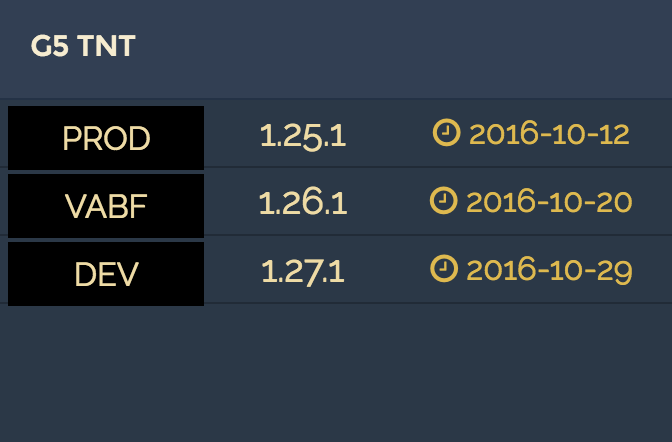
This widget display data from multiple JSON sources (up to three) in your [Mozaik](http://mozaik.rocks/) dashboard.
These JSON sources may be either static hosted files or JSON objects fetched from REST API's.
## Installation
To install mozaik-ext-multijson from npm, run:
```bash
npm install --save mozaik-ext-multijson
```
## Configuration
### Static hosted file
Let's say you want to display two set of data from files you host on your Dropbox public directory.
#### JSON file
In your Mozaik dashboard's config.js file, add the following section:
```javascript
{
type: 'json.multidata',
title: 'DEPLOYED APPLICATIONS',
sources: [
{
url: 'https://dl.dropboxusercontent.com/u/11555789/f1.json',
label: '${label}',
data: '${data}',
time: '${time}'
},
{
url: 'https://dl.dropboxusercontent.com/u/11555789/f2.json',
label: '${label}',
data: '${data}',
time: '${time}'
},
{
url: 'https://dl.dropboxusercontent.com/u/11555789/f3.json',
label: '${label}',
data: '${data}',
time: '${time}'
}
],
columns: 1, rows: 1,
x: 1, y: 1
}
```
### JSON data fetched from REST API
In your Mozaik dashboard's config.js file, add the webservice url in the api section. The url key shall contains the full URL where your webservice is hosted. An optionnal headers key can be added (to add authentication information for example):
```javascript
{
type: 'json.multidata',
title: 'DEPLOYED APPLICATIONS',
sources: [
{
url: 'http://mywebservice/rest/api/2/resource/id1',
headers: [{name: 'Authorization', value: 'Basic aKjs6LK8ijkSfT'}, {name: 'Content-type', value: 'application/json'}],
label: '${label}',
data: '${data}',
time: '${time}'
},
{
url: 'http://mywebservice/rest/api/2/resource/id2',
headers: [{name: 'Authorization', value: 'Basic aKjs6LK8ijkSfT'}, {name: 'Content-type', value: 'application/json'}],
label: '${label}',
data: '${data}',
time: '${time}'
},
{
url: 'http://mywebservice/rest/api/2/resource/id3',
headers: [{name: 'Authorization', value: 'Basic aKjs6LK8ijkSfT'}, {name: 'Content-type', value: 'application/json'}],
label: '${label}',
data: '${data}',
time: '${time}'
}
],
columns: 1, rows: 1,
x: 1, y: 1
}
```
### parameters
title, value and unit parameters can be either a String or a property path to be retrieve in the JSON data.
key | required | description
------------------|----------|-------------------------------------------------------------------
`type` | yes | *Always equal to 'json.multidata' (String)*
`title` | yes | *The title to be displayed in the header (String)*
`sources` | yes | *The list of the sources to be displayed (Array)*
`sources.url` | yes | *The url of the x.th source (URL)*
`sources.headers` | no | *Headers to be used to fetch the source (Array)*
`sources.label` | yes | *Label of the row (String)*
`sources.data` | yes | *Data to be displayed (String)*
`sources.time` | no | *Date information (String)*
---
_Source: https://npm.io/package/mozaik-ext-multijson · Machine-readable twin of the npm.io package page. Health data is recomputed on every publish._