# mt3d-plugin-fireworks
> Fireworks plugin for Mini Tokyo 3D
Latest version **2.1.0** (published 2026-09-30) · MIT license · 0 weekly downloads
## Install
```sh
npm install mt3d-plugin-fireworks
pnpm add mt3d-plugin-fireworks
yarn add mt3d-plugin-fireworks
bun add mt3d-plugin-fireworks
```
## Health
**Score 60/100 (C)** — status: active.
Positive: esm support; no vulnerabilities; recently updated; high maintenance score.
Warnings: low downloads; no types.
## Facts
| | |
|---|---|
| Version | 2.1.0 |
| Published | 2026-09-30 |
| First published | 2021-10-02 |
| Weekly downloads | 0 |
| License | MIT |
| TypeScript types | none |
| Module format | ESM + CommonJS |
| Dependencies | 0 |
| Unpacked size | 606.9 KB |
| Known vulnerabilities | 0 |
| Install scripts | no |
| GitHub stars | 5 |
| Author | Akihiko Kusanagi |
| Maintainers | nagix |
## Links
- npm: https://www.npmjs.com/package/mt3d-plugin-fireworks
- Repository: https://github.com/nagix/mt3d-plugin-fireworks
- Homepage: https://minitokyo3d.com
- Issues: https://github.com/nagix/mt3d-plugin-fireworks/issues
- npm.io page: https://npm.io/package/mt3d-plugin-fireworks
## Recent versions
- 2.1.0 (latest) — 2026-09-30
- 2.0.0 — 2026-08-14
- 1.4.0 — 2025-01-05
- 1.3.0 — 2024-10-07
- 1.2.0 — 2023-04-13
- 1.1.1 — 2022-08-28
- 1.1.0 — 2022-08-25
- 1.0.0 — 2022-02-10
- 0.2.0 — 2021-11-18
- 0.1.0 — 2021-10-02
## README
# Fireworks plugin for Mini Tokyo 3D
Fireworks plugin shows fireworks animations at a specific location on the [Mini Tokyo 3D](https://minitokyo3d.com) map at a scheduled date and time.
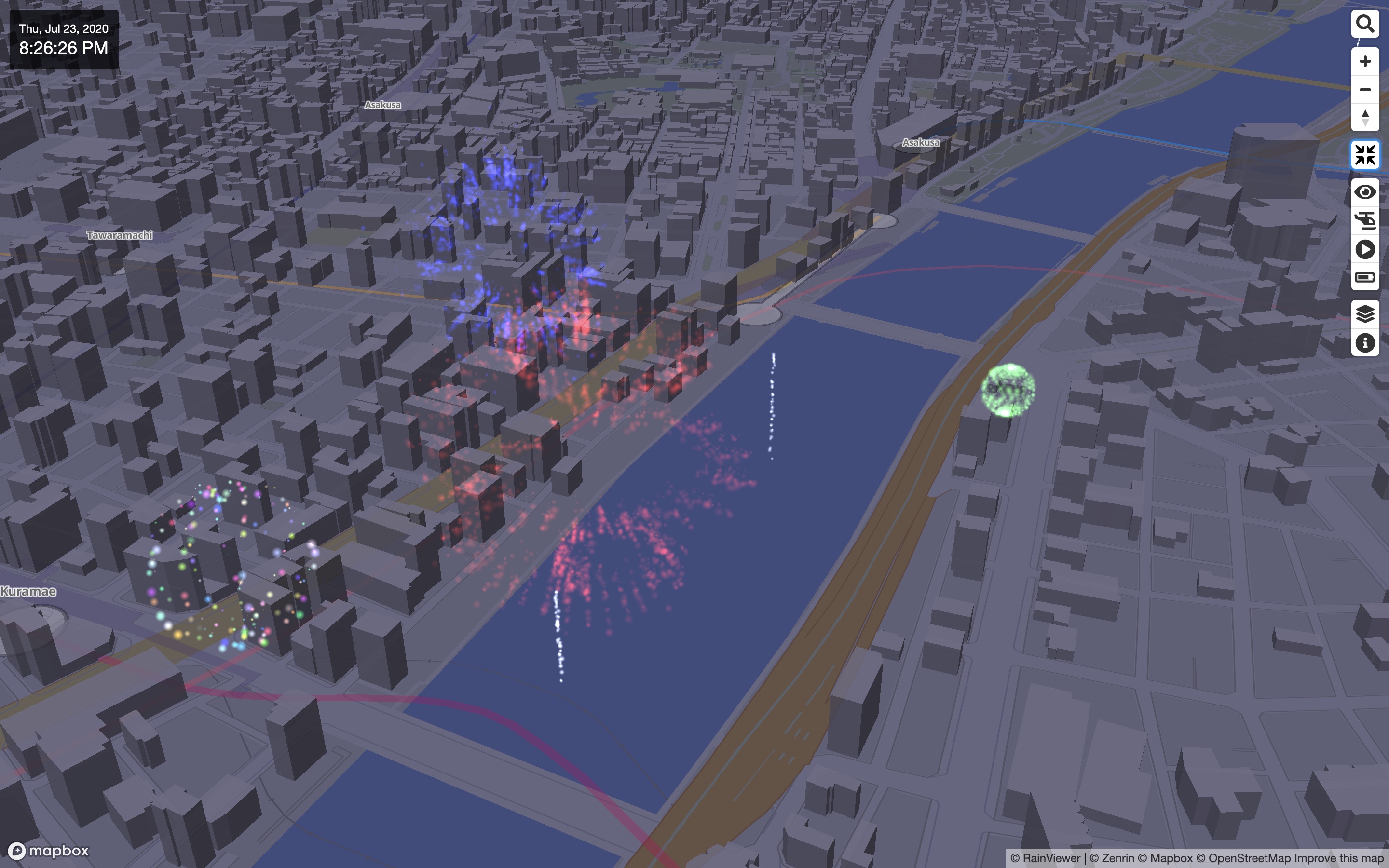
Fireworks plugin is used in [Mini Tokyo 3D Live Demo](https://minitokyo3d.com).
## How to Use
First, load the Mini Tokyo 3D and this plugin within the `` element of the HTML file.
```html
```
Then, create a Map instance specifying the `plugins` property, which is the array containing the plugin instance returned by `mt3dFireworks()`.
```html
```
## Options
The plugin accepts the following options.
| Name | Type | Default | Description
| :-- | :-- | :-- | :--
| **`options.url`** | `string` | `'https://mini-tokyo.appspot.com/fireworks'` | The URL of the fireworks event data source. Override this to use your own endpoint instead of the default hosted data.
| **`options.interactive`** | `boolean` | `true` | If `true`, the launch area of an ongoing event is highlighted on hover, and clicking within it shoots a shell up from the clicked point. Set to `false` to disable this.
## How to Build
The latest version of Node.js is required. Move to the root directory of the plugin, run the following commands, then the plugin scripts will be generated in the `dist` directory.
```bash
npm install
npm run build
```
For development, the following command watches the source files and outputs an unminified build with source maps to the `dev` directory. To debug it against Mini Tokyo 3D, set the `MT3D_PLUGIN_FIREWORKS` environment variable to the built file (`dev/mt3d-plugin-fireworks.js`) and run Mini Tokyo 3D's `npm run dev`, which loads and serves the plugin live on its development page.
```bash
npm run dev
```
## License
Fireworks plugin for Mini Tokyo 3D is available under the [MIT license](https://opensource.org/licenses/MIT).
---
_Source: https://npm.io/package/mt3d-plugin-fireworks · Machine-readable twin of the npm.io package page. Health data is recomputed on every publish._