# multibuttonengagement

> Customizable multi-button engagement for LivePerson's Conversational Cloud

Latest version **2.0.2** (published 2022-02-14) · MIT license · 0 weekly downloads

## Install

```sh
npm install multibuttonengagement
pnpm add multibuttonengagement
yarn add multibuttonengagement
bun add multibuttonengagement
```

## Health

**Score 15/100 (F)** — status: abandoned.

Positive: no vulnerabilities.

Warnings: low downloads; no types; no esm support.

Negative: abandoned; low maintenance score.

## Facts

| | |
|---|---|
| Version | 2.0.2 |
| Published | 2022-02-14 |
| First published | 2022-02-14 |
| Weekly downloads | 0 |
| License | MIT |
| TypeScript types | none |
| Module format | CommonJS |
| Dependencies | 1 |
| Unpacked size | 378.6 KB |
| Known vulnerabilities | 0 |
| Install scripts | no |
| GitHub stars | 1 |
| Author | Rob Lester |
| Maintainers | roblesterjr04 |
| Keywords | liveperson |

## Links

- npm: https://www.npmjs.com/package/multibuttonengagement
- Repository: https://github.com/LivePersonNY/MultiButtonEngagement
- Homepage: https://github.com/LivePersonNY/MultiButtonEngagement#readme
- Issues: https://github.com/LivePersonNY/MultiButtonEngagement/issues
- npm.io page: https://npm.io/package/multibuttonengagement

## Dependencies (1)

- [jquery](https://npm.io/package/jquery.md) ^3.6.0

## Recent versions

- 2.0.2 (latest) — 2022-02-14
- 2.0.1 — 2022-02-14

## README

# Multi Button Engagement

Customizable multi-button engagement for LivePerson's Conversational Cloud platform.

**Note:** This code repository is not supported, use at your own risk. 

## Setup

### Engagement

Add an engagement with the "Embedded" set as the format, and then cloose "HTML Engagement"

![Embedded](https://d1hryyr5hiabsc.cloudfront.net/web2020/img/git-static/eng1.png)

![html](https://d1hryyr5hiabsc.cloudfront.net/web2020/img/git-static/eng2.png)

Enter this code:

```html
<div id="lp-multi-channel-engagement" data-LP-event="click"></div>
```

Generate the code for the page here, note/copy the `<div>` code provided, and then finish creating the engagement.
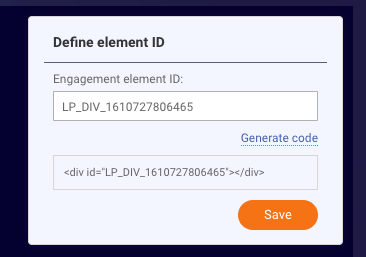
![html](https://d1hryyr5hiabsc.cloudfront.net/web2020/img/git-static/eng3.png)

### Website

#### Javascript

Using a tag manager, or direct insertion, load the `multi-engagement.min.js` file on your website. You can optionally use the CDN link here

https://cdn.jsdelivr.net/gh/LivePersonNY/MultiButtonEngagement/multi-engagement.min.js

#### Page element

Paste in the footer of your page the div noted from the engagement

```html
<div id="LP_DIV_XXXXXXXXX"></div>
```

### Custom Configuration

The settings of the engagement can be configured in 2 ways. Using `data` attributes in the `<div id="lp-multi...` added to the engagement, or by calling the `config` method on the `lpMultiChannelEngagement` object (created when js is loaded).

#### Using data attributes

For instance, to tell the engagement which channels you want to appear, override the "channels" data setting:

```html
<div data-channels="sms,whatsapp" id="lp-multi-channel-engagement" data-LP-event="click"></div>
```

To do in JS on page, use this example:

```html
<script src="/path/to/javascript.js"></script>
<script>
	lpMultiChannelEngagement.config({
		channels: "sms,whatsapp" //Choices are sms, whatsapp, apple, facebook
	});
</script>
```

### Options

Below is a table of the available options and defaults

#### Settings

|Option|Description|Default|
|---|---|---|
|imagemain|URL, Sets the primary enagement image.|![chat](https://d1hryyr5hiabsc.cloudfront.net/web2020/img/chat-engagements/LP_Sun_2020_Engagement_Icon.svg)|
|imagefacebook|URL, Sets the facebook button image.|![facebook](https://d1hryyr5hiabsc.cloudfront.net/web2020/img/chat-engagements/Facebook_Messenger2.svg)|

|imagewhatsapp|URL, Sets the whatsapp button image.|![whatsapp](https://d1hryyr5hiabsc.cloudfront.net/web2020/img/chat-engagements/WhatsApp2.svg)|

|imageapple|URL, Sets the apple business chat button image.|![whatsapp](https://d1hryyr5hiabsc.cloudfront.net/web2020/img/chat-engagements/Apple_Business_Chat2.svg)|

|imagesms|URL, Sets the sms button image.|![whatsapp](https://d1hryyr5hiabsc.cloudfront.net/web2020/img/chat-engagements/SMS2.svg)|
|channels|String, Sets the channels that will appear in the engagement|facebook,whatsapp,apple,sms|
|containerclass|String, the CSS class that is applied to the wrapping DIV for styling purposes|lp-multi-channel-engagement|
|zindex|Integer, Sets the Z index of the element, typically this will not need to be changed|10000|
|css|URL, The url to the CSS file that is loaded for styling. Use this if you want to dramatically change the look/feel of the engagement|[Default CSS...](https://d1hryyr5hiabsc.cloudfront.net/web2020/js/engagement.min.css)|
|debug|Boolean, enable debug logs to appear in the console|false|

#### Callbacks

**Note:** It is recommended to call these methods in JS rather than setting the callbacks in data attributes.

Available callback methods for this are: onClickWhatsapp, onClickFacebook, onClickApple, and onClickSms

Example:

```html
<script>
	lpMultiChannelEngagement.config({
		channels: 'facebook,whatsapp',
		onClickWhatsapp: function() {
			// Do something here like open a whatsapp page
		},
		onClickFacebook: function() {
			// Do something here like open Facebook
		}
	});
</script>
```

### Extra

#### Start web conversation with initial message from user

There is a method in this Javascript kit that will allow you to fire off an initial message to start a conversation. The method is `startWebWithMessage`.

```html
<script>
	lpMultiChannelEngagement.startWebWithMessage('Hi there!');
</script>
```

---
_Source: https://npm.io/package/multibuttonengagement · Machine-readable twin of the npm.io package page. Health data is recomputed on every publish._
