# nativescript-preferences
> Native app preferences for NativeScript: read and write NSUserDefaults / SharedPreferences, open the OS settings UI, and bind your own screens to the same values.
Latest version **2.1.0** (published 2026-09-09) · Apache-2.0 license · 0 weekly downloads
## Install
```sh
npm install nativescript-preferences
pnpm add nativescript-preferences
yarn add nativescript-preferences
bun add nativescript-preferences
```
Provides the command `ns-preferences`.
## Health
**Score 70/100 (B)** — status: active.
Positive: has types; esm support; no vulnerabilities; recently updated; high maintenance score; high quality score.
Warnings: low downloads.
## Facts
| | |
|---|---|
| Version | 2.1.0 |
| Published | 2026-09-09 |
| First published | 2017-11-14 |
| Weekly downloads | 0 |
| License | Apache-2.0 |
| TypeScript types | bundled |
| Module format | ESM + CommonJS |
| Dependencies | 0 |
| Unpacked size | 173.7 KB |
| Known vulnerabilities | 0 |
| Install scripts | no |
| GitHub stars | 13 |
| Author | Steve McNiven-Scott |
| Maintainers | sitefinitysteve |
| Keywords | NativeScript, Preferences, Settings, NSUserDefaults, SharedPreferences, PreferenceScreen, Settings.bundle, Android, iOS, Settings.bundle generator, preferences.xml generator |
## Links
- npm: https://www.npmjs.com/package/nativescript-preferences
- Repository: https://github.com/sitefinitysteve/nativescript-preferences
- Issues: https://github.com/sitefinitysteve/nativescript-preferences/issues
- npm.io page: https://npm.io/package/nativescript-preferences
## Alternatives
- [babylon](https://npm.io/package/babylon.md) — 5.1M weekly downloads
- [csscolorparser](https://npm.io/package/csscolorparser.md) — 3.7M weekly downloads
- [expr-eval-fork](https://npm.io/package/expr-eval-fork.md) — 1.5M weekly downloads
- [@leeoniya/ufuzzy](https://npm.io/package/@leeoniya/ufuzzy.md) — 247.7K weekly downloads
- [xml-parser](https://npm.io/package/xml-parser.md) — 78.4K weekly downloads
## Recent versions
- 2.1.0 (latest) — 2026-09-09
- 2.0.2 — 2026-09-08
- 2.0.1 — 2026-09-07
- 2.0.0 — 2026-09-07
- 1.2.0 — 2020-05-13
- 1.1.2 — 2019-08-17
- 1.1.1 — 2017-11-14
- 1.1.0 — 2017-11-14
- 1.0.9 — 2017-11-14
- 1.0.8 — 2017-11-14
- 1.0.7 — 2017-11-14
- 1.0.6 — 2017-11-14
- 1.0.5 — 2017-11-14
- 1.0.4 — 2017-11-14
- 1.0.3 — 2017-11-14
- … 2 more at https://npm.io/package/nativescript-preferences/versions
## README
# nativescript-preferences
**App settings for NativeScript, declared once.** Describe them in one TypeScript file; get the iOS Settings screen, the Android preference screen, and a typed API, all from the same definition and all reading the same native store.
```ts
import settings from './app.preferences';
settings.get('theme'); // 'system' | 'light' | 'dark', never undefined
settings.set('volume', 80); // persisted in NSUserDefaults / SharedPreferences
settings.onChange('theme', applyTheme);
await settings.openSettings(); // the OS draws the screen
```
- **No platform code.** One API on both OSes. No `if (isIOS)`, no plist, no XML written by hand.
- **Typed for real.** Keys, value types and option literals are inferred from the definition. A default that is not one of its options, or a misspelled property, is a compile error. Every key has a default, so reads are never `undefined`.
- **Live everywhere.** Change a value in the OS settings, in your code, or through a two-way binding, and everything else updates.
- **Native UI for free.** iOS gets a page in the Settings app, Android gets an AndroidX `PreferenceScreen`. Or bind your own screen to the same instance.
## One definition, both platforms
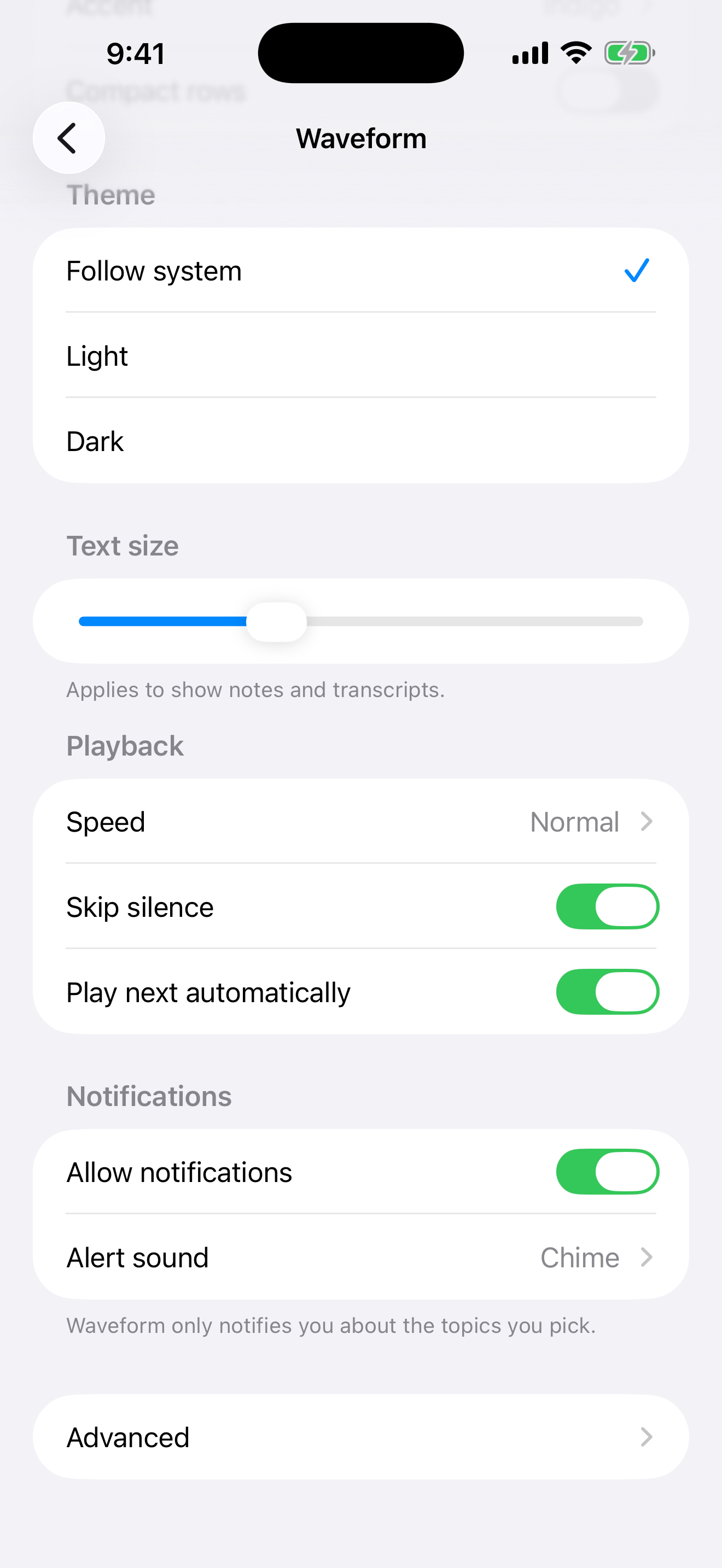
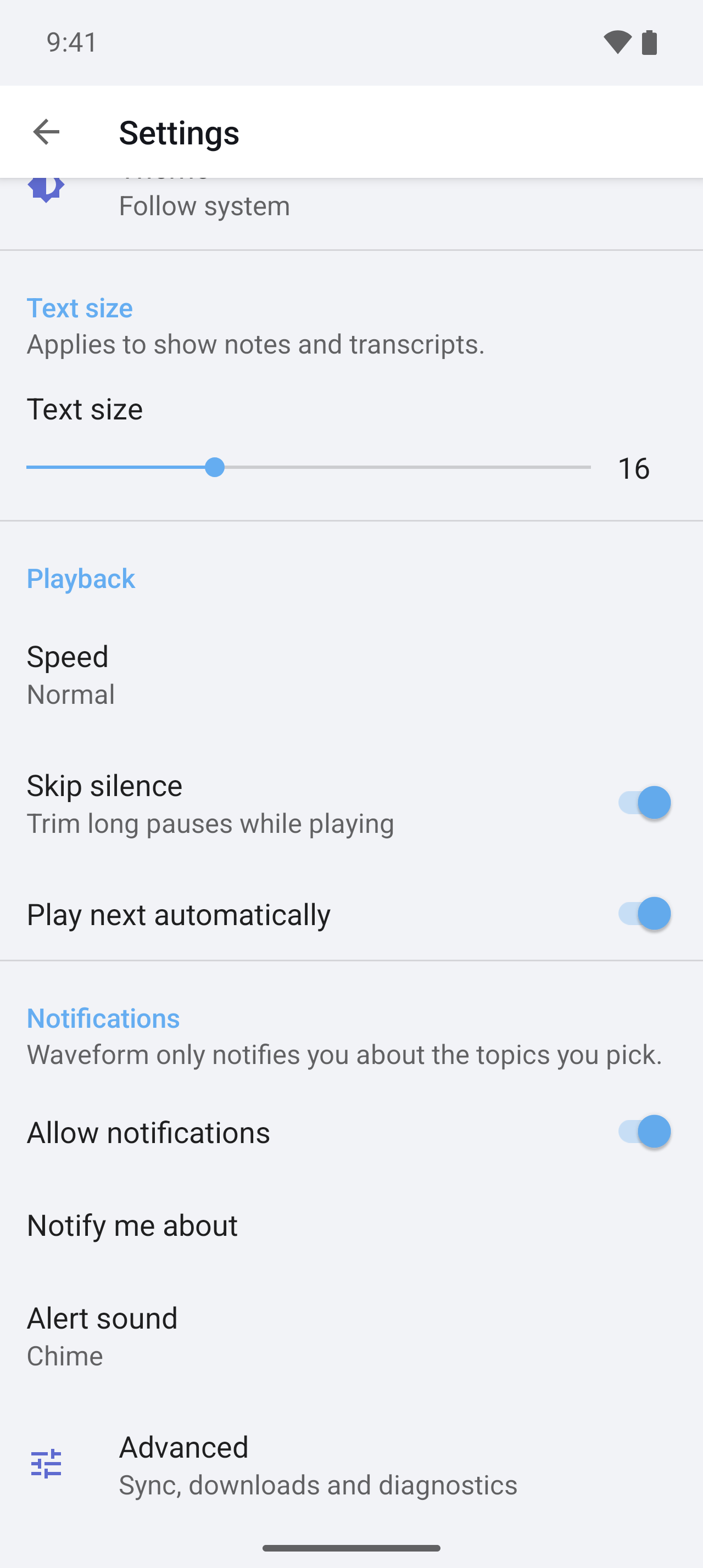
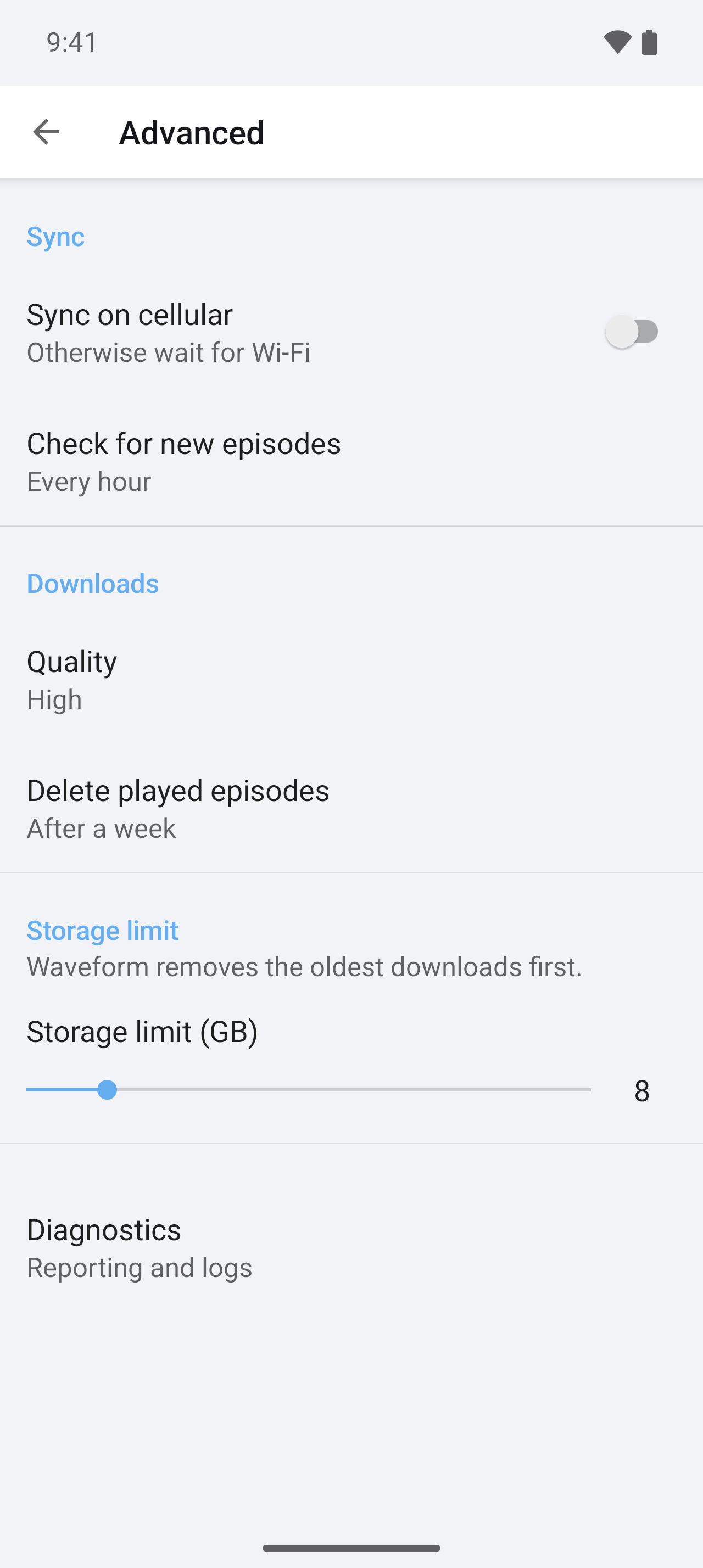
The demo app's [`app.preferences.ts`](demo/app/app.preferences.ts) produces every screen below. Nothing here is hand-written per platform.
| | iOS — the Settings app | Android — an AndroidX `PreferenceScreen` |
| --- | --- | --- |
| **Root** | 
 |
| 
 |
| **Nested screen** |
|
| **Nested screen** | 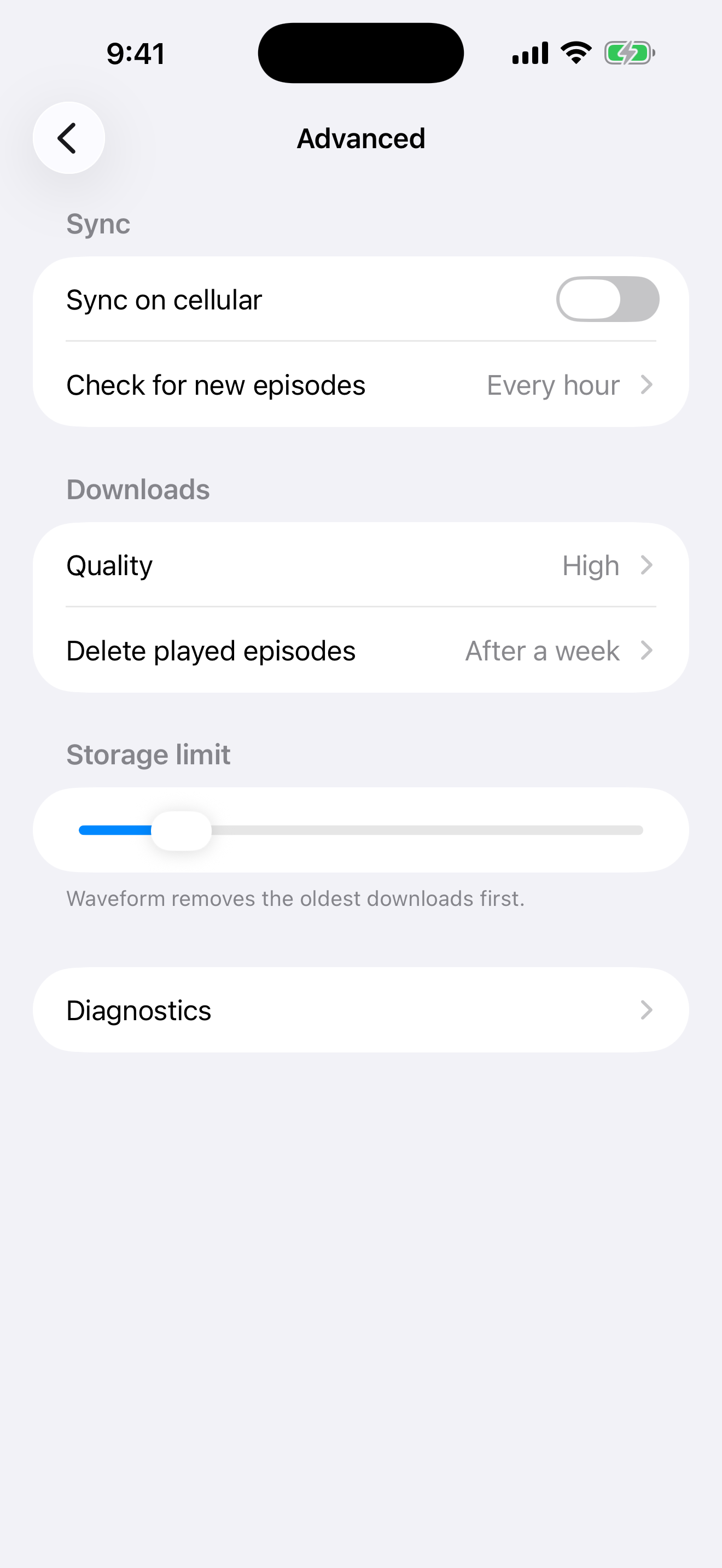 |
|  |
| **Two levels deep** |
|
| **Two levels deep** | 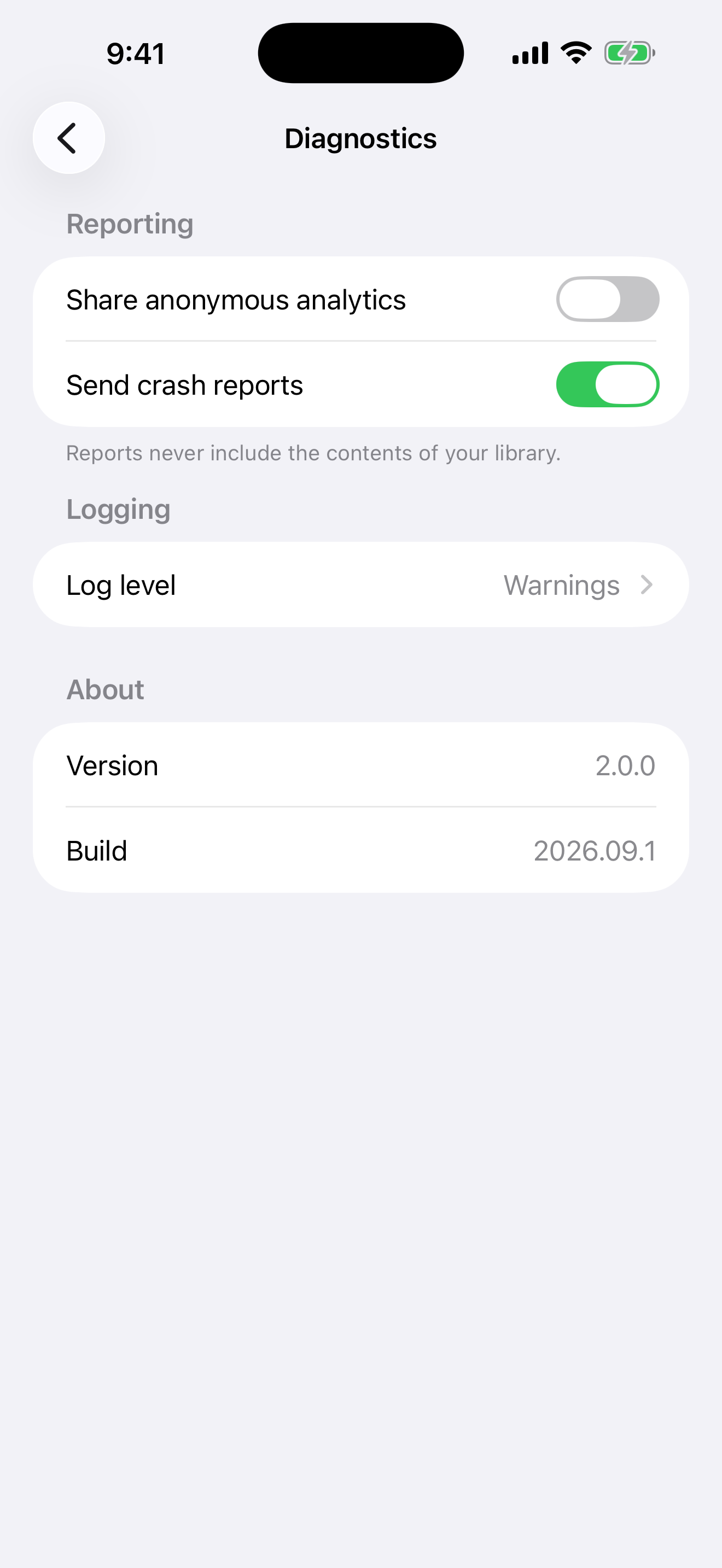 |
| 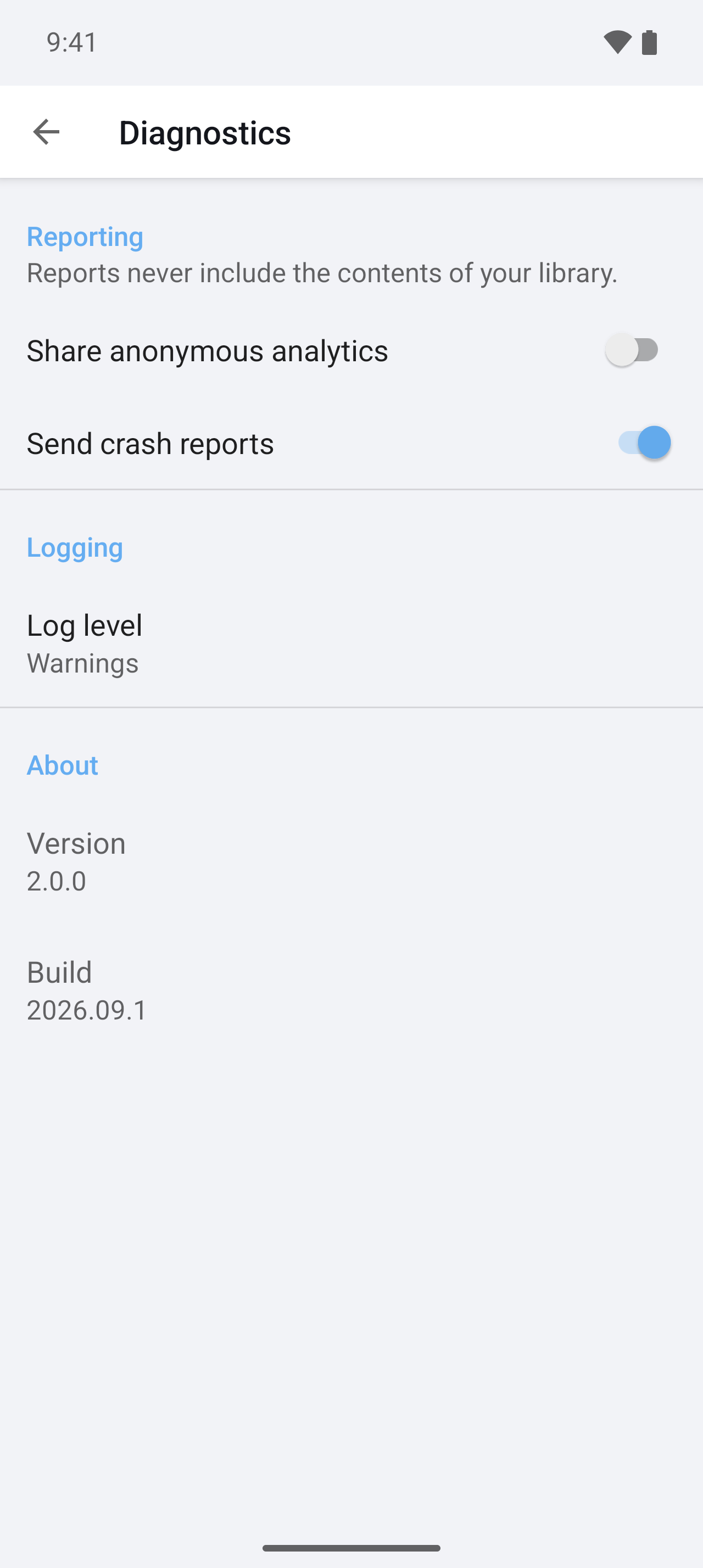 |
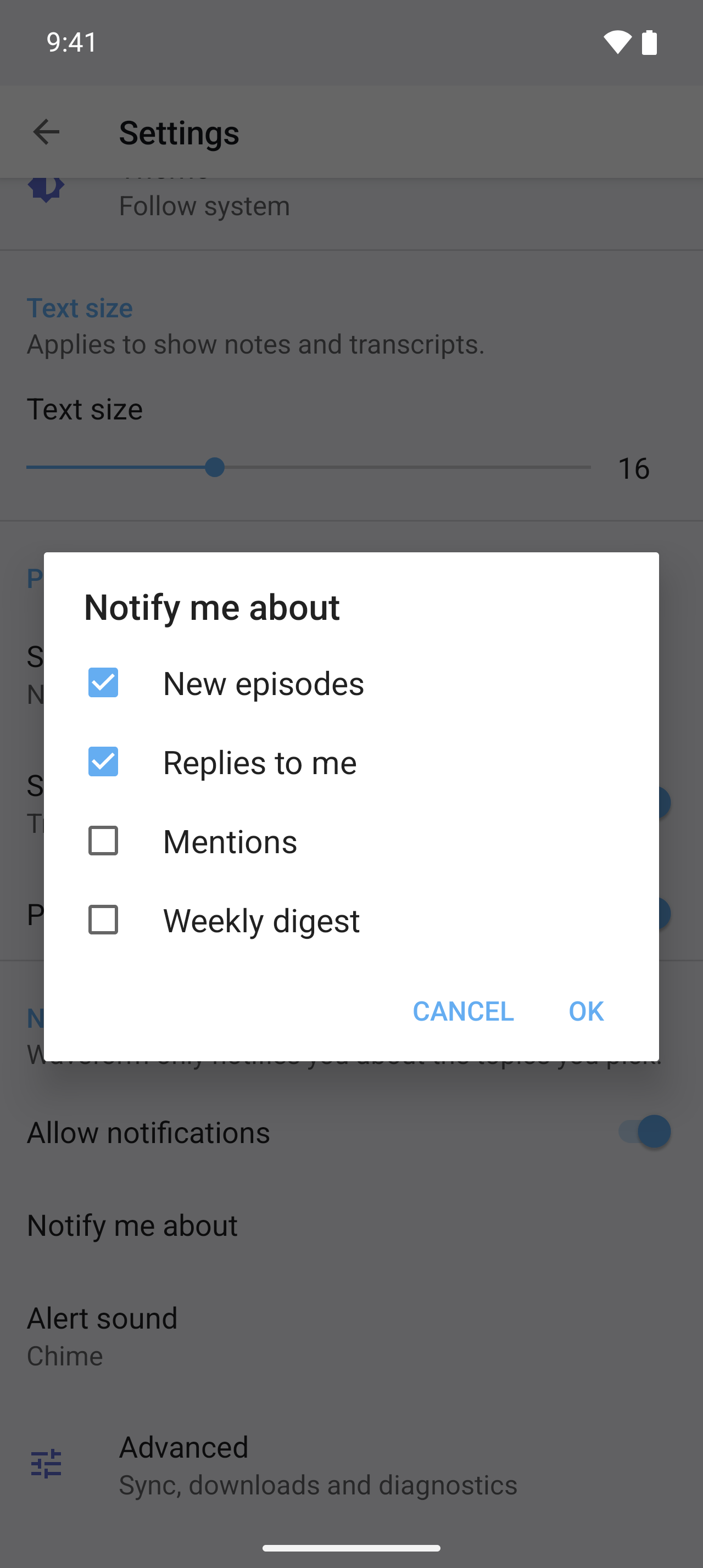
Same definition, native idioms on each side: the `list` for Theme is an `ios.widget` radio group on the left and a `DropDownPreference` with an icon on the right, and the `multilist` that iOS has no control for is hidden there and a `MultiSelectListPreference` on Android.
|
Same definition, native idioms on each side: the `list` for Theme is an `ios.widget` radio group on the left and a `DropDownPreference` with an icon on the right, and the `multilist` that iOS has no control for is hidden there and a `MultiSelectListPreference` on Android.
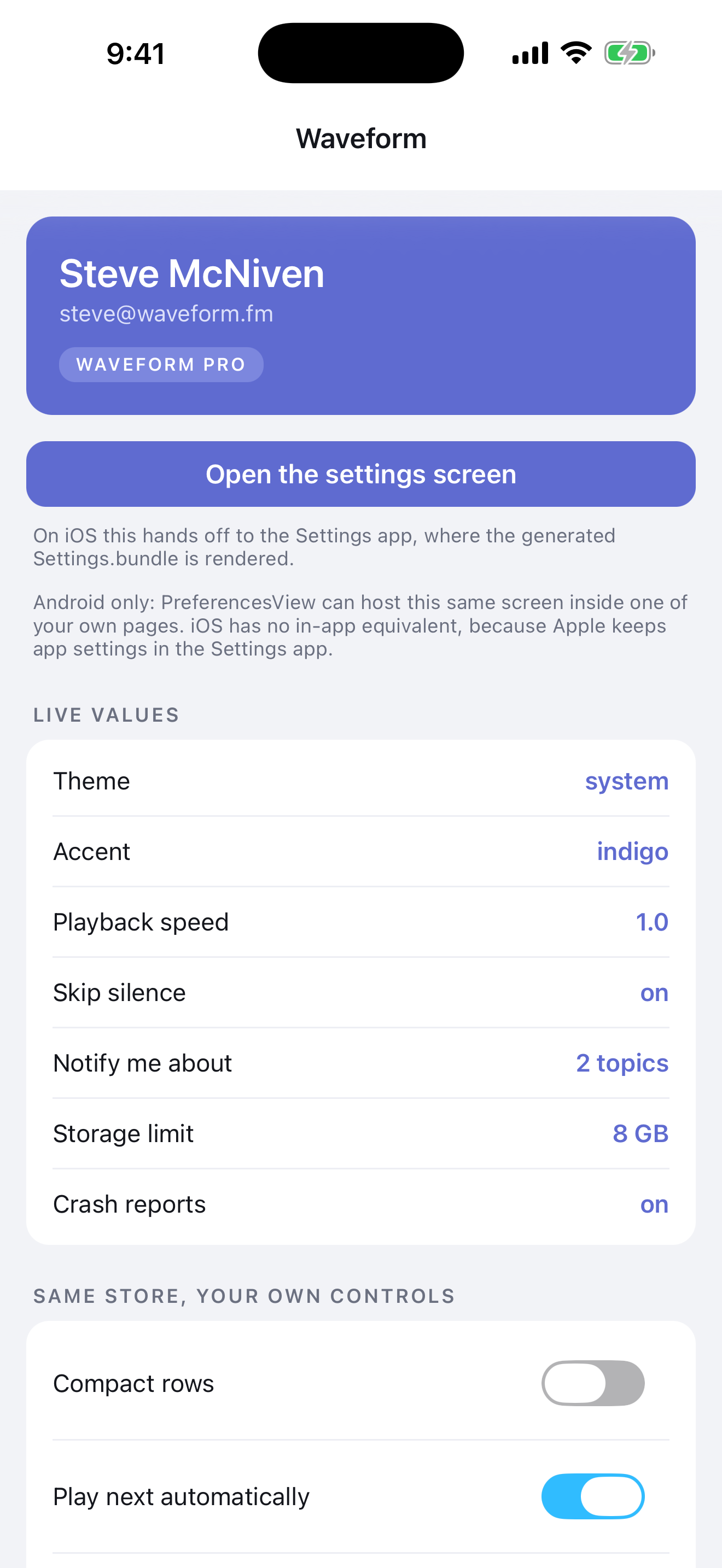
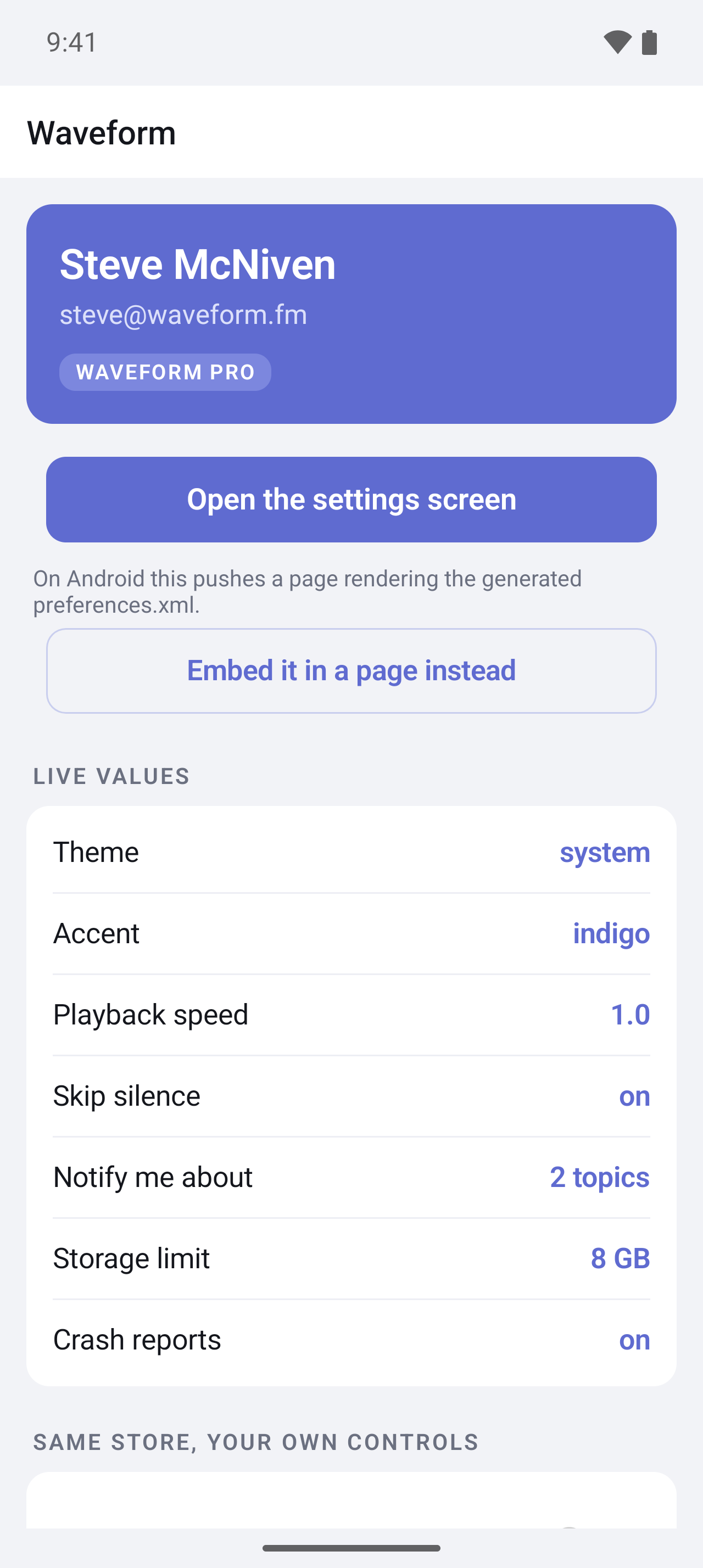
 And the same values in the app itself, through the typed API and two-way bindings:
 ## Quick start
```bash
ns plugin add nativescript-preferences
npx ns-preferences init
```
`init` creates `app/app.preferences.ts`, adds a build hook to `nativescript.config.ts`, and generates once. Describe your settings:
```ts
// app/app.preferences.ts
import { definePreferences } from 'nativescript-preferences';
export default definePreferences({
items: [
{
type: 'group',
title: 'General',
items: [
{ key: 'enabled', type: 'toggle', title: 'Enabled', default: true },
{
key: 'theme',
type: 'list',
title: 'Theme',
default: 'system',
options: [
{ value: 'system', title: 'Follow system' },
{ value: 'light', title: 'Light' },
{ value: 'dark', title: 'Dark' },
],
},
{ key: 'volume', type: 'slider', title: 'Volume', default: 50, min: 0, max: 100 },
],
},
],
});
```
Use them anywhere:
```ts
import settings from './app.preferences';
settings.get('volume'); // number
settings.get('theme'); // 'system' | 'light' | 'dark'
settings.set('enabled', false); // a string here is a compile error
settings.set('theme', null); // back to the default
const stop = settings.onChange('theme', (theme) => applyTheme(theme));
```
The file is both the schema and the runtime instance: `definePreferences` infers the keys and value types from the literal (no `as const` needed) and returns the typed `Preferences` for them. The build hook evaluates the same file under Node to write the native screens, so keep it self-contained: import only `nativescript-preferences` and relative `.ts` helpers there, nothing from the app or `@nativescript/*`.
Or bind a page to it. The instance is an `Observable`, so bindings work in both directions:
```ts
page.bindingContext = settings;
```
```xml
```
Every `ns run`, `ns build` and `ns prepare` regenerates the platform files, so the OS screen, the types and the defaults can't drift. Requires `@nativescript/core` 9 and TypeScript 6, the version NativeScript 9 ships with (5.3 and 7.0 are verified too). To read the definition at build time the hook uses the project's `typescript` when it has the compiler API, else the NativeScript CLI's own copy, so a TypeScript 7 project still builds. No native code, no manifest or `Info.plist` changes.
## What gets generated
| Output | Path |
| --- | --- |
| iOS Settings.bundle, one plist per screen | `App_Resources/iOS/Settings.bundle/` |
| AndroidX preference screen and its string arrays | `App_Resources/Android/src/main/res/xml/preferences.xml`, `values/preferences_arrays.xml` |
The definition file is the typed module, so nothing else is generated for it. (A `preferences.json` project also gets `output.typescript`; see [Still on preferences.json](#still-on-preferencesjson).)
Only changed files are written. Generated files carry a "Do not edit" header; files without it are never overwritten. `npx ns-preferences generate` runs it by hand, `npx ns-preferences check` fails CI when output is stale.
### Item types
Every item except `group` has a unique `key`. `title` and `summary` are optional (iOS shows `summary` only on groups, as footer text).
| `type` | Stores | iOS | Android | Fields |
| --- | --- | --- | --- | --- |
| `group` | nothing | `PSGroupSpecifier` | `PreferenceCategory` | `items` |
| `screen` | nothing | `PSChildPaneSpecifier` | nested `PreferenceScreen` | `items` |
| `text` | `string` | `PSTextFieldSpecifier` | `EditTextPreference` | `default`, `secure`, `keyboard`, `autocapitalize`, `autocorrect` (iOS) |
| `toggle` | `boolean` | `PSToggleSwitchSpecifier` | `SwitchPreferenceCompat` | `default` |
| `list` | one option | `PSMultiValueSpecifier` | `ListPreference` | `options`, `default` |
| `multilist` | `string[]` | needs `ios.widget` | `MultiSelectListPreference` | `options`, `default` |
| `slider` | integer | `PSSliderSpecifier` (no title) | `SeekBarPreference` | `default`, `min`, `max`, `step` |
| `label` | nothing | `PSTitleValueSpecifier` | `Preference` | `value` |
`options` are strings or `{ "value", "title" }`. Defaults are validated, and every error names the item.
### Per-platform overrides
Add `ios` or `android` to any item. `false` hides it on that platform. `widget` swaps the control; any other entry is written verbatim as a plist key or XML attribute, and `null` removes one.
```json
{
"key": "theme",
"type": "list",
"title": "Theme",
"default": "system",
"options": ["system", "light", "dark"],
"ios": { "widget": "PSRadioGroupSpecifier" },
"android": {
"widget": "DropDownPreference",
"android:icon": "@drawable/ic_theme",
"app:iconSpaceReserved": null
}
}
```
Any control that stores the same shape of data is a safe swap ([Apple reference](https://developer.apple.com/library/archive/documentation/PreferenceSettings/Conceptual/SettingsApplicationSchemaReference/Introduction/Introduction.html), [AndroidX reference](https://developer.android.com/reference/androidx/preference/package-summary)):
| Stores | iOS `widget` | Android `widget` |
| --- | --- | --- |
| `boolean` | `PSToggleSwitchSpecifier` | `SwitchPreferenceCompat`, `CheckBoxPreference` |
| `string` | `PSTextFieldSpecifier` | `EditTextPreference` |
| one option | `PSMultiValueSpecifier`, `PSRadioGroupSpecifier` | `ListPreference`, `DropDownPreference` |
| `string[]` | `PSMultiValueSpecifier` (picks one) | `MultiSelectListPreference` |
| integer | `PSSliderSpecifier` | `SeekBarPreference` |
| read-only | `PSTitleValueSpecifier` | `Preference` |
Fully qualified Android classes work too. The generator accepts any non-empty `widget` name without checking it, so stick to the table above or a control that stores the same shape of data.
Two iOS layout quirks are handled for you: a `PSRadioGroupSpecifier` is always emitted last in its group (iOS renders it as its own section and would reorder the rows otherwise; `generate` prints a note if it moved), and a `screen` that shares a group with other rows gets its own card instead of inheriting their footer.
### Keeping control
- **Hand-edit a file.** Remove its "Generated by nativescript-preferences" header and the generator leaves it alone. `generate --force` takes it back.
- **Stop generating one output.** `output: { android: false }` and write that file yourself.
- **Skip the hook.** `NS_PREFERENCES_SKIP=1 ns run ios` for one build, or remove the `hooks` entry from `nativescript.config.ts` for good.
Existing hand-written `Root.plist` or `preferences.xml` files are kept on the first run for the same reason.
### Still on preferences.json
`preferences.json` keeps working exactly as in 2.x: the same items, `"output": { "typescript": "app/settings.generated.ts" }`, and a generated module exporting the interface, the defaults and `settings`. `npx ns-preferences init --json` creates one, `preferences.schema.json` gives editor completion, and the hook picks up whichever of `app.preferences.ts` or `preferences.json` exists (both at once is an error, so two sources can never disagree). Moving over is mechanical: paste the `items` into `definePreferences({ items })`, drop `$schema` and `output.typescript`, delete the generated module, and import the definition instead.
## Without the generator
Everything above is sugar over one class:
```ts
import { Preferences } from 'nativescript-preferences';
interface Settings { enabled: boolean; theme: 'system' | 'light' | 'dark'; volume: number }
export const settings = new Preferences({
defaults: { enabled: true, theme: 'system', volume: 50 },
integers: ['volume'], // rounded on write, like every generated slider
});
```
A typed schema needs a default per key; that is what makes `get()` never `undefined`. `Preferences.shared` is the untyped instance, where `get()` may return `undefined` and `getString` / `getNumber` / `getBoolean` / `getStringArray` coerce. For an OS screen, write [`Root.plist`](demo/App_Resources/iOS/Settings.bundle/Root.plist) and [`preferences.xml`](demo/App_Resources/Android/src/main/res/xml/preferences.xml) yourself with the same keys.
## Platform details
**Android settings page.** Android has no OS-hosted settings, so `openSettings()` navigates the topmost `Frame` to a page rendering `preferences.xml` with `PreferenceFragmentCompat`. Nested screens open as pages, back works. Options (all ignored on iOS): `title`, `resource`, `rootKey`, `modal`, `frame`, `animated`. CSS classes `ns-preferences-page` and `ns-preferences`.
**Embed it.** `` hosts the Android screen in any page, tab or modal (`xmlns:prefs="nativescript-preferences"`). It renders nothing on iOS; `PreferencesView.isSupported` tells you. Handle `navigateToScreen` and set `args.handled = true` to present nested screens yourself. The plugin registers the namespace with the XML builder the moment it is imported, so it works under both webpack and Vite; just make sure something imports it before the page loads (the generated settings module does).
**Defaults, strongest first.** The stored value; the native defaults; the in-code defaults. On iOS the shared store registers the `Settings.bundle` `DefaultValue`s on launch, after the in-code defaults, so a bundle value wins where both define a key; a `suiteName` store has no bundle. Android has no registration layer: `registerDefaults()` fills in the `preferences.xml` `android:defaultValue`s for keys that have no stored value yet. AndroidX records that it has run with one app-wide flag, so a second call for another resource or a `suiteName` store does nothing unless the second argument, `readAgain`, is `true`. With the generator all three come from the same JSON.
**Coming from `ApplicationSettings`.** `Preferences` covers every `ApplicationSettings` call (`getBoolean` / `getString` / `getNumber`, `has`, `keys`, `remove`, `clear`) and adds typed keys, `string[]`, defaults, change events and the OS screen. On iOS both read the same `NSUserDefaults`; on Android `ApplicationSettings` keeps its own `prefs.db` file, so use `Preferences.applicationSettings` to read values written there, or move them once into `settings`.
**Separate stores.** `new Preferences({ suiteName: 'group.com.example.app' })` opens an iOS App Group suite or an Android `SharedPreferences` file. Pass the same `suiteName` to `PreferencesView` to edit it.
**Value types.** `string`, `boolean`, `number` and `string[]` map to `NSString`/`String`, `Bool`/`boolean`, `Integer` or `Double`/`int`, `long` or `float` (Android keeps a key's existing Java type), and `NSArray`/`Set`. A key named like a class member (`set`, `keys`) is readable via `get()` but not bindable; a warning is traced.
**iOS system keys.** iOS registers and writes its own entries next to yours (`NSHyphenatesAsLastResort`, `AppleLanguages`, `MultiWindowEnabled`...). Only keys you declared come out of the registration domain, and system-looking keys are filtered from the persistent domain (`systemKeyPattern`), so `keys()`, `getAll()` and the global change event only ever see app preferences.
**Whole numbers.** A `slider` is an integer on both platforms, but an iOS `Slider` bound to it reports fractions. The generated module passes every slider key as `integers`, so writes are rounded; do the same when you construct `Preferences` yourself.
**iOS caches `Settings.bundle` per install.** After editing the definition, a plain `ns run ios` can leave the old Settings screen in place. Delete the app from the simulator or device (or `xcrun simctl uninstall booted `) and run again.
## API
### `definePreferences(definition)`
Returns `Preferences>`, with the definition reachable as `settings.definition`. The definition is `{ title?, output?, items }`; items are the [types above](#item-types) with `ios` / `android` overrides. Inferred per item: `text` is `string`, `toggle` is `boolean`, `slider` is `number`, `multilist` is `string[]`, and `list` is the union of its option values. `label`, `group` and `screen` store nothing and have no key in the schema. Checked at compile time: a `list` default must be one of its options (and is required), a `multilist` default must be a subset, a group cannot contain a group, and an unknown property such as `titel` is an error. Requires TypeScript 6 (5.3 and 7.0 verified); the same inference is available as `InferPreferences` and the item types as `PreferenceItem`, `ListPreferenceItem` and so on.
### `Preferences`
| Member | Description |
| --- | --- |
| `static shared` | Untyped instance of the store behind the OS settings UI. |
| `static applicationSettings` | Untyped instance of the store core's `ApplicationSettings` uses. |
| `new Preferences({ defaults?, suiteName?, integers? })` | Defaults: one per key for a typed schema, any subset untyped. `integers` lists keys that round on write (every `slider`, when generated). |
| `get(key, fallback?)` | Stored value, else `fallback`, else the default. |
| `getString / getNumber / getBoolean / getStringArray(key, fallback?)` | Coerced reads. |
| `set(key, value)` | Writes; `null` or `undefined` removes the key. |
| `remove(key)`, `clear()` | Remove one key or all. Defaults stay in effect. |
| `has(key)`, `keys()`, `getAll()` | Inspect the store. `has` ignores defaults. |
| `onChange(callback)`, `onChange(key, callback)` | Subscribe; returns an unsubscribe function. Also `on('change')`. |
| `refresh()` | Re-read the native store and raise events for differences. |
| `registerDefaults()` | iOS: register `Settings.bundle` defaults. Android: persist `preferences.xml` defaults. |
| `openSettings(options?)` | Open the OS settings UI. Resolves `true` once presented. |
| `ios` / `android` | The underlying `NSUserDefaults` / `SharedPreferences`. |
| `dispose()` | Stop observing native changes (short-lived instances only). |
### `PreferencesView`
`resource`, `suiteName`, `rootKey` properties; `navigateToScreen` event with `{ key, title, handled }`; `static isSupported`.
### `ns-preferences` CLI
| Command | Description |
| --- | --- |
| `init` | Create `app/app.preferences.ts` (or `preferences.json` with `--json`), register the build hook, generate once. |
| `generate` | Write all outputs. `--force` overwrites files without the generated header. |
| `check` | Exit 1 when any generated file is stale. |
Options: `--config`, `--project`, `--app-dir`, `--app-resources`, `--platform ios|android`, `--json`. The definition is found in the app folder (`appPath` from `nativescript.config.ts`, else `src`, else `app`) or the project root. The hook lives at `hooks/before-prepare.cjs`.
## For AI assistants
[`llms.txt`](llms.txt) is a compact, self-contained reference for the whole package: the JSON format, the API, the rules, and the mistakes to avoid. It ships in the npm package (`node_modules/nativescript-preferences/llms.txt`), so an agent working in your app can read it directly, and [`SKILL.md`](SKILL.md) wraps the same content as an [Agent Skill](https://agentskills.io) for Claude Code and compatible tools.
## Development
```bash
npm run build # compile src/
npm test # generator tests
npm run demo.install && npm run demo.ios # or demo.android
```
The debug APK ships every ABI (about 100 MB of runtime); if an emulator refuses to install it, add `packagingOptions { jniLibs { ... } }` or `splits` to `demo/App_Resources/Android/app.gradle` for one ABI.
Releases are cut from tags: bump `src/package.json`, add the `## x.y.z` changelog section, then `git tag v2.0.0 && git push origin master v2.0.0`. The Release workflow publishes the GitHub release with those notes and the npm tarball attached. `npm publish` from `src/` is manual.
## License
Apache 2.0
---
_Source: https://npm.io/package/nativescript-preferences · Machine-readable twin of the npm.io package page. Health data is recomputed on every publish._
## Quick start
```bash
ns plugin add nativescript-preferences
npx ns-preferences init
```
`init` creates `app/app.preferences.ts`, adds a build hook to `nativescript.config.ts`, and generates once. Describe your settings:
```ts
// app/app.preferences.ts
import { definePreferences } from 'nativescript-preferences';
export default definePreferences({
items: [
{
type: 'group',
title: 'General',
items: [
{ key: 'enabled', type: 'toggle', title: 'Enabled', default: true },
{
key: 'theme',
type: 'list',
title: 'Theme',
default: 'system',
options: [
{ value: 'system', title: 'Follow system' },
{ value: 'light', title: 'Light' },
{ value: 'dark', title: 'Dark' },
],
},
{ key: 'volume', type: 'slider', title: 'Volume', default: 50, min: 0, max: 100 },
],
},
],
});
```
Use them anywhere:
```ts
import settings from './app.preferences';
settings.get('volume'); // number
settings.get('theme'); // 'system' | 'light' | 'dark'
settings.set('enabled', false); // a string here is a compile error
settings.set('theme', null); // back to the default
const stop = settings.onChange('theme', (theme) => applyTheme(theme));
```
The file is both the schema and the runtime instance: `definePreferences` infers the keys and value types from the literal (no `as const` needed) and returns the typed `Preferences` for them. The build hook evaluates the same file under Node to write the native screens, so keep it self-contained: import only `nativescript-preferences` and relative `.ts` helpers there, nothing from the app or `@nativescript/*`.
Or bind a page to it. The instance is an `Observable`, so bindings work in both directions:
```ts
page.bindingContext = settings;
```
```xml
```
Every `ns run`, `ns build` and `ns prepare` regenerates the platform files, so the OS screen, the types and the defaults can't drift. Requires `@nativescript/core` 9 and TypeScript 6, the version NativeScript 9 ships with (5.3 and 7.0 are verified too). To read the definition at build time the hook uses the project's `typescript` when it has the compiler API, else the NativeScript CLI's own copy, so a TypeScript 7 project still builds. No native code, no manifest or `Info.plist` changes.
## What gets generated
| Output | Path |
| --- | --- |
| iOS Settings.bundle, one plist per screen | `App_Resources/iOS/Settings.bundle/` |
| AndroidX preference screen and its string arrays | `App_Resources/Android/src/main/res/xml/preferences.xml`, `values/preferences_arrays.xml` |
The definition file is the typed module, so nothing else is generated for it. (A `preferences.json` project also gets `output.typescript`; see [Still on preferences.json](#still-on-preferencesjson).)
Only changed files are written. Generated files carry a "Do not edit" header; files without it are never overwritten. `npx ns-preferences generate` runs it by hand, `npx ns-preferences check` fails CI when output is stale.
### Item types
Every item except `group` has a unique `key`. `title` and `summary` are optional (iOS shows `summary` only on groups, as footer text).
| `type` | Stores | iOS | Android | Fields |
| --- | --- | --- | --- | --- |
| `group` | nothing | `PSGroupSpecifier` | `PreferenceCategory` | `items` |
| `screen` | nothing | `PSChildPaneSpecifier` | nested `PreferenceScreen` | `items` |
| `text` | `string` | `PSTextFieldSpecifier` | `EditTextPreference` | `default`, `secure`, `keyboard`, `autocapitalize`, `autocorrect` (iOS) |
| `toggle` | `boolean` | `PSToggleSwitchSpecifier` | `SwitchPreferenceCompat` | `default` |
| `list` | one option | `PSMultiValueSpecifier` | `ListPreference` | `options`, `default` |
| `multilist` | `string[]` | needs `ios.widget` | `MultiSelectListPreference` | `options`, `default` |
| `slider` | integer | `PSSliderSpecifier` (no title) | `SeekBarPreference` | `default`, `min`, `max`, `step` |
| `label` | nothing | `PSTitleValueSpecifier` | `Preference` | `value` |
`options` are strings or `{ "value", "title" }`. Defaults are validated, and every error names the item.
### Per-platform overrides
Add `ios` or `android` to any item. `false` hides it on that platform. `widget` swaps the control; any other entry is written verbatim as a plist key or XML attribute, and `null` removes one.
```json
{
"key": "theme",
"type": "list",
"title": "Theme",
"default": "system",
"options": ["system", "light", "dark"],
"ios": { "widget": "PSRadioGroupSpecifier" },
"android": {
"widget": "DropDownPreference",
"android:icon": "@drawable/ic_theme",
"app:iconSpaceReserved": null
}
}
```
Any control that stores the same shape of data is a safe swap ([Apple reference](https://developer.apple.com/library/archive/documentation/PreferenceSettings/Conceptual/SettingsApplicationSchemaReference/Introduction/Introduction.html), [AndroidX reference](https://developer.android.com/reference/androidx/preference/package-summary)):
| Stores | iOS `widget` | Android `widget` |
| --- | --- | --- |
| `boolean` | `PSToggleSwitchSpecifier` | `SwitchPreferenceCompat`, `CheckBoxPreference` |
| `string` | `PSTextFieldSpecifier` | `EditTextPreference` |
| one option | `PSMultiValueSpecifier`, `PSRadioGroupSpecifier` | `ListPreference`, `DropDownPreference` |
| `string[]` | `PSMultiValueSpecifier` (picks one) | `MultiSelectListPreference` |
| integer | `PSSliderSpecifier` | `SeekBarPreference` |
| read-only | `PSTitleValueSpecifier` | `Preference` |
Fully qualified Android classes work too. The generator accepts any non-empty `widget` name without checking it, so stick to the table above or a control that stores the same shape of data.
Two iOS layout quirks are handled for you: a `PSRadioGroupSpecifier` is always emitted last in its group (iOS renders it as its own section and would reorder the rows otherwise; `generate` prints a note if it moved), and a `screen` that shares a group with other rows gets its own card instead of inheriting their footer.
### Keeping control
- **Hand-edit a file.** Remove its "Generated by nativescript-preferences" header and the generator leaves it alone. `generate --force` takes it back.
- **Stop generating one output.** `output: { android: false }` and write that file yourself.
- **Skip the hook.** `NS_PREFERENCES_SKIP=1 ns run ios` for one build, or remove the `hooks` entry from `nativescript.config.ts` for good.
Existing hand-written `Root.plist` or `preferences.xml` files are kept on the first run for the same reason.
### Still on preferences.json
`preferences.json` keeps working exactly as in 2.x: the same items, `"output": { "typescript": "app/settings.generated.ts" }`, and a generated module exporting the interface, the defaults and `settings`. `npx ns-preferences init --json` creates one, `preferences.schema.json` gives editor completion, and the hook picks up whichever of `app.preferences.ts` or `preferences.json` exists (both at once is an error, so two sources can never disagree). Moving over is mechanical: paste the `items` into `definePreferences({ items })`, drop `$schema` and `output.typescript`, delete the generated module, and import the definition instead.
## Without the generator
Everything above is sugar over one class:
```ts
import { Preferences } from 'nativescript-preferences';
interface Settings { enabled: boolean; theme: 'system' | 'light' | 'dark'; volume: number }
export const settings = new Preferences({
defaults: { enabled: true, theme: 'system', volume: 50 },
integers: ['volume'], // rounded on write, like every generated slider
});
```
A typed schema needs a default per key; that is what makes `get()` never `undefined`. `Preferences.shared` is the untyped instance, where `get()` may return `undefined` and `getString` / `getNumber` / `getBoolean` / `getStringArray` coerce. For an OS screen, write [`Root.plist`](demo/App_Resources/iOS/Settings.bundle/Root.plist) and [`preferences.xml`](demo/App_Resources/Android/src/main/res/xml/preferences.xml) yourself with the same keys.
## Platform details
**Android settings page.** Android has no OS-hosted settings, so `openSettings()` navigates the topmost `Frame` to a page rendering `preferences.xml` with `PreferenceFragmentCompat`. Nested screens open as pages, back works. Options (all ignored on iOS): `title`, `resource`, `rootKey`, `modal`, `frame`, `animated`. CSS classes `ns-preferences-page` and `ns-preferences`.
**Embed it.** `` hosts the Android screen in any page, tab or modal (`xmlns:prefs="nativescript-preferences"`). It renders nothing on iOS; `PreferencesView.isSupported` tells you. Handle `navigateToScreen` and set `args.handled = true` to present nested screens yourself. The plugin registers the namespace with the XML builder the moment it is imported, so it works under both webpack and Vite; just make sure something imports it before the page loads (the generated settings module does).
**Defaults, strongest first.** The stored value; the native defaults; the in-code defaults. On iOS the shared store registers the `Settings.bundle` `DefaultValue`s on launch, after the in-code defaults, so a bundle value wins where both define a key; a `suiteName` store has no bundle. Android has no registration layer: `registerDefaults()` fills in the `preferences.xml` `android:defaultValue`s for keys that have no stored value yet. AndroidX records that it has run with one app-wide flag, so a second call for another resource or a `suiteName` store does nothing unless the second argument, `readAgain`, is `true`. With the generator all three come from the same JSON.
**Coming from `ApplicationSettings`.** `Preferences` covers every `ApplicationSettings` call (`getBoolean` / `getString` / `getNumber`, `has`, `keys`, `remove`, `clear`) and adds typed keys, `string[]`, defaults, change events and the OS screen. On iOS both read the same `NSUserDefaults`; on Android `ApplicationSettings` keeps its own `prefs.db` file, so use `Preferences.applicationSettings` to read values written there, or move them once into `settings`.
**Separate stores.** `new Preferences({ suiteName: 'group.com.example.app' })` opens an iOS App Group suite or an Android `SharedPreferences` file. Pass the same `suiteName` to `PreferencesView` to edit it.
**Value types.** `string`, `boolean`, `number` and `string[]` map to `NSString`/`String`, `Bool`/`boolean`, `Integer` or `Double`/`int`, `long` or `float` (Android keeps a key's existing Java type), and `NSArray`/`Set`. A key named like a class member (`set`, `keys`) is readable via `get()` but not bindable; a warning is traced.
**iOS system keys.** iOS registers and writes its own entries next to yours (`NSHyphenatesAsLastResort`, `AppleLanguages`, `MultiWindowEnabled`...). Only keys you declared come out of the registration domain, and system-looking keys are filtered from the persistent domain (`systemKeyPattern`), so `keys()`, `getAll()` and the global change event only ever see app preferences.
**Whole numbers.** A `slider` is an integer on both platforms, but an iOS `Slider` bound to it reports fractions. The generated module passes every slider key as `integers`, so writes are rounded; do the same when you construct `Preferences` yourself.
**iOS caches `Settings.bundle` per install.** After editing the definition, a plain `ns run ios` can leave the old Settings screen in place. Delete the app from the simulator or device (or `xcrun simctl uninstall booted `) and run again.
## API
### `definePreferences(definition)`
Returns `Preferences>`, with the definition reachable as `settings.definition`. The definition is `{ title?, output?, items }`; items are the [types above](#item-types) with `ios` / `android` overrides. Inferred per item: `text` is `string`, `toggle` is `boolean`, `slider` is `number`, `multilist` is `string[]`, and `list` is the union of its option values. `label`, `group` and `screen` store nothing and have no key in the schema. Checked at compile time: a `list` default must be one of its options (and is required), a `multilist` default must be a subset, a group cannot contain a group, and an unknown property such as `titel` is an error. Requires TypeScript 6 (5.3 and 7.0 verified); the same inference is available as `InferPreferences` and the item types as `PreferenceItem`, `ListPreferenceItem` and so on.
### `Preferences`
| Member | Description |
| --- | --- |
| `static shared` | Untyped instance of the store behind the OS settings UI. |
| `static applicationSettings` | Untyped instance of the store core's `ApplicationSettings` uses. |
| `new Preferences({ defaults?, suiteName?, integers? })` | Defaults: one per key for a typed schema, any subset untyped. `integers` lists keys that round on write (every `slider`, when generated). |
| `get(key, fallback?)` | Stored value, else `fallback`, else the default. |
| `getString / getNumber / getBoolean / getStringArray(key, fallback?)` | Coerced reads. |
| `set(key, value)` | Writes; `null` or `undefined` removes the key. |
| `remove(key)`, `clear()` | Remove one key or all. Defaults stay in effect. |
| `has(key)`, `keys()`, `getAll()` | Inspect the store. `has` ignores defaults. |
| `onChange(callback)`, `onChange(key, callback)` | Subscribe; returns an unsubscribe function. Also `on('change')`. |
| `refresh()` | Re-read the native store and raise events for differences. |
| `registerDefaults()` | iOS: register `Settings.bundle` defaults. Android: persist `preferences.xml` defaults. |
| `openSettings(options?)` | Open the OS settings UI. Resolves `true` once presented. |
| `ios` / `android` | The underlying `NSUserDefaults` / `SharedPreferences`. |
| `dispose()` | Stop observing native changes (short-lived instances only). |
### `PreferencesView`
`resource`, `suiteName`, `rootKey` properties; `navigateToScreen` event with `{ key, title, handled }`; `static isSupported`.
### `ns-preferences` CLI
| Command | Description |
| --- | --- |
| `init` | Create `app/app.preferences.ts` (or `preferences.json` with `--json`), register the build hook, generate once. |
| `generate` | Write all outputs. `--force` overwrites files without the generated header. |
| `check` | Exit 1 when any generated file is stale. |
Options: `--config`, `--project`, `--app-dir`, `--app-resources`, `--platform ios|android`, `--json`. The definition is found in the app folder (`appPath` from `nativescript.config.ts`, else `src`, else `app`) or the project root. The hook lives at `hooks/before-prepare.cjs`.
## For AI assistants
[`llms.txt`](llms.txt) is a compact, self-contained reference for the whole package: the JSON format, the API, the rules, and the mistakes to avoid. It ships in the npm package (`node_modules/nativescript-preferences/llms.txt`), so an agent working in your app can read it directly, and [`SKILL.md`](SKILL.md) wraps the same content as an [Agent Skill](https://agentskills.io) for Claude Code and compatible tools.
## Development
```bash
npm run build # compile src/
npm test # generator tests
npm run demo.install && npm run demo.ios # or demo.android
```
The debug APK ships every ABI (about 100 MB of runtime); if an emulator refuses to install it, add `packagingOptions { jniLibs { ... } }` or `splits` to `demo/App_Resources/Android/app.gradle` for one ABI.
Releases are cut from tags: bump `src/package.json`, add the `## x.y.z` changelog section, then `git tag v2.0.0 && git push origin master v2.0.0`. The Release workflow publishes the GitHub release with those notes and the npm tarball attached. `npm publish` from `src/` is manual.
## License
Apache 2.0
---
_Source: https://npm.io/package/nativescript-preferences · Machine-readable twin of the npm.io package page. Health data is recomputed on every publish._